You have a Teams deployment.
All users are assigned Microsoft 365 Copilot licenses.
You need to ensure that Teams meeting participants can access Copilot features during and after a meeting.
Which setting should you enable first?
A. Require participant agreement for recording and transcription
B. Live captions
C. Live streaming
D. Transcription
Show Answer
Correct Answer: D
Explanation: Copilot in Teams relies on the meeting transcript to provide in-meeting and post-meeting AI features such as summaries, action items, and insights. Therefore, transcription must be enabled before participants can use those Copilot capabilities. Live captions and live streaming are not sufficient, and participant agreement for recording/transcription is a compliance setting rather than the core prerequisite.
Question 30
You have a Microsoft 365 E5 subscription and use Microsoft Teams.
You plan to support meetings that use breakout rooms.
You need to recommend a breakout room solution that meets the following requirements:
• Supports 500 participants
• Supports content sharing and chat
What should you include in the recommendation?
A. town halls
B. webinars
C. live events
D. meetings
Show Answer
Correct Answer: D
Explanation: Breakout rooms are supported only in standard Microsoft Teams meetings, not in webinars, town halls, or live events. Teams meetings support well over 500 interactive participants, along with content sharing and meeting chat, satisfying the stated requirements.
Question 30
Users report poor quality during Microsoft Teams audio conferences.
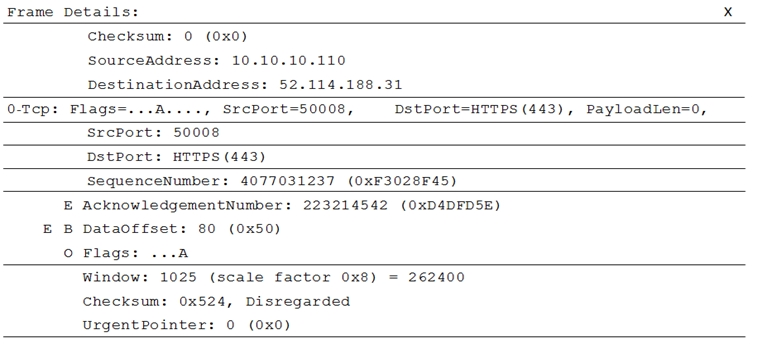
You run a network trace during an audio conference from a user's device as shown in the following exhibit.
What causes the poor quality of the audio conferences?
A. The source port range for audio is too narrow.
B. The source port for audio is above 50,000.
C. The UDP traffic is being limited.
D. The TLS traffic is being limited.
Show Answer
Correct Answer: C
Explanation: The trace shows TCP traffic to HTTPS destination port 443, rather than UDP media traffic. Teams falls back to TCP when UDP media traffic is blocked or restricted, and this fallback can degrade real-time audio quality.
Question 31
HOTSPOT
-
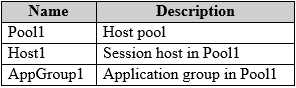
You have a Microsoft 365 subscription that contains an Azure Virtual Desktop deployment. The Azure Virtual Desktop deployment contains the resources shown in the following table.
You install the Teams for virtual desktop infrastructure (VDI) client on Host1. Media optimization is NOT configured.
You need to ensure that audio during a Teams meeting is redirected to a user's local device.
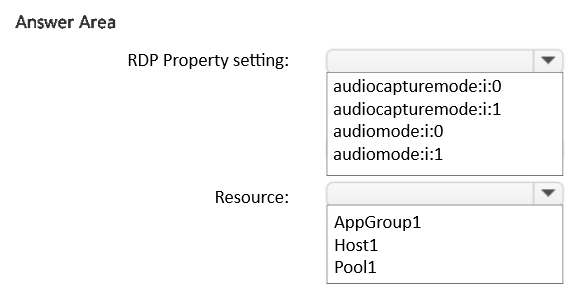
Which RDP Property setting should you configure, and to which resource should you apply the setting? To answer, select the appropriate options in the answer area.
NOTE: Each correct selection is worth one point.
Show Answer
Correct Answer: audiomode:i:0
Pool1
Explanation: Use the host pool RDP property to redirect remote audio playback to the client device. RDP properties are configured at the host pool level and apply to sessions.
Question 33
HOTSPOT
-
You have a Microsoft 365 subscription that uses Teams.
You plan to deploy Teams to a branch office named Branch1.
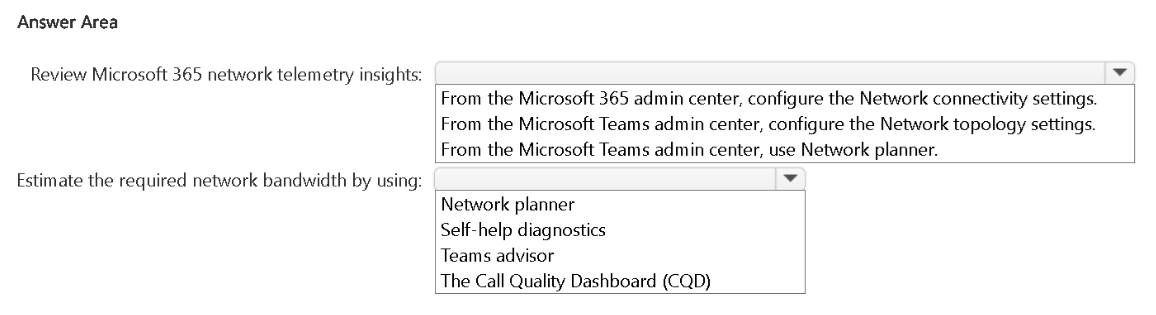
You need to review Microsoft 365 network telemetry insights and estimate the required network bandwidth required for the deployment to Branch1.
What should you do for each requirement? To answer, select the appropriate options in the answer area.
NOTE: Each correct selection is worth one point.
Show Answer
Correct Answer: Review Microsoft 365 network telemetry insights:
From the Microsoft 365 admin center, configure the Network connectivity settings.
Estimate the required network bandwidth by using:
Network planner
Explanation: Microsoft 365 network telemetry insights are provided through Network Connectivity in the Microsoft 365 admin center. Teams Network planner is designed to estimate bandwidth requirements for new deployments.
Question 35
You have a Teams deployment.
From Microsoft Call Quality Dashboard, you discover that internal calls are marked as outside.
You need to ensure that inside and outside calls are reported correctly.
What should you configure?
A. Tenant Data Upload
B. Roaming policies under Network topology
C. Network sites under Network topology
D. Trusted IPs under Network topology
E. Voice routing policies
Show Answer
Correct Answer: D
Explanation: Call Quality Dashboard classifies calls as inside or outside based on the organization's configured Trusted IPs in Network topology. If internal calls are being marked as outside, configure the organization's Trusted IP ranges so CQD can correctly identify traffic originating from the corporate network.
Question 36
You have a Teams deployment.
You block access to several Teams apps.
You need to ensure that users are redirected to a custom website to request access to the blocked apps.
What should you use?
A. the Org-wide app settings
B. a configuration profile
C. the Customize app store settings
D. an app setup policy
Show Answer
Correct Answer: A
Explanation: Org-wide app settings in the Teams admin center include the User requests configuration, which allows administrators to configure a custom URL where users are redirected to request access to blocked apps. Configuration profiles and app setup policies do not provide this redirect capability, and Customize app store settings is for branding/store customization rather than blocked app access requests.
Question 37
Case study -
This is a case study. Case studies are not timed separately. You can use as much exam time as you would like to complete each case. However, there may be additional case studies and sections on this exam. You must manage your time to ensure that you are able to complete all questions included on this exam in the time provided.
To answer the questions included in a case study, you will need to reference information that is provided in the case study. Case studies might contain exhibits and other resources that provide more information about the scenario that is described in the case study. Each question is independent of the other questions in this case study.
At the end of this case study, a review screen will appear. This screen allows you to review your answers and to make changes before you move to the next section of the exam. After you begin a new section, you cannot return to this section.
To start the case study -
To display the first question in this case study, click the Next button. Use the buttons in the left pane to explore the content of the case study before you answer the questions. Clicking these buttons displays information such as business requirements, existing environment, and problem statements. If the case study has an All Information tab, note that the information displayed is identical to the information displayed on the subsequent tabs. When you are ready to answer a question, click the Question button to return to the question.
General Overview -
Wingtip Toys is a manufacturing company that has 5,000 users, and locations across North America and Europe.
Departments -
The company has the following departments:
• IT
• Sales
• Security
• Customer support
• Human resources (HR)
• Research and development (R&D)
Microsoft Office 365 Environment
All users are assigned a Microsoft 365 E5 license and are enabled for Microsoft Teams Phone.
Users in the R&D department are assigned a Teams Premium license.
Requirements -
Call Handling Requirements -
Wingtip Toys identifies the following call handling requirements:
• Inbound calls to the main telephone number of Wingtip Toys must be routed to the correct department by using an auto attendant.
• During holiday periods, the auto attendant must perform the following actions:
• Route customer support calls to the customer support department.
• Play a recorded message for calls to all the other departments, and then disconnect the call.
Meeting Requirements -
Wingtip Toys identifies the following meeting requirements:
• Meetings that include users from the R&D department must have a watermark applied to screen sharing sessions.
• Once a quarter, the CEO of Wingtip Toys must host a live, online event that is attended by all users.
Governance Requirements -
Wingtip Toys identifies the following governance requirements:
• New teams must meet the following requirements:
• The Team type setting must be set to Private.
• Users must be able to send emails to team channels.
• Team members must be prevented from deleting messages from team channels.
• Each team name must be validated against a list of blocked team names.
• Each team name must contain a prefix of GRP and the department name as a suffix.
• Team channels must include a pinned tab that displays the Wingtip Toys website.
• When a user creates a team, the team picture must be the logo of the user's department.
• The department manager of the user that creates the team must be assigned the Owner role for the team.
• The use of animated GIFs must be prevented in team channels.
Collaboration Requirements -
Wingtip Toys identifies the following collaboration requirements:
• Fabrikam users must be able to join team channels hosted by Wingtip Toys.
• Wingtip Toys users must be prevented from joining team channels hosted by Fabrikam.
Monitoring Requirements -
A notification must be sent to users in the IT department when a Teams Rooms system goes offline.
Pilot Project Requirements -
Wingtip Toys is currently evaluating third-party call center apps that integrate with Teams. The security department mandates that all third-party apps be reviewed by a qualified analyst and comply with industry-standard frameworks.
User Issues -
Wingtip Toys users report audio and video issues when accessing Teams meetings by using a web browser.
Business Requirements -
Wingtip Toys identifies the following business requirements:
• Follow the principle of least privilege.
• Minimize administrative effort.
• Minimize costs.
Which two actions should you perform to meet the collaboration requirements? Each correct answer presents part of the solution.
NOTE: Each correct selection is worth one point.
A. Add Fabrikam as an organization.
B. Create a meeting policy.
C. Create a messaging policy.
D. Configure the inbound settings.
E. Configure the outbound settings.
Show Answer
Correct Answer: A, D
Explanation: To enable shared channels with a specific external organization, first add the external organization (Fabrikam) in cross-tenant access settings. Then configure the inbound settings to allow Fabrikam users to access shared channels hosted by Wingtip Toys. Outbound settings control whether your users can access shared channels hosted by the external organization; the requirement is to prevent Wingtip Toys users from joining Fabrikam-hosted shared channels, which remains blocked by default unless enabled. Only the actions required to satisfy the stated collaboration requirement are adding the organization and configuring inbound access.
Question 38
You have a Microsoft 365 E5 subscription that uses Teams.
You have a team named Team1 that contains guest users.
You need to ensure that the members of Team1 are prevented from sharing sensitive information with the guest users during Teams private chats or in Teams channels.
Which type of policy should you configure?
A. data loss prevention (DLP) policy
B. messaging policy
C. information barrier policy
D. sensitivity label policy
Show Answer
Correct Answer: A
Explanation: A Microsoft Purview Data Loss Prevention (DLP) policy for Microsoft Teams can detect sensitive information in Teams chat and channel messages and block or restrict sharing of that information, including with guest users. Messaging policies control chat features, information barriers control which users can communicate, and sensitivity labels protect containers/content but do not enforce blocking sensitive content in Teams conversations with guests.
Question 39
HOTSPOT
-
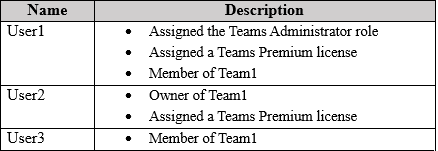
You have a Teams deployment that contains a team named Team1 and the users shown in the following table.
User2 plans to schedule a product training event for the members of Team1. The event must support the following:
• Attendee registration
• Interactivity by using Q&A
• Microsoft 365 Copilot during and after the event
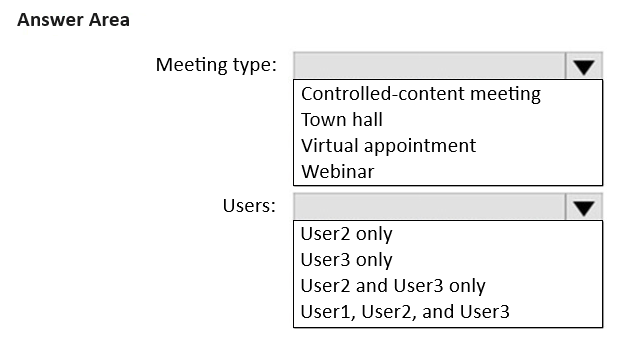
You need to recommend which type of meeting to create, and which users will require a Copilot license.
What should you recommend to User2? To answer, select the appropriate options in the answer area.
Show Answer
Correct Answer: Meeting type: Webinar
Users: User2 and User3 only
Explanation: Webinars support attendee registration and Q&A. Microsoft 365 Copilot is licensed per user, so each participant who will use Copilot during or after the event needs a Copilot license. User1 is not part of the planned event.
$19
Get all 448 questions with detailed answers and explanations
Instant download HTML + PDF delivered the moment payment clears.
Secure Stripe checkout we never see or store your card details.
7-day refund if files are defective see our refund policy.