Case study -
Overview -
Company Information -
ADatum Corporation is an energy company that has offices across North America and 3,000 employees.
Physical Locations -
ADatum has the offices shown in the following table.
Existing Environment -
Network Infrastructure -
The office in Calgary has a 1-Gbps internet circuit. The offices in San Diego and New York have 100-Mbps internet circuits. The field site in Edmonton has a 3-Mbps internet circuit.
Departments -
ADatum has the following departments:
• Information technology (IT)
• Project management
• Marketing
Microsoft 365 and Tenants Environment
ADatum recently purchased a Microsoft 365 E5 subscription that has the Microsoft Teams Domestic Calling Plan add-on. All users are assigned Microsoft 365 E5 and Microsoft Teams Domestic Calling Plan licenses and Calling Plans is deployed.
Azure AD has the default Cross-tenant access settings configured.
The Teams policies settings are configured as shown in the following exhibit.
The Teams client is deployed to a non-persistent Virtual Desktop Infrastructure (VDI) used by the project management department.
Allow guest access in Teams is set to Off.
The Microsoft Viva Connections app is deployed to all users.
Problem Statements -
ADatum identifies the following issues:
• An executive at the San Diego office reports that video drops during Teams meetings.
• The Edmonton field site has limited bandwidth, and users report poor audio during Teams calls and meetings.
• Users in the project management department report that they cannot give or take control during Teams calls and meetings while sharing their VDI desktop.
Planned Changes -
ADatum plans to implement the following changes:
• Configure the media bit rate settings for the users at the Edmonton field site. The settings must apply only to the user while they are at the site, but NOT when they are at a different office.
• Create a Teams channel to enable the project management department to collaborate with the IT department on a device upgrade project.
• Implement a pilot rollout of Operator Connect for the users in the New York office. A port re-quest was accepted already.
• Create a Teams channel for the marketing department for external collaboration.
• Rename the Viva Connections icon as Start portal.
Technical Requirements -
ADatum identifies the following technical requirements:
• The marketing department requires that all the files shared by using Teams remain available for at least three years after deletion.
• The marketing department must be able to apply a watermark to content and video shared dur-ing Teams meetings.
• All users require indefinite access to training videos recorded in Teams by the IT department.
• All access to Teams and shared resources must use the principle of least privilege.
• Guest access must remain disabled.
You need to ensure that file sharing during Teams chats meets the technical requirements of the marketing department.
What should you do?
A. Create a retention policy for the SharePoint sites location.
B. Enable Customer Lockbox.
C. Create a retention policy for Teams chats.
D. Create a data loss prevention (DLP) policy for Teams chat and channel messages.
E. Create a retention policy for the OneDrive accounts location.
Show Answer
Correct Answer: E
Explanation: Files shared in Teams chats are stored in the sender’s OneDrive, not in a Teams channel’s SharePoint site. Create a retention policy for OneDrive accounts to retain those files after deletion.
Question 12
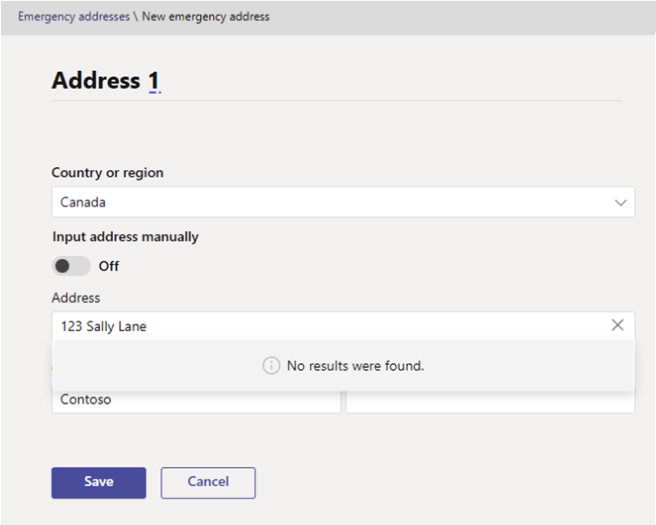
In the Microsoft Teams admin center, you attempt to add an emergency address as shown in the following exhibit.
You need to validate the address.
What should you do?
A. Provide the Emergency Location Identification Number (ELIN) associated with the emergency address.
B. Create an emergency call routing policy.
C. Create an emergency calling policy.
D. Specify the latitude and longitude of the location.
Show Answer
Correct Answer: D
Explanation: Specify the location’s latitude and longitude to identify it precisely when the address lookup returns no results. An ELIN and emergency calling or routing policies don’t validate an address.
Question 12
HOTSPOT
-
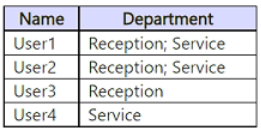
You have a Microsoft 365 E3 subscription that uses Teams Phone and contains the users shown in the following table.
You need to create a separate call flow for each department. Each call flow must contain the following components:
• An auto attendant for business hours and holidays
• A channel-based call queue that contains users in the corresponding department
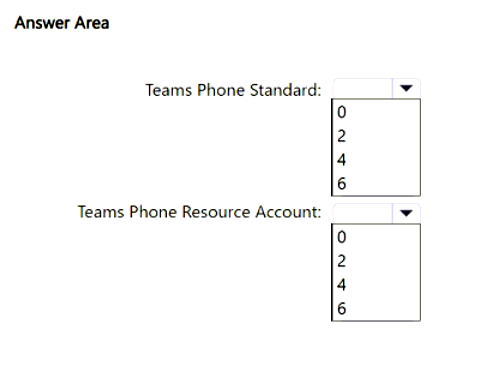
What is the minimum number of Teams Phone Standard and Teams Phone Resource Account licenses required? To answer, select the appropriate options in the answer area.
NOTE: Each correct selection is worth one point.
Show Answer
Correct Answer: Teams Phone Standard: 4
Teams Phone Resource Account: 2
Explanation: There are four users who participate in Teams Phone, so each requires a Teams Phone Standard license. There are two departments, each needing one auto attendant. An auto attendant requires a resource account, while the channel-based call queues behind the auto attendants do not require additional resource accounts for this scenario.
Question 12
You work as a Systems Administrator for your company. The company has a subscription to Microsoft 365. All users in your company have a Microsoft 365 E5 license.
All users in the company use Microsoft Teams for collaboration.
A developer in the company is developing a custom app to be used in Microsoft Teams.
The developer wants to test the app in Microsoft Teams before releasing the app for use by all company users. The developer has a .zip file containing an app package for the custom app.
You need to enable the developer to upload the app to Microsoft Teams for testing. The app must available to the developer only in Microsoft Teams.
What should you do?
A. Modify the global app setup policy.
B. Configure an app setup policy that applies to the developer only.
C. Modify the global app permission policy.
D. Configure an app permission policy that applies to the developer only.
Show Answer
Correct Answer: B
Explanation: Assign the developer a Teams app setup policy with **Upload custom apps** enabled. This lets the developer upload the .zip package for personal testing without enabling uploads for everyone through the global policy. App permission policies do not control whether a user can upload custom apps.
Question 13
You have a Teams deployment.
You deploy the new Teams client to users.
The users report that a third-party Teams store app fails to load.
You need to identity the cause of the issue.
What should you do?
A. Enable Extended diagnostics data for the new Teams client.
B. Run the Microsoft 365 network connectivity test tool.
C. Run the Teams client in a browser and open the developer tools.
D. Run sfc.exe as an administrator.
Show Answer
Correct Answer: C
Explanation: For a third-party Teams Store app that fails to load in the new Teams client, the recommended way to identify the cause is to run Teams in a browser and use the browser's Developer Tools (especially the Network and Console tabs) to inspect failed requests and error details. Extended diagnostics are useful for collecting additional telemetry but are not the primary troubleshooting step for identifying why a specific app fails to load.
Question 13
You have a Microsoft 365 subscription that uses Microsoft Teams and contains a user named User1. User1 has a Windows 10 device that has the Teams desktop client installed.
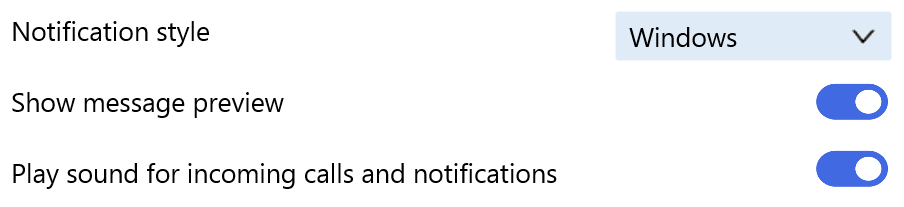
The Teams desktop client has the notification settings shown in the following exhibit.
User1 reports that he does NOT receive alerts for Teams activities on his device.
What should you do to ensure that User1 receives Teams alerts?
A. From the Settings app, modify the Focus assist settings.
B. From the Microsoft Teams client change Teams and channels notifications to All activity.
C. From the Settings app, modify the Notifications & actions settings.
D. From the Microsoft Teams admin center, modify the Messaging policies settings.
Show Answer
Correct Answer: C
Explanation: Teams is configured to use the Windows notification style, so Windows controls whether its alerts are displayed. In Settings > System > Notifications & actions, enable notifications for Microsoft Teams and allow them to appear as banners and in the notification center.
Question 13
You work as a Systems Administrator for your company. The company has a subscription to Microsoft 365. All users in your company have a Microsoft 365 E3 license.
All users use Microsoft Skype for Business Online for collaboration.
You plan to deploy Microsoft Teams phones to all users.
A company policy has the following requirements for the Microsoft Teams phones:
✑ The screen saver must be enabled and configured to start after 60 seconds.
✑ Screen capture must be enabled.
You need to configure the Microsoft Teams phones to meet the policy requirements.
Which of the following actions should you perform?
A. Configure the Teams settings under Org-wide settings in Microsoft Teams admin center.
B. Configure a Teams App Setup policy in the Microsoft Teams admin center.
C. Deploy a configuration profile in the Microsoft Teams admin center.
D. Configure a Teams policy in the Microsoft Teams admin center.
Show Answer
Correct Answer: C
Explanation: Deploy a configuration profile from the Teams admin center for the Teams phones. The profile’s device settings let you enable the screen saver, set its start time to 60 seconds, and enable screen capture. The other options configure organization-wide Teams settings, app setup, or user policies rather than these phone device settings.
Question 14
You work as a Systems Administrator for your company. The company has a main office in New York and 20 branch offices in North America. Some of the branch offices are in locations with low bandwidth Internet connectivity.
The company has a Microsoft 365 subscription. All users in the company have a Microsoft 365 E3 license.
All users use Microsoft Teams for collaboration.
You deploy Quality of Service (QoS) due to branch office users reporting occasional poor call quality when using Microsoft Teams.
You need to confirm that QoS is being applied at the branch offices.
Which of the following should you use?
A. Microsoft Network Monitor
B. Microsoft Network Testing Companion
C. Microsoft Teams Device Usage Report
D. Microsoft Teams Call Quality Dashboard
Show Answer
Correct Answer: A
Explanation: Use Microsoft Network Monitor to capture Teams traffic and inspect its DSCP markings, confirming that QoS markings are present at the branch office. The Call Quality Dashboard reports call-quality metrics but does not verify DSCP markings; the other options are not the appropriate tool for checking packet markings.
Question 14
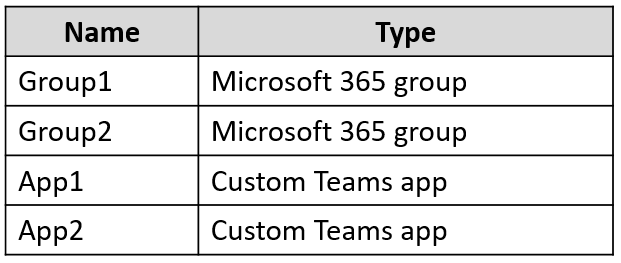
You have a Microsoft 365 E5 subscription that uses Microsoft Teams and contains the resources shown in the following table.
You need to configure the subscription to meet the following requirements:
• App1 must be pinned only to the Teams desktop client of the users in Group1.
• App2 must be pinned only to the Teams desktop client of the users in Group2.
What should you do in the Microsoft Teams admin center?
A. Create app setup policies.
B. Create app permission policies.
C. Modify the global (Org-wide default) app permission policy.
D. Modify the global (Org-wide default) app setup policy.
Show Answer
Correct Answer: A
Explanation: Create separate app setup policies to pin App1 for Group1 and App2 for Group2. App setup policies control which apps are pinned in the Teams client; app permission policies control app availability, not pinning.
Sources:
https://learn.microsoft.com/en-us/microsoftteams/teams-app-setup-policies
Question 14
You have a Teams deployment.
You have a conference room that contains a Teams Rooms for Windows device named Device1.
You need to customize the default meeting layout configuration for Device1.
Which file should you modify?
A. Configuration.json
B. Settings.json
C. Persistent.conf
D. SkypeSettings.xml
Show Answer
Correct Answer: D
Explanation: Teams Rooms for Windows uses the XML configuration file named SkypeSettings.xml to configure device settings, including the default meeting layout and Front Row/content layout behavior. The other files listed are not the supported configuration file for these settings.
$19
Get all 448 questions with detailed answers and explanations
Instant download HTML + PDF delivered the moment payment clears.
Secure Stripe checkout we never see or store your card details.
7-day refund if files are defective see our refund policy.