Your company uses Microsoft Teams.
You need to configure an auto attendant that will use a Direct Routing phone number to receive incoming calls.
Which type of license do you require?
A. Microsoft 365 E3
B. Microsoft 365 Business Standard
C. the Advanced Communications add-on for Teams
D. Microsoft 365 Phone System - Virtual User
Show Answer
Correct Answer: D
Explanation: An auto attendant that is assigned a Direct Routing phone number uses a resource account, which requires the Microsoft 365 Phone System - Virtual User (now commonly referred to as the Teams Phone Resource Account) license. This free license is required for Auto Attendants and Call Queues that are assigned a phone number.
Sources:
https://learn.microsoft.com/en-us/answers/questions/5584946/license-requirement-for-teams-voice
Question 118
HOTSPOT
-
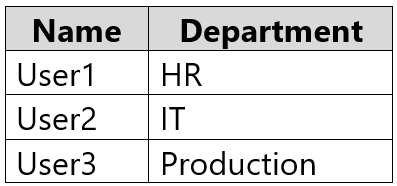
Your company has the users shown in the following table.
The company uses Teams.
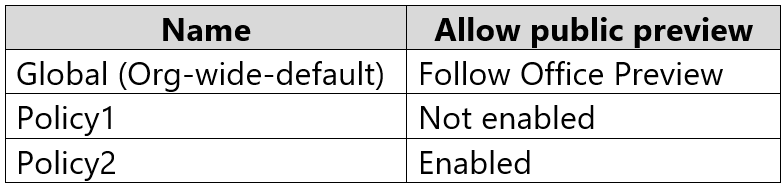
You have Teams update policies configured as shown in the following table.
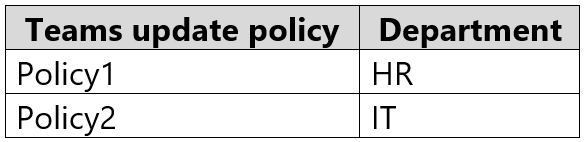
The Teams update policies are assigned to departments as shown in the following table.
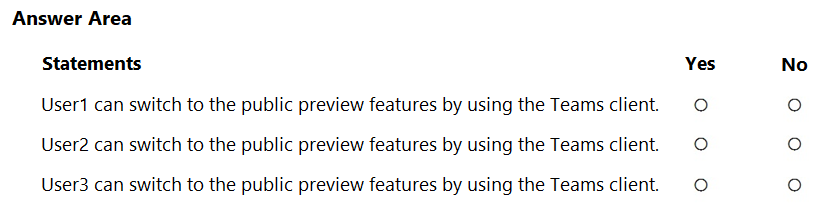
For each of the following statements, select Yes if True. Otherwise select No.
NOTE: Each correct selection is worth one point.
Show Answer
Correct Answer: User1: No
User2: Yes
User3: No
Explanation: Policy1 disables public preview. Policy2 enables it, allowing the user to opt in via the Teams client. Users without an assigned policy use the global 'Follow Office Preview' setting, which does not let them switch in the Teams client; it only applies automatically to users already on Office Current Channel (Preview).
Question 119
You have a Microsoft 365 E5 subscription that includes a user named User1.
You need to assign User1 permissions to troubleshoot call analytics issues by using basic tools. Your solution must follow the principle of least privilege.
Which role should you assign to User1?
A. Teams communication support specialist
B. Teams communication support engineer
C. Teams Administrator
D. Teams communication admin
Show Answer
Correct Answer: A
Explanation: The least-privilege role for troubleshooting Teams call analytics issues using basic tools is Teams Communications Support Specialist. The Support Engineer role includes advanced troubleshooting capabilities, while Teams Administrator and Teams Communications Administrator have broader administrative permissions than required.
Question 120
You have a Microsoft 365 subscription.
You plan to implement Teams.
You need to confirm the location of the Teams service workload for data at rest.
What should you configure in the Microsoft 365 admin center?
A. the Data sources tab in Search & intelligence
B. the Organization profile tab in Org settings
C. the Overview tab in Service health
D. the Security & privacy tab in Org settings
Show Answer
Correct Answer: B
Explanation: The Microsoft 365 admin center displays data location for workloads, including Microsoft Teams, under Org settings > Organization profile > Data location. This is where you confirm the geographic location of Teams data at rest. Service health provides service status, Search & intelligence is unrelated, and Security & privacy does not display workload data locations.
Question 121
Your company uses Teams.
You have a team named Team1.
You need to prevent guest users from accessing files in Team1. The solution must NOT affect external collaboration with any other teams.
What should you do?
A. From the SharePoint admin center, edit the External sharing settings for the associated site.
B. From the Microsoft Entra admin center, configure the External collaboration settings for guest users.
C. From the Microsoft Entra admin center, create a Conditional Access policy.
D. From the Microsoft Teams admin center, set external access to Block all external domains.
E. From the Microsoft Teams admin center, set Allow guest access in Teams to Off.
Show Answer
Correct Answer: A
Explanation: Teams files are stored in the associated SharePoint site. Configuring external sharing for that specific SharePoint site prevents guest access to files for Team1 without changing guest or external collaboration settings tenant-wide. The other options apply organization-wide or affect chat/federation rather than restricting file access for a single team.
Question 122
HOTSPOT
-
Your company has a Microsoft Office 365 subscription.
All users use an email domain named @adatum.com.
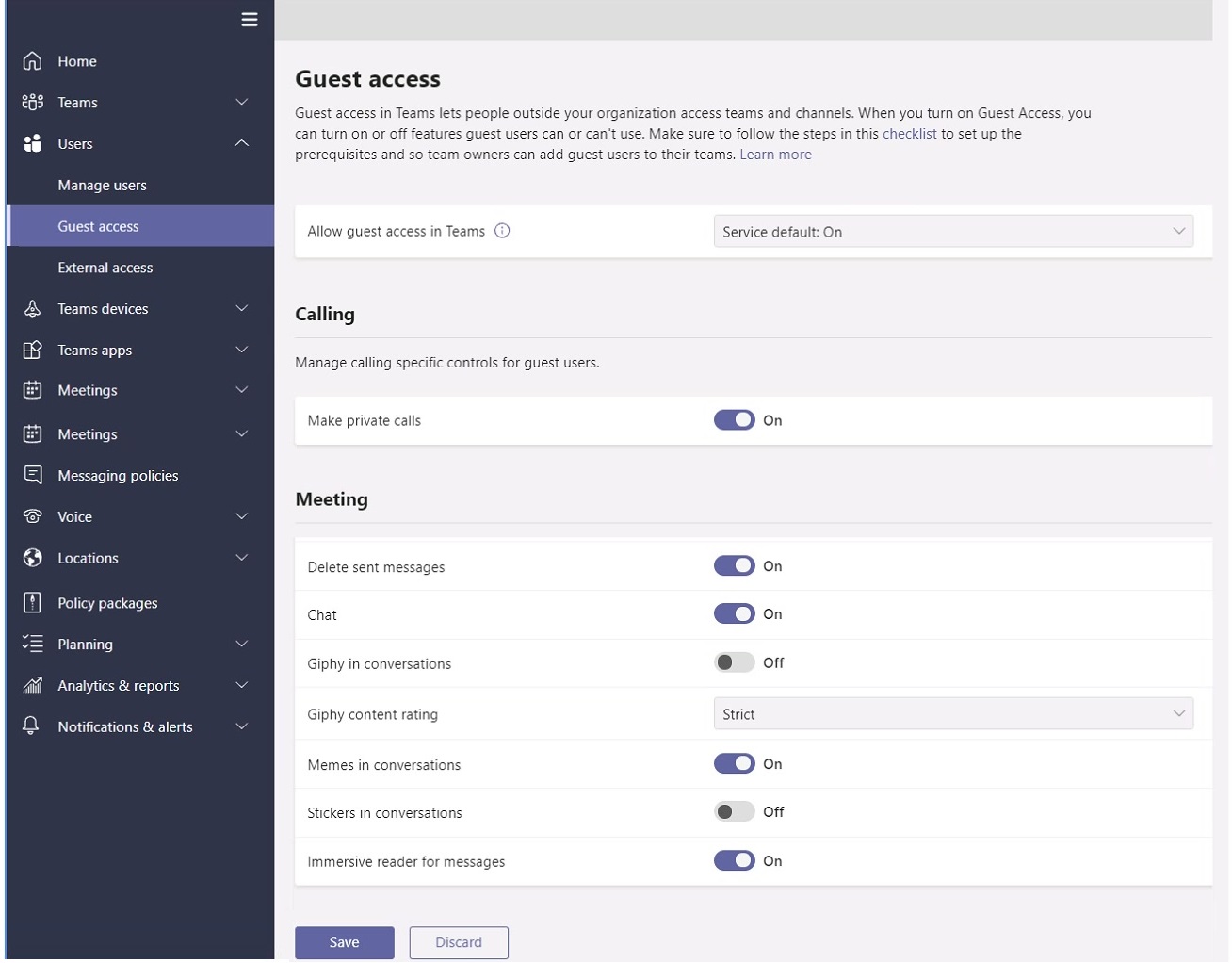
You have the guest access settings shown in the Guest Access exhibit. (Click the Guest Access tab.)
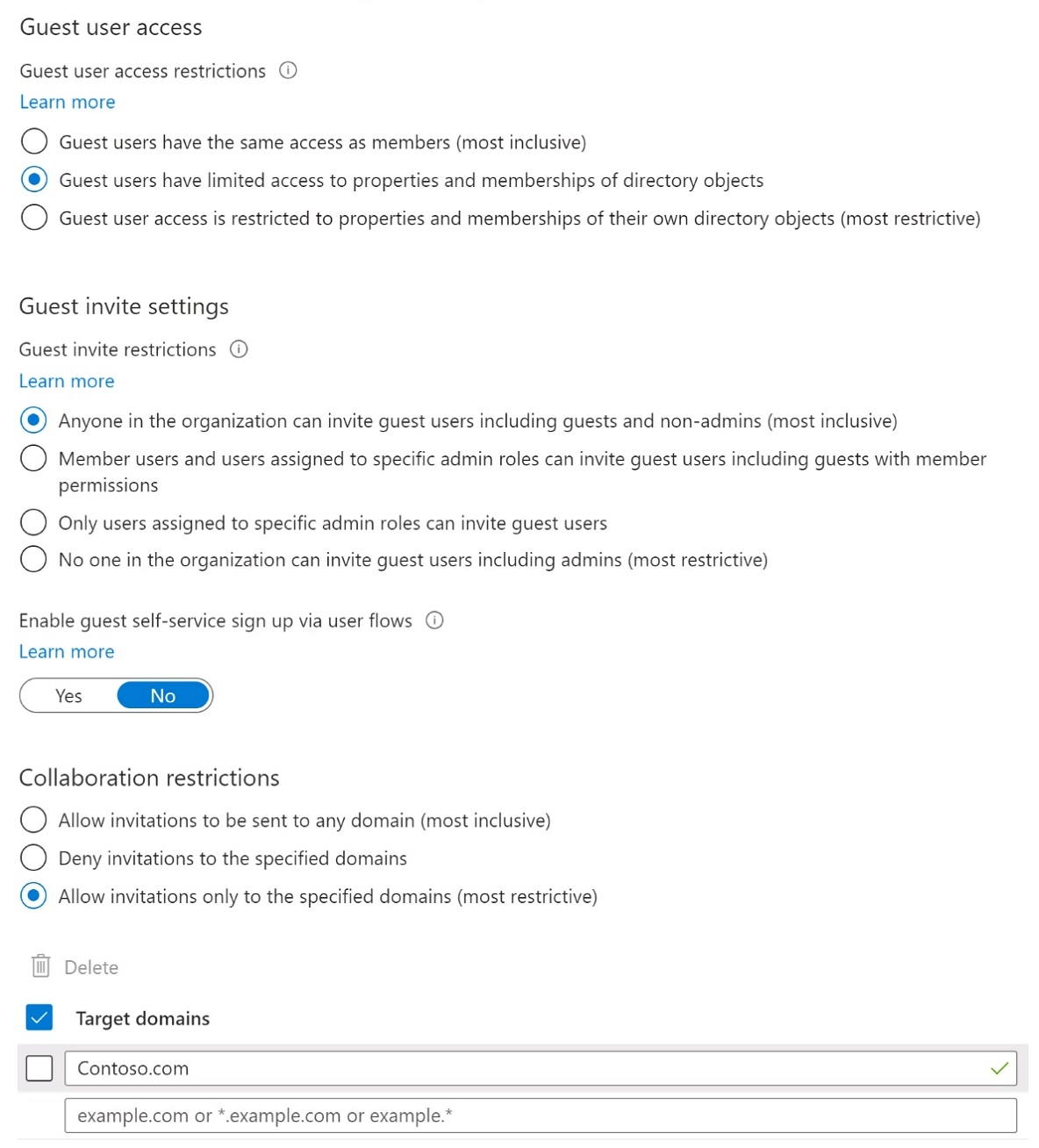
You have the External collaboration settings shown in the External Collaboration exhibit. (Click the External Collaboration tab.)
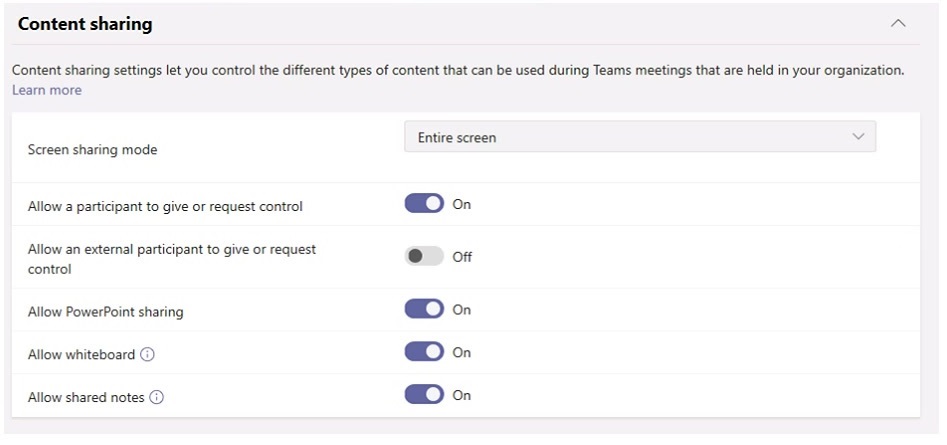
You have a meeting policy that is configured as shown in the Meeting Policy exhibit. (Click the Meeting Policy tab.)
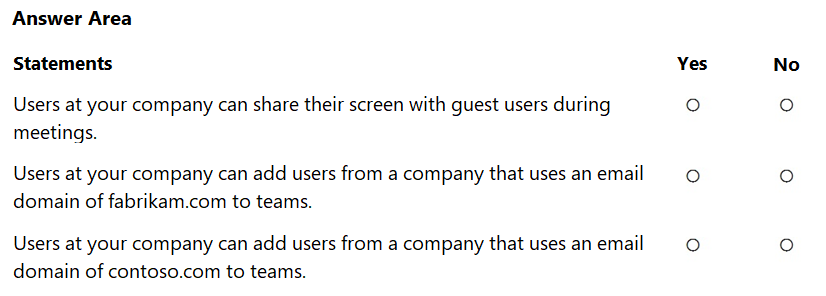
For each of the following statements, select Yes if the statement is true. Otherwise, select No.
NOTE: Each correct selection is worth one point.
Show Answer
Correct Answer: Yes
No
Yes
Explanation: Screen sharing is allowed by the meeting policy. External collaboration allows invitations only to specified domains, and only contoso.com is allowed, so fabrikam.com cannot be added while contoso.com can.
Question 123
HOTSPOT
-
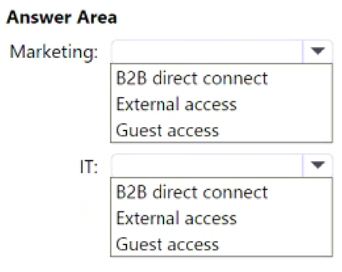
Your company has the following departments:
• Marketing
• Information technology (IT)
The company uses Teams.
You need to recommend an access solution that meets the following requirements:
• The marketing department must collaborate with an external consultant by using a Microsoft PowerPoint presentation stored in the General channel of a new team.
• The IT department must be able to communicate with external consultants by using a private Teams chat and Teams calls.
Which type of access should you recommend for each department? To answer, select the appropriate options in the answer area.
NOTE: Each correct selection is worth one point.
Explanation: Guest access allows external users to collaborate in Teams, channels, and files. External access (federation) supports chat and calls with external users without granting access to teams or shared files.
Question 124
HOTSPOT
-
You have a Microsoft 365 E5 subscription that uses Teams.
A user reports that a team named Team1 is missing and is no longer accessible.
You discover that an administrator deleted Team1 accidentally.
You need to restore Team1.
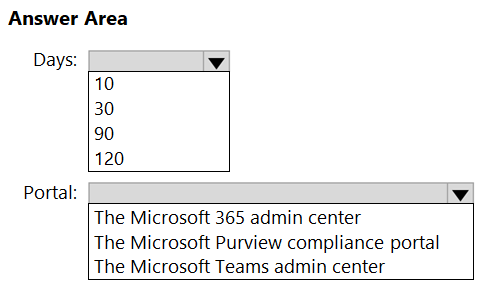
How many days do you have to restore Team1, and which portal should you use? To answer, select the appropriate options in the answer area.
NOTE: Each correct selection is worth one point.
Show Answer
Correct Answer: 30
The Microsoft Teams admin center
Explanation: A deleted Microsoft Teams team can be restored within 30 days. Current administration supports restoring deleted teams directly from the Teams admin center (Manage teams > View deleted teams).
Question 125
You have a Microsoft 365 subscription that uses Teams.
You need to upload network IP subnet information to call analytics.
What should you configure?
A. Voice application policies
B. Network topology
C. Reporting labels
D. Notification & alerts
Show Answer
Correct Answer: C
Explanation: For Call Analytics, you upload reporting labels that map network IP subnets to meaningful physical locations (such as offices or buildings). These labels enable Call Analytics to associate call data with uploaded subnet information. Network topology is used for cloud voice features such as Location-Based Routing and dynamic emergency calling, not for uploading subnet information to Call Analytics.
Sources:
https://learn.microsoft.com/en-us/microsoftteams/cqd-upload-tenant-building-data
Question 126
DRAG DROP
-
Your company uses Teams.
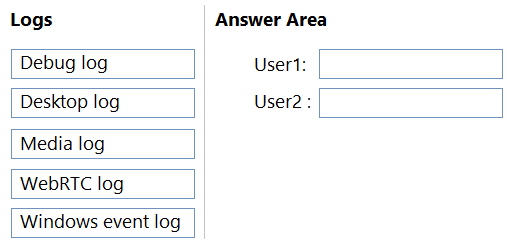
Two users named User1 and User2 use the Teams client for Windows.
The users report the following issues:
• User1 reports that when attempting to sign in, the Teams client remains on the sign-in page.
• User2 reports receiving an error when attempting to screen share during a Teams meeting.
You need to troubleshoot the issues.
Which client-side log should you review for each user? To answer, drag the appropriate logs to the correct users. Each log may be used once, more than once, or not at all. You may need to drag the split bar between panes or scroll to view content.
NOTE: Each correct selection is worth one point.
Show Answer
Correct Answer: User1: Debug log
User2: Media log
Explanation: Debug logs include sign-in/authentication and connection activity. Media logs contain diagnostics for audio, video, and screen sharing issues in Teams meetings.
$19
Get all 448 questions with detailed answers and explanations
Instant download HTML + PDF delivered the moment payment clears.
Secure Stripe checkout we never see or store your card details.
7-day refund if files are defective see our refund policy.