HOTSPOT
-
Your company has two offices in Canada and Australia.
You have a Microsoft 365 subscription that uses Teams.
A user named User1 moves from the Canada office to the Australia office.
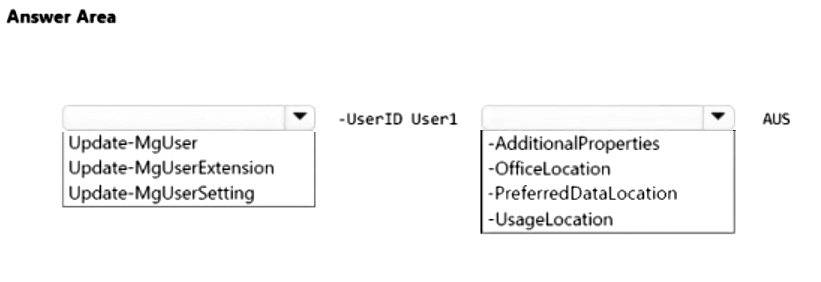
You need to use PowerShell to move data at rest to Australia for User1.
How should you complete the PowerShell command? To answer, select the appropriate options in the answer area.
NOTE: Each correct selection is worth one point.
Explanation: To move Microsoft 365 data at rest for a user to a different geo location, update the user's PreferredDataLocation property using Update-MgUser. Set it to the target geo code (AUS).
Question 86
SIMULATION
-
You need to prevent unauthenticated users from joining Teams meetings.
To complete this task, sign in to the Microsoft 365 portal.
Show Answer
Correct Answer: Microsoft Teams admin center → Meetings → Meeting settings (or Meeting policies → Global) → Turn off "Anonymous users can join a meeting" → Save.
Explanation: Disabling anonymous meeting join prevents unauthenticated users from joining Teams meetings. In current admin experiences, this setting may appear under Meeting settings or the Global meeting policy.
Question 87
DRAG DROP -
You have a Microsoft 365 E5 subscription that uses Teams.
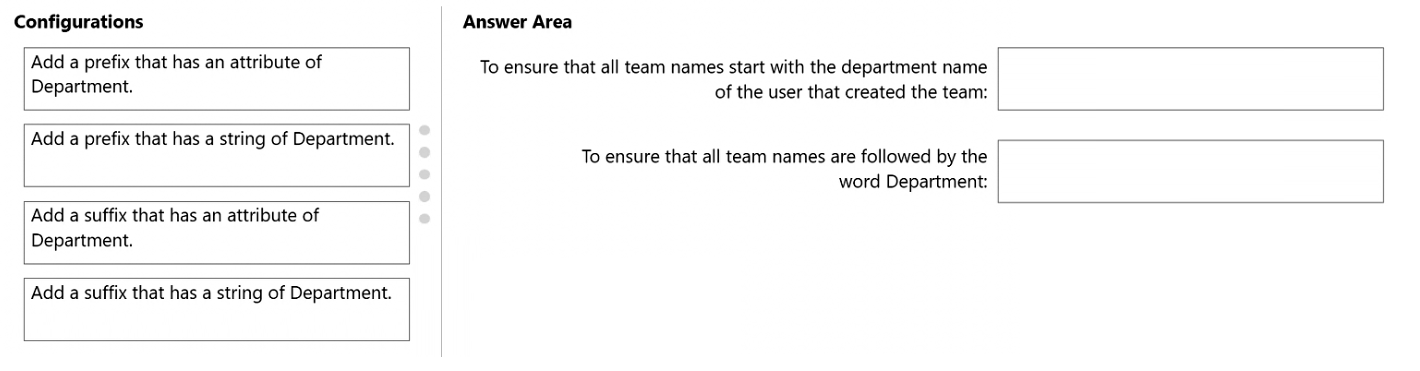
You need to implement a consistent team naming strategy that meets the following requirements:
• All team names must start with the department name of the user that created the team.
• All team names must be followed by the word Department.
How should you configure the group naming policy? To answer, drag the appropriate configurations to the correct requirements. Each configuration may be used once, more than once, or not at all. You may need to drag the split bar between panes or scroll to view content.
NOTE: Each correct selection is worth one point.
Show Answer
Correct Answer: Start with creator's department: Add a prefix that has an attribute of Department.
End with the word Department: Add a suffix that has a string of Department.
Explanation: Use the Azure AD/Microsoft Entra group naming policy with an attribute-based prefix to insert the creator's Department value, and a fixed string suffix to append the literal word 'Department'.
Question 88
DRAG DROP
-
Your company has a Microsoft 365 subscription that uses Microsoft Teams.
The company has a team named Customer Support.
Guest users from outside the company regularly access the Customer Support team.
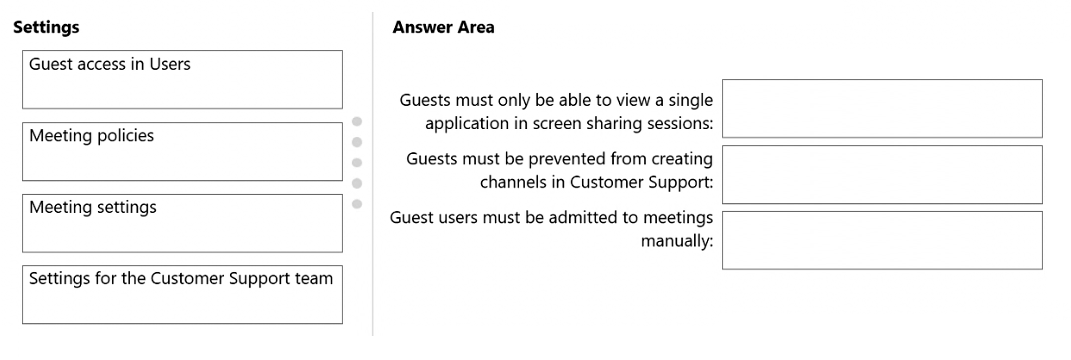
You need to configure the Guest access settings to meet the following requirements:
• Guest users must be able to view only a single application during screen sharing sessions.
• Guest users must be prevented from creating channels in Customer Support.
• Guest users must be admitted to meetings manually.
Which settings should you configure for each requirement? To answer, drag the appropriate settings to the correct requirements. Each setting may be used once, more than once, or not at all. You may need to drag the split bar between panes or scroll to view content.
NOTE: Each correct selection is worth one point.
Show Answer
Correct Answer: Guests must only be able to view a single application in screen sharing sessions: Meeting policies
Guests must be prevented from creating channels in Customer Support: Settings for the Customer Support team
Guest users must be admitted to meetings manually: Meeting policies
Explanation: Meeting policies control screen sharing mode (entire screen vs single application) and meeting lobby/admission behavior. Team-specific settings control whether guests can create channels within that team.
Question 89
DRAG DROP
-
Your company has a Microsoft 365 subscription that uses Teams.
A user named User1 reports the following issues:
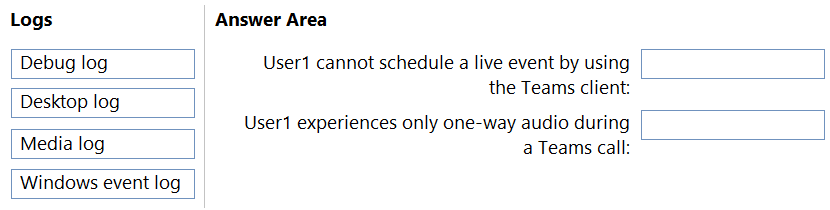
• User1 cannot schedule a live event by using the Teams client.
• User1 experiences only one-way audio during a Teams call.
You need to troubleshoot the issues.
Which client-side log should you review for each issue? To answer, drag the appropriate logs to the correct issues. Each log may be used once, more than once, or not at all. You may need to drag the split bar between panes or scroll to view content.
NOTE: Each correct selection is worth one point.
Show Answer
Correct Answer: User1 cannot schedule a live event by using the Teams client: Debug log
User1 experiences only one-way audio during a Teams call: Media log
Explanation: Debug logs capture Teams client feature and scheduling issues, while media logs are used to troubleshoot audio/video call media problems such as one-way audio.
Question 90
Your company has a Microsoft 365 subscription.
A user invites an external user to join a Microsoft Teams meeting by using a Microsoft Outlook meeting invitation.
The external user cannot join the meeting.
You need to ensure that all external users can join Microsoft Team meetings.
What should you do from the Microsoft Teams admin center?
A. From Guest access, set Allow guest access in Teams to On.
B. Edit the Meeting settings and set Anonymous users can join a meeting to On.
C. Edit the global meeting policy and set Private meeting scheduling to On.
D. Edit the live events policy and set Who can join scheduled live events to Everyone.
Show Answer
Correct Answer: B
Explanation: To allow external participants who are not authenticated as guests in the tenant to join Microsoft Teams meetings, enable anonymous meeting join in the Teams admin center by setting 'Anonymous users can join a meeting' to On. Guest access controls collaboration as a guest in Teams, not the ability for any external invitee to join a meeting via a meeting link. The other options relate to private meeting scheduling or live events and do not address this scenario.
Question 91
HOTSPOT
-
Case study
-
Overview
-
Company Information
-
ADatum Corporation is an energy company that has offices across North America and 3,000 employees.
Physical Locations
-
ADatum has the offices shown in the following table.
Existing Environment
-
Network Infrastructure
-
The office in Calgary has a 1-Gbps internet circuit. The offices in San Diego and New York have 100-Mbps internet circuits. The field site in Edmonton has a 3-Mbps internet circuit.
Departments
-
ADatum has the following departments:
• Information technology (IT)
• Project management
• Marketing
Microsoft 365 and Tenants Environment
ADatum recently purchased a Microsoft 365 E5 subscription that has the Microsoft Teams Domestic Calling Plan add-on. All users are assigned Microsoft 365 E5 and Microsoft Teams Domestic Calling Plan licenses and Calling Plans is deployed.
Azure AD has the default Cross-tenant access settings configured.
The Teams policies settings are configured as shown in the following exhibit.
The Teams client is deployed to a non-persistent Virtual Desktop Infrastructure (VDI) used by the project management department.
Allow guest access in Teams is set to Off.
The Microsoft Viva Connections app is deployed to all users.
Problem Statements
-
ADatum identifies the following issues:
• An executive at the San Diego office reports that video drops during Teams meetings.
• The Edmonton field site has limited bandwidth, and users report poor audio during Teams calls and meetings.
• Users in the project management department report that they cannot give or take control during Teams calls and meetings while sharing their VDI desktop.
Planned Changes
-
ADatum plans to implement the following changes:
• Configure the media bit rate settings for the users at the Edmonton field site. The settings must apply only to the user while they are at the site, but NOT when they are at a different office.
• Create a Teams channel to enable the project management department to collaborate with the IT department on a device upgrade project.
• Implement a pilot rollout of Operator Connect for the users in the New York office. A port re-quest was accepted already.
• Create a Teams channel for the marketing department for external collaboration.
• Rename the Viva Connections icon as Start portal.
Technical Requirements
-
ADatum identifies the following technical requirements:
• The marketing department requires that all the files shared by using Teams remain available for at least three years after deletion.
• The marketing department must be able to apply a watermark to content and video shared dur-ing Teams meetings.
• All users require indefinite access to training videos recorded in Teams by the IT department.
• All access to Teams and shared resources must use the principle of least privilege.
• Guest access must remain disabled.
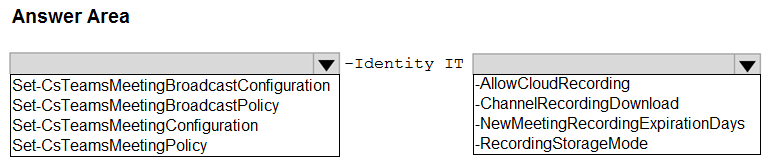
You need to configure a policy for the IT department to meet the technical requirements for training videos.
How should you complete the PowerShell cmdlet? To answer, select the appropriate options in the answer area.
NOTE: Each correct selection is worth one point.
Show Answer
Correct Answer: Set-CsTeamsMeetingPolicy -Identity IT -NewMeetingRecordingExpirationDays -1
Explanation: Meeting recording expiration is controlled by the Teams Meeting Policy. Setting NewMeetingRecordingExpirationDays to -1 disables automatic expiration so recordings remain available indefinitely.
Question 92
DRAG DROP
-
You have a Microsoft E5 subscription that uses Teams.
Your company uses the Microsoft Viva Connections app.
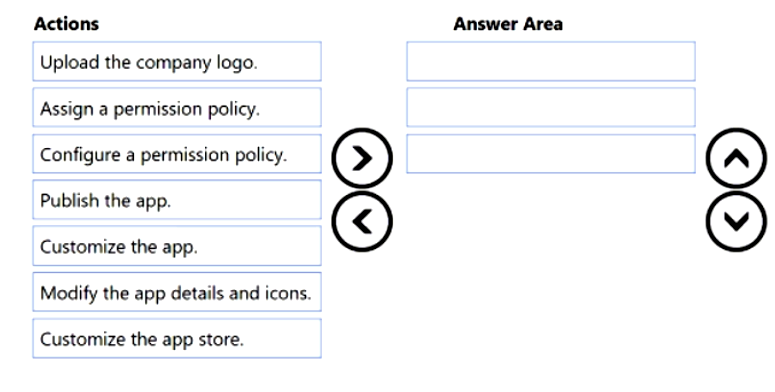
You need to configure the app to meet the following requirements:
• Rename the app as Start.
• Replace Viva Connections with a custom logo.
Which three actions should you perform in sequence? To answer, move the appropriate actions from the list of actions to the answer area and arrange them in the correct order.
Show Answer
Correct Answer: Customize the app.
Modify the app details and icons.
Publish the app.
Explanation: To rename Viva Connections and replace its logo, first create a customized version of the app, then edit its name/details and icons, and finally publish the customized app so the changes become available.
Question 93
SIMULATION
-
You need to ensure that users can perform the following actions:
• Record Teams calls and Teams meeting.
• Transcribe Teams calls and Teams meeting.
To complete this task, sign in to the Microsoft 365 portal.
Show Answer
Correct Answer: Teams admin center > Meetings > Meeting policies > Global (Org-wide default): Meeting recording = On, Transcription = On.
Teams admin center > Voice > Calling policies > Global (Org-wide default): Cloud recording for calling = On, Transcription = On.
Explanation: Enable recording and transcription separately for meeting policies and calling policies so users can record and transcribe both Teams meetings and Teams calls.
Question 94
Your company uses Teams.
A user named User1 cannot invite guest users to Teams.
What should you recommend using to identify the cause of the issue?
A. Microsoft Teams network Assessment Tool
B. Teams advisor
C. Microsoft 365 network connectivity test tool
D. self-help diagnostics
Show Answer
Correct Answer: D
Explanation: Self-help diagnostics in the Microsoft 365 admin center include diagnostics specifically for Microsoft Teams guest access and can identify configuration or policy issues preventing a user from inviting guest users. The network assessment and connectivity tools are intended for network performance/connectivity issues, and Teams advisor is not the primary diagnostic tool for this scenario.
$19
Get all 448 questions with detailed answers and explanations
Instant download HTML + PDF delivered the moment payment clears.
Secure Stripe checkout we never see or store your card details.
7-day refund if files are defective see our refund policy.