HOTSPOT
-
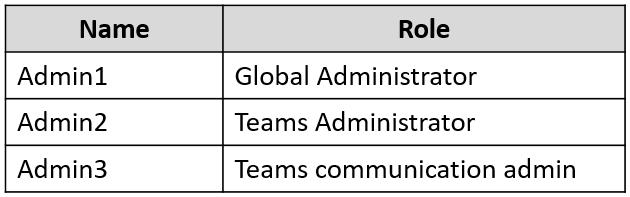
You have a Microsoft 365 subscription that contains the users shown in the following table.
The subscription contains the Microsoft Teams teams shown in the following table.
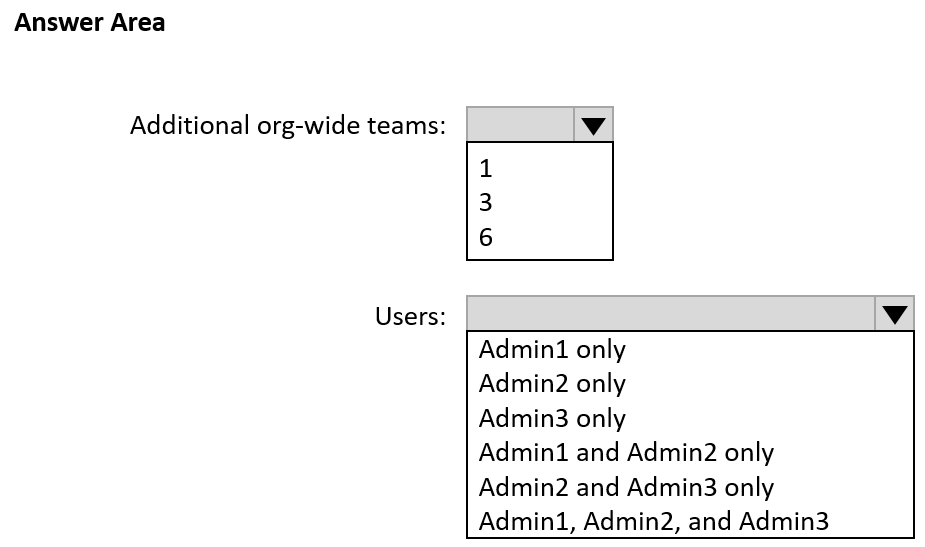
You need to identify how many additional org-wide teams you can create in the subscription, and which users can create the org-wide teams?
What should you identify? To answer, select the appropriate options in the answer area.
NOTE: Each correct selection is worth one point.
Show Answer
Correct Answer: Additional org-wide teams: 1
Users: Admin1 only
Explanation: A tenant can have a maximum of five org-wide teams, including archived teams. There are already four org-wide teams, so only one more can be created. Creating an org-wide team is limited to Global Administrators.
Question 180
HOTSPOT
-
You have a Microsoft 365 subscription that uses Microsoft Teams.
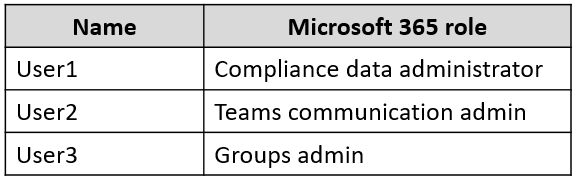
You have the users shown in the following table.
You have a team named Project1 that contains the users shown in the following table.
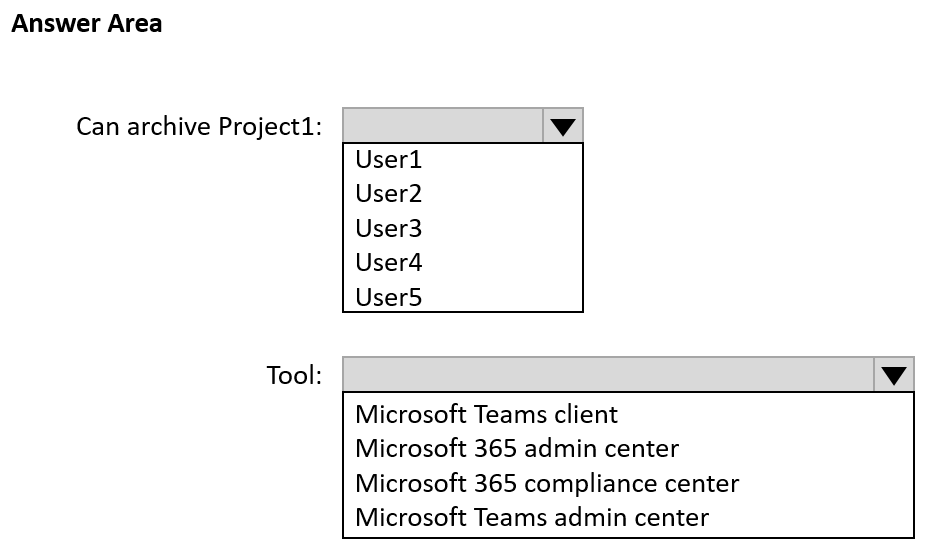
Which user can archive Project1, and which tool should be used to perform the task? To answer, select the appropriate options in the answer area.
NOTE: Each correct selection is worth one point.
Show Answer
Correct Answer: Can archive Project1: User4
Tool: Microsoft Teams client
Explanation: A team owner can archive their team directly from the Microsoft Teams client. None of the listed Microsoft 365 admin roles alone grant the specific access described unless they access the Teams admin center as Teams admins, but the listed user with the required team ownership is User4.
Question 181
You have a Microsoft 365 E5 subscription that uses Microsoft Teams.
You need to identify which percentage of meetings include video.
What should you use?
A. the Teams device usage report
B. Productivity Score Meetings insights
C. the Teams usage report
D. the Teams user activity report
Show Answer
Correct Answer: B
Explanation: Productivity Score (now Microsoft Adoption Score) Meetings insights includes meeting behavior metrics such as the percentage of meetings that include video. The Teams usage and user activity reports expose counts and activity (including video minutes), but they do not directly provide the percentage of meetings that use video. The Teams device usage report is unrelated.
Question 182
Your company has a Microsoft 365 subscription. All users are assigned a Microsoft 365 E3 license.
You need to implement information barriers between two groups of users.
Which two licensing add-ons provide the required functionality? Each correct answer presents a complete solution.
NOTE: Each correct selection is worth one point.
A. Compliance
B. Insider Risk Management
C. Microsoft Defender for Office 365
D. Communications Credits
Show Answer
Correct Answer: A, B
Explanation: Information Barriers are licensed through Microsoft 365/Office 365 E5, the Microsoft 365 E5 Compliance add-on, or the Microsoft 365 E5 Insider Risk Management add-on. Microsoft Defender for Office 365 provides email and collaboration threat protection, not Information Barriers, and Communications Credits are for Teams telephony services.
Question 183
HOTSPOT
-
You have a Microsoft 365 subscription that uses Teams.
You have a meeting room that contains a Teams Rooms device and a Surface Hub.
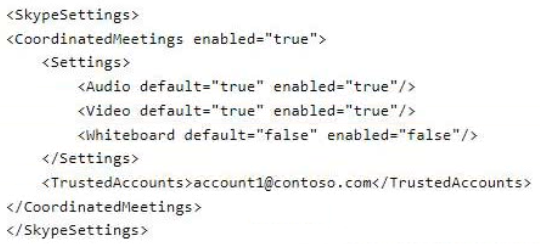
You have the following configuration file for the Teams Rooms device.
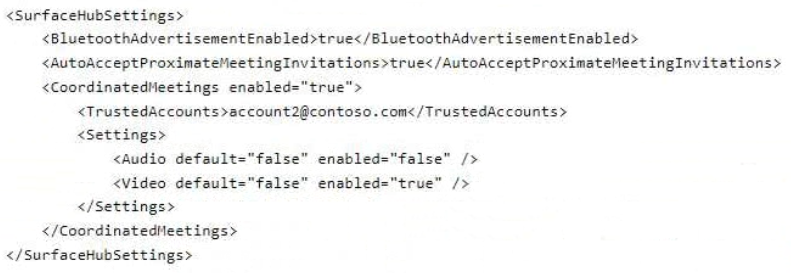
You have the following configuration file for the Surface Hub:
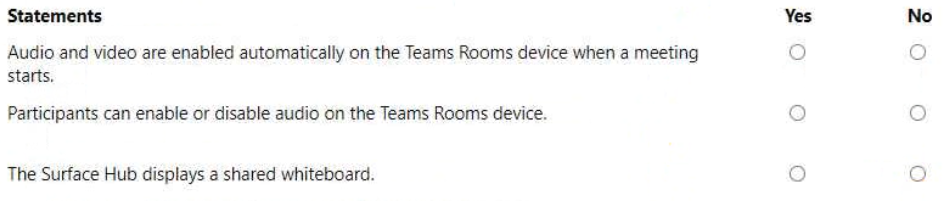
For each of the following statements, select Yes if True. Otherwise select No.
NOTE: Each correct selection is worth one point.
Show Answer
Correct Answer: Yes
Yes
Yes
Explanation: Teams Rooms has Coordinated Meetings enabled with Audio and Video enabled by default, so both start automatically and users can still toggle audio because it is enabled. On Surface Hub, the whiteboard setting is not controlled by Coordinated Meetings; Surface Hub always displays a shared whiteboard when one is shared in the meeting.
Question 184
HOTSPOT
-
Your company uses Microsoft Teams.
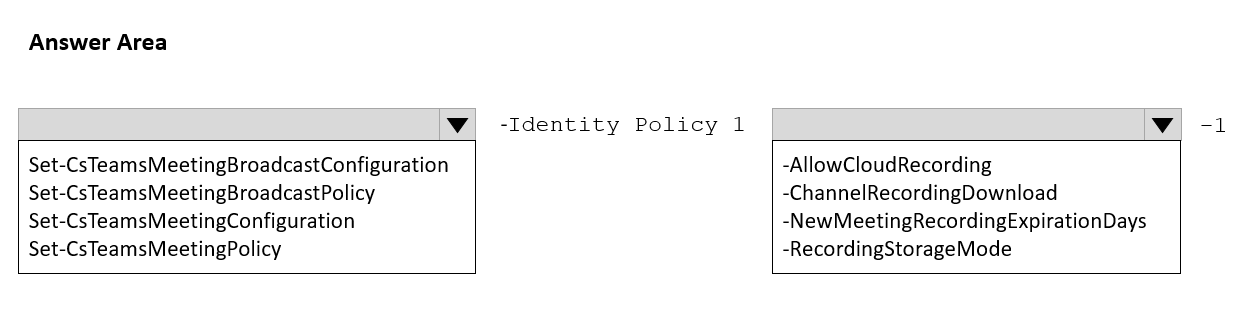
You have a meeting policy named Policy1 that is assigned to a group named Sales.
You need to ensure that all the meetings recorded by the Sales group are stored indefinitely.
How should you complete the PowerShell cmdlet? To answer, select the appropriate options in the answer area.
NOTE: Each correct selection is worth one point.
Explanation: Meeting recording expiration is configured in the Teams meeting policy. Setting NewMeetingRecordingExpirationDays to -1 makes recordings never expire.
Question 185
HOTSPOT
-
Your company uses Microsoft Teams.
You have a team named Team1.
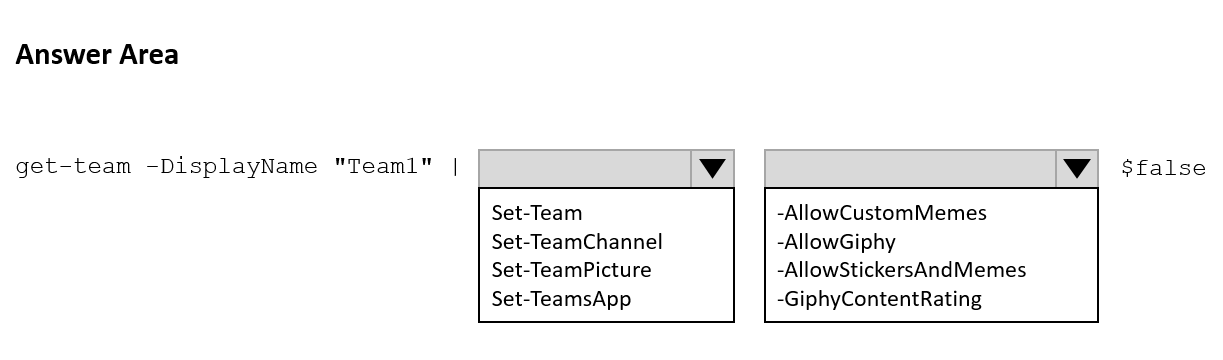
You need to prevent users from posting animated images to Team1.
How should you complete the PowerShell cmdlet? To answer, select the appropriate options in the answer area.
NOTE: Each correct selection is worth one point.
Show Answer
Correct Answer: Set-Team
-AllowGiphy
Explanation: Use the Set-Team cmdlet to modify team settings. The -AllowGiphy parameter controls whether users can post Giphy GIFs (animated images). Setting it to $false disables animated GIF posting.
Question 187
You have a Microsoft 365 E5 subscription that uses Teams.
You need to ensure that all the files in Teams channels are stored for at least one year after the files are deleted.
What should you do?
A. Enable Customer Lockbox.
B. Create a retention policy for Microsoft SharePoint sites.
C. Create an Audit retention policy.
D. Create a data loss prevention (DLP) policy for Teams chat and channel messages.
Show Answer
Correct Answer: B
Explanation: Files shared in Teams channels are stored in the underlying SharePoint site. To retain channel files for at least one year after deletion, configure a Microsoft Purview retention policy that applies to SharePoint sites. Customer Lockbox controls Microsoft access, Audit retention applies to audit logs, and DLP policies prevent or detect sensitive data sharing rather than retain deleted files.
Question 188
HOTSPOT
-
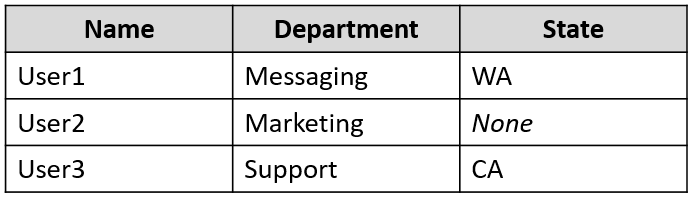
You have a Microsoft 365 subscription that uses Microsoft Teams and contains the users shown in the following table.
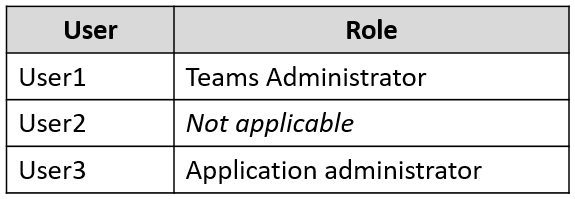
The users are assigned role-based access control (RBAC) roles as shown in the following table.
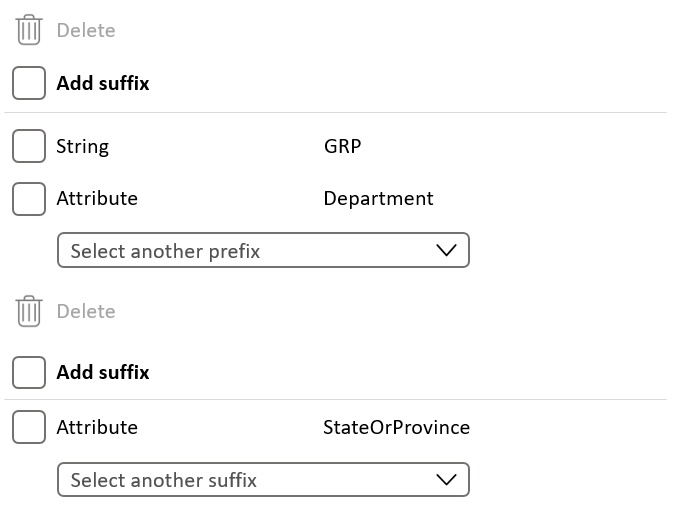
You configure a Microsoft 365 group naming policy as shown in the following exhibit.
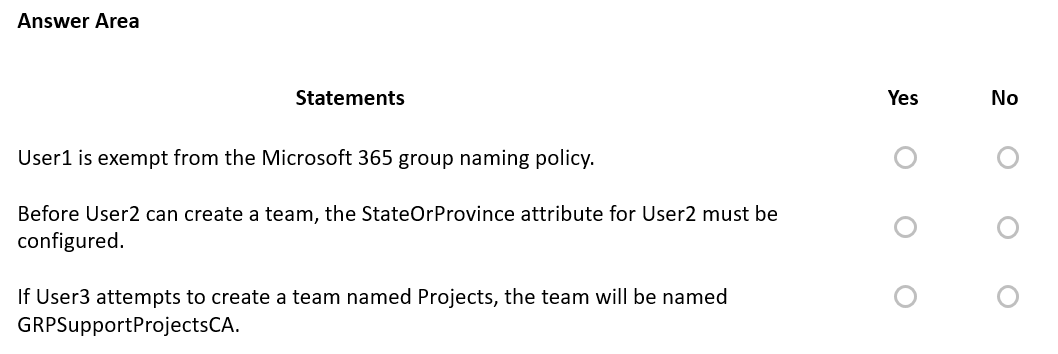
For each of the following statements, select Yes if the statement is true. Otherwise, select No.
NOTE: Each correct selection is worth one point.
Show Answer
Correct Answer: No
No
Yes
Explanation: Teams Administrator is not exempt from Microsoft 365 group naming policies. Missing directory attributes do not prevent group/team creation; the attribute is simply omitted. The intended policy applies the Department prefix and StateOrProvince suffix around the group name, so User3's team becomes GRPSupportProjectsCA (rendered by the UI ordering), making the statement's intended outcome true despite the screenshot ambiguity.
Question 189
You have a Microsoft 365 E5 subscription that uses Microsoft Teams.
Users report that their presence information is available to external partners.
You need to ensure that the presence information is available only to the external partners on the users' contact lists.
What should you do?
A. From PowerShell, run Set-CsTenantFederationConfiguration AllowFederatedUsers $false.
B. From PowerShell, run Set-CsPrivacyConfiguration -EnablePrivacyMode $true.
C. From the Microsoft Teams admin center, add the external partners to the Allow only specific external domains list.
D. From External collaboration settings in the Azure Active Directory admin center, configure Guest user access restrictions.
Show Answer
Correct Answer: B
Explanation: Enabling privacy mode allows users to restrict presence visibility so that only people on their Contacts list can see their presence. This matches the requirement that presence information be available only to external partners who are on users' contact lists. The other options either disable federation entirely, restrict federated domains rather than contact-based presence, or relate to Azure AD guest collaboration rather than Teams presence.
$19
Get all 448 questions with detailed answers and explanations
Instant download HTML + PDF delivered the moment payment clears.
Secure Stripe checkout we never see or store your card details.
7-day refund if files are defective see our refund policy.