HOTSPOT
-
You have a Microsoft 365 subscription that uses Teams.
You plan to create a Teams policy that will provide users with the ability to participate in surveys by Microsoft.
How should you complete the PowerShell command? To answer, select the appropriate options in the answer area.
NOTE: Each correct selection is worth one point.
Explanation: Teams survey participation is configured with a Teams Feedback Policy. To allow Microsoft surveys, use New-CsTeamsFeedbackPolicy with receiveSurveysMode set to enabled.
Question 156
HOTSPOT
-
You have a Microsoft 365 subscription that uses Microsoft Teams.
You purchase three new Microsoft Teams display devices.
You need to provision the new devices remotely.
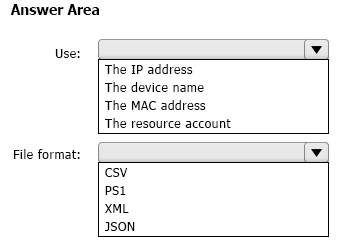
What information should you use to identify each device, and which file format should you use for the upload? To answer, select the appropriate options in the answer area.
NOTE: Each correct selection is worth one point.
Show Answer
Correct Answer: Use: The MAC address
File format: CSV
Explanation: Microsoft Teams remote device provisioning identifies devices by their MAC address. Bulk provisioning uploads use a CSV file containing the device MAC addresses.
Question 157
Your company uses Teams.
All users are assigned a Microsoft 365 E5 license.
You need to purchase an add-on license that will enable the users to apply a sensitivity label to control the end-to-end encryption of highly sensitive Teams meetings.
Which add-on license should you purchase?
A. Priva Privacy Risk Management
B. Microsoft Teams Premium
C. Audio Conferencing
D. Microsoft 365 E5 Security
E. Microsoft 365 E5 Compliance
Show Answer
Correct Answer: B
Explanation: The required add-on is Microsoft Teams Premium. Microsoft 365 E5 already includes Microsoft Purview Information Protection capabilities for sensitivity labels, but applying sensitivity labels to Teams meetings with advanced protected meeting capabilities, including controlling end-to-end encryption for highly sensitive meetings, requires the Teams Premium add-on license.
Question 158
Your company uses Teams.
You plan to deploy Teams to a branch office that has limited bandwidth.
Which two features can be used when the Teams client has a bandwidth restriction of 150 kilobit/s up and 150 kilobit/s down? Each correct answer presents a complete solution.
NOTE: Each correct selection is worth one point.
A. one-to-one screen sharing
B. one-to-one video
C. screen sharing during meetings
D. audio during meetings
E. video during meetings
Show Answer
Correct Answer: B, D
Explanation: At a bandwidth limit of 150 kbps upstream and 150 kbps downstream, one-to-one video meets the minimum requirement (150/150), and audio during meetings requires far less bandwidth (about 10/10). One-to-one screen sharing (~200/200), screen sharing during meetings (~250/250), and video during meetings (~150/200) exceed the available bandwidth in at least one direction.
Question 159
SIMULATION
-
Please wait while the virtual machine loads. Once loaded, you may proceed to the lab section. This may take a few minutes, and the wait time will not be deducted from your overall test time.
When the Next button is available, click it to access the lab section. In this section, you will perform a set of tasks in a live environment. While most functionality will be available to you as it would be in a live environment, some functionality (e.g. copy and paste, ability to navigate to external websites) will not be possible by design.
Scoring is based on the outcome of performing the tasks stated in the lab. In other words it doesn’t matter how you accomplish the task, if you successfully perform it, you will earn credit for that task.
Labs are not timed separately, and this exam may have more than one lab that you must complete. You can use as much time as you would like to complete each lab. But you should manage your time appropriately to ensure that you are able to complete the lab(s) and all other sections of the exam in the time provided.
Please not that once you submit your work by clicking the Next button within a lab, you will NOT be able to return to the lab.
You may now click next to proceed to the lab.
Username and password.
Use the following login credentials as needed:
To enter your username, place your cursor in the Sign in box and click on the username below.
To enter your password, place your cursor in the Enter password box and click on the password below.
Microsoft 365 Username:
Microsoft 365 Password: XXXXXXXXXXXX
If the Microsoft 365 portal does not load successfully in the browser, press CTRL-K to reload the portal in a new browser tab.
The following information is for technical support purposes only:
Lab Instance: 26178313
-
Task 9
-
You need to deploy the Microsoft Viva Connections app to Teams and install the app as the first item on the app bar of the Teams client for all users.
To complete this task, sign in to the Microsoft 365 portal.
Show Answer
Correct Answer: Microsoft 365 admin center → Teams admin center → Teams apps → Setup policies → Global (Org-wide default) → Add Viva Connections app, move it to position 1 on the app bar, save. If needed, Teams apps → Manage apps → Viva Connections → Allow.
Explanation: Deploy Viva Connections by ensuring the app is allowed and pinning it as the first app in the Global Teams app setup policy so it is installed/pinned for all users.
Question 161
Your company uses Teams.
You plan to assign an enhanced encryption policy to enable end-to-end encryption for Teams calls.
Which features support end-to-end encryption for one-to-one Teams calls?
A. audio only
B. video only
C. chat only
D. audio and video only
E. audio, video, and chat
Show Answer
Correct Answer: D
Explanation: End-to-end encryption for one-to-one Microsoft Teams calls protects the real-time media (voice and video). Chat is not end-to-end encrypted by this feature; chat and other content are protected by standard Microsoft 365 encryption instead. Screen sharing is also supported during E2EE calls, but it is not among the answer choices, so the correct option is audio and video only.
Sources:
https://learn.microsoft.com/en-us/microsoftteams/teams-end-to-end-encryption
Question 162
Your company uses Microsoft Teams.
The company has 10 corporate images.
You want to provide the images to users as custom backgrounds for Teams meetings.
You need to make the backgrounds available to Teams users.
What should you configure?
A. Teams settings
B. Meeting settings
C. Meeting policies
D. Team templates
Show Answer
Correct Answer: C
Explanation: To provide organizational custom background images for Teams meetings, administrators configure meeting policies/customization policies in the Teams admin center. This feature is associated with Teams Premium and is managed through meeting customization policies rather than general Teams settings, meeting settings, or team templates.
Question 163
HOTSPOT -
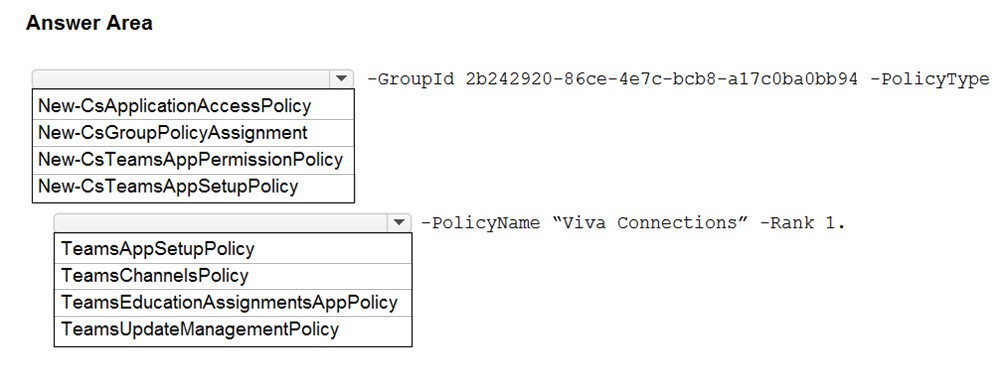
You need to install the Microsoft Viva Connections application in Microsoft Teams for a specific group.
How should you complete the PowerShell cmdlets? To answer, select the appropriate options in the answer area.
NOTE: Each correct selection is worth one point.
Hot Area:
Explanation: To install Viva Connections for a specific group, assign a Teams App Setup Policy to the Microsoft 365 group using New-CsGroupPolicyAssignment with PolicyType TeamsAppSetupPolicy.
Question 164
Note: This question is part of a series of questions that present the same scenario. Each question in the series contains a unique solution that might meet the stated goals. Some question sets might have more than one correct solution, while others might not have a correct solution.
After you answer a question in this section, you will NOT be able to return to it. As a result, these questions will not appear in the review screen.
Your company has 10 offices in North America and Europe.
The company has 5,000 users.
You plan to deploy Microsoft Teams for all the users.
You run a pilot project for the planned deployment.
You need to identify the network packet loss from the pilot computers to Microsoft Teams during calls.
Solution: From the Microsoft Teams admin center, you review Usage reports.
Does this meet the goal?
A. Yes
B. No
Show Answer
Correct Answer: B
Explanation: Usage reports in the Microsoft Teams admin center provide adoption and usage metrics, not per-call network quality metrics such as packet loss. To identify packet loss during Teams calls, you would use Call Analytics or the Call Quality Dashboard (CQD), not Usage reports.
Question 165
SIMULATION
-
Please wait while the virtual machine loads. Once loaded, you may proceed to the lab section. This may take a few minutes, and the wait time will not be deducted from your overall test time.
When the Next button is available, click it to access the lab section. In this section, you will perform a set of tasks in a live environment. While most functionality will be available to you as it would be in a live environment, some functionality (e.g. copy and paste, ability to navigate to external websites) will not be possible by design.
Scoring is based on the outcome of performing the tasks stated in the lab. In other words, it doesn’t matter how you accomplish the task, if you successfully perform it, you will earn credit for that task.
Labs are not timed separately, and this exam may have more than one lab that you must complete. You can use as much time as you would like to complete each lab. But you should manage your time appropriately to ensure that you are able to complete the lab(s) and all other sections of the exam in the time provided.
Please not that once you submit your work by clicking the Next button within a lab, you will NOT be able to return to the lab.
You may now click next to proceed to the lab.
Username and password.
Use the following login credentials as needed:
To enter your username, place your cursor in the Sign in box and click on the username below.
To enter your password, place your cursor in the Enter password box and click on the password below.
Microsoft 365 Username:
Microsoft 365 Password: XXXXXXXXXXXX
If the Microsoft 365 portal does not load successfully in the browser, press CTRL-K to reload the portal in a new browser tab.
The following information is for technical support purposes only:
Lab Instance: 26178313
-
Task 1
-
Your company is opening a branch office in Miami. The office uses a network range of 10.10.10.0/24.
You need to restrict Teams bandwidth to 1,000 Kbps for all the users working at the Miami office. The solution must NOT affect other offices.
To complete this task, sign in to the Microsoft 365 portal.
Show Answer
Correct Answer: Teams admin center → Locations → Network topology → Roaming policies: create a policy with Media bit rate = 1000 Kbps.
Then Network sites: add the Miami site, assign the roaming policy, and add subnet 10.10.10.0/24.
Explanation: Use a Teams Network Roaming Policy to limit media bandwidth by network location, then associate it with the Miami network site/subnet so only users on that subnet are affected.
$19
Get all 448 questions with detailed answers and explanations
Instant download HTML + PDF delivered the moment payment clears.
Secure Stripe checkout we never see or store your card details.
7-day refund if files are defective see our refund policy.