You have a Microsoft 365 subscription that uses Teams.
You need to identify the percentage of meetings that follow one or more meeting best practices.
What should you use?
A. Adoption Score in the Microsoft 365 admin center
B. usage reports in the Microsoft Teams admin center
C. audit reports in the Microsoft Purview compliance portal
D. improvement actions in Compliance Manager
Show Answer
Correct Answer: A
Explanation: Adoption Score in the Microsoft 365 admin center includes a People Experiences category with metrics for Teams meeting practices, including the percentage of meetings that follow one or more meeting best practices. The other options provide usage, auditing, or compliance information rather than this best-practice adoption metric.
Question 191
HOTSPOT
-
You have a Microsoft 365 subscription that uses Microsoft Teams.
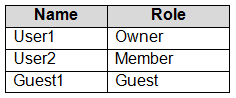
You have a team named Project1 that contains the members shown in the following table.
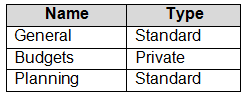
Project1 contains the channels shown in the following table.
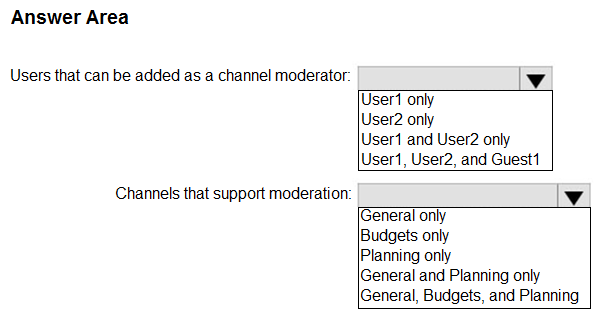
You need to identify which users can be added as a channel moderator, and which channels support moderation.
What should you identify? To answer, select the appropriate options in the answer area.
NOTE: Each correct selection is worth one point.
Show Answer
Correct Answer: Users: User1 and User2 only
Channels: Planning only
Explanation: Channel moderators can be team owners or members, not guests. Channel moderation is supported for standard channels except the default General channel; private channels do not support moderation.
Question 193
HOTSPOT
-
You have a Microsoft 365 subscription that uses Microsoft Teams.
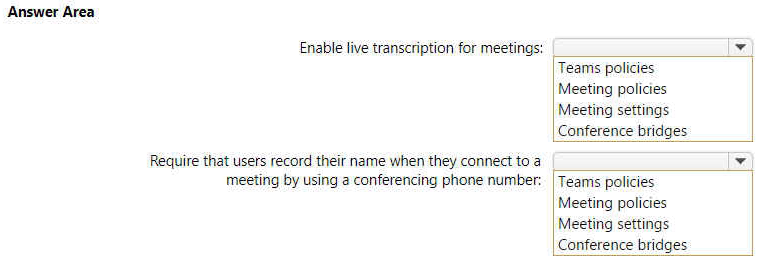
You need to configure Microsoft Teams to meet the following requirements:
• Enable live transcription for meetings.
• Require that users record their name when they connect to a meeting by using a conferencing phone number.
What should you configure for each requirement? To answer, select the appropriate options in the answer area.
NOTE: Each correct selection is worth one point.
Show Answer
Correct Answer: Enable live transcription for meetings: Meeting policies
Require users record their name when they connect by conferencing phone: Conference bridges
Explanation: Live transcription is controlled through Teams meeting policies. Requiring dial-in users to record their name is configured in the Audio Conferencing conference bridge settings.
Question 194
You have a Microsoft 365 subscription that contains 300 users.
All the users have existing direct inward dial (DID) phone numbers.
You plan to implement Phone System in Microsoft Teams.
You need to migrate the users' DID phone numbers to Microsoft Teams.
What should you do?
A. From Voice in the Microsoft Teams admin center, select Phone numbers, and then select Add.
B. From the Microsoft Teams admin center, run the porting wizard.
C. From the Microsoft Teams admin center, create a dial plan.
D. From the Microsoft 365 admin center, open a service request.
Show Answer
Correct Answer: B
Explanation: To migrate existing DID phone numbers from a current carrier to Microsoft Teams Phone, you must port the numbers. The Microsoft Teams admin center includes a porting wizard to submit and manage number port requests. Adding phone numbers is for obtaining new numbers, creating a dial plan does not migrate numbers, and opening a generic Microsoft 365 service request is not the standard process.
Question 195
Your company uses Teams Calling Plans.
When a user places a Teams call to an ambulance service, you need to ensure that a notification is also sent to the main receptionist of the company.
What should you configure?
A. a caller ID policy
B. a calling policy
C. a voice routing policy
D. an emergency calling policy
Show Answer
Correct Answer: D
Explanation: An emergency calling policy in Microsoft Teams is used to configure notifications when users place emergency calls. It can notify designated people (such as a receptionist) via chat or conference them into the emergency call, and can also call an external PSTN number. Caller ID, calling policies, and voice routing policies do not provide emergency notification functionality.
Question 196
HOTSPOT
-
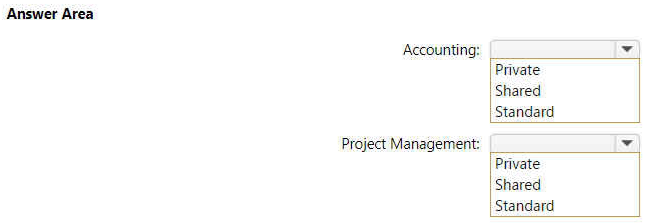
Your company uses Teams.
You have the following teams:
• Accounting
• Project Management
• Information Technology
You plan to create new channels.
You need to recommend channel types to meet the following requirements:
• Only the managers on the Accounting team must have access to collaborate on annual reports.
• The Project Management team must be able to collaborate with the Information Technology team on a network refresh project.
Which channel type should you recommend for each team? To answer, select the appropriate options in the answer area.
NOTE: Each correct selection is worth one point.
Explanation: Private channels restrict access to a subset of team members. Shared channels allow collaboration with people from other teams without requiring everyone to join the same team.
Question 198
HOTSPOT
-
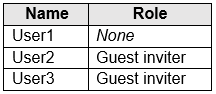
You have a Microsoft 365 subscription named contoso.com that uses Microsoft Teams and contains the users shown in the following table.
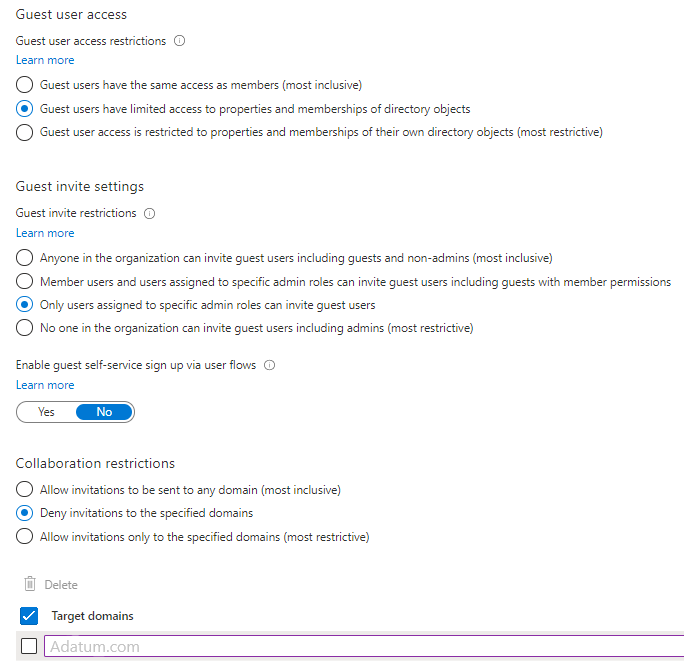
In Azure Active Directory (Azure AD), the External collaboration settings are configured as shown in the exhibit. (Click the Exhibit tab).
Allow guest access in Teams is set to On.
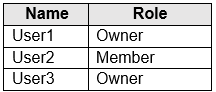
You have a team named Project1 that contains the users shown in the following table.
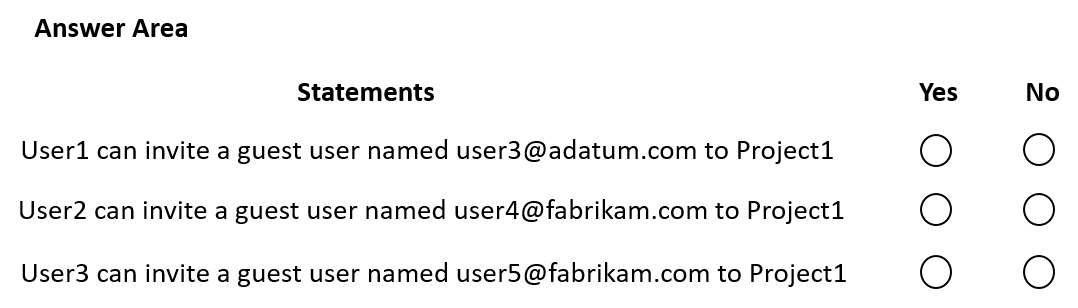
Both User1 and User3 are owners of a team named Project1. User2 is a member of Project1.
For each of the following statements, select Yes if the statement is true. Otherwise, select No.
NOTE: Each correct selection is worth one point.
Show Answer
Correct Answer: No
No
Yes
Explanation: Guest invitations are limited to users with admin roles such as Guest Inviter. However, adding a guest to a specific Team also requires appropriate Team ownership. In addition, invitations to adatum.com are blocked by the tenant's deny list.
Question 199
HOTSPOT
-
You have a Microsoft 365 subscription that uses Microsoft Teams and contains a user named User1 and three groups named Group1, Group2, and Group3. User1 is a member of Group1, Group2, and Group3.
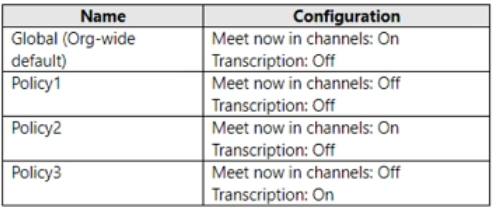
The subscription has the meeting policies shown in the following table.
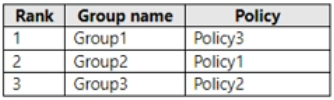
The meeting policies are assigned to groups as shown in the following table.
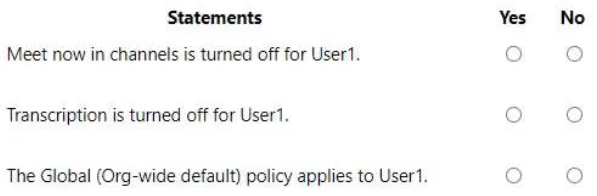
For each of the following statements, select Yes if the statement is true. Otherwise, select No.
Show Answer
Correct Answer: Yes
No
No
Explanation: User1 inherits the meeting policy from the highest-ranked group assignment. Group1 has rank 1 and is assigned Policy3, which has Meet now in channels = Off and Transcription = On. Therefore, Meet now in channels is off, Transcription is not off, and the global policy does not apply.
Question 200
You have a Microsoft 365 subscription named contoso.com that uses Microsoft Teams.
You need to ensure that Microsoft Teams users can perform the following tasks:
• Search for customers that use Skype (Consumer).
• Start a Skype chat with the customers.
Which two actions should you perform? Each correct answer presents part of the solution.
NOTE: Each correct selection is worth one point.
A. From the Microsoft Teams admin center, turn on guest access.
B. From the Microsoft Teams admin center, turn on external access.
C. Add a _sipfederationtls SRV record to the contoso.com DNS domain.
D. Add a _sipinternaltls SRV record to the contoso.com DNS domain.
E. From the Azure portal, configure Azure AD B2C.
Show Answer
Correct Answer: B, C
Explanation: To allow Microsoft Teams users to search for and chat with Skype (Consumer) users, you must enable External access (federation/public IM connectivity) in the Teams admin center. For SIP federation/public IM connectivity, the _sipfederationtls SRV DNS record is the relevant record. Guest access is unrelated, _sipinternaltls is for internal client sign-in, and Azure AD B2C is not required.
Question 201
Your network contains an Active Directory domain. The domain contains 1,000 computers that run Windows 11.
Your company uses Microsoft Teams.
You need to ensure that the computers can prioritize audio and video during Teams meetings.
From the Microsoft Teams admin center, you set Insert Quality of Service (QoS) markers for real-time media traffic to On.
What should you do next?
A. From Meeting settings in the Microsoft Teams admin center, configure the media port range to use any available ports.
B. From Group Policy Management, create a Group Policy setting to specify the DSCP values.
C. From the Teams PowerShell module, create a network roaming policy.
D. From Meeting policies in the Microsoft Teams admin center, configure the Media bit rate (Kbs) setting.
Show Answer
Correct Answer: B
Explanation: Enabling 'Insert Quality of Service (QoS) markers for real-time media traffic' allows Teams to mark traffic, but Windows clients must have QoS policies that define the DSCP values (typically deployed via Group Policy in an Active Directory environment). Configuring media to use any available ports would undermine port-based QoS, a network roaming policy is unrelated, and media bitrate does not implement traffic prioritization.
$19
Get all 448 questions with detailed answers and explanations
Instant download HTML + PDF delivered the moment payment clears.
Secure Stripe checkout we never see or store your card details.
7-day refund if files are defective see our refund policy.