You have a Microsoft 365 E5 subscription.
You plan to have Teams administrators use self-help diagnostics.
Which two scenarios are covered by self-help diagnostics? Each correct answer presents a complete solution.
NOTE: Each correct selection is worth one point.
A. Attempt to locate a missing Teams meeting recording.
B. Review Teams quest access.
C. Validate that a specified user can disable Teams live events.
D. Validate that a specified user is configured to record meetings.
E. Validate end-to-end encryption for strictly confidential Teams meetings
Show Answer
Correct Answer: A, D
Explanation: Microsoft Teams self-help diagnostics include scenarios for locating missing meeting recordings and validating whether a specific user is configured with the permissions/policies required to record meetings. Guest access review, disabling Teams live events, and validating end-to-end encryption for confidential meetings are not covered by the self-help diagnostics scenario set.
Question 75
HOTSPOT
-
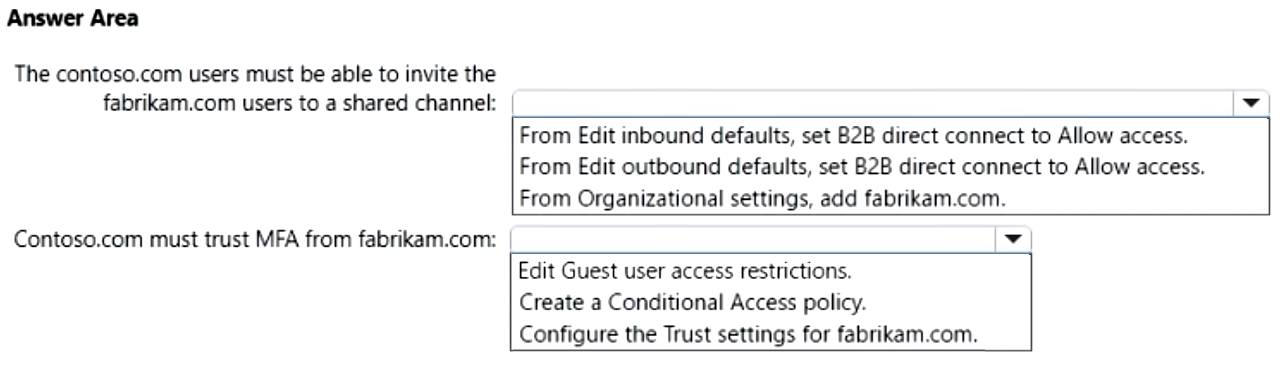
You have a Microsoft 365 subscription named contoso.com.
Contoso.com uses Teams to collaborate with users from a partner company that has a Microsoft 365 subscription named fabrikam.com.
You need to enable Teams shared channels. The solution must meet the following requirements:
• The users in contoso.com must be able to invite only the users in fabrikam.com to a shared channel.
• Contoso.com must trust multi-factor authentication (MFA) from fabrikam.com.
What should you configure in the Azure portal for each requirement? To answer, select the appropriate options in the answer area.
NOTE: Each correct selection is worth one point.
Show Answer
Correct Answer: The contoso.com users must be able to invite the fabrikam.com users to a shared channel:
From Edit outbound defaults, set B2B direct connect to Allow access.
Contoso.com must trust MFA from fabrikam.com:
Configure the Trust settings for fabrikam.com.
Explanation: Teams shared channels use Azure AD B2B Direct Connect. To allow Contoso users to invite Fabrikam users, configure outbound B2B direct connect access. Trusting Fabrikam MFA is configured in Cross-tenant access settings by enabling the trust settings for that organization.
Question 76
DRAG DROP
-
You have a Microsoft 365 E5 subscription.
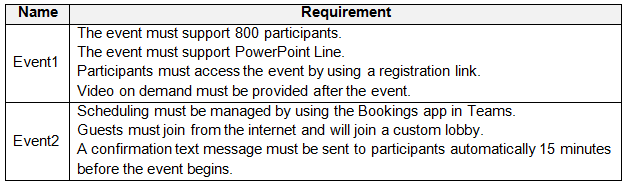
You plan to schedule the events shown in the following table.
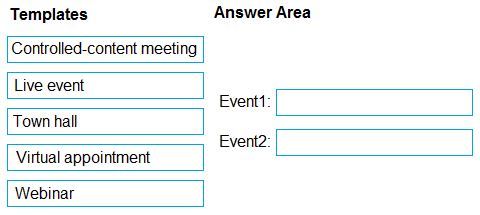
Which meeting template should you use for each event? To answer, drag the appropriate templates to the correct events. Each template may be used once, more than once, or not at all. You may need to drag the split bar between panes or scroll to view content.
NOTE: Each correct selection is worth one point.
Explanation: A webinar supports registration, interactive attendance up to the required size, PowerPoint Live, and on-demand recordings. Virtual appointments are managed through Microsoft Bookings and support external guests, a custom lobby, and automated SMS notifications/reminders.
Question 77
You have a Microsoft 365 E5 subscription that includes Teams.
All users are assigned the Teams Premium add-on license.
You need to schedule an event that supports 20,000 streaming participants and uses enterprise content delivery network (eCDN).
Which meeting template should you select?
A. Controlled-content meeting
B. Virtual appointment
C. Town hall
D. Webinar
Show Answer
Correct Answer: C
Explanation: Town hall is the Teams event type designed for large-scale broadcast events. With Teams Premium and the appropriate licensing, it supports up to 20,000 attendees (with Microsoft's documented limits/extended capacity) and supports integration with Microsoft eCDN for large internal streaming events. Webinars are intended for interactive registration-based events and have much lower attendee limits, while virtual appointments and controlled-content meetings are not designed for this scenario.
Question 78
SIMULATION
-
You need to ensure that when users join meeting by using a phone, they are prompted to record their name.
To complete this task, sign in to the Microsoft 365 portal.
Show Answer
Correct Answer: Microsoft Teams admin center → Meetings → Conference bridges → Bridge settings → Enable 'Automatically ask callers to record their name before joining a meeting' (or equivalent prompt to record name) → Save.
Explanation: The prompt for phone users to record their name is configured in the Audio Conferencing (conference bridge) settings.
Question 79
SIMULATION
-
A company named Contoso, Ltd. plans to deploy Teams Phone with location-based emergency dialing.
You need to ensure that when users dial emergency numbers, the call is routed based on the user's current location.
You do NOT need to configure networks and locations at this time.
To complete this task, sign in to the Microsoft 365 portal.
Show Answer
Correct Answer: In the Teams admin center, configure Emergency calling by creating and assigning an Emergency call routing policy so emergency calls are routed based on the user's current location. Do not configure networks or locations yet.
Explanation: Location-based emergency dialing requires an emergency call routing policy. Networks and locations can be configured later; the task is to enable routing behavior via the appropriate policy.
Question 80
You have a Microsoft 365 E3 subscription that uses Teams. The subscription contains an administrator named Admin1 that is assigned the Teams Administrator role.
Admin1 reports that he can assign default policy packages to users but cannot create and assign custom policy packages.
You need to ensure that Admin1 can create and assign custom policy packages in Teams.
What should you do?
A. For Admin1, run the Grant-CsUserPolicyPackage PowerShell cmdlet.
B. Assign a Teams Premium license to Admin1.
C. For Admin1, run the Grant-CsGroupPolicyPackageAssignment PowerShell cmdlet.
D. Assign a Microsoft 365 E5 license to Admin1.
Show Answer
Correct Answer: B
Explanation: Creating and assigning custom policy packages in Microsoft Teams requires Teams Premium capabilities. A Teams Administrator can assign default policy packages, but creating custom policy packages requires a Teams Premium license. PowerShell grant cmdlets assign policy packages; they do not enable creation of custom policy packages. An M365 E5 license alone does not provide Teams Premium.
Question 81
SIMULATION
-
You need to prevent guest users from calling your company’s Teams users.
To complete this task, sign in to the Microsoft 365 portal.
Show Answer
Correct Answer: Microsoft Teams admin center → Users > Guest access → Calling → Turn off "Make private calls".
Explanation: To prevent guest users from calling your organization's Teams users, disable private calling for guest access in the Teams admin center.
Question 82
Note: This question is part of a series of questions that present the same scenario. Each question in the series contains a unique solution that might meet the stated goals. Some question sets might have more than one correct solution, while others might not have a correct solution.
After you answer a question in this section, you will NOT be able to return to it. As a result, these questions will not appear in the review screen.
You have a Microsoft 365 subscription that includes Teams. The subscription contains a user named User1.
You are deploying 10 new Teams devices.
You need to ensure that User1 can restart the Teams devices remotely.
Solution: You assign the Teams Administrator role to User1.
Does this meet the goal?
A. Yes
B. No
Show Answer
Correct Answer: A
Explanation: Yes. Assigning the Teams Administrator role meets the goal. The Teams Administrator role has permissions to manage Teams devices through the Teams admin center, including remotely restarting supported Teams devices. While the Teams Devices Administrator role is a more limited role designed specifically for device management, the broader Teams Administrator role also includes the required permissions.
Question 83
HOTSPOT
-
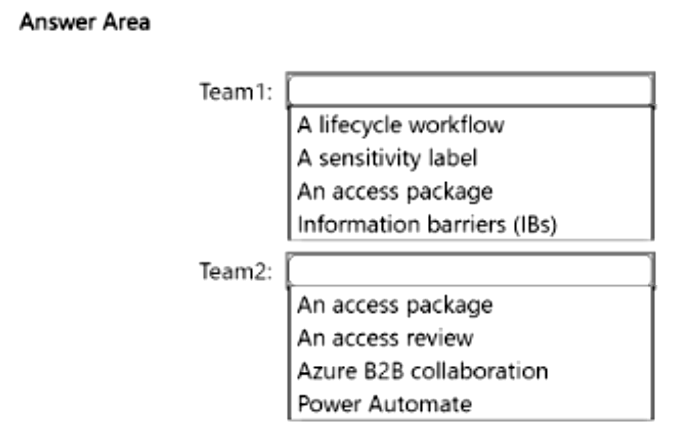
You have a Microsoft 365 subscription that uses Teams and contains the teams shown in the following table.
You need to deploy an access solution that meets the following requirements:
• The members of Team1 must be prevented from adding guest accounts to the team.
• After every quarter, the owners of Team2 must review guest access and remove guests that no longer require access to the team.
What should you configure for each team? To answer, select the appropriate options in the answer area.
NOTE: Each correct selection is worth one point.
Show Answer
Correct Answer: Team1: A sensitivity label
Team2: An access review
Explanation: Sensitivity labels for Teams can control guest access (including preventing guest additions). Access Reviews in Microsoft Entra ID allow team owners to periodically review and remove guest users who no longer need access.
$19
Get all 448 questions with detailed answers and explanations
Instant download HTML + PDF delivered the moment payment clears.
Secure Stripe checkout we never see or store your card details.
7-day refund if files are defective see our refund policy.