You have a Microsoft 365 subscription.
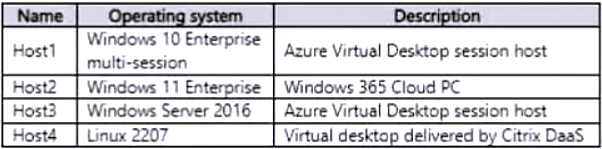
You have a virtualized desktop infrastructure (VDI) that contains the virtual machines shown in the following table.
You need to install the Teams for VDI client on supported virtual machines.
Which virtual machines support the Teams for VDI client?
A. Host1 only
B. Host2 only
C. Host1, Host2, and Host3 only
D. Host1, Host2, and Host4 only
E. Host1, Host2, Host3, and Host4
Show Answer
Correct Answer: C
Explanation: Host1 (Windows 10 Enterprise multi-session), Host2 (Windows 11 Enterprise), and Host3 (Windows Server 2016) are supported Windows environments for Teams for VDI. Host4 runs Linux, which is not supported.
Question 4
HOTSPOT -
You have a Microsoft 365 subscription that uses Microsoft Teams.
You plan to deploy a Microsoft Teams display device.
You need to enable automatic provisioning.
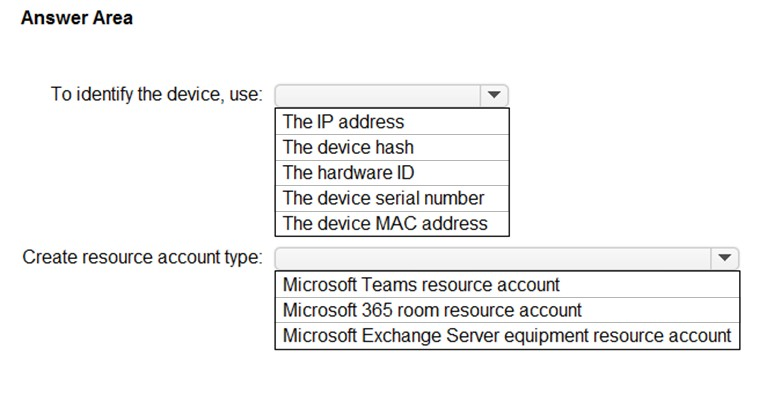
Which type of resource account should you create, and what should you use to identify the device? To answer, select the appropriate options in the answer area.
NOTE: Each correct selection is worth one point.
Hot Area:
Show Answer
Correct Answer: To identify the device: The device MAC address
Create resource account type: Microsoft 365 room resource account
Explanation: Automatic provisioning identifies the Teams display by its MAC address. A Microsoft 365 room resource account is used for the shared device.
Question 5
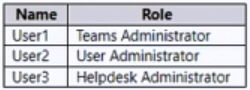
You have a Microsoft 365 E5 subscription that uses Teams and contains the users shown in the following table.
You create a group naming policy to enforce a consistent naming convention for Teams names.
Which users are exempt from the group naming policy restrictions?
A. User1 only
B. User2 only
C. User3 only
D. User1 and User3 only
E. User1, User2, and User3
Show Answer
Correct Answer: B
Explanation: User2, who has the User Administrator role, is exempt from the group naming policy. The Teams Administrator and Helpdesk Administrator roles do not provide that exemption.
Question 5
You plan to deploy Microsoft Teams to a remote location.
You perform a network readiness assessment for Microsoft Teams by using the Network Testing Companion.
Which two tests are included in the assessment? Each correct answer presents part of the solution.
NOTE: Each correct selection is worth one point.
A. trace route information
B. video quality tests
C. open and blocked ports
D. audio quality tests
E. Quality of Service (QoS) validation
Show Answer
Correct Answer: C, D
Explanation: The Network Testing Companion checks connectivity to required Teams ports and runs audio quality tests to assess call performance. It does not include a video quality test.
Question 5
HOTSPOT
-
You have a Teams deployment.
You are deploying the new Teams client to user devices.
When some users attempt to install the Teams client they receive an error message that states the client cannot be installed due to organizational policy.
You verify that the latest Windows updates are installed, and no Group Policy Objects (GPOs) are applied to the user devices.
You need to resolve the issue.
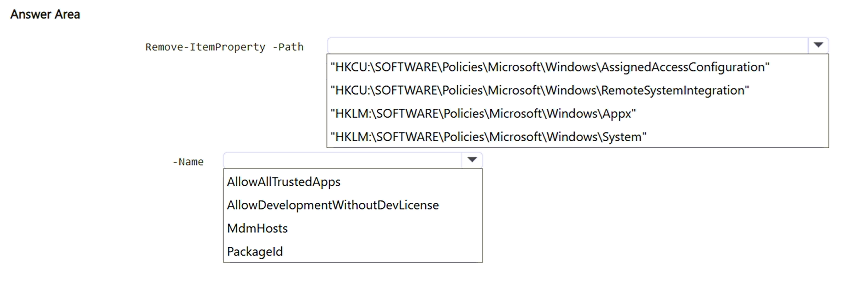
How should you complete the PowerShell command? To answer, select the appropriate options in the answer area.
NOTE: Each correct selection is worth one point.
Explanation: The installation is being blocked by a Windows Appx policy. Removing the AllowAllTrustedApps policy value from the Appx policy registry path resolves the organizational policy block for the new Teams client.
Question 6
You have a Microsoft 365 subscription.
You plan to implement Microsoft Teams.
You need to perform network quality and connectivity tests from an on-premises network to Microsoft 365 Online services by using the Network Testing
Companion.
You install the Network Testing Companion module on a local Windows 10 device.
Which additional software should you install to perform the tests?
A. Network Assessment Tool
B. Windows Performance Analyzer (WPA)
C. the Microsoft Teams desktop client
D. Windows Assessment Toolkit
Show Answer
Correct Answer: A
Explanation: Install the Network Assessment Tool. The Network Testing Companion uses it to run network connectivity and performance tests for Microsoft Teams and other Microsoft 365 services.
Question 6
You have a Teams Phone deployment.
You discover that the Teams client cannot receive PSTN calls but can receive Teams calls.
You need to ensure that the Teams client can receive both PSTN and Teams calls.
What should you configure in the Teams client?
A. Manage call group
B. Redirect external phone calls
C. Manage delegates
D. Forward all calls
Show Answer
Correct Answer: D
Explanation: If 'Forward all calls' is enabled, incoming PSTN calls are forwarded instead of ringing the Teams client. Disabling this setting allows the client to receive both PSTN and Teams calls. The other options relate to call groups, delegates, or handling external calls rather than the core issue of all calls being forwarded.
Question 6
Case study -
Overview -
Company Information -
ADatum Corporation is an energy company that has offices across North America and 3,000 employees.
Physical Locations -
ADatum has the offices shown in the following table.
Existing Environment -
Network Infrastructure -
The office in Calgary has a 1-Gbps internet circuit. The offices in San Diego and New York have 100-Mbps internet circuits. The field site in Edmonton has a 3-Mbps internet circuit.
Departments -
ADatum has the following departments:
• Information technology (IT)
• Project management
• Marketing
Microsoft 365 and Tenants Environment
ADatum recently purchased a Microsoft 365 E5 subscription that has the Microsoft Teams Domestic Calling Plan add-on. All users are assigned Microsoft 365 E5 and Microsoft Teams Domestic Calling Plan licenses and Calling Plans is deployed.
Azure AD has the default Cross-tenant access settings configured.
The Teams policies settings are configured as shown in the following exhibit.
The Teams client is deployed to a non-persistent Virtual Desktop Infrastructure (VDI) used by the project management department.
Allow guest access in Teams is set to Off.
The Microsoft Viva Connections app is deployed to all users.
Problem Statements -
ADatum identifies the following issues:
• An executive at the San Diego office reports that video drops during Teams meetings.
• The Edmonton field site has limited bandwidth, and users report poor audio during Teams calls and meetings.
• Users in the project management department report that they cannot give or take control during Teams calls and meetings while sharing their VDI desktop.
Planned Changes -
ADatum plans to implement the following changes:
• Configure the media bit rate settings for the users at the Edmonton field site. The settings must apply only to the user while they are at the site, but NOT when they are at a different office.
• Create a Teams channel to enable the project management department to collaborate with the IT department on a device upgrade project.
• Implement a pilot rollout of Operator Connect for the users in the New York office. A port re-quest was accepted already.
• Create a Teams channel for the marketing department for external collaboration.
• Rename the Viva Connections icon as Start portal.
Technical Requirements -
ADatum identifies the following technical requirements:
• The marketing department requires that all the files shared by using Teams remain available for at least three years after deletion.
• The marketing department must be able to apply a watermark to content and video shared dur-ing Teams meetings.
• All users require indefinite access to training videos recorded in Teams by the IT department.
• All access to Teams and shared resources must use the principle of least privilege.
• Guest access must remain disabled.
You need to implement the planned changes for the marketing department.
Which two actions should you perform? Each correct answer presents part of the solution.
NOTE: Each correct selection is worth one point.
A. Set Invite external users to shared channels to On for the Global (Org-wide default) Teams policy.
B. From the Azure Active Directory admin center, configure the B2B direct connect outbound access settings for external users and groups.
C. From the Azure Active Directory admin center, configure the B2B direct connect inbound access settings for external users and groups.
D. Set Join external shared channels to On for the Teams policy of the marketing department.
E. Set Invite external users to shared channels to On for the Teams policy of the marketing department.
Show Answer
Correct Answer: C, E
Explanation: Marketing needs to create a shared channel and invite external users. Enable **Invite external users to shared channels** in the Marketing Teams policy (E), and configure inbound B2B direct connect access so external users can access shared channels in ADatum’s tenant (C). Shared channels use B2B direct connect rather than guest access, so guest access can remain disabled.
Question 7
Case study -
Overview -
Company Information -
ADatum Corporation is an energy company that has offices across North America and 3,000 employees.
Physical Locations -
ADatum has the offices shown in the following table.
Existing Environment -
Network Infrastructure -
The office in Calgary has a 1-Gbps internet circuit. The offices in San Diego and New York have 100-Mbps internet circuits. The field site in Edmonton has a 3-Mbps internet circuit.
Departments -
ADatum has the following departments:
• Information technology (IT)
• Project management
• Marketing
Microsoft 365 and Tenants Environment
ADatum recently purchased a Microsoft 365 E5 subscription that has the Microsoft Teams Domestic Calling Plan add-on. All users are assigned Microsoft 365 E5 and Microsoft Teams Domestic Calling Plan licenses and Calling Plans is deployed.
Azure AD has the default Cross-tenant access settings configured.
The Teams policies settings are configured as shown in the following exhibit.
The Teams client is deployed to a non-persistent Virtual Desktop Infrastructure (VDI) used by the project management department.
Allow guest access in Teams is set to Off.
The Microsoft Viva Connections app is deployed to all users.
Problem Statements -
ADatum identifies the following issues:
• An executive at the San Diego office reports that video drops during Teams meetings.
• The Edmonton field site has limited bandwidth, and users report poor audio during Teams calls and meetings.
• Users in the project management department report that they cannot give or take control during Teams calls and meetings while sharing their VDI desktop.
Planned Changes -
ADatum plans to implement the following changes:
• Configure the media bit rate settings for the users at the Edmonton field site. The settings must apply only to the user while they are at the site, but NOT when they are at a different office.
• Create a Teams channel to enable the project management department to collaborate with the IT department on a device upgrade project.
• Implement a pilot rollout of Operator Connect for the users in the New York office. A port re-quest was accepted already.
• Create a Teams channel for the marketing department for external collaboration.
• Rename the Viva Connections icon as Start portal.
Technical Requirements -
ADatum identifies the following technical requirements:
• The marketing department requires that all the files shared by using Teams remain available for at least three years after deletion.
• The marketing department must be able to apply a watermark to content and video shared dur-ing Teams meetings.
• All users require indefinite access to training videos recorded in Teams by the IT department.
• All access to Teams and shared resources must use the principle of least privilege.
• Guest access must remain disabled.
You need to resolve the issue reported by the project management department users.
What should you do?
A. Instruct the users to launch Teams and select Check for updates.
B. Uninstall the current Teams client, and then reinstall the latest version of the client.
C. From the Microsoft Teams admin center, create and assign a new meeting policy.
D. From the Microsoft Teams admin center, modify the Meeting settings.
Show Answer
Correct Answer: C
Explanation: Create and assign a meeting policy that enables **Participants can give or request control**. This meeting-policy setting allows users to give or take control while sharing their desktop. Updating or reinstalling the Teams client, or changing organization-wide meeting settings, does not address this policy setting.
Question 7
You work as a Systems Administrator for your company. The company has a subscription to Microsoft 365. All users in your company have a Microsoft 365 E5 license.
All users in the company use Microsoft Teams for collaboration.
Users report that a team has been deleted in Microsoft Teams. The team was available yesterday.
You need to restore the deleted team.
Which tool should you use?
A. The Microsoft Teams admin center
B. The Microsoft Teams client app
C. The Azure Active Directory admin center
D. The Exchange Online admin center
Show Answer
Correct Answer: A
Explanation: Use the Microsoft Teams admin center. It lets an administrator view and restore deleted teams (typically within the 30-day recovery period).
$19
Get all 448 questions with detailed answers and explanations
Instant download HTML + PDF delivered the moment payment clears.
Secure Stripe checkout we never see or store your card details.
7-day refund if files are defective see our refund policy.