This is the free Microsoft SC-401 practice question bank —
140 of 269 total questions, each with a full explanation, free to
read with no signup required. Updated 2026-11-12.
Every answer is verified against official Microsoft documentation —
see our methodology.
Question 1
You have a Microsoft 365 E5 subscription that uses Microsoft Purview data loss prevention (DLP) policies.
You need to identify which users uploaded confidential files to external websites. The solution must minimize administrative effort.
What should you use in the Microsoft Purview portal?
A. Content explorer
B. Audit
C. Data explorer
D. Activity explorer
Show Answer
Correct Answer: D
Explanation: Use Activity explorer. It displays DLP-related activities, including user and file details, and can help identify uploads of sensitive or confidential files to external websites. This is the most direct option for investigating those activities with minimal administrative effort.
Question 1
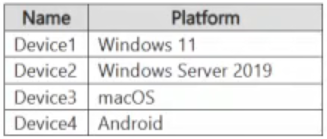
You have a Microsoft 365 E5 subscription that contains the devices shown in the following table.
You are evaluating Microsoft Purview Information Protection.
On which devices can you deploy the Information Protection client?
A. Device1 only
B. Device1 and Device2 only
C. Device1, Device2, and Device3 only
D. Device1, Device3, and Device4 only
E. Device1, Device2, Device3, and Device4
Show Answer
Correct Answer: B
Explanation: The Information Protection client supports Windows 11 and Windows Server 2019. It does not support macOS or Android, so it can be deployed on Device1 and Device2 only.
Question 1
HOTSPOT
You have a Microsoft 365 E5 subscription that contains four Microsoft SharePoint Online sites named Site1, Site2, Site3, and Site4.
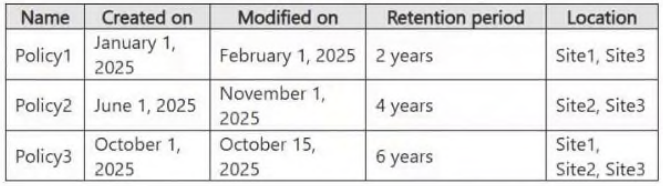
You have the retention policies shown in the following table.
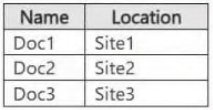
You have the documents shown in the following table.
User1 moves Doc3 to Site4.
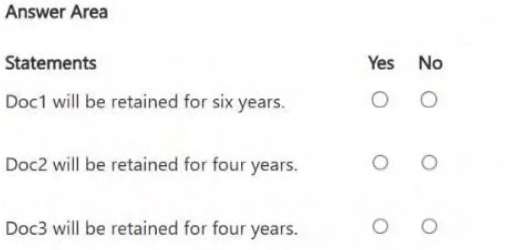
For each of the following statements, select Yes if the statement is true. Otherwise, select No.
NOTE: Each correct selection is worth one point.
Show Answer
Correct Answer: Doc1: Yes
Doc2: No
Doc3: No
Explanation: Where multiple retention policies apply, the longest period takes precedence. Doc1 and Doc2 are therefore subject to the six-year policy, not a four-year period. Moving Doc3 to Site4 does not make it subject to a four-year policy.
Question 2
You have a Microsoft 365 E5 subscription.
You need to apply data loss prevention (DLP) policies to the following:
• Microsoft Exchange Online mailboxes
• Microsoft SharePoint Online sites
• Microsoft 365 Copilot
• Microsoft OneDrive accounts
• On-premises repositories
What is the minimum number of DLP policies required to achieve the goal?
A. 1
B. 2
C. 3
D. 4
E. 5
Show Answer
Correct Answer: B
Explanation: Two DLP policies are required. One policy can cover Exchange Online, SharePoint Online, OneDrive, and on-premises repositories. Microsoft 365 Copilot must be configured in a separate DLP policy because it cannot be combined with those other locations in the same policy.
Question 2
HOTSPOT
You have a Microsoft 365 subscription.
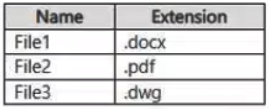
You have the sensitive files shown in the following tables.
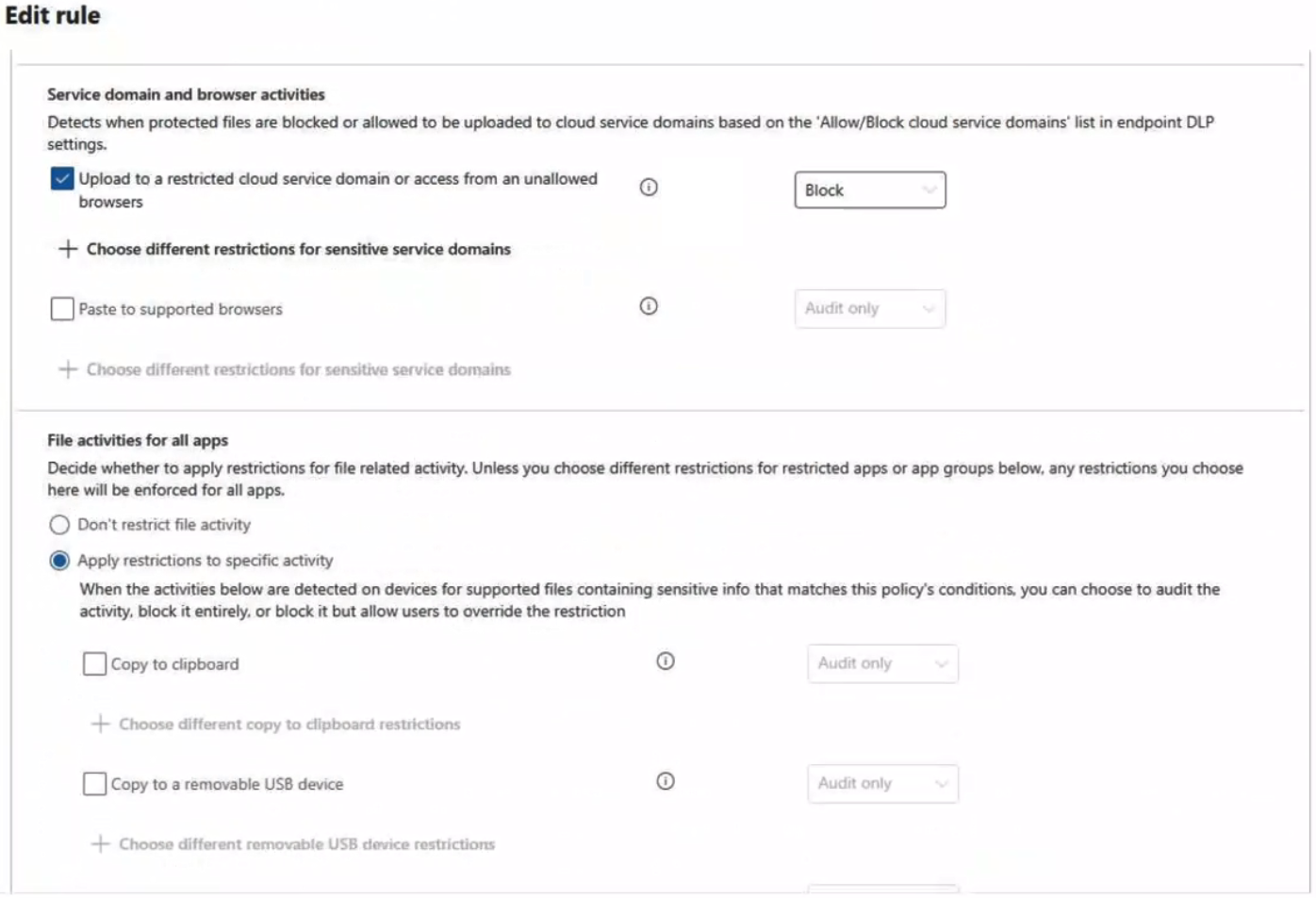
You have an Endpoint data loss prevention (Endpoint DLP) policy that contains the actions shown in the Actions exhibit. (Click the Actions tab.)
The status of the Endpoint DLP policy is shown in the Status exhibit. (Click the Status tab.)
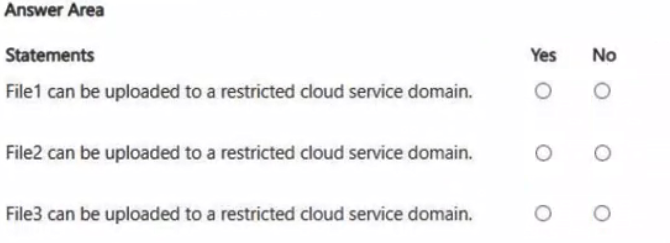
For each of the following statements, select Yes if the statement is true. Otherwise, select No.
NOTE: Each correct selection is worth one point.
Show Answer
Correct Answer: File1: No
File2: No
File3: Yes
Explanation: The active policy blocks uploads of supported sensitive files to restricted cloud service domains. Endpoint DLP supports .docx and .pdf files, but not .dwg files.
Question 2
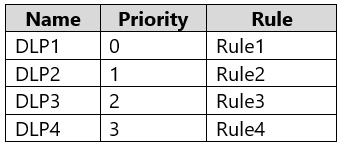
You have a Microsoft 365 E5 subscription that contains a Microsoft SharePoint Online site named Site1 and the data loss prevention (DLP) policies shown in the following table.
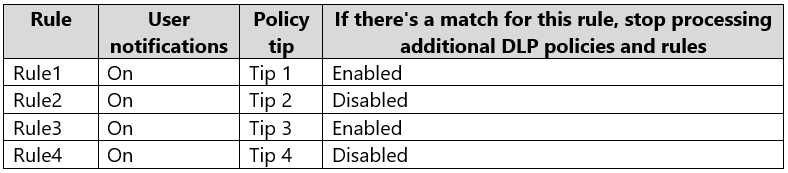
The DLP rules are configured as shown in the following table.
All the policies are assigned to Site1.
You need to ensure that if a user uploads a document to Site1 that matches all the rules, the user will be shown the Tip 2 policy tip.
What should you do?
A. Enable additional processing of the policies if there is a match for Rule1.
B. Prevent additional processing of the policies if there is a match for Rule2.
C. Change the priority of DLP2 to 3.
D. Change the priority of DLP2 to 0.
Show Answer
Correct Answer: D
Explanation: Change DLP2’s priority to 0 so Rule2 is evaluated first and Tip 2 is shown. With the current priorities, Rule1 is evaluated first and its enabled stop-processing setting prevents Rule2 from being processed. Simply allowing processing to continue after Rule1 would not make Tip 2 the highest-priority tip.
Question 3
You need to be alerted when users share sensitive documents from Microsoft OneDrive to any users outside your company.
What should you do?
A. From the Microsoft Entra admin center, configure an Identity Protection policy.
B. From the Microsoft Purview portal, start an eDiscovery search.
C. From the Microsoft Purview portal, start a data investigation.
D. From the Microsoft Purview portal, create a data loss prevention (DLP) policy.
Show Answer
Correct Answer: D
Explanation: Create a Microsoft Purview data loss prevention (DLP) policy configured to detect sensitive documents in OneDrive when they’re shared with people outside the company and generate an alert.
Question 3
You have a Microsoft 365 subscription that contains the devices shown in the following table.
From which devices can Microsoft Purview Insider Risk Management capture forensic evidence?
A. Device1 only
B. Device2 only
C. Device1 and Device2 only
D. Device2 and Device3 only
E. Device1, Device2, and Device3
Show Answer
Correct Answer: B
Explanation: Forensic evidence capture requires a supported Windows device to be onboarded to Microsoft Purview and have the Microsoft Purview client installed. Device2 meets these requirements. Device1 is not onboarded, and Device3 is a macOS device without the client installed.
Question 3
HOTSPOT
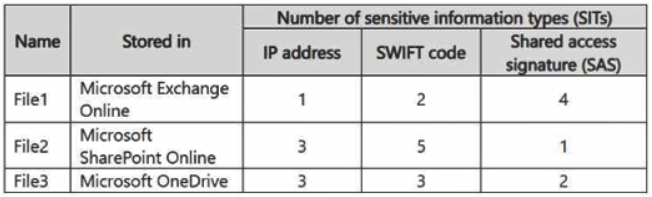
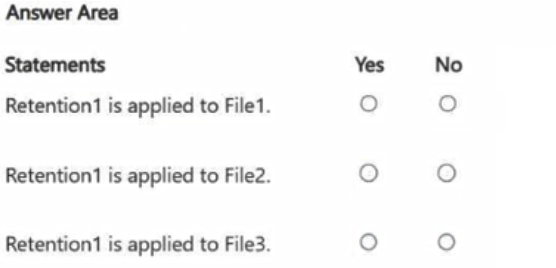
You have a Microsoft 365 subscription that has a retention label named Retention1. The subscription contains the files shown in the following table.
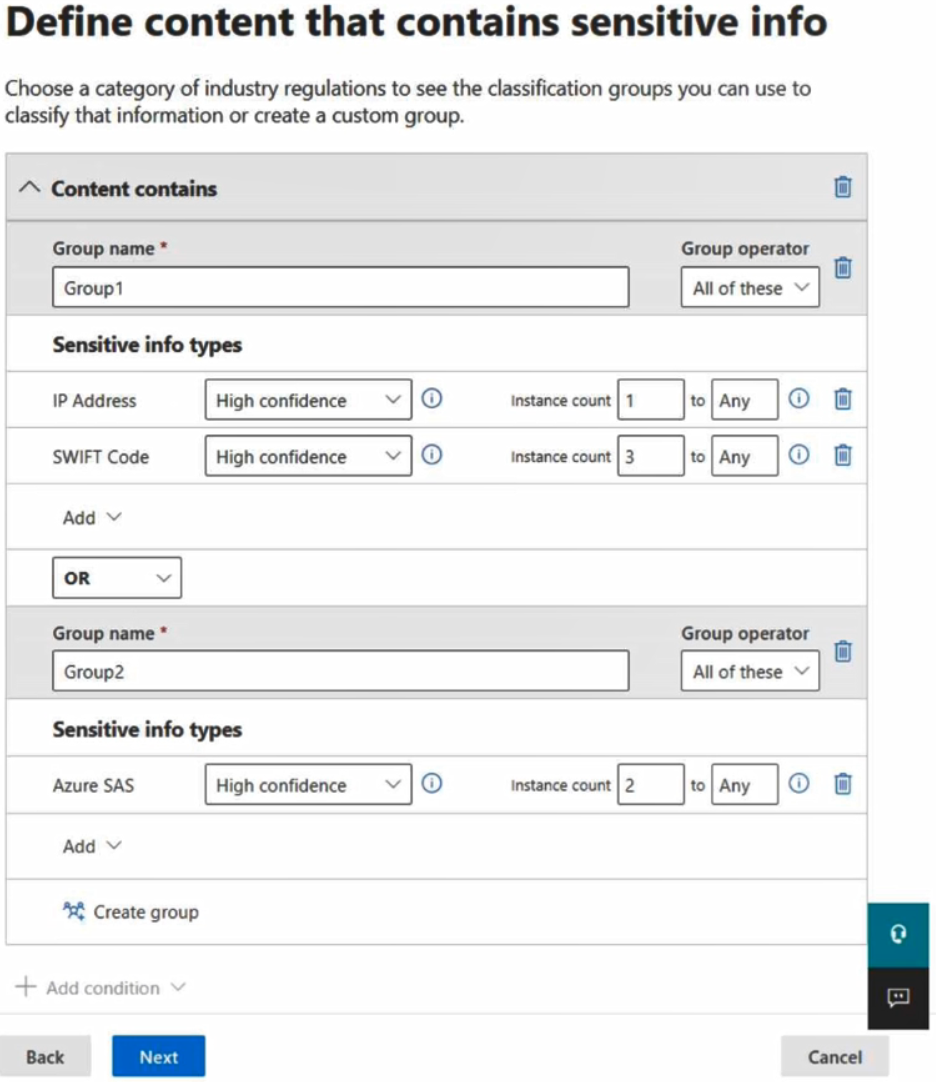
You create an auto-labeling policy named Policy1 that will automatically apply Retention1 as shown in the Auto-labeling policy exhibit. (Click the Auto-labeling policy tab.)
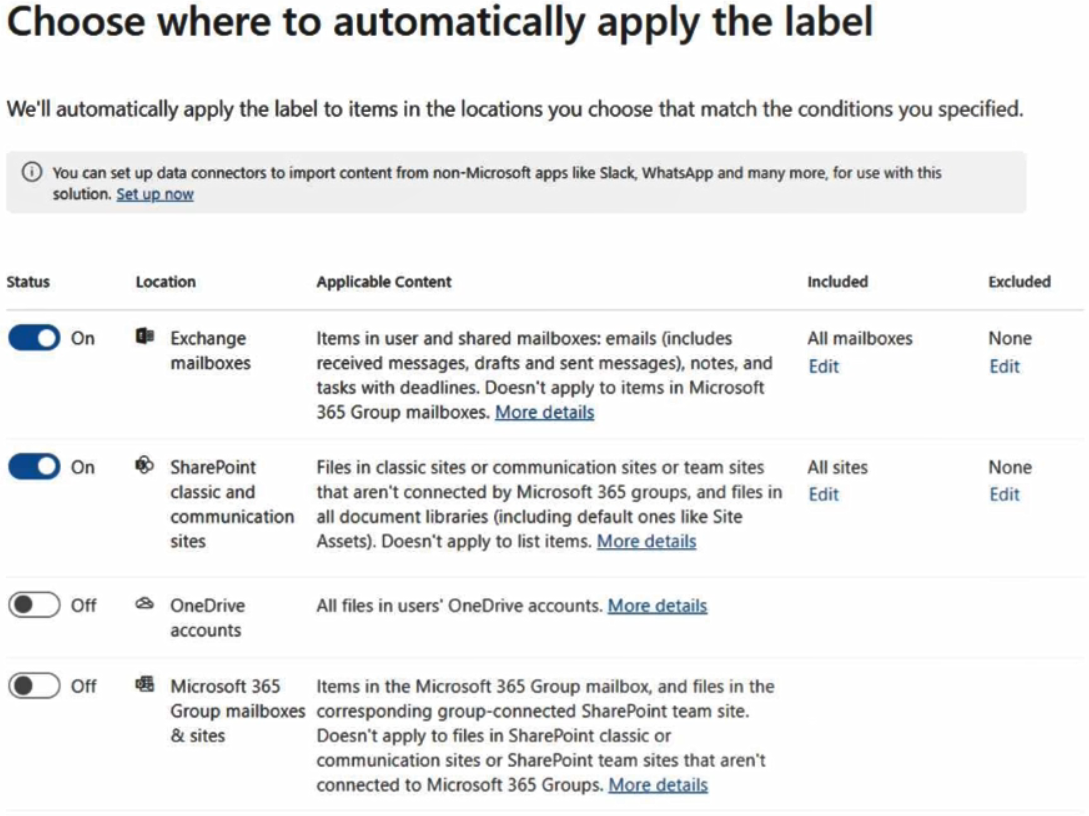
You configure Policy1 to apply Retention1 as shown in the Locations exhibit. (Click the Locations tab.)
For each of the following statements, select Yes if the statement is true. Otherwise, select No.
NOTE: Each correct selection is worth one point.
Show Answer
Correct Answer: File1: Yes
File2: Yes
File3: No
Explanation: File1 meets the Azure SAS condition, and File2 meets both the IP address and SWIFT code conditions. Their locations are enabled. File3 meets the content conditions, but OneDrive is disabled in the policy.
Question 4
SIMULATION
Username and password
Use the following login credentials as needed:
To enter your username, place your cursor in the Sign in box and select the username below.
To enter your password, place your cursor in the Enter password box and select the password below.
Microsoft 365 Username:
Microsoft 365 Password: XXXXXXXXX
If the Microsoft Edge browser or Microsoft 365 portal does not load successfully, select the Microsoft Edge browser icon from the task bar, type the URL “https://admin.microsoft.com”, and press Enter.
The following information is for technical support purposes only:
Lab Instance: XXXXXXXXX
Task 2
You need to ensure that email sent to external recipients with the word Falcon in the subject line will be encrypted by using an RMS template named Highly Confidential \ All Employees.
Show Answer
Correct Answer: Exchange admin center → Mail flow → Rules → Add a rule → Create a new rule.
Set the subject condition to include “Falcon” and the recipient condition to “Outside the organization.”
Set the action to apply the RMS template “Highly Confidential \ All Employees.” Save and enable the rule.
Explanation: The mail flow rule encrypts messages only when both conditions match: “Falcon” is in the subject and a recipient is external.
$19
Get all 269 questions with detailed answers and explanations
Instant download HTML + PDF delivered the moment payment clears.
Secure Stripe checkout we never see or store your card details.
7-day refund if files are defective see our refund policy.