Note: This question is part of a series of questions that present the same scenario. Each question in the series contains a unique solution that might meet the stated goals. Some question sets might have more than one correct solution, while others might not have a correct solution.
After you answer a question in this section, you will NOT be able to return to it. As a result, these questions will not appear in the review screen.
You have a Microsoft 365 subscription.
You have a user named User1. Several users have full access to the mailbox of User1.
Some email messages sent to User1 appear to have been read and deleted before the user viewed them.
When you search the audit log in the Microsoft Purview portal to identify who signed in to the mailbox of User1, the results are blank.
You need to ensure that you can view future sign-ins to the mailbox of User1.
Solution: You run the Set-MailboxFolderPermission -Identity "User1" -User
-AccessRights Owner command.
Does that meet the goal?
A. Yes
B. No
Show Answer
Correct Answer: B
Explanation: No. Set-MailboxFolderPermission changes permissions on a mailbox folder; it does not enable auditing or make future mailbox access events visible in the audit log.
Question 73
Note: This question is part of a series of questions that present the same scenario. Each question in the series contains a unique solution that might meet the stated goals. Some question sets might have more than one correct solution, while others might not have a correct solution.
After you answer a question in this section, you will NOT be able to return to it. As a result, these questions will not appear in the review screen.
You recently discovered that the developers at your company emailed Azure Storage Account keys in plain text to third parties.
You need to ensure that when Azure Storage Account keys are emailed, the emails are encrypted.
Solution: You configure a mail flow rule that matches the text patterns.
Does this meet the goal?
A. Yes
B. No
Show Answer
Correct Answer: B
Explanation: Matching text patterns alone does not encrypt messages or reliably identify Azure Storage Account keys. Use a sensitive information type to detect the keys and an encryption action for matching emails.
Question 74
HOTSPOT
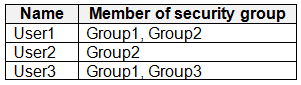
You have a Microsoft 365 E5 subscription that contains the users shown in the following table.
You have the data loss prevention (DLP) policies shown in the following table.
From Insider risk management, you configure a priority user group named PriGroup1 that contains User3 as a member.
You have the insider risk policies shown in the following table.
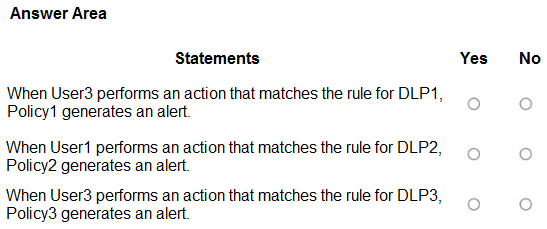
For each of the following statements, select Yes if the statement is true. Otherwise, select No.
NOTE: Each correct selection is worth one point.
Show Answer
Correct Answer: Yes
No
No
Explanation: User3 is in Group1, and DLP1 has High severity, so it can trigger Policy1. DLP2 and DLP3 have Medium severity; their matches do not trigger insider risk alerts, even though the users are in scope.
Question 75
HOTSPOT
You have a Microsoft 365 subscription.
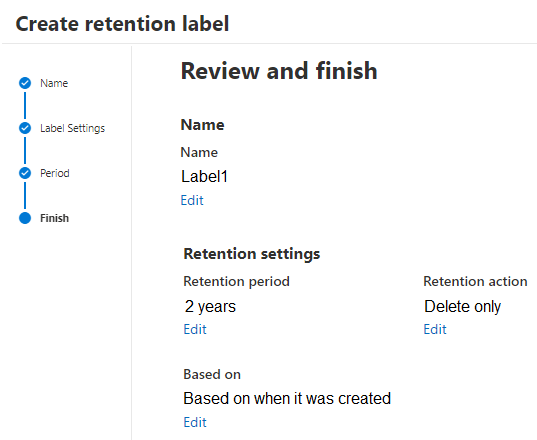
You create a retention label named Label1 as shown in the following exhibit.
You publish Label1 to SharePoint sites.
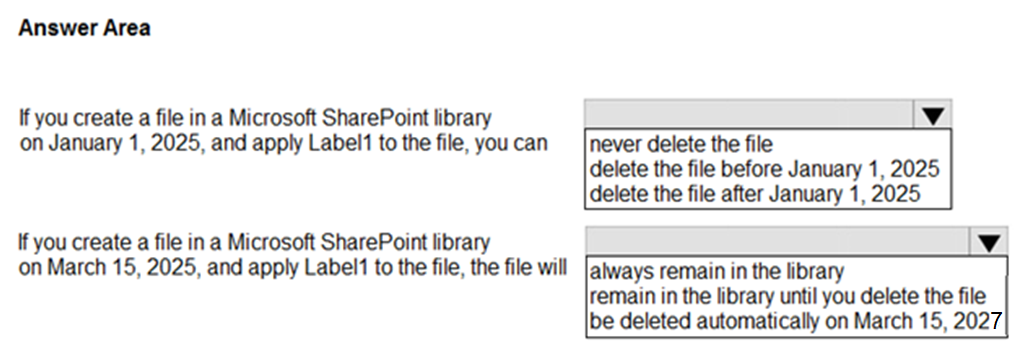
Use the drop-down menus to select the answer choice that completes each statement based on the information presented in the graphic.
NOTE: Each correct selection is worth one point.
Show Answer
Correct Answer: 1. Delete the file after January 1, 2025.
2. Be deleted automatically on March 15, 2027.
Explanation: Label1 is set to delete only, not to prevent earlier deletion. If the file still exists, it is automatically deleted two years after its creation date.
Question 76
You have a Microsoft 365 E5 subscription that contains a user named User1.
You need to ensure that all email messages that contain attachments are encrypted automatically by using Microsoft Purview Message Encryption.
What should you create?
A. a mail flow rule
B. a sensitivity label
C. a data loss prevention (DLP) policy
D. an information barrier segment
Show Answer
Correct Answer: A
Explanation: Create a mail flow rule with a condition that detects messages containing attachments and an action to apply Microsoft Purview Message Encryption. Mail flow rules can automatically encrypt messages based on message conditions.
Question 77
HOTSPOT
You have a Microsoft 365 E5 subscription that uses Microsoft Purview and just-in-time (JIT) protection. Fallback action in case of failure is set to Block users from completing actions.
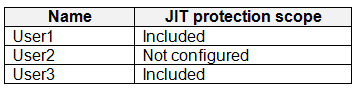
The subscription contains the users shown in the following table.
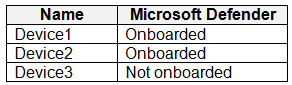
The subscription contains the devices shown in the following table.
The devices contain the files shown in the following table.
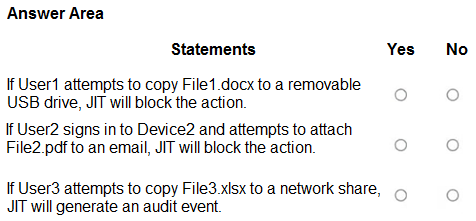
For each of the following statements, select Yes if the statement is true. Otherwise, select No.
NOTE: Each correct selection is worth one point.
Show Answer
Correct Answer: Yes
No
No
Explanation: User1 is in scope and Device1 is onboarded. Because File1.docx has not been evaluated, the configured fallback action blocks the copy. User2 is not in JIT scope, and Device3 is not onboarded, so JIT does not apply to those actions.
Question 78
You have a Microsoft 365 subscription. You create a retention policy and apply the policy to Exchange Online mailboxes.
You need to ensure that the retention policy tags can be assigned to mailbox items as soon as possible.
What should you do?
A. From the Microsoft Purview portal, create a data loss prevention (DLP) policy.
B. From the Microsoft Purview portal, create a label policy.
C. From Exchange Online PowerShell, run Start-ManagedFolderAssistant.
D. From Exchange Online PowerShell, run Start-RetentionAutoTagLearning.
Show Answer
Correct Answer: C
Explanation: Run Start-ManagedFolderAssistant to trigger mailbox retention processing promptly. The Managed Folder Assistant processes retention policies and tags; otherwise, it runs on its regular processing schedule.
Question 79
You have a Microsoft 365 E5 subscription.
You are implementing insider risk management.
You need to maximize the amount of historical data that is collected when an event is triggered.
What is the maximum number of days that historical data can be collected?
A. 30
B. 60
C. 90
D. 180
Show Answer
Correct Answer: C
Explanation: Insider Risk Management can collect up to 90 days of historical activity when a triggering event occurs. This is the maximum past-activity detection window, not the period for which activity may be displayed or analyzed elsewhere.
Question 80
SIMULATION
Username and password
Use the following login credentials as needed:
To enter your username, place your cursor in the Sign in box and select the username below.
To enter your password, place your cursor in the Enter password box and select the password below.
Microsoft 365 Username:
Microsoft 365 Password: XXXXXXXXX
If the Microsoft Edge browser or Microsoft 365 portal does not load successfully, select the Microsoft Edge browser icon from the task bar, type the URL “https://admin microsoft.com”, and press Enter.
The following information is for technical support purposes only:
Lab Instance: XXXXXXXX.
Task 8
You need to create a retain Microsoft SharePoint files that contain the word Falcon for two years from the date they were created and then delete them.
Show Answer
Correct Answer: 1. In Microsoft Purview, create a retention label that retains items for **2 years from creation**, then **deletes them**.
2. Create an **auto-apply retention label policy** for SharePoint. Choose content containing specific words or phrases, enter **Falcon**, and select the new label.
Explanation: The label defines when files are deleted; the auto-apply policy targets SharePoint files containing “Falcon.”
Question 81
You have a data loss prevention (DLP) policy that applies to the Devices location. The policy protects documents that contain United States passport numbers.
Users report that they cannot upload documents to a travel management website because of the policy.
You need to ensure that the users can upload the documents to the travel management website. The solution must prevent the protected content from being uploaded to other locations.
Which Microsoft 365 Endpoint data loss prevention (Endpoint DLP) setting should you configure?
A. Service domains
B. Unallowed apps
C. Unallowed browsers
D. File path exclusions
Show Answer
Correct Answer: A
Explanation: Configure **Service domains** to allow the travel management website as an approved domain for the protected content. This permits uploads to that site without broadly allowing uploads to other locations.
$19
Get all 268 questions with detailed answers and explanations
Instant download HTML + PDF delivered the moment payment clears.
Secure Stripe checkout we never see or store your card details.
7-day refund if files are defective see our refund policy.