You create a retention label that has a retention period of seven years.
You need to ensure that documents containing a credit card number are retained for seven years. Other documents must not be retained.
What should you create?
A. a retention label policy of type auto-apply
B. a retention label policy of type publish
C. a retention policy that deletes files automatically
D. a retention policy that retains files automatically
Show Answer
Correct Answer: A
Explanation: Create an auto-apply retention label policy configured to detect credit card numbers and apply the seven-year retention label only to matching documents. Documents that do not match the condition will not receive the label.
Question 123
You have a Microsoft 365 subscription.
You create and run a content search from the Microsoft Purview portal.
You need to download the results of the content search.
What should you obtain first?
A. a certificate
B. a password
C. a pin
D. an export key
Show Answer
Correct Answer: D
Explanation: Obtain the export key first. It is used to download and decrypt the content search results.
Question 124
You have a Microsoft 365 E5 subscription.
You create a sensitivity label named Label1 and publish Label1 to all users and groups.
You have the following files in a SharePoint site:
• File1.doc
• File2.docx
• File3.xlsx
• File4.txt
You need to identify which files can have Label1 applied.
Which files should you identify?
A. File2.docx only
B. File2.docx and File3.xlsx only
C. File1.doc, File2.docx, and File3.xlsx only
D. File1.doc, File2.doc, File3.xlsx, and File4.txt
Show Answer
Correct Answer: B
Explanation: SharePoint sensitivity labeling supports modern Office Open XML files such as .docx and .xlsx. The legacy .doc file and plain-text .txt file aren’t supported for applying the label in this scenario.
Question 125
Note: This question is part of a series of questions that present the same scenario. Each question in the series contains a unique solution that might meet the stated goals. Some question sets might have more than one correct solution, while others might not have a correct solution.
After you answer a question in this section, you will NOT be able to return to it. As a result, these questions will not appear in the review screen.
You implement Microsoft 365 Endpoint data loss prevention (Endpoint DLP).
You have computers that run Windows 11 and have Microsoft 365 Apps installed. The computers are joined to a Microsoft Entra tenant.
You need to ensure that Endpoint DLP policies can protect content on the computers.
Solution: You enroll the computer in Microsoft Intune.
Does this meet the goal?
A. Yes
B. No
Show Answer
Correct Answer: B
Explanation: No. Enrolling a computer in Intune alone does not make it eligible for Endpoint DLP protection. The device must be onboarded to Microsoft Defender for Endpoint, and Endpoint DLP policies must be configured and assigned.
Question 126
You are configuring a data loss prevention (DLP) policy to report when credit card data is found on a Microsoft Entra joined Windows device.
You plan to use information from the policy to restrict the ability to copy the sensitive data to the clipboard.
What should you configure in the policy advanced DLP rule?
A. user notifications
B. an action
C. user overrides
D. the incident report
Show Answer
Correct Answer: B
Explanation: Configure an action in the advanced DLP rule. Actions control endpoint activities such as copying sensitive data to the clipboard, letting you audit or restrict that activity. Incident reports provide reporting but do not enforce the restriction.
Question 127
You have a Microsoft 365 E5 tenant that contains the policies shown in the following table.
A file named File1 has all the policies applied.
How long will File1 be retained?
A. File1 will be deleted automatically after 10 years.
B. File1 will be deleted automatically after five years.
C. File1 will be retained until the file is deleted manually.
D. File1 will be deleted automatically after seven years.
Show Answer
Correct Answer: A
Explanation: The 10-year retention requirement prevents File1 from being deleted sooner. The applicable delete action takes effect after that retention period, so File1 is deleted after 10 years.
Question 128
HOTSPOT
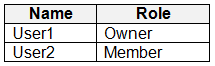
You have a Microsoft SharePoint Online site named Site1 that has the users shown in the following table.
You create the retention labels shown in the following table.
You publish the retention labels to Site1.
On March 1, 2023, you assign the retention labels to the files shown in the following table.
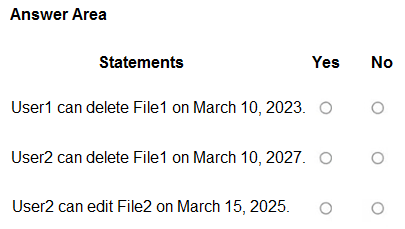
For each of the following statements, select Yes if the statement is true. Otherwise, select No.
Show Answer
Correct Answer: Yes
Yes
No
Explanation: A retain-only label allows a user to delete the visible file during its retention period; SharePoint preserves a copy. After four years, User2 can also delete File1 if it still exists. File2 is scheduled for automatic deletion two years after labeling, so it is no longer available to edit on March 15, 2025.
Question 129
At the end of a project, you upload project documents to a Microsoft SharePoint Online library that contains many files. The following is a sample of the project document file names:
• aei_AA989.docx
• bci_WS098.docx
• cei_DF112.docx
• ebc_QQ454.docx
• ecc_BB565.docx
All documents that use this naming format must be labeled as Project Documents:
You need to create an auto-apply retention label policy.
What should you use to identify the files?
A. A retention label
B. A trainable classifier
C. A sensitive info type
Show Answer
Correct Answer: C
Explanation: Use a sensitive information type configured with a regular-expression pattern matching the filename format (for example, three lowercase letters, an underscore, two uppercase letters, and three digits). Then use that type as the condition in the auto-apply retention label policy. A trainable classifier is intended to recognize document content or categories, not a structured filename pattern.
Question 130
DRAG DROP
You have a Microsoft 365 E5 subscription.
You plan to implement Microsoft Purview Insider Risk Management.
You obtain a file named File1.csv that contains employee resignation data.
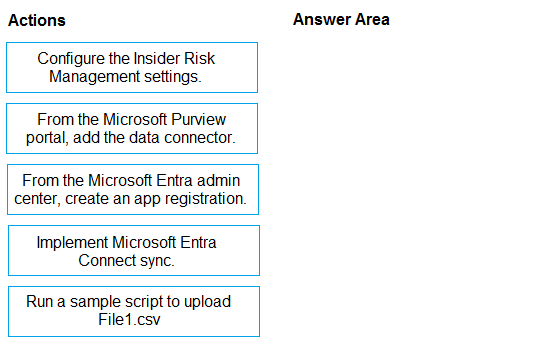
You need to implement the HR data connector and upload File1.csv by using the connector.
Which three actions should you perform in sequence? To answer, move the appropriate actions from the list of actions to the answer area and arrange them in the correct order.
Show Answer
Correct Answer: 1. From the Microsoft Entra admin center, create an app registration.
2. From the Microsoft Purview portal, add the data connector.
3. Run a sample script to upload File1.csv.
Explanation: The app registration provides authentication for the HR data connector. After adding the connector in Purview, use the sample script to upload the resignation data.
Question 131
SIMULATION
Username and password
Use the following login credentials as needed:
To enter your username, place your cursor in the Sign in box and select the username below.
To enter your password, place your cursor in the Enter password box and select the password below.
Microsoft 365 Username:
Microsoft 365 Password: XXXXXXXXX
If the Microsoft Edge browser or Microsoft 365 portal does not load successfully, select the Microsoft Edge browser icon from the task bar, type the URL “https://admin microsoft.com”, and press Enter.
The following information is for technical support purposes only:
Lab Instance: XXXXXXXX.
Task 6
You plan to implement Endpoint data loss prevention (Endpoint DLP) policies for computers that run Windows.
Users have an application named App1 that stores data locally in a folder named C:\app1\data
You need to prevent the folder from being monitored by Endpoint DLP.
Show Answer
Correct Answer: In Microsoft Purview, go to Settings > Data loss prevention > Endpoint DLP settings > File path exclusions. Add `C:\app1\data\*` and save.
Explanation: Excluding this path prevents Endpoint DLP from monitoring files in App1’s data folder.
$19
Get all 268 questions with detailed answers and explanations
Instant download HTML + PDF delivered the moment payment clears.
Secure Stripe checkout we never see or store your card details.
7-day refund if files are defective see our refund policy.