You need to be alerted when users share sensitive documents from Microsoft OneDrive to any users outside your company.
What should you do?
A. From the Microsoft Defender portal create an activity policy.
B. From the Microsoft Purview portal start an Advanced eDiscovery search.
C. From the Exchange admin center, create a data loss prevention (DLP) policy.
D. From the Microsoft Defender portal, create a file policy.
Show Answer
Correct Answer: D
Explanation: Create a file policy in the Microsoft Defender portal. File policies can identify sensitive OneDrive files and alert when they are shared externally. An activity policy monitors user actions but is less suited to combining file sensitivity with external-sharing conditions.
Question 22
You plan to implement Microsoft Purview Advanced Message Encryption.
You need to ensure that encrypted email sent to external recipients expires after seven days.
What should you create first?
A. a mail flow rule
B. an X.509 version 3 certificate
C. a custom branding template
D. a remote domain in Microsoft Exchange
E. a connector in Microsoft Exchange
Show Answer
Correct Answer: C
Explanation: Create a custom branding template first. It lets you configure message expiration, including setting encrypted messages to expire after seven days; a mail flow rule can then apply the template to messages sent to external recipients.
Question 22
HOTSPOT
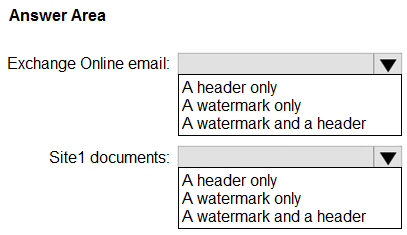
You have a Microsoft SharePoint Online site named Site1 and a sensitivity label named Sensitivity1. Sensitivity1 adds a watermark and a header to content.
You create a policy to automatically apply Sensitivity1 to emails in Microsoft Exchange Online and Site.
How will Sensitivity1 mark matching emails and Site1 documents? To answer, select the appropriate options in the answer area.
NOTE: Each correct selection is worth one point.
Show Answer
Correct Answer: Exchange Online email: A header only
Site1 documents: A watermark and a header
Explanation: Watermarks apply to documents, not email. The label’s header applies to both.
Question 22
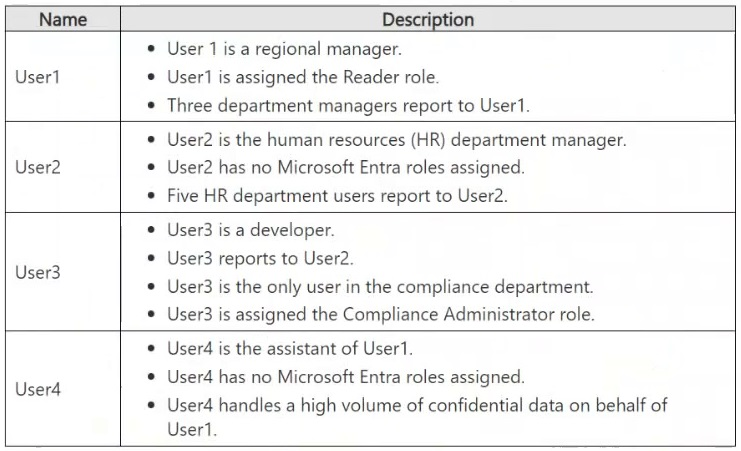
You have a Microsoft 365 E5 subscription that contains the users shown in the following table.
Which users will Microsoft Purview insider risk management flag as potential high-impact users?
A. User1 and User2 only
B. User2 and User3 only
C. User1, User2, and User3 only
D. User1, User2, User3, and User4
Show Answer
Correct Answer: D
Explanation: All four users can be flagged as potential high-impact users: User1 and User2 have leadership influence through their reporting structures; User3 has the Compliance Administrator role; and User4 handles a high volume of confidential data. High-impact scoring considers organizational influence or role as well as access to sensitive content.
Question 23
HOTSPOT
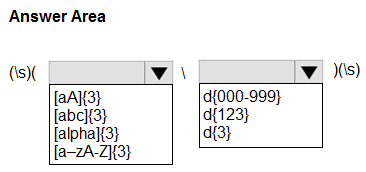
You use project codes that have a format of three alphabetical characters that represent the project type, followed by three digits, for example Abc123.
You need to create a new sensitive info type for the project codes.
How should you configure the regular expression to detect the content? To answer, select the appropriate options in the answer area.
NOTE: Each correct selection is worth one point.
Show Answer
Correct Answer: First dropdown: [a-zA-Z]{3}
Second dropdown: d{3}
Explanation: The first part matches three letters, and the displayed backslash plus d{3} matches three digits.
Question 23
You have a Microsoft 365 E5 subscription that contains a trainable classifier named Trainable1.
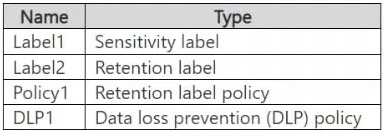
You plan to create the items shown in the following table.
Which items can use Trainable 1?
A. Label2 only
B. Label1 and Label2 only
C. Label1 and Policy1 only
D. Label2, Policy1, and DLP1 only
E. Label1, Label2, Policy1, and DLP1
Show Answer
Correct Answer: E
Explanation: Trainable classifiers can be used to automatically apply sensitivity labels, to determine which content receives retention labels through an auto-apply retention label policy, and as conditions in DLP policies. A retention label is applied through the policy rather than configured with the classifier directly; in this question’s terms, all four listed items can use Trainable1.
Question 24
SIMULATION
Username and password
Use the following login credentials as needed:
To enter your username, place your cursor in the Sign in box and select the username below.
To enter your password, place your cursor in the Enter password box and select the password below.
Microsoft 365 Username:
Microsoft 365 Password: XXXXXXXXX
If the Microsoft Edge browser or Microsoft 365 portal does not load successfully, select the Microsoft Edge browser icon from the task bar, type the URL “https://admin.microsoft.com”, and press Enter.
The following information is for technical support purposes only:
Lab Instance: XXXXXXXXX
Task 5
You need to simulate applying the Confidential - Finance label to all the content in the Exchange emails, the SharePoint sites, and the OneDrive accounts that contain the Credit Card Number sensitive info type.
Show Answer
Correct Answer: In Microsoft Purview, go to Information protection → Auto-labeling and create a policy for the **Confidential - Finance** label.
Select **all Exchange email, SharePoint sites, and OneDrive accounts**.
Set the condition to **Sensitive info type: Credit Card Number**, then save and **run the policy in simulation mode**.
Explanation: The policy identifies matching content in all three locations and previews the label application without enforcing it.
Question 24
You have a Microsoft 365 E5 subscription that contains a retention policy named RP1 as shown in the following table.
You place a preservation lock on RP1.
You need to modify RP1.
Which two modifications can you perform? Each correct answer presents part of the solution.
NOTE: Each correct selection is worth one point.
A. Add locations to the policy.
B. Delete the policy.
C. Remove locations from the policy.
D. Decrease the retention period of the policy.
E. Disable the policy.
F. Increase the retention period of the policy.
Show Answer
Correct Answer: A, F
Explanation: A preservation-locked retention policy cannot be disabled or deleted, and its retention period cannot be shortened or its locations removed. You can expand its scope by adding locations and extend the retention period.
Question 24
SIMULATION
Username and password
Use the following login credentials as needed:
To enter your username, place your cursor in the Sign in box and select the username below.
To enter your password, place your cursor in the Enter password box and select the password below.
Microsoft 365 Username:
Microsoft 365 Password: XXXXXXXXX
If the Microsoft Edge browser or Microsoft 365 portal does not load successfully, select the Microsoft Edge browser icon from the task bar, type the URL “https://admin microsoft.com”, and press Enter.
The following information is for technical support purposes only:
Lab Instance: XXXXXXXX.
Task 1
You need to provide users with the ability to manually classify files that contain product information that are stored in SharePoint Online sites. The solution must meet the following requirements:
• The users must be able to apply a classification of Product1 to the files.
• Any authenticated user must be able to open files classified as Product1.
• Files classified as Product1 must be encrypted.
Show Answer
Correct Answer: Create a sensitivity label named Product1 for files.
Configure encryption with View permission for all authenticated users.
Publish the label to the users who need to classify the SharePoint files.
Explanation: A published sensitivity label can be applied manually. Its encryption protects the files while allowing authenticated users to open them.
Question 25
SIMULATION
Username and password
Use the following login credentials as needed:
To enter your username, place your cursor in the Sign in box and select the username below.
To enter your password, place your cursor in the Enter password box and select the password below.
Microsoft 365 Username:
Microsoft 365 Password: XXXXXXXXX
If the Microsoft Edge browser or Microsoft 365 portal does not load successfully, select the Microsoft Edge browser icon from the task bar, type the URL “https://admin.microsoft.com”, and press Enter.
The following information is for technical support purposes only:
Lab Instance: XXXXXXXXX
Task 3
You need to create a retention label that retains items for 10 years starting from June 1, 2025. The items must be deleted after the retention period.
You do NOT need to publish or auto-apply the label at this time.
Show Answer
Correct Answer: 1. In Microsoft Purview, create an event type.
2. Create a retention label: retain items for 10 years, start retention when that event occurs, and delete items at the end of the period.
3. Create an event of that type dated June 1, 2025. Do not publish or auto-apply the label.
Explanation: An event supplies the fixed start date; the label supplies the 10-year retention period and deletion action. The label must be applied to items for the event to trigger their retention period.
$19
Get all 269 questions with detailed answers and explanations
Instant download HTML + PDF delivered the moment payment clears.
Secure Stripe checkout we never see or store your card details.
7-day refund if files are defective see our refund policy.