You have a Microsoft 365 tenant that uses Microsoft Purview Message Encryption.
You need to ensure that any emails containing attachments and sent to
are encrypted automatically by using Microsoft Purview Message Encryption.
What should you do?
A. From the Exchange admin center, create a mail flow rule.
B. From the Exchange admin center, create a new sharing policy.
C. From the Microsoft Defender portal, create a Safe Attachments policy.
D. From the Microsoft Purview portal, configure an auto-apply retention label policy.
Show Answer
Correct Answer: A
Explanation: Create a mail flow rule in the Exchange admin center. The rule can match messages with attachments sent to the specified recipients and apply Microsoft Purview Message Encryption automatically.
Question 113
DRAG DROP
You have a Microsoft 365 E5 subscription.
You need to prevent the sharing of sensitive information in Microsoft Teams.
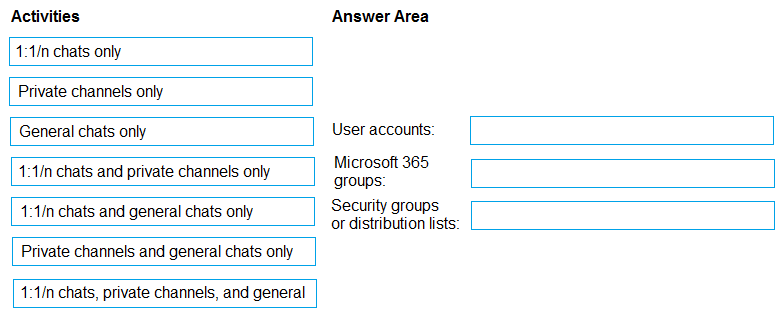
Which entities can you protect by applying a data loss prevention (DLP) policy to each resource?
To answer, drag the appropriate activities to the correct entity. Each activity may be used once, more than once, or not at all. You may need to drag the split bar between panes or scroll to view content.
NOTE: Each correct selection is worth one point.
Show Answer
Correct Answer: User accounts: 1:1/n chats only
Microsoft 365 groups: 1:1/n chats, private channels, and general chats
Security groups or distribution lists: 1:1/n chats only
Explanation: When scoped to a Microsoft 365 group, Teams DLP can protect chats and channel messages. Scoping to individual users, security groups, or distribution lists protects chats only.
Question 114
You have a Microsoft 365 E5 subscription.
You plan to use insider risk management to collect and investigate forensic evidence.
You need to enable forensic evidence capturing.
What should you do first?
A. Configure the information protection scanner.
B. Claim capacity
C. Enable Adaptive Protection
D. Create priority user groups.
Show Answer
Correct Answer: B
Explanation: Claim capacity in the Microsoft Purview portal first. Forensic evidence capture requires capacity to be claimed before you configure or enable the feature.
Question 115
HOTSPOT
You have a Microsoft 365 E5 subscription.
You plan to implement Microsoft Purview insider risk management.
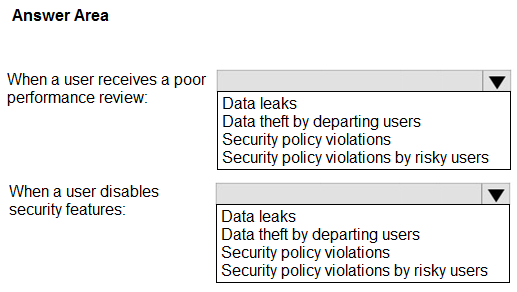
You need to recommend policy templates that meet the following requirements:
• Contain risk indicators and scoring for when a user receives a poor performance review.
• Contain risk indicators and scoring for when a user disables security features on a device.
Which template should you use for each requirement? To answer, select the appropriate options in the answer area,
NOTE: Each correct selection is worth one point.
Explanation: The risky-users template includes stressor events such as poor performance reviews. The security-policy-violations template scores device security violations, including disabling security features.
Question 116
DRAG DROP
You have a Microsoft 365 E5 subscription that contains two users named User1 and User2.
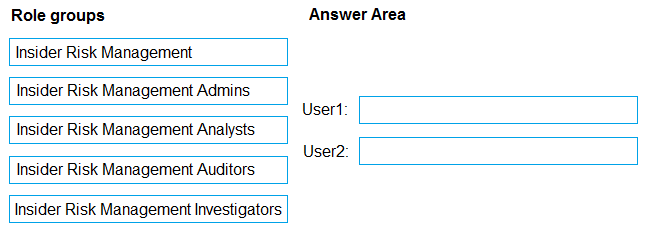
You need to implement insider risk management. The solution must meet the following requirements:
• Ensure that User1 can create insider risk management policies.
• Ensure that User2 can use content captured by using insider risk management policies.
• Follow the principle of least privilege.
To which role group should you add each user? To answer, drag the appropriate role groups to the correct users. Each role group may be used once, more than once, or not at all. You may need to drag the split bar between panes or scroll to view content.
NOTE: Each correct selection is worth one point.
Explanation: Admins can create insider risk policies. Investigators can review content captured by those policies without receiving administrative permissions.
Question 117
Note: This question is part of a series of questions that present the same scenario. Each question in the series contains a unique solution that might meet the stated goals. Some question sets might have more than one correct solution, while others might not have a correct solution.
After you answer a question in this section, you will NOT be able to return to it. As a result, these questions will not appear in the review screen.
You have a Microsoft 365 subscription.
You have a user named User1. Several users have full access to the mailbox of User1.
Some email messages sent to User1 appear to have been read and deleted before the user viewed them.
When you search the audit log in the Microsoft Purview portal to identify who signed in to the mailbox of User1, the results are blank.
You need to ensure that you can view future sign-ins to the mailbox of User1.
Solution: You run the Set-AuditConfig –Workload Exchange command.
Does that meet the goal?
A. Yes
B. No
Show Answer
Correct Answer: B
Explanation: No. `Set-AuditConfig -Workload Exchange` configures auditing for the Exchange workload, but does not by itself enable mailbox auditing for User1. To capture future mailbox access, mailbox auditing must be enabled for User1’s mailbox (for example, with `Set-Mailbox -Identity User1 -AuditEnabled $true`).
Question 118
You create a data loss prevention (DLP) policy. The Advanced DLP rules page is shown in the Rules exhibit. (Click the Rules tab)
The Review your settings page is shown in the Review exhibit. (Click the Review tab.)
You need to review the potential impact of enabling the policy without applying the actions.
What should you do?
A. Exit the policy, and then select I’d like to test it out first.
B. Edit the policy, remove all the actions in DLP rule 1, and select I’d like to test it out first.
C. Edit the policy, remove the Restrict access to the content and Send incident report to Administrator actions, and then select Yes, turn it on right away.
D. Edit the policy, remove all the actions in DLP rule 1, and select Yes, turn it on right away.
Show Answer
Correct Answer: A
Explanation: Choose “I’d like to test it out first” to run the DLP policy in test mode. This lets you review its potential impact without applying the actions; you do not need to remove the rule actions.
Question 119
You create a label that encrypts email data.
Users report that they cannot use the label in Outlook on the web to protect the email messages they send.
You need to ensure that the users can use the new label to protect their email.
What should you do?
A. Create a label policy.
B. Wait six hours and ask the users to try again.
C. Create a new sensitive information type.
D. Modify the priority order of label policies.
Show Answer
Correct Answer: A
Explanation: A sensitivity label must be published to users through a label policy before they can apply it in Outlook on the web. Create a label policy that includes the new label and assigns it to the relevant users.
Question 120
You have a Microsoft 365 E5 subscription that contains two users named User1 and User2. The subscription has a data loss prevention (DLP) policy named Policy1.
User2 sends an outbound message that generates a false positive for Policy1.
You need to ensure that User1 can download the message that generated the alert. The solution must follow the principle of least privilege.
To which role group should you add User1?
A. Data Investigator
B. Security Operator
C. eDiscovery Manager
D. Global Reader
Show Answer
Correct Answer: A
Explanation: Add User1 to the Data Investigator role group. It provides the permissions needed to investigate the DLP alert and download the message, without granting the broader access of eDiscovery Manager or Global Administrator-level access.
Question 121
You have a Microsoft 365 E5 subscription.
A security manager receives an email message every time a data loss prevention (DLP) policy match occurs.
You need to limit alert notifications to actionable DLP events.
What should you do?
A. From the Microsoft Purview portal, modify the Policy Tips settings of a DLP policy.
B. From the Microsoft Defender portal, apply a filter to the alerts.
C. From the Microsoft Purview portal, modify the matched activities threshold of an alert policy.
D. From the Microsoft Purview portal, modify the User overrides settings of a DLP policy.
Show Answer
Correct Answer: C
Explanation: Modify the alert policy’s matched activities threshold in the Microsoft Purview portal. This lets you require a specified number of matching activities before an alert is generated, reducing email notifications for less actionable DLP events.
$19
Get all 268 questions with detailed answers and explanations
Instant download HTML + PDF delivered the moment payment clears.
Secure Stripe checkout we never see or store your card details.
7-day refund if files are defective see our refund policy.