You have a Microsoft 365 E5 subscription that contains a Microsoft SharePoint Online site named Site1. Site1 contains a file named File1.
You have a retention policy named Retention1 that has the following settings:
• Retain items for a specific period
o Retention period: 5 years
o At the end of the retention period: Delete items automatically
Retention1 is applied to Site1.
You need to ensure that File1 is deleted automatically after seven years. The solution must NOT affect the retention of other files on Site1.
What should you do first?
A. Publish and apply a new retention label.
B. Move File1 to a new folder and configure the access control list (ACL) entries for File1.
C. Create a new retention policy.
D. Move File1 to a new folder and list the excluded locations for Retention1.
Show Answer
Correct Answer: A
Explanation: Use a retention label for File1 so its retention can be controlled without changing the policy for other files on Site1. Configure the label to retain the file for seven years and delete it automatically at the end of that period, then publish and apply it to File1.
Question 12
HOTSPOT
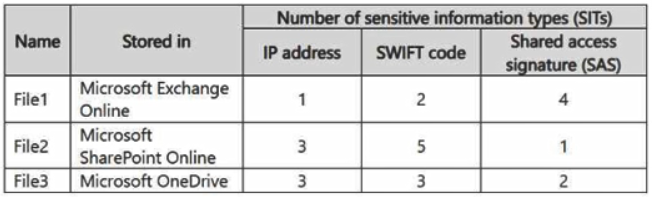
You have a Microsoft 365 subscription that has a retention label named Retention1. The subscription contains the files shown in the following table.
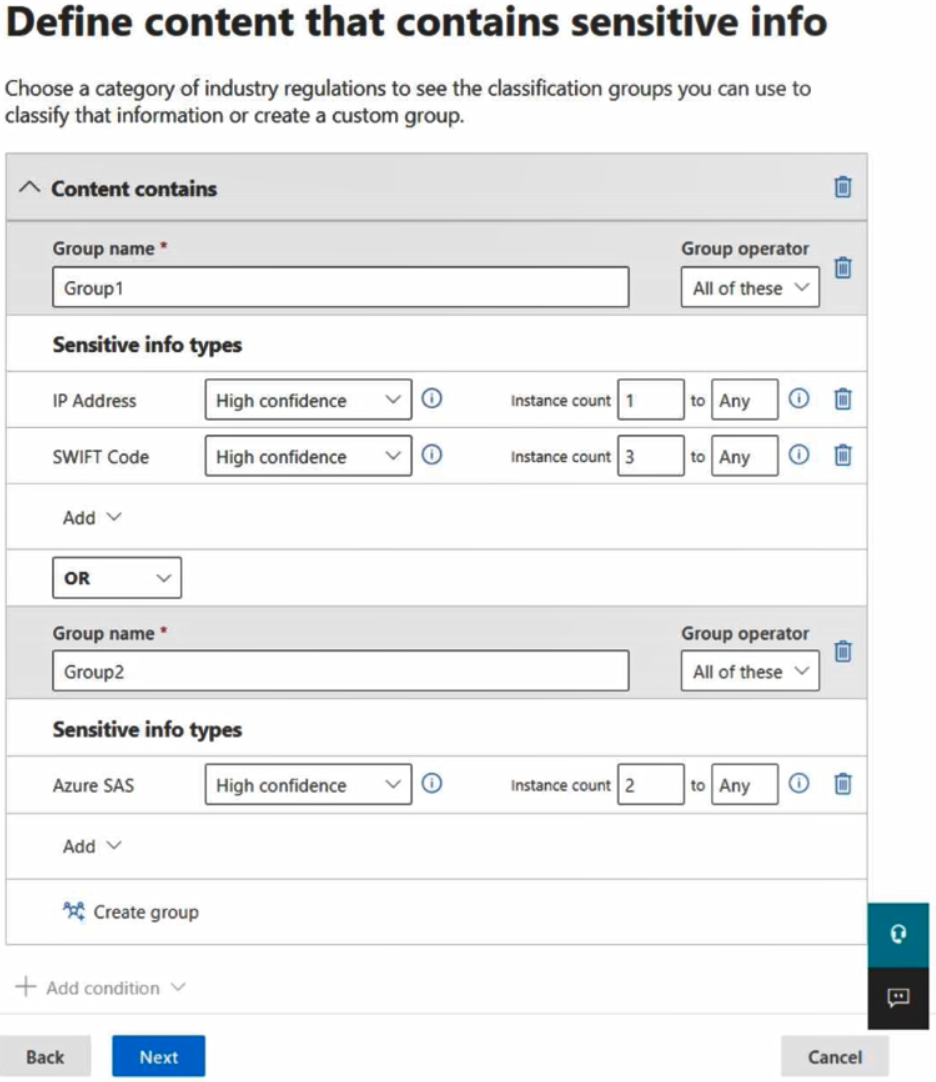
You create an auto-labeling policy named Policy1 that will automatically apply Retention1 as shown in the Auto-labeling policy exhibit. (Click the Auto-labeling policy tab.)
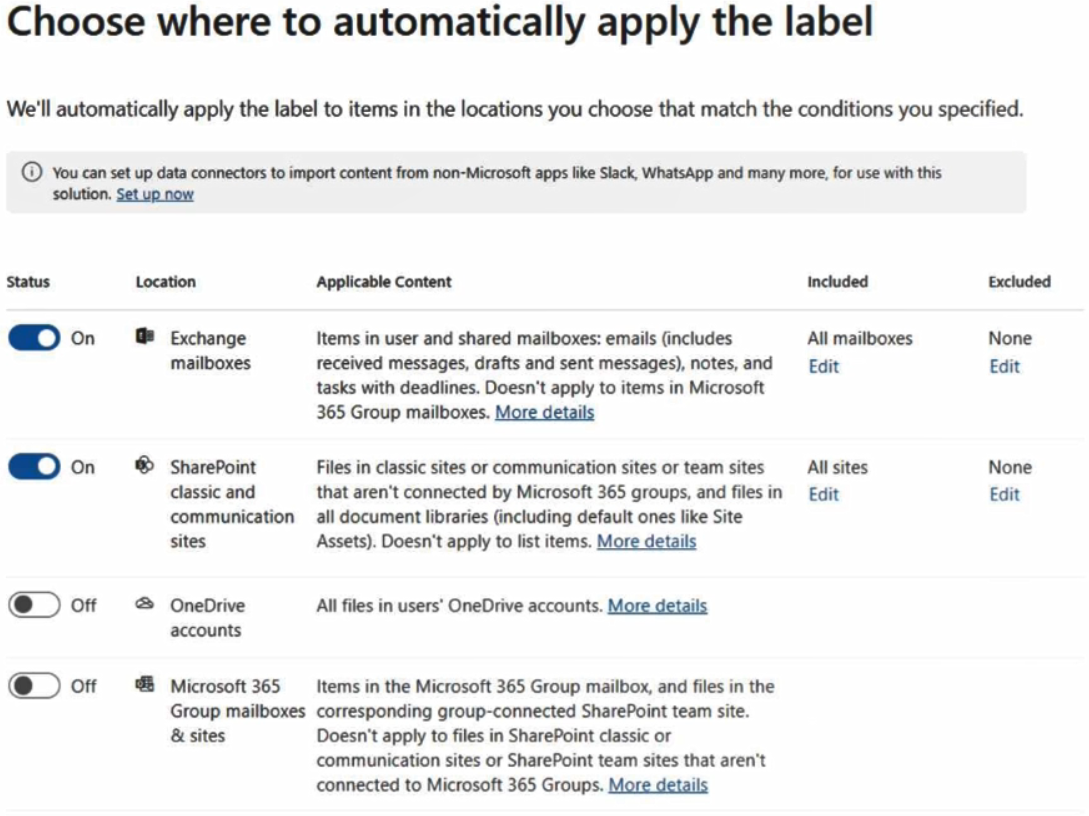
You configure Policy1 to apply Retention1 as shown in the Locations exhibit. (Click the Locations tab.)
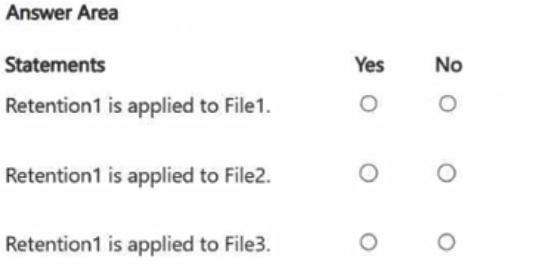
For each of the following statements, select Yes if the statement is true. Otherwise, select No.
NOTE: Each correct selection is worth one point.
Show Answer
Correct Answer: File1: Yes
File2: Yes
File3: No
Explanation: File1 meets the Azure SAS condition, and File2 meets the IP address and SWIFT code conditions. Exchange and SharePoint are enabled locations. File3 meets a content condition, but OneDrive is disabled.
Question 13
You have a Microsoft 365 subscription that contains a user named User1.
You create a Highly Confidential sensitivity label named Label1.
You need to prevent User1 from using Microsoft 365 Copilot to summarize content that has Label1 applied. The solution must ensure that User1 can directly access the content.
Which type of policy should you create?
A. communication compliance
B. retention
C. data loss prevention (DLP)
D. insider risk management
Show Answer
Correct Answer: C
Explanation: Create a data loss prevention (DLP) policy. DLP can prevent Microsoft 365 Copilot from processing or summarizing content based on its sensitivity label while still allowing User1 to access that content directly.
Question 14
You have a Microsoft 365 E5 subscription that contains a Microsoft Teams channel named Channel1. Channel1 contains research and development documents.
You plan to implement Microsoft 365 Copilot for the subscription.
You need to prevent the contents of files stored in Channel1 from being included in answers generated by Copilot and shown to unauthorized users.
What should you use?
A. sensitivity labels
B. communication compliance policy
C. Microsoft Purview insider risk management
D. Microsoft Purview Information Barriers (IBs)
Show Answer
Correct Answer: A
Explanation: Use sensitivity labels to apply protection and access restrictions to the files. Microsoft 365 Copilot honors the usage rights on protected content, so users who lack permission to access the files won’t receive their contents in Copilot answers.
Question 15
You have a Microsoft 365 E5 subscription.
You plan to implement retention policies for Microsoft Teams.
Which item types can be retained?
A. embedded images
B. voice memos from the Teams mobile client
C. code snippets
Show Answer
Correct Answer: A
Explanation: Microsoft Teams retention policies can retain embedded images. Recorded voice memos from the Teams mobile client and code snippets aren’t retained by these policies.
Question 16
HOTSPOT
You have a Microsoft 365 E5 subscription that contains a Microsoft SharePoint Online site named Site1 and a sensitivity label named Label1.
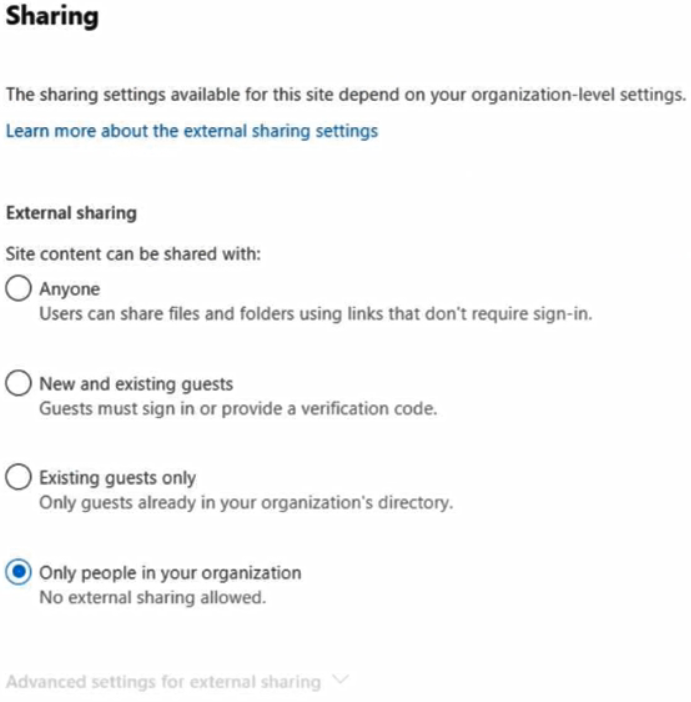
The external sharing settings for Site1 are configured as shown in the Site1 exhibit. (Click the Site1 tab.)
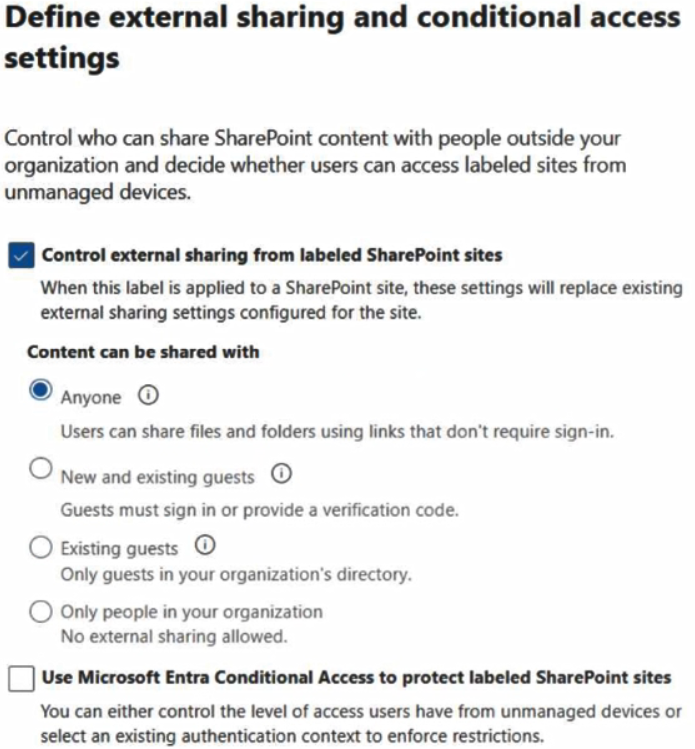
The external sharing settings for Label1 are configured as shown in the Label1 exhibit. (Click the Label1 tab.)
Label1 is applied to Site1.
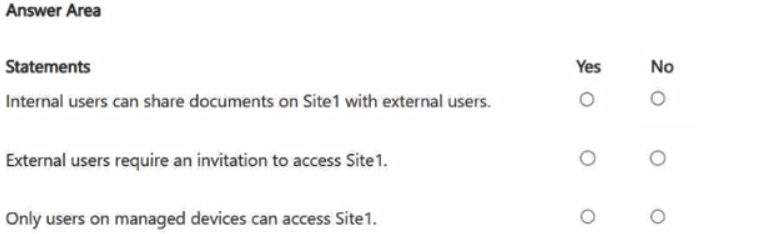
For each of the following statements, select Yes if the statement is true. Otherwise, select No.
NOTE: Each correct selection is worth one point.
Show Answer
Correct Answer: Yes
No
No
Explanation: Label1 replaces Site1’s sharing setting with “Anyone,” so internal users can share documents externally without requiring an invitation. The label does not enable a managed-device access restriction.
Question 17
You need to be alerted when users share sensitive documents from Microsoft OneDrive to any users outside your company.
What should you do?
A. From the Microsoft Defender portal, create a file policy.
B. From the Exchange admin center, create a data loss prevention (DLP) policy.
C. From the Microsoft Entra admin center, configure an Identity Protection policy.
D. From the Microsoft Defender portal, create an activity policy.
Show Answer
Correct Answer: A
Explanation: Create a file policy in the Microsoft Defender portal. A file policy can match sensitive content in OneDrive files and their external-sharing status, then generate an alert. An activity policy can detect sharing actions but does not evaluate whether the file is sensitive; an Exchange admin center DLP policy is not the appropriate OneDrive control.
Question 18
You have a Microsoft 365 subscription.
You need to monitor Microsoft 365 Copilot user prompts and responses for content that has been matched by the Protected Materials trainable classifier.
Which type of policy should you create?
A. communication compliance
B. data loss prevention (DLP)
C. insider risk management
D. retention
Show Answer
Correct Answer: A
Explanation: Create a communication compliance policy. Communication compliance can monitor Microsoft 365 Copilot prompts and responses and detect content matched by trainable classifiers such as Protected Materials.
Question 19
HOTSPOT
You have Microsoft 365 E5 tenant that has a domain name of 86s40q.onmicrosoft.com.
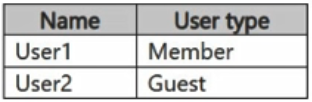
The tenant contains the users shown in the following table.
You have a published sensitivity label.
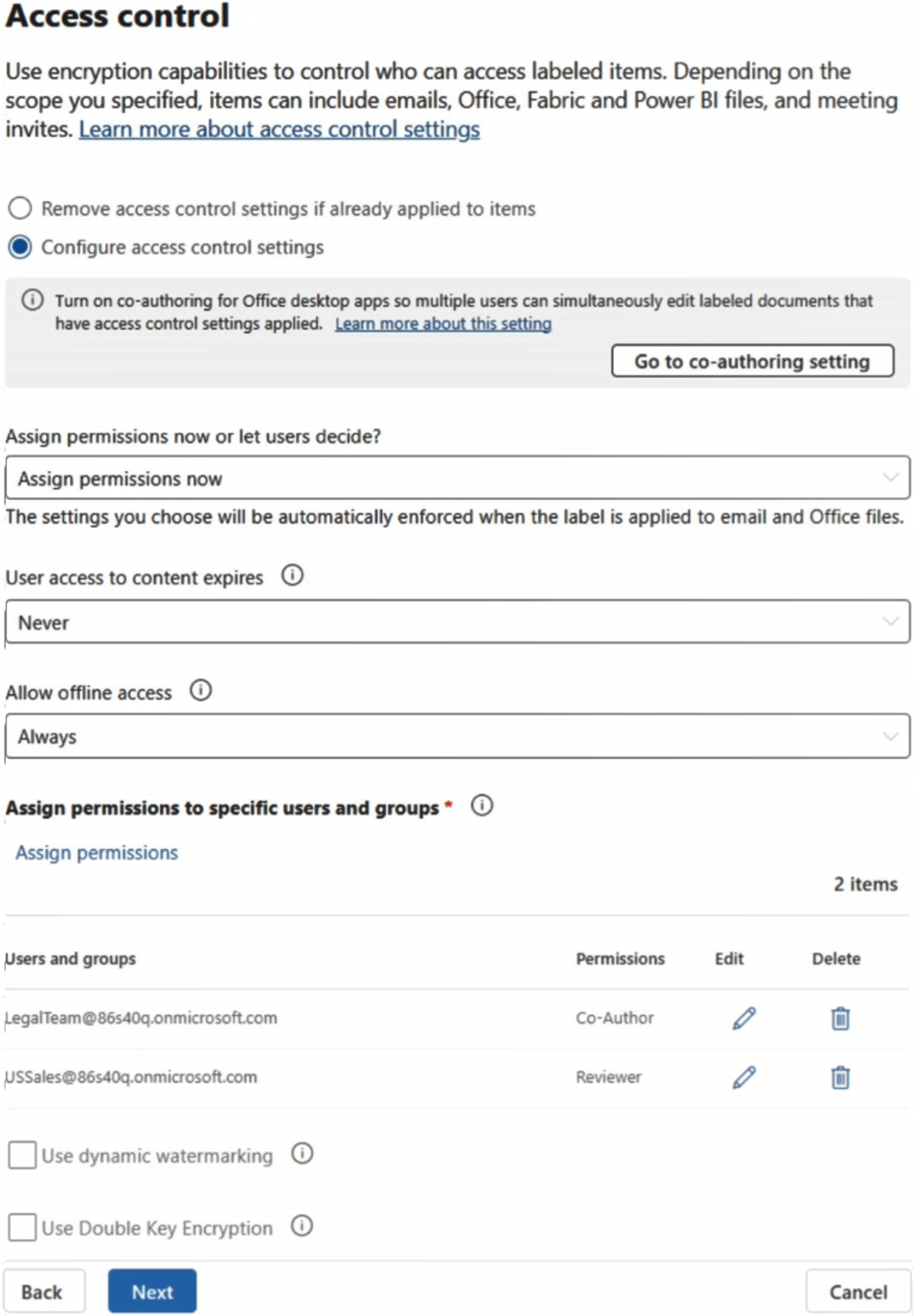
The Access control settings for the sensitivity label are configured as shown in the exhibit. (Click the Exhibit tab.)
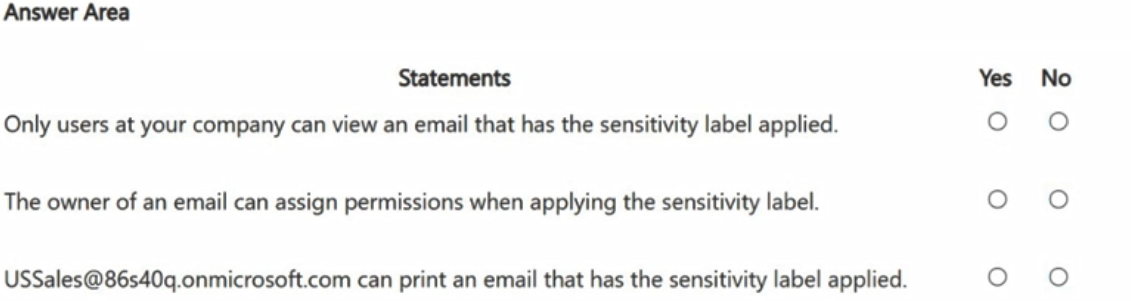
For each of the following statements, select Yes if the statement is true. Otherwise, select No.
NOTE: Each correct selection is worth one point.
Show Answer
Correct Answer: No
No
No
Explanation: A guest could view the email if included in an authorized group, so access is not necessarily limited to company users. Permissions are assigned by the label, not the email owner. The Reviewer permission assigned to USSales does not include printing.
Question 20
You have a Microsoft 365 E5 subscription that contains the devices shown in the following table.
You are evaluating Microsoft Purview Information Protection.
On which devices can you deploy the Information Protection client?
A. Device1 only
B. Device1 and Device2 only
C. Device1, Device2, and Device3 only
D. Device1, Device3, and Device4 only
E. Device1, Device2, Device3, and Device4
Show Answer
Correct Answer: B
Explanation: The Information Protection client is supported on the applicable Windows client and server operating systems shown for Device1 and Device2. Device3 and Device4 run unsupported operating systems, so the client can be deployed only to Device1 and Device2.
$19
Get all 268 questions with detailed answers and explanations
Instant download HTML + PDF delivered the moment payment clears.
Secure Stripe checkout we never see or store your card details.
7-day refund if files are defective see our refund policy.