HOTSPOT
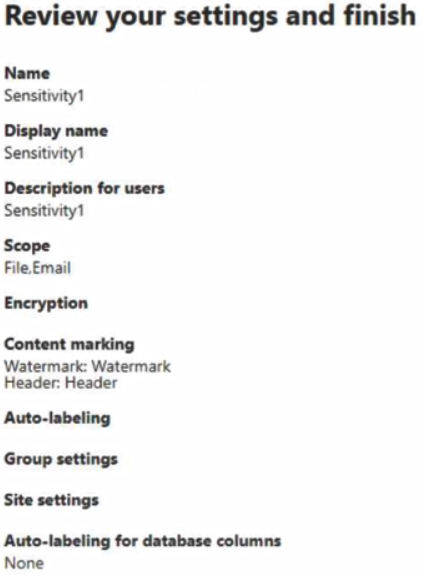
You create a sensitivity label as shown in the Sensitivity Label exhibit. (Click the Sensitivity Label tab.)
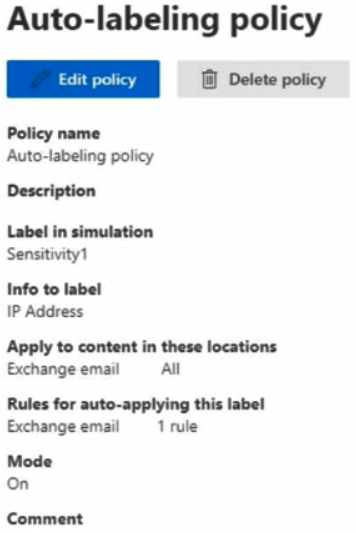
You create an auto-labeling policy as shown in the Auto Labeling Policy exhibit. (Click the Auto Labeling Policy tab.)
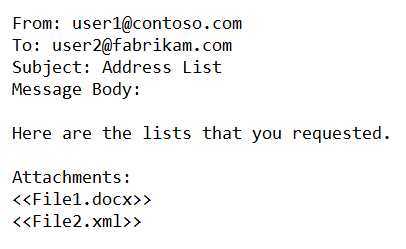
A user sends the following email:
Both attachments contain lists of IP addresses.
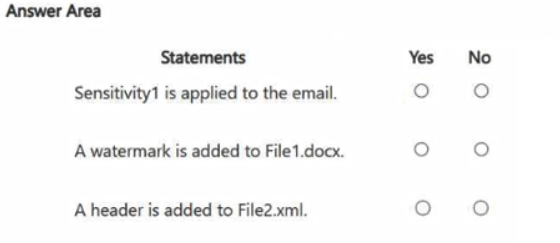
For each of the following statements, select Yes if the statement is true. Otherwise, select No.
NOTE: Each correct selection is worth one point.
Show Answer
Correct Answer: Sensitivity1 is applied to the email: Yes
A watermark is added to File1.docx: No
A header is added to File2.xml: No
Explanation: The IP addresses in the supported Word attachment can trigger the Exchange auto-labeling policy. The policy labels the email, not its attachments, so neither attachment receives the label’s content markings.
Question 22
You plan to implement Microsoft Purview Advanced Message Encryption.
You need to ensure that encrypted email sent to external recipients expires after seven days.
What should you create first?
A. a mail flow rule
B. an X.509 version 3 certificate
C. a custom branding template
D. a remote domain in Microsoft Exchange
E. a connector in Microsoft Exchange
Show Answer
Correct Answer: C
Explanation: Create a custom branding template first. It lets you configure message expiration, including setting encrypted messages to expire after seven days; a mail flow rule can then apply the template to messages sent to external recipients.
Question 24
SIMULATION
Username and password
Use the following login credentials as needed:
To enter your username, place your cursor in the Sign in box and select the username below.
To enter your password, place your cursor in the Enter password box and select the password below.
Microsoft 365 Username:
Microsoft 365 Password: XXXXXXXXX
If the Microsoft Edge browser or Microsoft 365 portal does not load successfully, select the Microsoft Edge browser icon from the task bar, type the URL “https://admin.microsoft.com”, and press Enter.
The following information is for technical support purposes only:
Lab Instance: XXXXXXXXX
Task 5
You need to simulate applying the Confidential - Finance label to all the content in the Exchange emails, the SharePoint sites, and the OneDrive accounts that contain the Credit Card Number sensitive info type.
Show Answer
Correct Answer: In Microsoft Purview, go to Information protection → Auto-labeling and create a policy for the **Confidential - Finance** label.
Select **all Exchange email, SharePoint sites, and OneDrive accounts**.
Set the condition to **Sensitive info type: Credit Card Number**, then save and **run the policy in simulation mode**.
Explanation: The policy identifies matching content in all three locations and previews the label application without enforcing it.
Question 25
SIMULATION
Username and password
Use the following login credentials as needed:
To enter your username, place your cursor in the Sign in box and select the username below.
To enter your password, place your cursor in the Enter password box and select the password below.
Microsoft 365 Username:
Microsoft 365 Password: XXXXXXXXX
If the Microsoft Edge browser or Microsoft 365 portal does not load successfully, select the Microsoft Edge browser icon from the task bar, type the URL “https://admin.microsoft.com”, and press Enter.
The following information is for technical support purposes only:
Lab Instance: XXXXXXXXX
Task 3
You need to create a retention label that retains items for 10 years starting from June 1, 2025. The items must be deleted after the retention period.
You do NOT need to publish or auto-apply the label at this time.
Show Answer
Correct Answer: 1. In Microsoft Purview, create an event type.
2. Create a retention label: retain items for 10 years, start retention when that event occurs, and delete items at the end of the period.
3. Create an event of that type dated June 1, 2025. Do not publish or auto-apply the label.
Explanation: An event supplies the fixed start date; the label supplies the 10-year retention period and deletion action. The label must be applied to items for the event to trigger their retention period.
Question 26
HOTSPOT
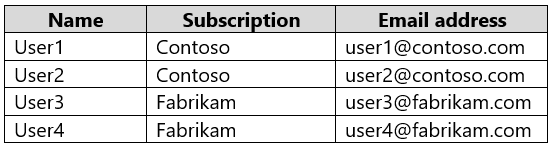
You have two Microsoft 365 subscriptions named Contoso and Fabrikam. The subscriptions contain the users shown in the following table.
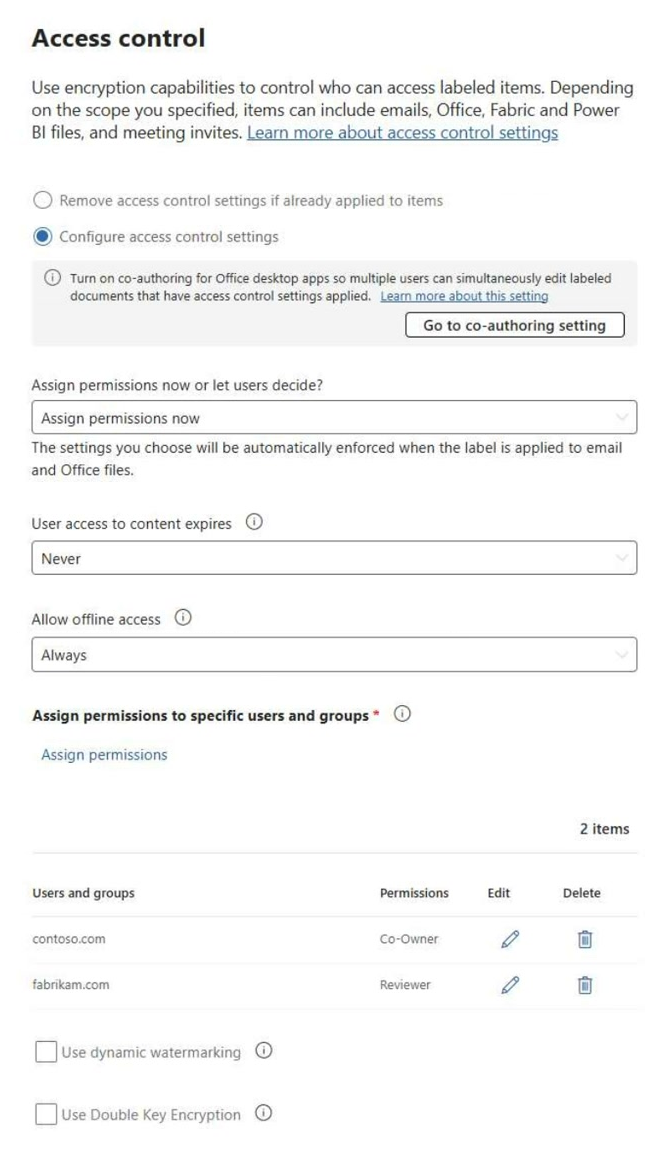
You have a sensitivity label named Sensitivity1 as shown in the exhibit. (Click the Exhibit tab)
You have the files shown in the following table.
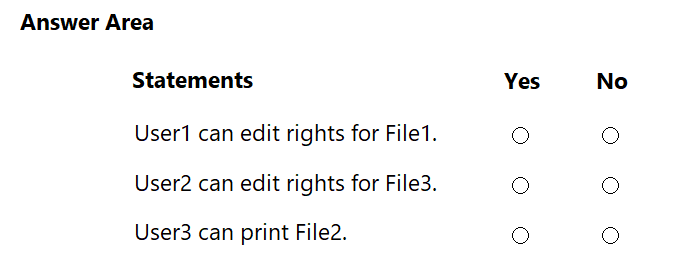
For each of the following statements, select Yes if the statement is true. Otherwise, select No.
NOTE: Each correct selection is worth one point.
Show Answer
Correct Answer: User1 can edit rights for File1: Yes
User2 can edit rights for File3: Yes
User3 can print File2: No
Explanation: The label grants the contoso.com domain Co-Owner permissions, which include changing rights. The fabrikam.com domain has Reviewer permissions, which do not include printing.
Question 27
You have a Microsoft 365 E5 subscription that contains a user named User1.
You deploy Microsoft Purview Data Security Posture Management for AI (DPSM for AI).
You need to ensure that User1 can review default policies that were created as part of the deployment. The solution must follow the principle of least privilege.
To which role groups should you add User1?
A. Compliance Administrator and Compliance Data Administrator
B. Content Explorer Content Viewer and View-Only Organization Management for Microsoft Exchange Online
C. Security Reader and Insider Risk Management Investigators
D. Compliance Management and Organization Management for Microsoft Exchange Online
Show Answer
Correct Answer: C
Explanation: Add User1 to the Security Reader and Insider Risk Management Investigators role groups. These provide the read access needed to view DSPM for AI and review its default policies without granting broad policy-administration privileges.
Question 28
You receive an email that contains a list of words that will be used fora sensitive information type.
You need to create a file that can be used as the source of a keyword dictionary.
In which format should you save the list?
A. an ACCDB database file that contains a table named Dictionary
B. a TSV file that contains words separated by tabs
C. a CSV file that contains words separated by commas
D. an XLSX file that contains one word in each cell of the first row
Show Answer
Correct Answer: C
Explanation: Save the list as a CSV file, with the keywords separated by commas. This format can be used as the source for a keyword dictionary.
Question 29
You have a Microsoft 365 E5 tenant that has a retention label named Label1.
You need to create an auto-labeling policy that will apply Label1.
To which location can Label1 be applied?
A. Teams channel messages
B. OneDrive accounts
C. on-premises repositories
D. Teams chats
Show Answer
Correct Answer: B
Explanation: Auto-labeling policies can apply retention labels to OneDrive accounts (as well as supported Exchange and SharePoint locations). They don’t apply retention labels to Teams messages or on-premises repositories.
Question 30
You receive an email that contains a list of words that will be used for a sensitive information type.
You need to create a file that can be used as the source of a keyword dictionary.
In which format should you save the list?
A. a JSON file that has an element for each word
B. a DOCX file that has one word on each line
C. a CSV file that contains words separated by commas
D. an ACCDB database file that contains a table named Dictionary
Show Answer
Correct Answer: C
Explanation: Save the words as a CSV file. Keyword dictionary files can be uploaded in TXT or CSV format; among the options, CSV is the supported format.
Question 31
You have a Microsoft 365 E5 tenant that has a retention label named Label1.
You need to create an auto-labeling policy that will apply Label1.
To which location can Label1 be applied?
A. OneDrive accounts
B. Microsoft Entra security groups
C. Microsoft Defender for Cloud Apps
D. Teams chats
Show Answer
Correct Answer: A
Explanation: Auto-apply retention label policies can target OneDrive accounts. Microsoft Entra security groups and Defender for Cloud Apps are not supported content locations for these policies, and Teams chats use separate retention policies.
$19
Get all 268 questions with detailed answers and explanations
Instant download HTML + PDF delivered the moment payment clears.
Secure Stripe checkout we never see or store your card details.
7-day refund if files are defective see our refund policy.