You have a Microsoft 365 subscription that contains the devices shown in the following table.
From which devices can Microsoft Purview Insider Risk Management capture forensic evidence?
A. Device1 only
B. Device2 only
C. Device1 and Device2 only
D. Device2 and Device3 only
E. Device1, Device2, and Device3
Show Answer
Correct Answer: B
Explanation: Forensic evidence capture is supported only on eligible devices that are onboarded to Microsoft Purview and have the Microsoft Purview client installed. Of the listed devices, Device2 is the one that meets the requirements.
Question 83
DRAG DROP
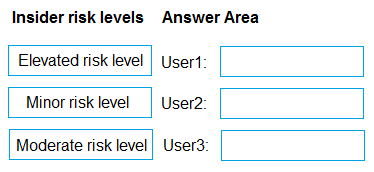
You have a Microsoft 365 5 subscription that uses Microsoft Purview insider risk management and contains three users named User1, User2, and User3.
All insider risk management policies have adaptive protection enabled and the default conditions for insider risk levels configured.
The users perform the following activities, which trigger insider risk policy alerts:
• User1 performs at least one data exfiltration activity that results in a high severity risk score.
• User2 performs at least three risky user activities within seven days, that each results in a high severity risk score.
• User3 performs at least two data exfiltration activities within seven days, that each results in a high severity risk score.
Which insider risk level is assigned to each user? To answer, drag the appropriate levels to the correct users. Each level may be used once, more than once, or not at all. You may need to drag the split bar between panes or scroll to view content.
NOTE: Each correct selection is worth one point.
Explanation: Under the default adaptive protection conditions, one high-severity activity places User1 at Minor risk, two within seven days place User3 at Moderate risk, and three within seven days place User2 at Elevated risk.
Question 84
You have a Microsoft 365 E5 tenant.
You create a data loss prevention (DLP) policy.
You need to ensure that the policy protects documents in Microsoft Teams chat sessions.
Which location should you enable in the policy?
A. SharePoint sites
B. Teams chat and channel messages
C. Exchange email
D. OneDrive accounts
Show Answer
Correct Answer: D
Explanation: Documents shared in Teams chats are stored in the sharing user’s OneDrive account, so enable OneDrive accounts to apply DLP to those files. Teams chat and channel messages protects message content; it is not the location for the underlying chat documents.
Question 85
SIMULATION
Username and password
Use the following login credentials as needed:
To enter your username, place your cursor in the Sign in box and select the username below.
To enter your password, place your cursor in the Enter password box and select the password below.
Microsoft 365 Username:
Microsoft 365 Password: XXXXXXXXX
If the Microsoft Edge browser or Microsoft 365 portal does not load successfully, select the Microsoft Edge browser icon from the task bar, type the URL “https://admin microsoft.com”, and press Enter.
The following information is for technical support purposes only:
Lab Instance: XXXXXXXX.
Task 5
You need to ensure that a group named U.S. Sales can store files containing information subject to General Data Protection Regulation (GDPR) in their OneDrive accounts. All other current GDPR restrictions must remain in effect.
Show Answer
Correct Answer: Edit the existing GDPR DLP policy. Under the OneDrive accounts location, exclude the U.S. Sales group, then save the policy. Leave all other settings unchanged.
Explanation: The OneDrive exclusion lets group members store GDPR-related files there while preserving the policy’s other restrictions.
Question 86
You need to create a retention policy to delete content after seven years from the following locations:
• Exchange Online email
• SharePoint Online sites
• OneDrive accounts
• Microsoft 365 Groups
• Teams channel messages
• Teams chats
What is the minimum number of retention policies that you should create?
A. 1
B. 2
C. 3
D. 4
Show Answer
Correct Answer: B
Explanation: Create one policy for Exchange Online, SharePoint Online, OneDrive, and Microsoft 365 Groups, and a separate policy for Teams messages. This gives a minimum of two policies for the same seven-year deletion period.
Question 87
You are creating a DLP policy named Policy1 that will be applied to the locations as shown in the following exhibit.
Policy1 contains an advanced data loss prevention (DLP) rule named Rule1.
Which two conditions can you use in Rule1? Each correct answer presents a complete solution.
NOTE: Each correct selection is worth one point.
A. Document property is
B. Attachment’s file extension is
C. Document size equals or is greater than
D. Content is shared from Microsoft 365
E. Content contains
Show Answer
Correct Answer: D, E
Explanation: The supported conditions are **Content is shared from Microsoft 365** and **Content contains**. The other choices are not available for the locations specified in the exhibit.
Question 88
You have a Microsoft 365 E5 subscription that contains a device named Device1.
You need to enable Endpoint data loss prevention (Endpoint DLP) for Device1.
What should you do first in the Microsoft Purview portal?
A. Turn on device onboarding.
B. Enable Microsoft Priva Privacy Risk Management.
C. Create a Microsoft Purview Information Barriers (IBs) segment.
D. Add a Microsoft Purview Information Protection scanner cluster.
E. Onboard Device1 to Microsoft Purview.
Show Answer
Correct Answer: A
Explanation: First, turn on device onboarding in the Microsoft Purview portal. After onboarding is enabled, you can onboard Device1 and configure Endpoint DLP for it.
Question 89
HOTSPOT
You have a Microsoft 365 E5 subscription that uses Microsoft Purview.
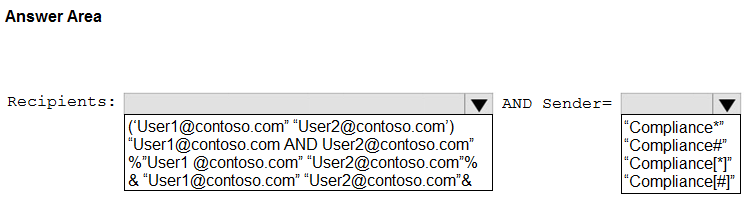
You need to perform a content search for email messages that meet the following requirements:
• Are delivered to both
and
• Are sent from a user account that has a name that starts with the word Compliance
How should you complete the query in the KQL editor? To answer, select the appropriate options in the answer area.
NOTE: Each correct selection is worth one point.
Show Answer
Correct Answer: Recipients: "User1@contoso.com" AND "User2@contoso.com"
Sender: "Compliance*"
Explanation: AND requires both recipients to be present. The * wildcard matches sender names beginning with Compliance.
Question 90
You have Microsoft 365 E5 tenant that uses Microsoft Teams and contains two users named User1 and User2.
You create a data loss prevention (DLP) policy that is applied to the Teams chat and channel messages location for User1 and User2.
Which Teams entities will have DLP protection?
A. 1:1/n chats and general channels only
B. 1:1/n chats and private channels only
C. 1:1/n chats, general channels, and private channels
Show Answer
Correct Answer: C
Explanation: With Microsoft 365 E5, a DLP policy targeting Teams chat and channel messages can protect 1:1 and group chats, general (standard) channels, and private channels.
Question 91
You need to provide a user with the ability to view data loss prevention (DLP) alerts in the Microsoft Purview portal. The solution must use the principle of least privilege.
Which role should you assign to the user?
A. Security Operator
B. Security Reader
C. Compliance Data Administrator
D. Compliance Administrator
Show Answer
Correct Answer: B
Explanation: Security Reader provides read-only access to security information, including viewing DLP alerts. It is the least-privileged option; Security Operator and the compliance administrator roles provide broader capabilities.
$19
Get all 268 questions with detailed answers and explanations
Instant download HTML + PDF delivered the moment payment clears.
Secure Stripe checkout we never see or store your card details.
7-day refund if files are defective see our refund policy.