HOTSPOT
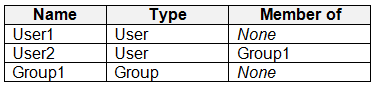
You have a Microsoft 365 E5 subscription that contains the resources shown in the following table.
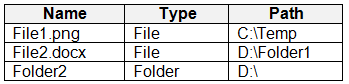
The subscription contains a Windows 11 device named Device1 and has the Microsoft Purview Information Protection client installed. Device1 contains the resources shown in the following table.
You publish a sensitivity label named Label1 to User1 and Group1.
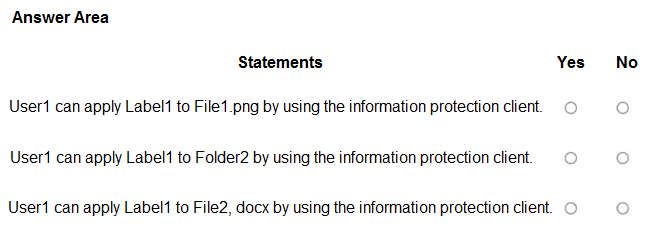
For each of the following statements, select Yes if the statement is true, Otherwise, select No.
NOTE: Each correct selection is worth one point.
Show Answer
Correct Answer: File1.png: Yes
Folder2: No
File2.docx: Yes
Explanation: User1 has access to Label1 and can apply it to supported files, including .png and .docx files. A folder itself cannot have a sensitivity label applied.
Question 25
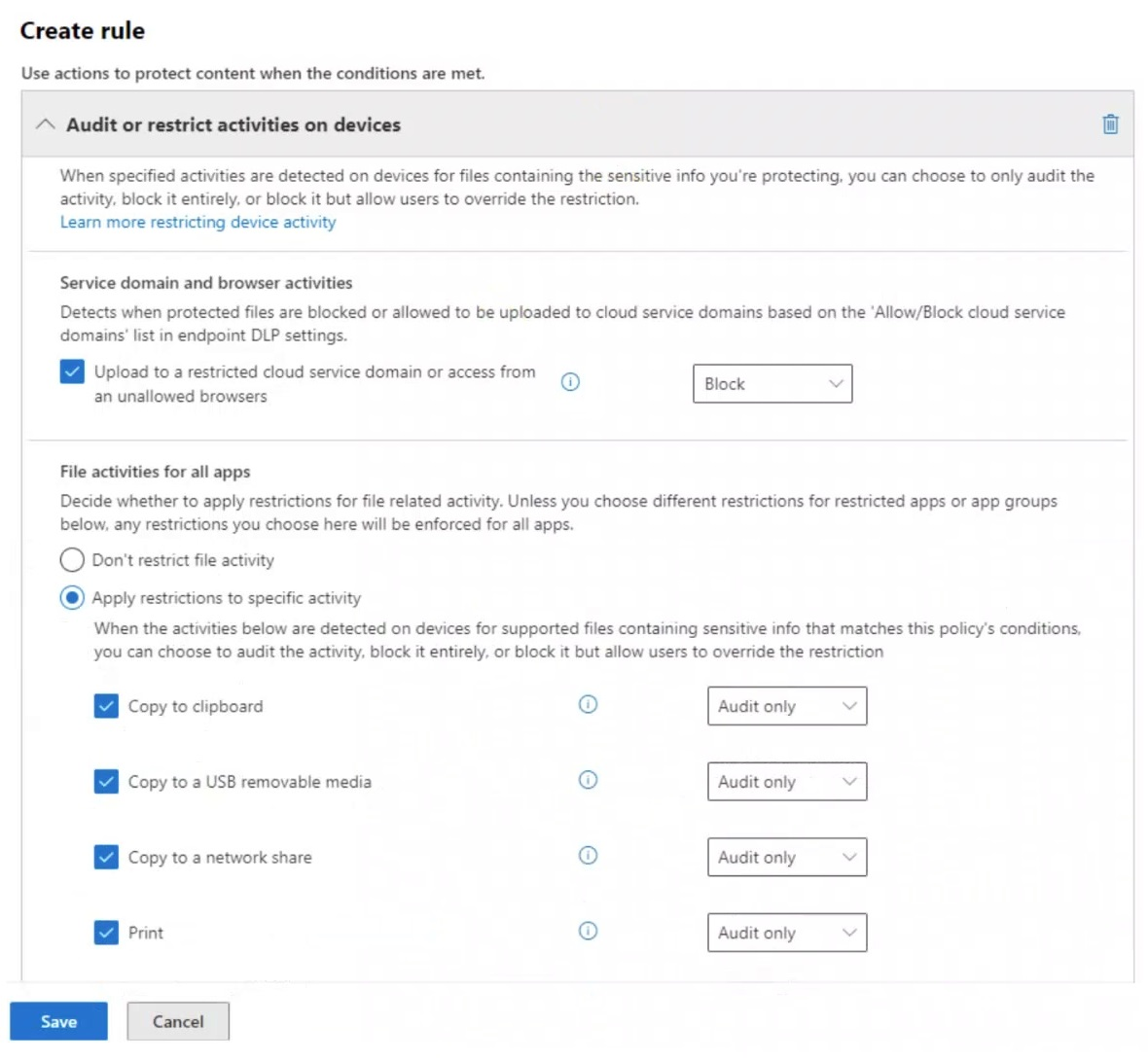
You have a data loss prevention (DLP) policy configured for endpoints as shown in the following exhibit.
From a computer named Computer1, a user can sometimes upload files to cloud services and sometimes cannot. Other users experience the same issue.
What are two possible causes of the issue? Each correct answer presents a complete solution.
NOTE: Each correct selection is worth one point.
A. The unallowed browsers in the Microsoft 365 Endpoint data loss prevention (Endpoint DLP) settings are NOT configured.
B. There are file path exclusions in the Microsoft 365 Endpoint data loss prevention (Endpoint DLP) settings.
C. The Access by restricted apps action is set to Audit only.
D. The Copy to clipboard action is set to Audit only.
E. The computers are NOT onboarded to Microsoft Purview.
Show Answer
Correct Answer: A, B
Explanation: If unallowed browsers aren’t configured, the browser-based restriction may not apply consistently across browsers. File path exclusions can also cause the restriction to vary by file location. The audit-only clipboard setting is unrelated to cloud uploads, and devices that aren’t onboarded would not receive Endpoint DLP enforcement at all.
Question 26
HOTSPOT
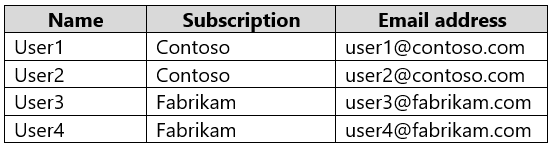
You have two Microsoft 365 subscriptions named Contoso and Fabrikam. The subscriptions contain the users shown in the following table.
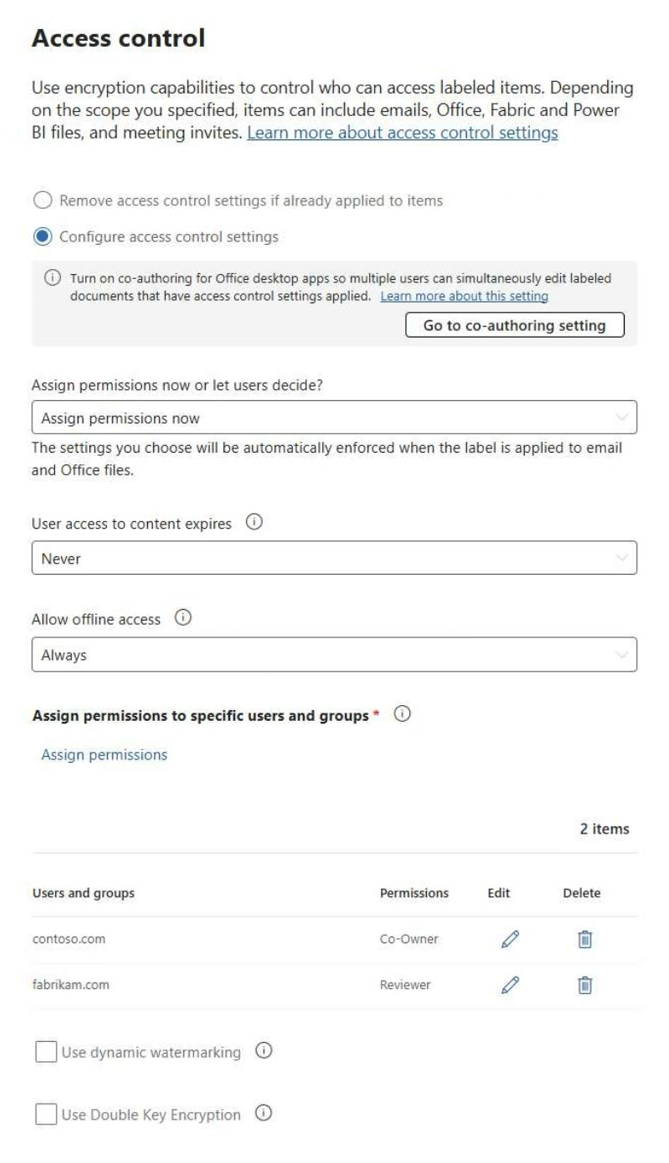
You have a sensitivity label named Sensitivity1 as shown in the exhibit. (Click the Exhibit tab)
You have the files shown in the following table.
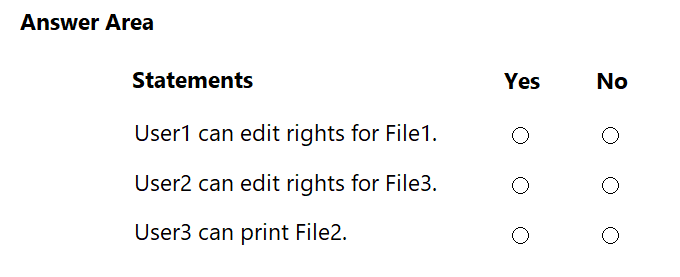
For each of the following statements, select Yes if the statement is true. Otherwise, select No.
NOTE: Each correct selection is worth one point.
Show Answer
Correct Answer: User1 can edit rights for File1: Yes
User2 can edit rights for File3: Yes
User3 can print File2: No
Explanation: The label grants the contoso.com domain Co-Owner permissions, which include changing rights. The fabrikam.com domain has Reviewer permissions, which do not include printing.
Question 26
HOTSPOT
You have a Microsoft 365 E5 subscription.
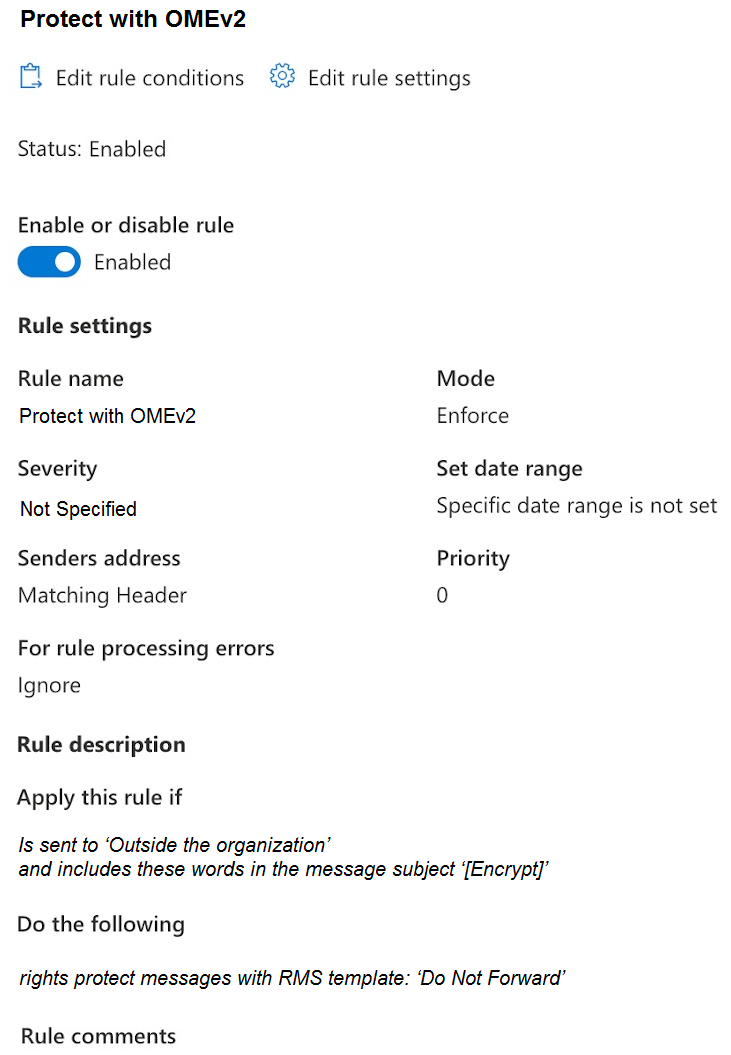
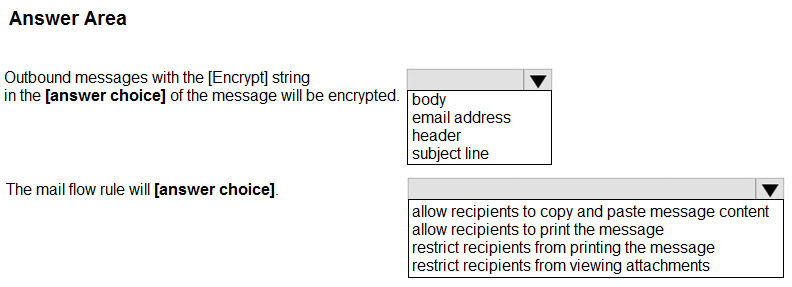
In Microsoft Exchange Online, you have the mail flow rule shown in the following exhibit.
Use the drop-down menus to select the answer choice that completes each statement based on the information presented in the graphic.
NOTE: Each correct selection is worth one point.
Show Answer
Correct Answer: 1. Subject line
2. Restrict recipients from printing the message
Explanation: The rule matches outbound messages containing [Encrypt] in the subject and applies the Do Not Forward template, which prevents recipients from printing them.
Question 26
Case Study
Instructions
This is a case study. Case studies are not timed separately from other exam sections. You can use as much exam time as you would like to complete each case study. However, there might be additional case studies or other exam sections. Manage your time to ensure that you can complete all the exam sections in the time provided. Pay attention to the Exam Progress at the top of the screen so you have sufficient time to complete any exam sections that follow this case study.
To answer the case study questions, you will need to reference information that is provided in the case. Case studies and associated questions might contain exhibits or other resources that provide more information about the scenario described in the case. Information provided in an individual question does not apply to the other questions in the case study.
A Review Screen will appear at the end of this case study. From the Review Screen, you can review and change your answers before you move to the next exam section. After you leave this case study, you will NOT be able to return to it.
To start the case study
To display the first question in this case study, select the "Next" button. To the left of the question, a menu provides links to information such as business requirements, the existing environment, and problem statements. Please read through all this information before answering any questions. When you are ready to answer a question, select the "Question" button to return to the question.
Overview
Contoso, Ltd. is a consulting company that has a main office in Montreal and three branch offices in Seattle, Boston, and Johannesburg.
Existing Environment
Microsoft 365 Environment
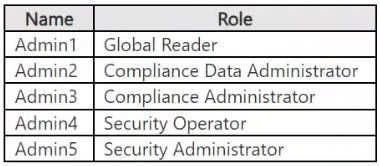
Contoso has a Microsoft 365 E5 tenant. The tenant contains the administrative user accounts shown in the following table.
Users store data in the following locations:
SharePoint sites
OneDrive accounts
Exchange email
Exchange public folders
Teams chats
Teams channel messages
When users in the research department create documents, they must add a 10-digit project code to each document. Project codes that start with the digits 999 are confidential.
SharePoint Online Environment
Contoso has four Microsoft SharePoint Online sites named Site1, Site2, Site3, and Site4.
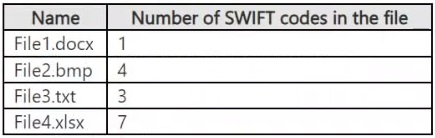
Site2 contains the files shown in the following table.
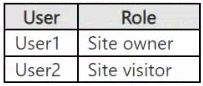
Two users named User1 and User2 are assigned roles for Site2 as shown in the following table.
Site3 stores documents related to the company's projects. The documents are organized in a folder hierarchy based on the project.
Site4 has the following two retention policies applied:
Name: Site4RetentionPolicy1
Locations to apply the policy: Site4
Delete items older than: 2 years
Delete content based on: When items were created
Name: Site4RetentionPolicy2
Locations to apply the policy: Site4
Retain items for a specific period: 4 years
Start the retention period based on: When items were created
At the end of the retention period: Do nothing
Problem Statements
Management at Contoso is concerned about data leaks. On several occasions, confidential research department documents were leaked.
Requirements
Planned Changes
Contoso plans to create the following data loss prevention (DLP) policy:
Name: DLPpolicy1
Locations to apply the policy: Site2
Conditions:
Content contains any of these sensitive info types: SWIFT Code
Instance count: 2 to any
Actions: Restrict access to the content
Technical Requirements
Contoso must meet the following technical requirements:
All administrative users must be able to review DLP reports.
Whenever possible, the principle of least privilege must be used.
For all users, all Microsoft 365 data must be retained for at least one year.
Confidential documents must be detected and protected by using Microsoft 365.
Site1 documents that include credit card numbers must be labeled automatically.
All administrative users must be able to create Microsoft 365 sensitivity labels.
After a project is complete, the documents in Site3 that relate to the project must be retained for 10 years.
You need to meet the retention requirement for the users' Microsoft 365 data.
What is the minimum number of retention policies required to achieve the goal?
A. 1
B. 2
C. 3
D. 4
E. 6
Show Answer
Correct Answer: B
Explanation: Two retention policies are required: one can cover SharePoint, OneDrive, Exchange mailboxes, and Exchange public folders; Teams chats and channel messages require a separate policy. The Site3 project-retention requirement is not part of the question about users’ Microsoft 365 data.
Question 27
You have a Microsoft 365 E5 subscription that contains a user named User1.
You deploy Microsoft Purview Data Security Posture Management for AI (DPSM for AI).
You need to ensure that User1 can review default policies that were created as part of the deployment. The solution must follow the principle of least privilege.
To which role groups should you add User1?
A. Compliance Administrator and Compliance Data Administrator
B. Content Explorer Content Viewer and View-Only Organization Management for Microsoft Exchange Online
C. Security Reader and Insider Risk Management Investigators
D. Compliance Management and Organization Management for Microsoft Exchange Online
Show Answer
Correct Answer: C
Explanation: Add User1 to the Security Reader and Insider Risk Management Investigators role groups. These provide the read access needed to view DSPM for AI and review its default policies without granting broad policy-administration privileges.
Question 27
HOTSPOT
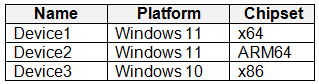
You have a Microsoft 365 5 subscription that contains the devices shown in the following table.
You publish Microsoft Purview Information Protection sensitivity labels.
You plan to deploy the information protection client to the devices. The solution must ensure that the labels can be applied to sensitive images and documents.
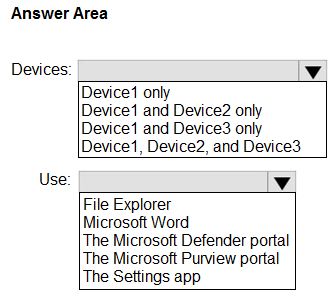
On which devices can you install the information protection client, and what should users use to apply labels? To answer, select the appropriate options in the answer area.
NOTE: Each correct selection is worth one point.
Show Answer
Correct Answer: Devices: Device1 and Device2 only
Use: File Explorer
Explanation: The client supports labeling on Windows 11 x64 and ARM64, but Windows 10 requires x64. Users can apply labels to images and documents through the client’s File Explorer integration.
Question 27
You have Microsoft 365 E5 subscription.
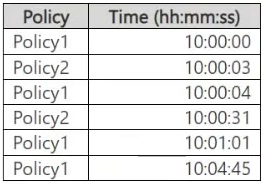
You create two alert policies named Policy1 and Policy2 that will be triggered at the times shown in the following table.
How many alerts will be added to the Microsoft Purview portal?
A. 2
B. 3
C. 4
D. 5
E. 6
Show Answer
Correct Answer: C
Explanation: Purview aggregates events matching the same alert policy when they occur within one minute. Policy1’s events at 10:00:00 and 10:00:04 form one alert; its 10:01:01 and 10:04:45 events each form separate alerts. Policy2’s events at 10:00:03 and 10:00:31 form one alert. That totals 4 alerts.
Question 28
You receive an email that contains a list of words that will be used fora sensitive information type.
You need to create a file that can be used as the source of a keyword dictionary.
In which format should you save the list?
A. an ACCDB database file that contains a table named Dictionary
B. a TSV file that contains words separated by tabs
C. a CSV file that contains words separated by commas
D. an XLSX file that contains one word in each cell of the first row
Show Answer
Correct Answer: C
Explanation: Save the list as a CSV file, with the keywords separated by commas. This format can be used as the source for a keyword dictionary.
Question 28
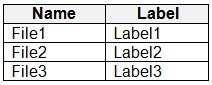
You have a Microsoft 365 E5 subscription. The subscription contains a user named User1 and the sensitivity labels shown in the following table.
You publish the labels to User1.
The subscription contains the files shown in the following table.
Which files can Microsoft 365 Copilot summarize for User1?
A. File2 only
B. File3 only
C. File2 and File3 only
D. File1, File2, and File3
Show Answer
Correct Answer: A
Explanation: Microsoft 365 Copilot can summarize protected content only when the user has both VIEW and EXTRACT usage rights. User1 has both rights for File2 (Label2). File1 and File3 do not grant EXTRACT; EXPORT on Label3 does not substitute for EXTRACT.
$19
Get all 269 questions with detailed answers and explanations
Instant download HTML + PDF delivered the moment payment clears.
Secure Stripe checkout we never see or store your card details.
7-day refund if files are defective see our refund policy.