HOTSPOT
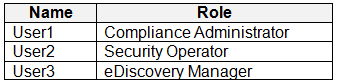
You have a Microsoft 365 E5 tenant that contains the users shown in the following table.
You need to implement sensitivity labels.
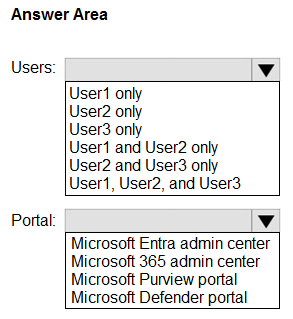
Which users can create sensitivity labels, and which portal should the users use? To answer, select the appropriate options in the answer area.
NOTE: Each correct selection is worth one point.
Show Answer
Correct Answer: Users: User1 only
Portal: Microsoft Purview portal
Explanation: The Compliance Administrator role can create sensitivity labels. The Security Operator and eDiscovery Manager roles do not grant that permission.
Question 93
HOTSPOT
You have a Microsoft 365 subscription.
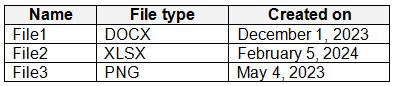
You have a Microsoft SharePoint Online site named Site1. Site1 has a document library that contains the files shown in the following table.
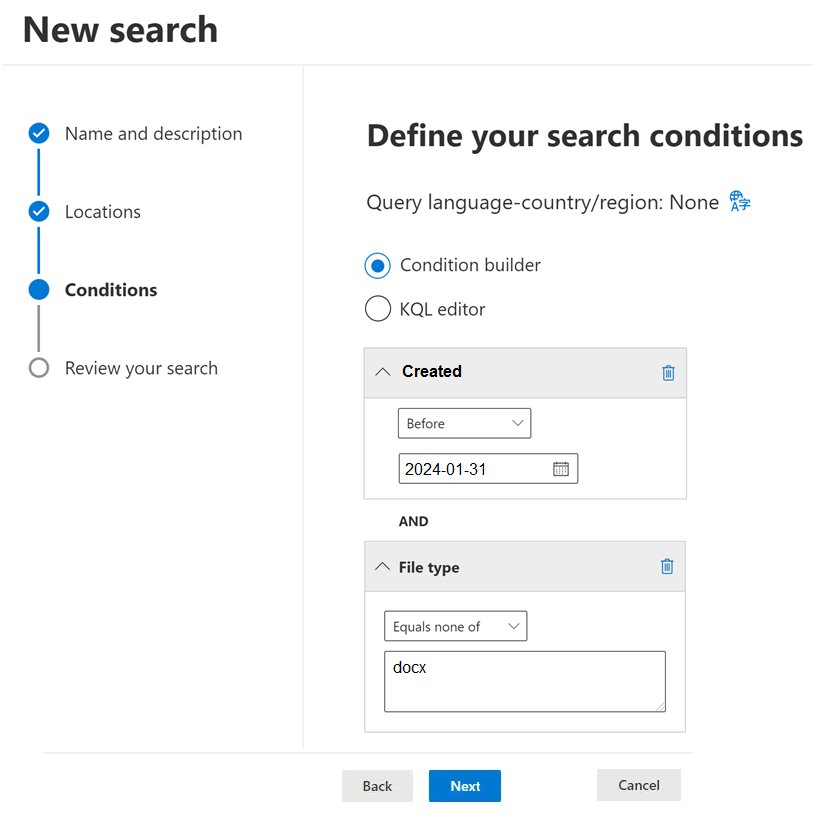
From the Microsoft Purview compliance portal, for Site1 you create a content search named Search1 that has the date in the YYYY-MM-DD format as shown in the following exhibit.
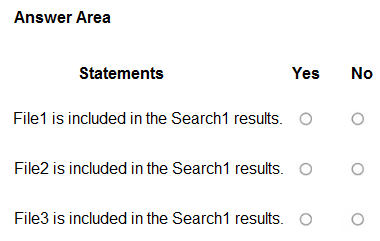
For each of the following statements, select Yes if the statement is true. Otherwise, select No.
NOTE: Each correct selection is worth one point.
Show Answer
Correct Answer: File1: No
File2: No
File3: Yes
Explanation: The search includes files created before 2024-01-31 whose file type is not DOCX. File1 is excluded by its type, File2 by its creation date, and File3 meets both conditions.
Question 94
You have a Microsoft 365 E5 subscription that contains a Microsoft SharePoint Online site named Site1. Site1 contains the files shown in the following table.
In the Microsoft Purview portal, you create a content search named Content1 and configure the search conditions as shown in the following exhibit.
Which files will be returned by Content1?
A. File2.docx only
B. File3.docx only
C. File1.docx and File2.docx only
D. File1.docx and File3.docx only
E. Filet.docx, File2.docx, and File3.docx
Show Answer
Correct Answer: A
Explanation: The leading minus excludes files whose Author matches USER1. The comparison is case-insensitive, so it excludes files authored by either User1 or USER1. Only File2.docx remains.
Question 95
HOTSPOT
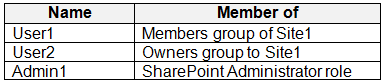
You have a Microsoft 365 E5 subscription that contains a Microsoft SharePoint Online site named Site1 and the users shown in the following table.
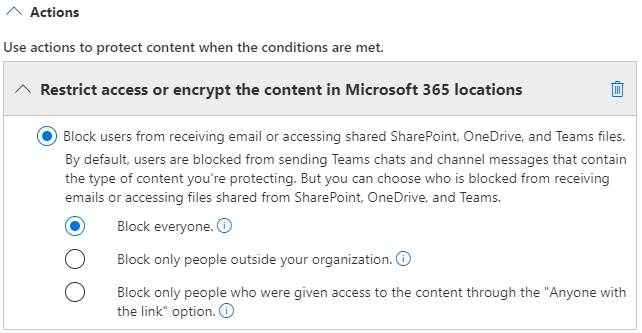
You have a data loss prevention (DLP) policy named DLP1 as shown in the following exhibit.
You apply DLP1 to Site1
User1 uploads a file named File1 to Site1. File does NOT match any of the DLP1 rules. User2 updates File1 to contain data that matches the DLP1 rules.
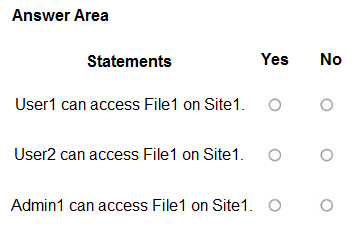
For each of the following statements, select Yes if the statement is true. Otherwise, select No.
NOTE: Each correct selection is worth one point.
Show Answer
Correct Answer: User1: Yes
User2: Yes
Admin1: No
Explanation: With “Block everyone,” the file owner and last modifier retain access. User1 uploaded File1, and User2 last modified it. A SharePoint Administrator does not automatically have access to Site1’s files.
Question 96
You have a Microsoft 365 E5 subscription.
You create a data loss prevention (DLP) policy and select Use Notifications to inform your users and help educate them on the proper use of sensitive info.
Which apps will show the policy tip?
A. Outlook on the web only
B. Outlook Win32 only
C. Outlook for iOS and Android only
D. Outlook on the web and Outlook Win32 only
E. Outlook Win32 and Outlook for iOS and Android only
F. Outlook on the web, Outlook Win32, and Outlook for iOS and Android
Show Answer
Correct Answer: D
Explanation: DLP policy tips are shown in Outlook on the web and Outlook for Windows (Win32). Outlook for iOS and Android does not support these DLP policy tips.
Question 97
HOTSPOT
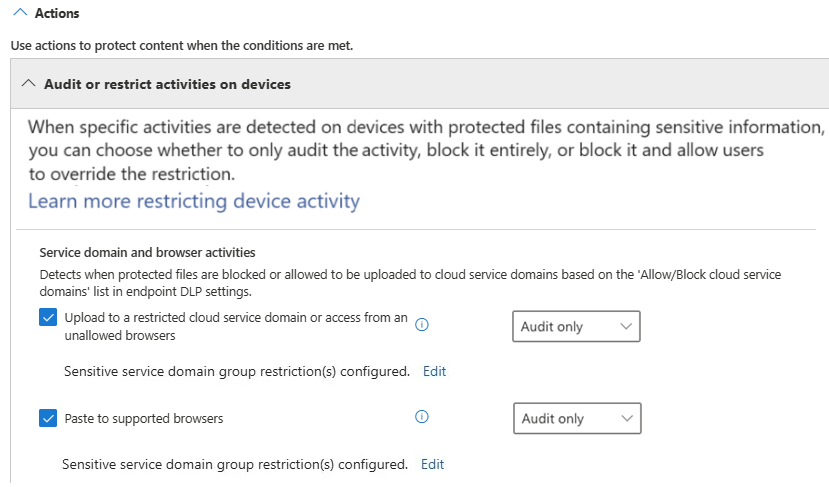
You have a Microsoft 365 ES subscription that contains a user named User1. The subscription contains an Endpoint data loss prevention (Endpoint DLP) policy as shown in the Actions exhibit. (Click the Actions tab.)
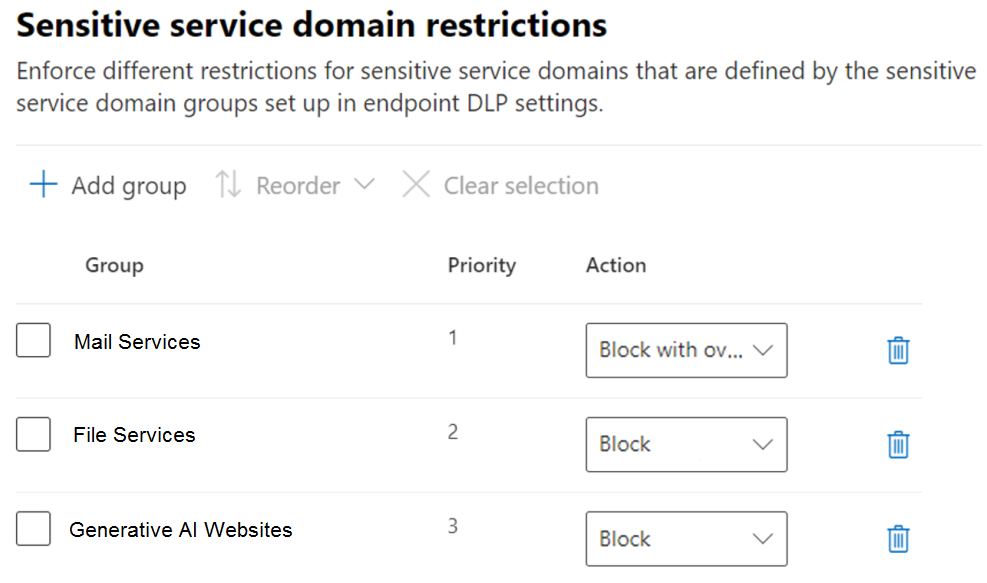
You configure the Upload to a restricted cloud service domain or access from an unallowed browsers settings as shown in the Upload restrictions exhibit. (Click the Upload restrictions tab.)
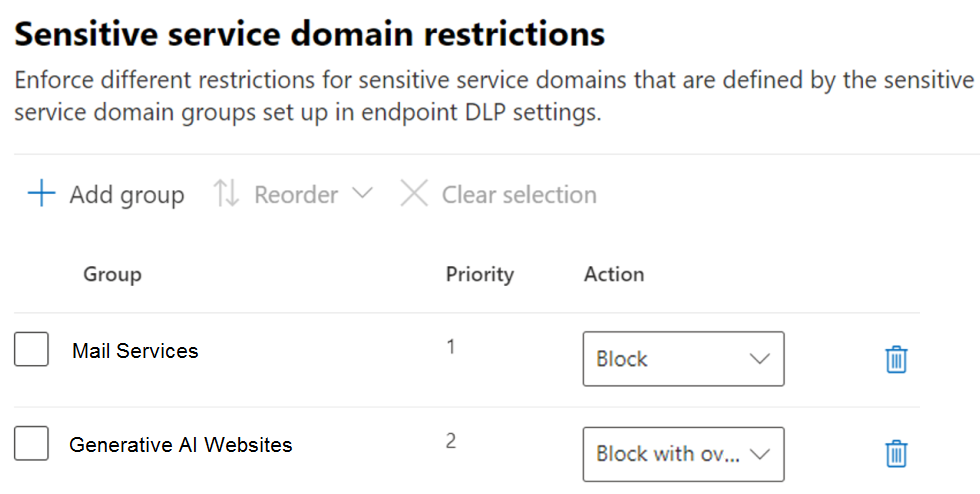
You configure the Paste to supported browsers settings as shown in the Paste restrictions exhibit. (Click the Paste restrictions tab.)
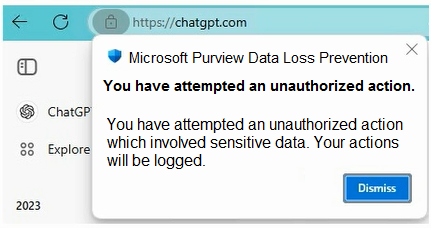
When User1 pastes content into ChatGPT, the user receives the error message shown in the Error exhibit. (Click the Error tab.)
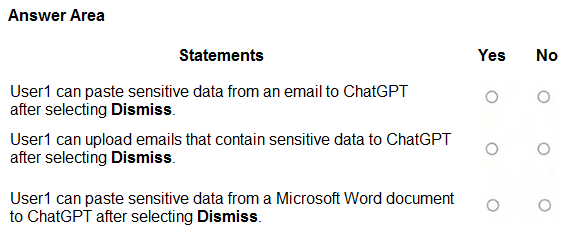
For each of the following statements, select Yes if the statement is true. Otherwise, select No.
NOTE: Each correct selection is worth one point.
Show Answer
Correct Answer: No
No
No
Explanation: ChatGPT is in the Generative AI Websites group. Uploads are blocked, and pasting is blocked unless User1 explicitly overrides the restriction. Selecting Dismiss only closes the alert; it does not override the block.
Question 98
HOTSPOT
You have a Microsoft 365 E5 subscription.
You need to implement Endpoint data loss prevention (Endpoint DLP) to meet the following requirements:
• Ensure that users can upload data to only two sites named Site1 and Site2.
• Prevent users from pasting data to two search engines named Search1 and Search2.
• Minimize the number of policies and groups.
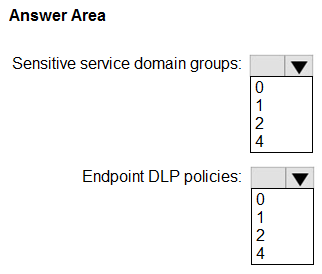
What is the minimum number of sensitive service domain groups and Endpoint DLP policies required? To answer, select the appropriate options in the answer area.
NOTE: Each correct selection is worth one point.
Explanation: Set Site1 and Site2 as the only allowed service domains for uploads. Use one sensitive service domain group for Search1 and Search2, then configure one Endpoint DLP policy to block restricted uploads and pasting to that group.
Question 99
You have a Microsoft 365 subscription.
You configure a Microsoft Purview insider risk management policy named Policy1.
You need to ensure that you will receive real-time recommendations on how to configure the indicator thresholds for Policy1. The solution must ensure that the recommendations are based on a user's activity from the past 10 days.
What should you do first?
A. Create an Insider Risk Indicators connector.
B. Configure the Insider Risk Management Data sharing settings.
C. Create a data loss prevention (DLP) policy
D. Enable insider risk management analytics.
Show Answer
Correct Answer: D
Explanation: Enable insider risk management analytics first. Analytics analyzes activity from the past 10 days and provides real-time recommendations for configuring indicator thresholds.
Question 100
You have a Microsoft 365 E5 subscription that contains 500 Windows devices.
You plan to deploy Microsoft Purview Data Security Posture Management for AI (DSPM for AI).
You need to ensure that you can monitor user activities on third-party generative AI websites.
Which two prerequisites should you complete for DSPM for AI? Each correct answer presents part of the solution,
NOTE: Each correct selection is worth one point.
A. Create an Endpoint data loss prevention (Endpoint DLP) policy.
B. Onboard the devices to Microsoft Purview.
C. Install the Microsoft Purview extension on the devices.
D. Create a communication compliance policy.
E. Enroll the devices in Microsoft Intune.
F. Create a data leaks policy.
Show Answer
Correct Answer: B, C
Explanation: Onboard the Windows devices to Microsoft Purview and install the Microsoft Purview browser extension. These enable DSPM for AI to collect and monitor user activity on third-party generative AI websites.
Question 101
SIMULATION
Username and password
Use the following login credentials as needed:
To enter your username, place your cursor in the Sign in box and select the username below.
To enter your password, place your cursor in the Enter password box and select the password below.
Microsoft 365 Username:
Microsoft 365 Password: XXXXXXXXX
If the Microsoft Edge browser or Microsoft 365 portal does not load successfully, select the Microsoft Edge browser icon from the task bar, type the URL “https://admin microsoft.com”, and press Enter.
The following information is for technical support purposes only:
Lab Instance: XXXXXXXX.
Task 4
You need to block users from sending emails containing information that is subject to Payment Card Industry Data Security Standard (PCI DSS). The solution must affect only emails.
Show Answer
Correct Answer: Create a Microsoft Purview DLP policy using the **Financial → PCI Data Security Standard (PCI DSS)** template.
Select **Exchange email** as the only location.
Configure the policy to **block emails that match** the PCI DSS conditions, then turn it on.
Explanation: The PCI DSS template detects payment-card information. Limiting the policy to Exchange email ensures it does not affect other locations.
$19
Get all 268 questions with detailed answers and explanations
Instant download HTML + PDF delivered the moment payment clears.
Secure Stripe checkout we never see or store your card details.
7-day refund if files are defective see our refund policy.