HOTSPOT
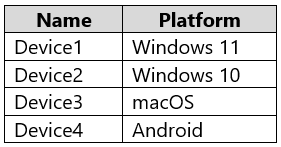
You have a Microsoft 365 E5 subscription that contains the devices shown in the following table.
You plan to implement insider risk management and capture forensic evidence.
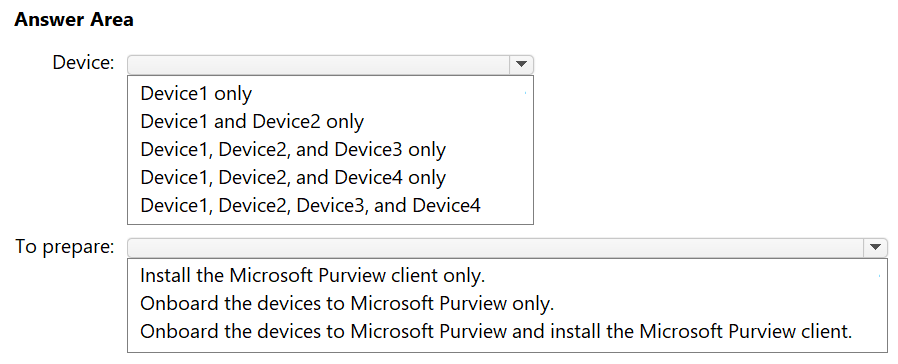
Which devices support the collection of forensic evidence, and what should you do to prepare each supported device? To answer, select the appropriate options in the answer area.
NOTE: Each correct selection is worth one point.
Show Answer
Correct Answer: Device: Device1 and Device2 only
To prepare: Onboard the devices to Microsoft Purview and install the Microsoft Purview client.
Explanation: Forensic evidence collection supports Windows 10 and Windows 11 devices. Each supported device must be onboarded to Microsoft Purview and have the Microsoft Purview client installed.
Question 33
HOTSPOT
You have a Microsoft 365 E5 tenant that contains a published sensitivity label named Sensitivity1.
You plan to create a Microsoft Entra group named Group1 and assign Sensitivity1 to Group1.
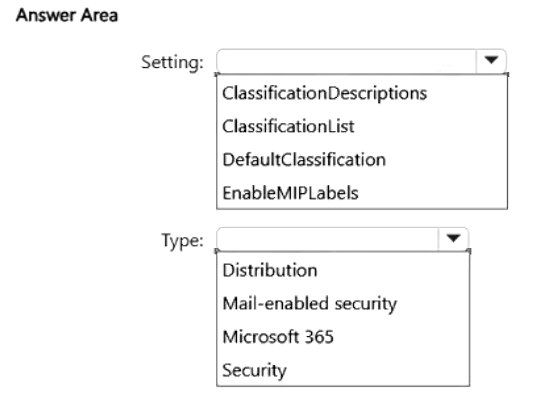
How should you configure Group1? To answer, select the appropriate options in the answer area.
NOTE: Each correct selection is worth one point.
Show Answer
Correct Answer: Setting: EnableMIPLabels
Type: Microsoft 365
Explanation: EnableMIPLabels allows sensitivity labels on groups. Sensitivity labels can be assigned to Microsoft 365 groups.
Question 34
HOTSPOT
You have the files shown in the following table.
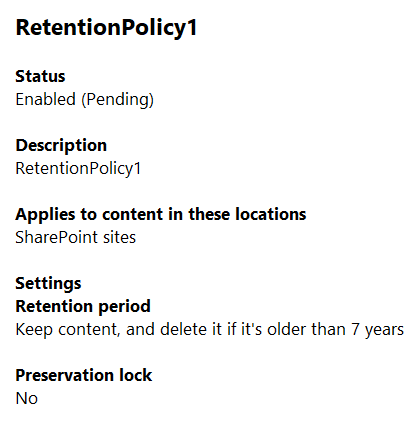
You configure a retention policy as shown in the exhibit. (Click the Exhibit tab.)
The start of the retention period is based on when items are created. The current date is January 01, 2025.
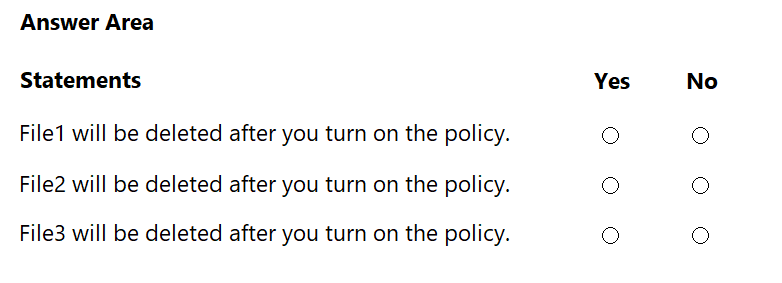
For each of the following statements, select Yes if the statement is true. Otherwise, select No.
NOTE: Each correct selection is worth one point.
Show Answer
Correct Answer: File1: Yes
File2: No
File3: No
Explanation: The policy applies only to SharePoint sites. File1 was created more than seven years before January 1, 2025, so it will be deleted. File2 and File3 are in locations the policy does not cover.
Question 35
HOTSPOT
You have a Microsoft 365 subscription. Auditing is enabled.
A user named User1 is a member of a dynamic security group named Group1.
You discover that User1 is no longer a member of Group1.
You need to search the audit log to identify why User1 was removed from Group1.
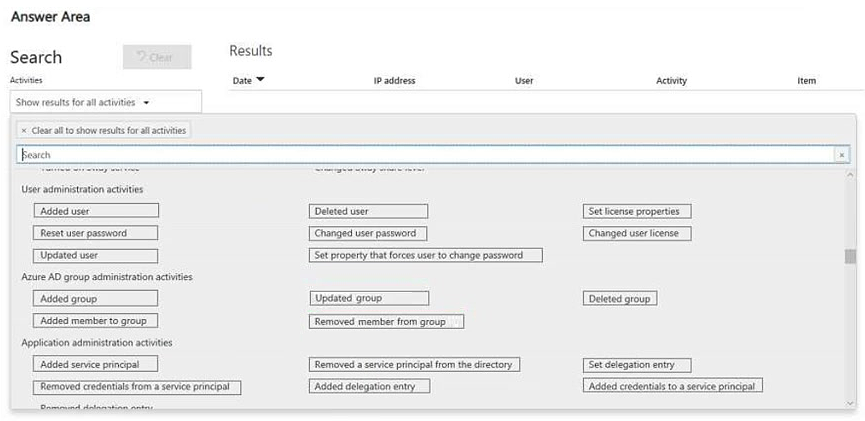
Which two activities should you use in the search? To answer, select the appropriate activities in the answer area.
NOTE: Each correct selection is worth one point.
Show Answer
Correct Answer: Updated user
Updated group
Explanation: A dynamic group recalculates membership when a user’s attributes or the group’s membership rule changes. These activities help identify which change caused User1’s removal.
Question 36
You have a Microsoft 365 tenant that has a retention label policy.
You need to configure the policy to meet the following requirements:
• Prevent the disabling or deletion of the policy.
• Ensure that new labels can be added.
• Prevent the removal of labels.
What should you do?
A. Enable insider risk management.
B. Enable the regulatory record option.
C. Import a file plan.
D. Create a preservation lock.
Show Answer
Correct Answer: D
Explanation: Create a preservation lock. It prevents the retention label policy from being disabled or deleted and prevents labels from being removed, while still allowing new labels to be added.
Question 37
You have a Microsoft 365 E5 subscription that contains two Microsoft SharePoint Online sites named Site1 and Site2.
You plan to configure a retention label named Label1 and apply Label1 to all the files in Site1.
You need to ensure that two years after a file is created in Site1, the file moves automatically to Site2.
How should you configure the Choose what happens after the retention period setting for Label1?
A. Deactivate retention settings
B. Run a Power Automate flow
C. Start a disposition review
D. Change the label
Show Answer
Correct Answer: B
Explanation: Configure Label1 to run a Power Automate flow after the retention period. The flow can move the file from Site1 to Site2; the other settings do not perform that automated move.
Question 38
HOTSPOT
You have a Microsoft 365 E5 subscription.
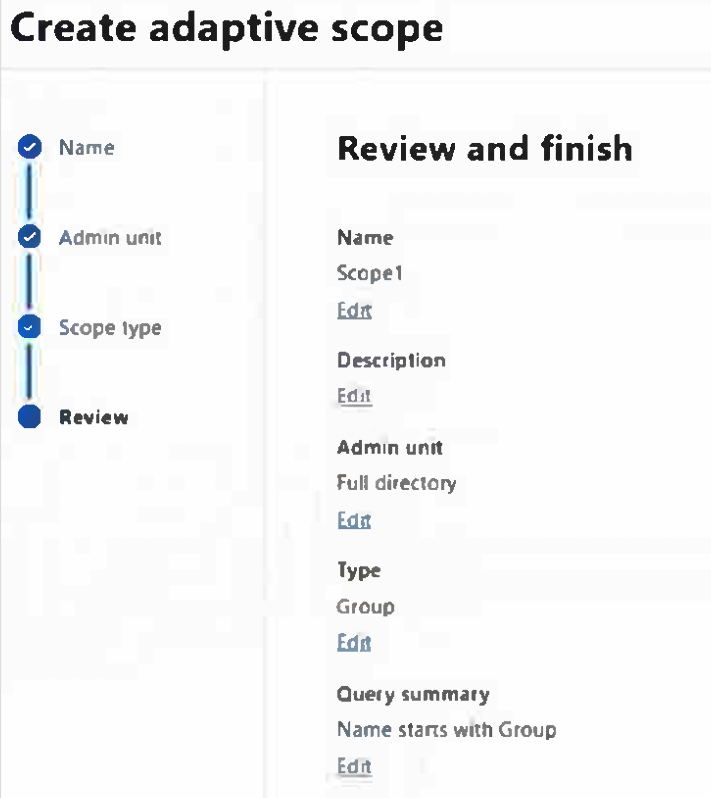
You create an adaptive scope named Scope1 as shown in the following exhibit.
You create a retention policy named Policy1 that includes Scope1.
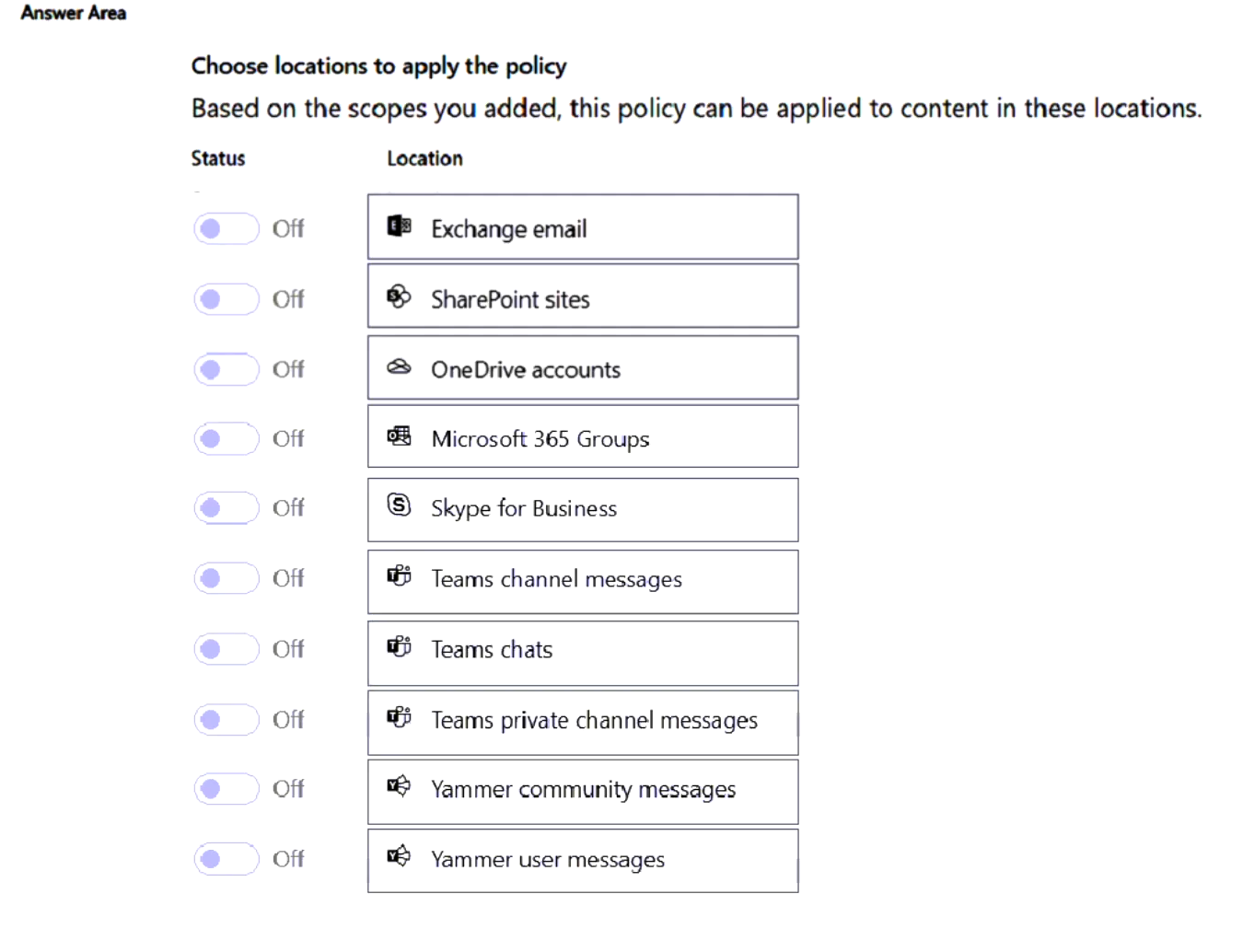
To which three locations can you apply Policy1? To answer select the appropriate locations in the answer area.
NOTE: Each correct selection is worth one point.
Show Answer
Correct Answer: Microsoft 365 Groups
Teams channel messages
Yammer community messages
Explanation: Scope1 is a Group-type adaptive scope, so Policy1 can target group mailboxes and sites, Teams channel messages, and Yammer community messages.
Question 39
HOTSPOT
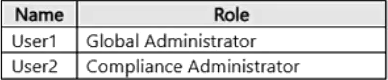
You have a Microsoft 365 E5 tenant that contains the users shown in the following table.
You have a retention policy that has the following configurations:
• Retain items for a specific period: 5 years
• Locations to apply the policy: Exchange email, SharePoint sites
You place a Preservation Lock on Policy1.
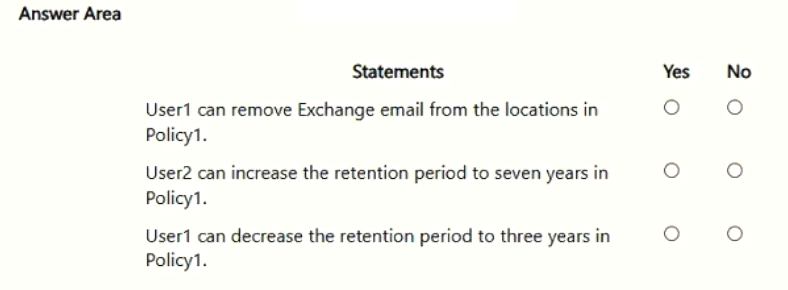
For each of the following statements, select Yes if the statement is true. Otherwise, select No.
NOTE: Each correct selection is worth one point.
Show Answer
Correct Answer: No
Yes
No
Explanation: Preservation Lock prevents anyone from removing a location or shortening the retention period, including a Global Administrator. The retention period can still be increased by a Compliance Administrator.
Question 40
SIMULATION
Username and password
Use the following login credentials as needed:
To enter your username, place your cursor in the Sign in box and select the username below.
To enter your password, place your cursor in the Enter password box and select the password below.
Microsoft 365 Username:
Microsoft 365 Password: XXXXXXXXX
If the Microsoft Edge browser or Microsoft 365 portal does not load successfully, select the Microsoft Edge browser icon from the task bar, type the URL “https://admin.microsoft.com”, and press Enter.
The following information is for technical support purposes only:
Lab Instance: XXXXXXXXX
Task 4
You need reduce the number of false-positives generated by the General Data Protection Regulation (GDPR) data loss prevention (DLP) policy.
Show Answer
Correct Answer: In Microsoft Purview, open Data loss prevention → Policies → GDPR → Edit rules. Increase the sensitive information types’ confidence level and minimum instance count, then save the policy. Test the changes in simulation mode before applying them.
Explanation: Requiring stronger matches and more instances reduces matches on incidental content. Simulation mode lets you check the effect before enforcement.
Question 41
SIMULATION
Username and password
Use the following login credentials as needed:
To enter your username, place your cursor in the Sign in box and select the username below.
To enter your password, place your cursor in the Enter password box and select the password below.
Microsoft 365 Username:
Microsoft 365 Password: XXXXXXXXX
If the Microsoft Edge browser or Microsoft 365 portal does not load successfully, select the Microsoft Edge browser icon from the task bar, type the URL “https://admin.microsoft.com”, and press Enter.
The following information is for technical support purposes only:
Lab Instance: XXXXXXXXX
Task 1
You plan to implement Endpoint data loss prevention (Endpoint DLP). You plan to create a policy that will restrict OneDrive.exe from accessing files that have the Highly Confidential sensitivity label.
You need to configure the Endpoint DLP settings so that onedrive.exe actions can be restricted by a DLP policy.
You do NOT need to create a DLP policy at this time.
Show Answer
Correct Answer: In Microsoft Purview, go to Settings > Data loss prevention > Endpoint DLP settings > Restricted apps and app groups. Add OneDrive.exe as a restricted app and save. Do not create a DLP policy.
Explanation: Adding OneDrive.exe to the restricted apps list makes its access to protected files available for restriction by an Endpoint DLP policy.
$19
Get all 268 questions with detailed answers and explanations
Instant download HTML + PDF delivered the moment payment clears.
Secure Stripe checkout we never see or store your card details.
7-day refund if files are defective see our refund policy.