HOTSPOT
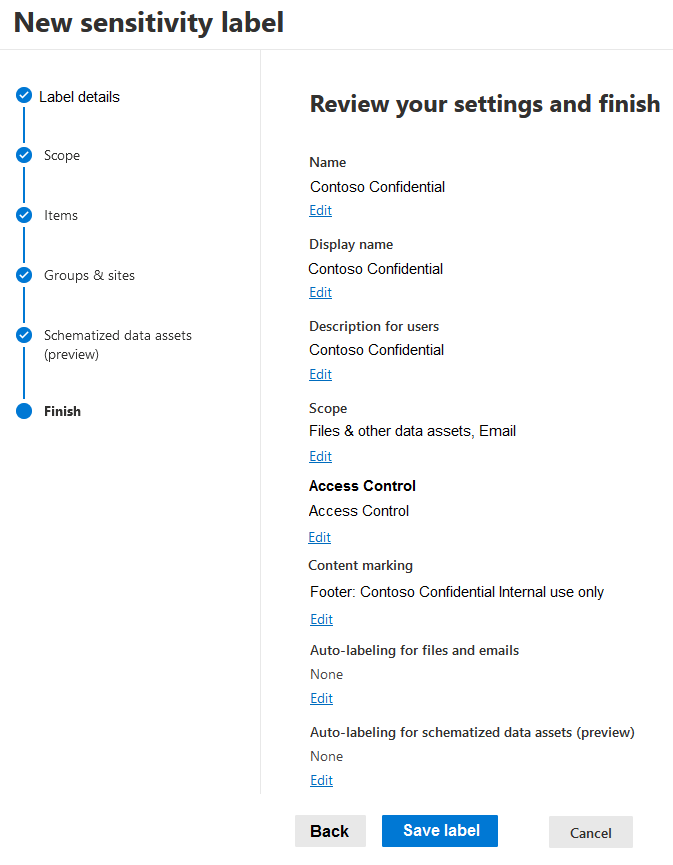
You have a Microsoft 365 subscription that contains a sensitivity label named Contoso Confidential.
You publish Contoso Confidential to all users.
Contoso Confidential is configured as shown in the Configuration exhibit. (Click the Configuration tab.)
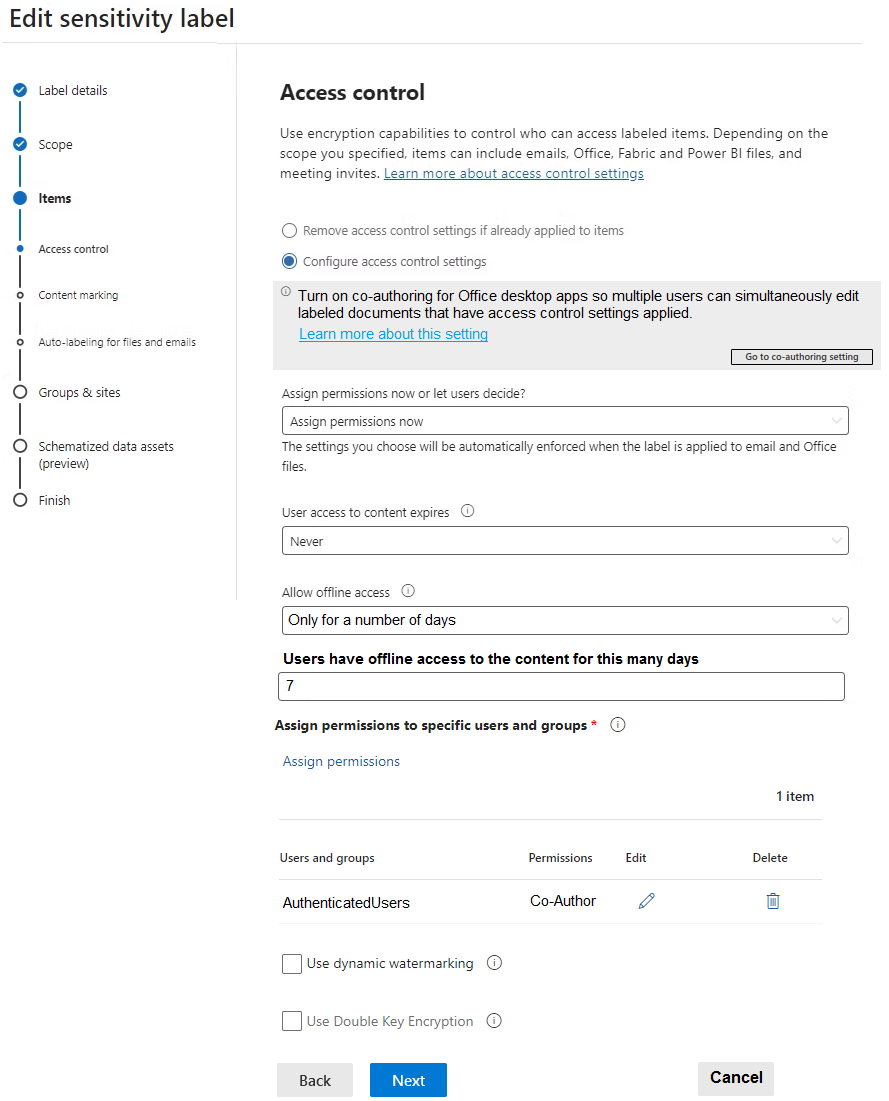
The Access control settings of Contoso Confidential are configured as shown in the Access control exhibit. (Click the Access control tab.)
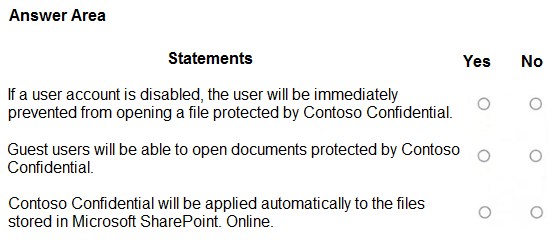
For each of the following statements, select Yes if the statement is true. Otherwise, select No.
NOTE: Each correct selection is worth one point.
Show Answer
Correct Answer: No
Yes
No
Explanation: Offline access is allowed for seven days, so disabling an account does not immediately revoke an existing use license. Guest users are included in AuthenticatedUsers. Auto-labeling is set to None; publishing the label does not automatically apply it to SharePoint files.
Question 17
You need to be alerted when users share sensitive documents from Microsoft OneDrive to any users outside your company.
What should you do?
A. From the Microsoft Defender portal, create a file policy.
B. From the Exchange admin center, create a data loss prevention (DLP) policy.
C. From the Microsoft Entra admin center, configure an Identity Protection policy.
D. From the Microsoft Defender portal, create an activity policy.
Show Answer
Correct Answer: A
Explanation: Create a file policy in the Microsoft Defender portal. A file policy can match sensitive content in OneDrive files and their external-sharing status, then generate an alert. An activity policy can detect sharing actions but does not evaluate whether the file is sensitive; an Exchange admin center DLP policy is not the appropriate OneDrive control.
Question 17
DRAG DROP
You have a Microsoft 365 E5 subscription.
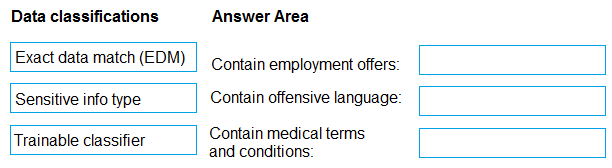
You need to label Microsoft Exchange Online emails that match the following conditions:
• Contain employment offers
• Contain offensive language
• Contain medical terms and conditions
The solution must minimize administrative effort.
Which type of data classification should you use for each condition? To answer, drag the appropriate data classification types to the correct conditions. Each data classification type may be used once, more than once, or not at all. You may need to drag the split bar between panes or scroll to view content.
NOTE: Each correct selection is worth one point.
Show Answer
Correct Answer: Employment offers: Trainable classifier
Offensive language: Trainable classifier
Medical terms and conditions: Sensitive info type
Explanation: Use built-in trainable classifiers for context-dependent employment offers and offensive language. A built-in sensitive info type detects medical terms and conditions, minimizing configuration.
Question 18
You have a Microsoft 365 subscription.
You need to monitor Microsoft 365 Copilot user prompts and responses for content that has been matched by the Protected Materials trainable classifier.
Which type of policy should you create?
A. communication compliance
B. data loss prevention (DLP)
C. insider risk management
D. retention
Show Answer
Correct Answer: A
Explanation: Create a communication compliance policy. Communication compliance can monitor Microsoft 365 Copilot prompts and responses and detect content matched by trainable classifiers such as Protected Materials.
Question 18
HOTSPOT
You need to implement an information compliance policy to meet the following requirements:
• Documents that contain passport numbers from the United States, Germany, Australia, and Japan must be identified automatically.
• When a user attempts to send an email or an attachment that contains a passport number, the user must receive a tooltip in Microsoft Outlook.
• Users must be blocked from using Microsoft SharePoint Online or OneDrive for Business to share a document that contains a passport number.
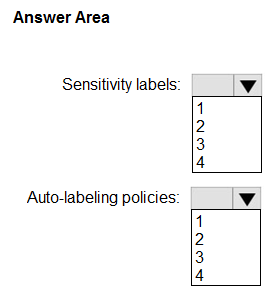
What is the minimum number of sensitivity labels and auto-labeling policies you should create? To answer, select the appropriate options in the answer area.
Explanation: One label and one auto-labeling policy can cover the passport-number types for all four countries. Use a DLP policy to show the Outlook policy tip and block sharing in SharePoint Online and OneDrive for Business.
Question 19
HOTSPOT
You have Microsoft 365 E5 tenant that has a domain name of 86s40q.onmicrosoft.com.
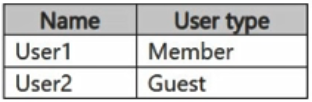
The tenant contains the users shown in the following table.
You have a published sensitivity label.
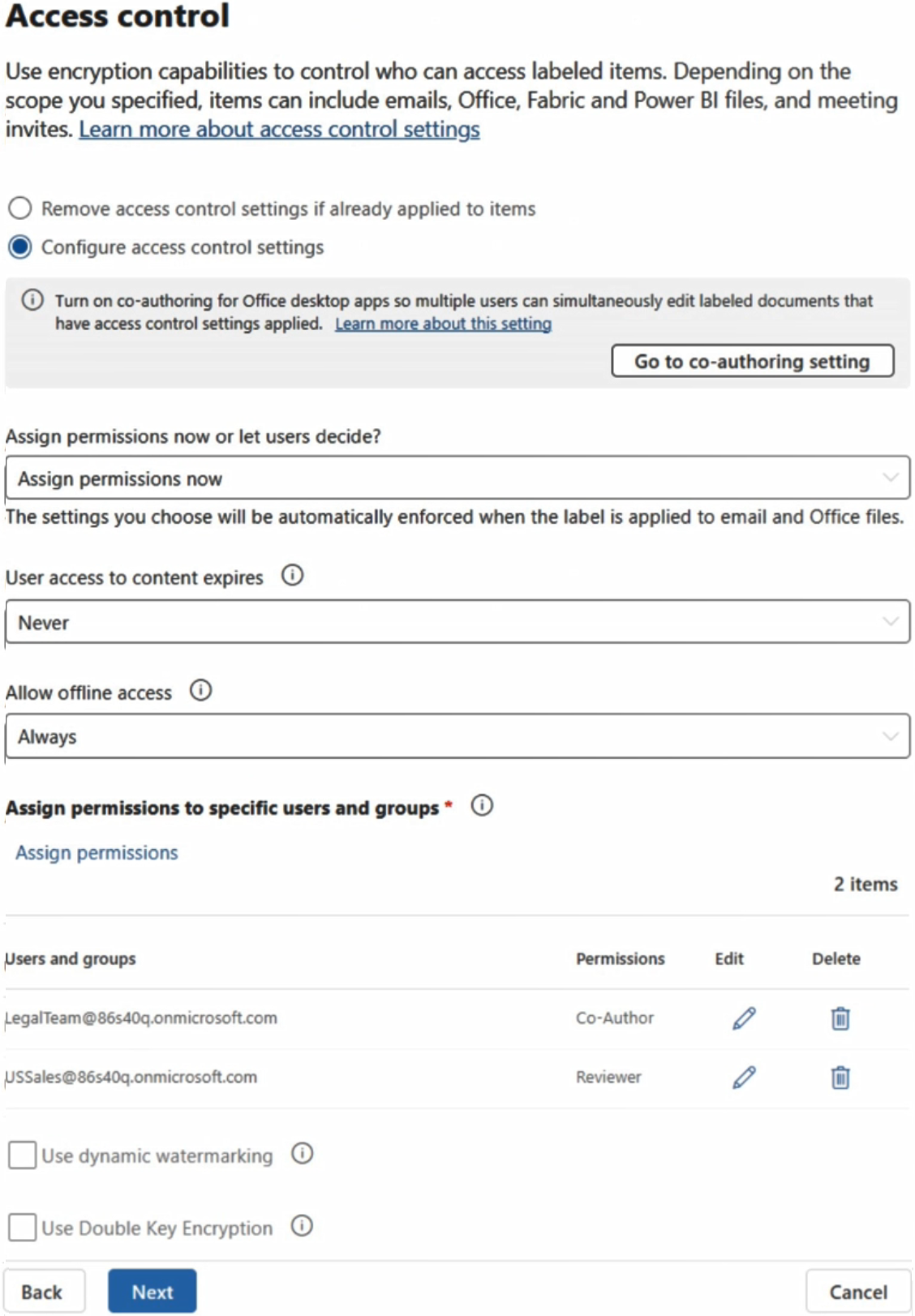
The Access control settings for the sensitivity label are configured as shown in the exhibit. (Click the Exhibit tab.)
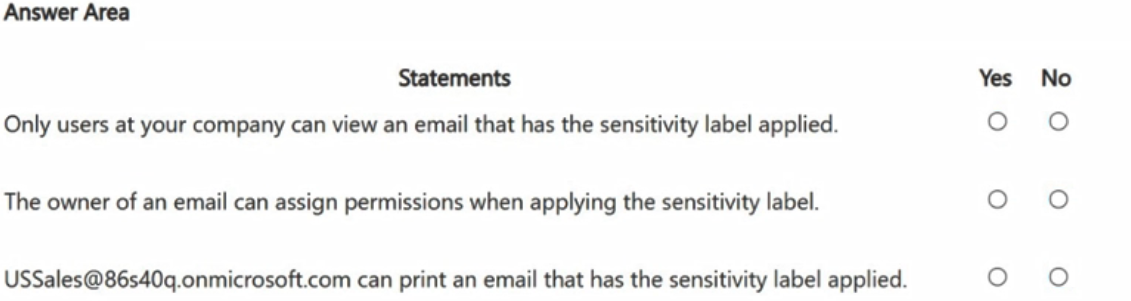
For each of the following statements, select Yes if the statement is true. Otherwise, select No.
NOTE: Each correct selection is worth one point.
Show Answer
Correct Answer: No
No
No
Explanation: A guest could view the email if included in an authorized group, so access is not necessarily limited to company users. Permissions are assigned by the label, not the email owner. The Reviewer permission assigned to USSales does not include printing.
Question 19
HOTSPOT
You have a Microsoft 365 365 E5 subscription.
You plan to create a new sensitive information type (SIT) by using the Microsoft Purview portal.
You need to copy and modify an existing SIT from which to create the new SIT.
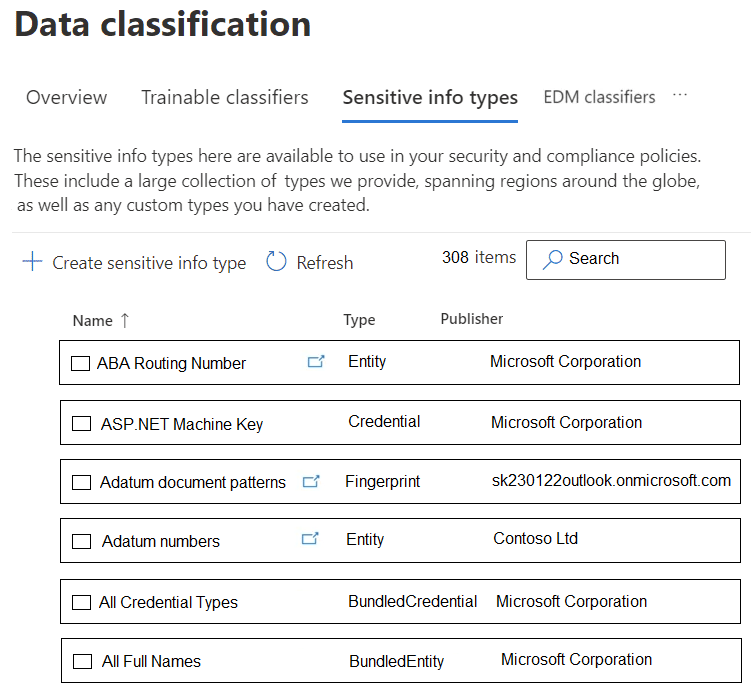
What are two SITs that you can copy and modify? To answer, select the appropriate SITs in the answer area.
NOTE: Each correct selection is worth one point.
Show Answer
Correct Answer: ABA Routing Number
Adatum numbers
Explanation: Both are Entity-type sensitive information types that can be copied as templates and modified. The credential, fingerprint, and bundled types shown cannot be copied this way.
Question 19
You have a Microsoft 365 E5 subscription that contains thee users named User1, User2, and User3 and a file named File1.docx.
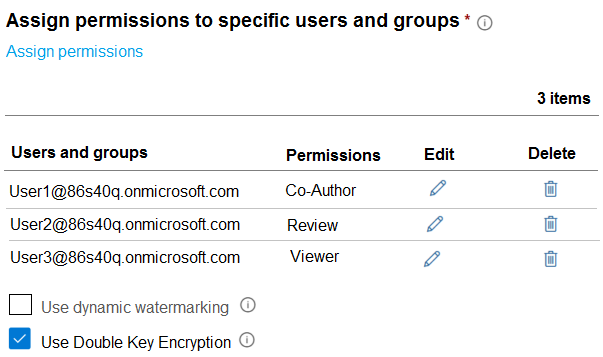
You create a sensitivity label named Label1 as shown in the following exhibit.
You apply Label1 to File1.
For which users can Microsoft 365 Copilot summarize File1?
A. No user
B. User1 only
C. User1 and User2 only
D. User1, User2, and User3
Show Answer
Correct Answer: A
Explanation: Label1 uses Double Key Encryption (DKE). Microsoft 365 Copilot can't access or process DKE-protected content, regardless of whether a user has Co-Author, Review, or Viewer permissions. Therefore, no user can have Copilot summarize File1.
Question 20
You have a Microsoft 365 E5 tenant that uses a domain named contoso.com.
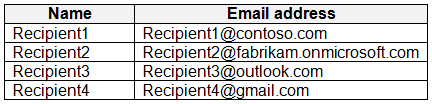
A user named User1 sends link-based, branded emails that are encrypted by using Microsoft Purview Advanced Message Encryption to the recipients shown in the following table.
For which recipients can User1 revoke the emails?
A. Recipient1 only
B. Recipient4 only
C. Recipient1 and Recipient2 only
D. Recipient3 and Recipient4 only
E. Recipient1, Recipient2, Recipient3, and Recipient4
Show Answer
Correct Answer: B
Explanation: User1 can revoke a branded encrypted email only when the recipient receives the link-based experience. Recipient1 (contoso.com) and Recipient2 (a Microsoft 365 recipient) receive the inline experience; Recipient3 (an Outlook.com/Microsoft account recipient) also receives the inline experience in a supported Outlook client. Recipient4 (Gmail) receives the link-based experience, so only that message can be revoked.
Question 21
HOTSPOT
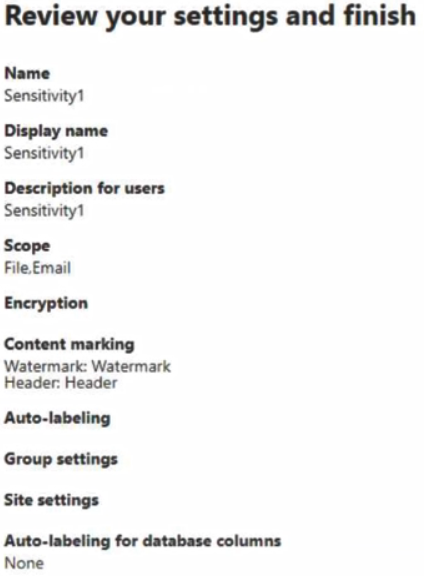
You create a sensitivity label as shown in the Sensitivity Label exhibit. (Click the Sensitivity Label tab.)
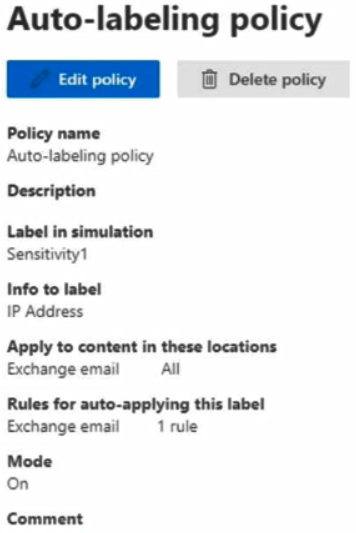
You create an auto-labeling policy as shown in the Auto Labeling Policy exhibit. (Click the Auto Labeling Policy tab.)
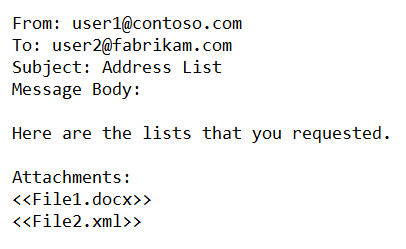
A user sends the following email:
Both attachments contain lists of IP addresses.
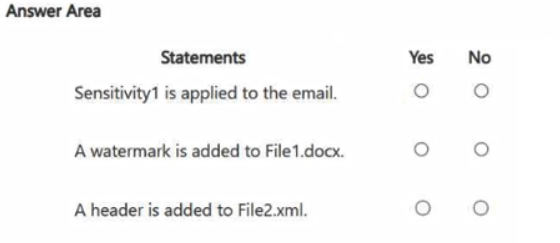
For each of the following statements, select Yes if the statement is true. Otherwise, select No.
NOTE: Each correct selection is worth one point.
Show Answer
Correct Answer: Sensitivity1 is applied to the email: Yes
A watermark is added to File1.docx: No
A header is added to File2.xml: No
Explanation: The IP addresses in the supported Word attachment can trigger the Exchange auto-labeling policy. The policy labels the email, not its attachments, so neither attachment receives the label’s content markings.
$19
Get all 269 questions with detailed answers and explanations
Instant download HTML + PDF delivered the moment payment clears.
Secure Stripe checkout we never see or store your card details.
7-day refund if files are defective see our refund policy.