HOTSPOT -
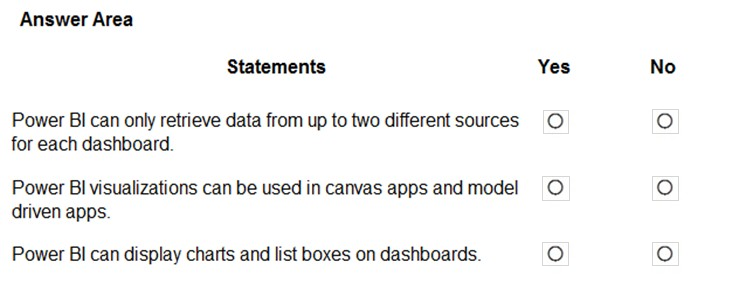
You are building Power BI visualizations for a team.
For each of the following statements, select Yes if the statement is true. Otherwise, select No.
NOTE: Each correct selection is worth one point.
Hot Area:
Show Answer
Correct Answer: 1. No
2. Yes
3. Yes
Explanation: Dashboards are not limited to two data sources. Power BI visuals can be used in canvas and model-driven apps, and dashboards can display charts and list-box visuals.
Question 24
DRAG DROP -
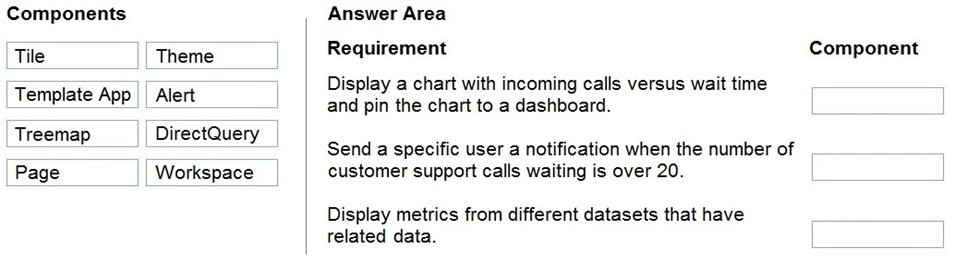
A company plans to display support call metrics on a screen that is visible to all call center staff.
You need to recommend solutions to meet the company's requirements.
What should you recommend? To answer, drag the appropriate components to the correct requirements. Each component may be used once, more than once, or not at all. You may need to drag the split bar between panes or scroll to view content.
NOTE: Each correct selection is worth one point.
Select and Place:
Show Answer
Correct Answer: Chart pinned to a dashboard: Tile
Notification when waiting calls exceed 20: Alert
Metrics from different datasets: Workspace
Explanation: A pinned chart becomes a dashboard tile. An alert notifies a user when a threshold is crossed. A workspace can contain a dashboard with tiles sourced from different datasets.
Question 24
A company has an online store to sell toys. The volume of order tracking requests has increased.
You need to allow customers to use an interactive interface on the website to request order tracking information. Which technology should you use?
A. Power Automate flows
B. Power BI
C. Customer Service Insights
D. Copilot Studio copilots
Show Answer
Correct Answer: D
Explanation: Copilot Studio copilots are designed to provide interactive conversational interfaces, such as chatbots on websites, that can answer customer questions and retrieve order tracking information. Power Automate automates workflows, Power BI is for analytics and reporting, and Customer Service Insights provides analytics rather than a customer-facing interactive interface.
Question 25
DRAG DROP -
You are a district manager for a large retail company. You want to provide sales managers with deeper sales insights to ensure that they can make more informed decisions for their stores.
Store managers must be able to view data in near real-time.
You need to create and share a Power BI dashboard that can be used by the store managers.
Which tools can you use? To answer, drag the appropriate reporting types to the correct requirements. Each reporting type may be used once, more than once, or not at all. You may need to drag the split bar between panes or scroll to view content.
NOTE: Each correct selection is worth one point.
Select and Place:
Show Answer
Correct Answer: Create a dashboard for a single store: Power BI Service only
Share the dashboard with retail managers: Power BI Service only
Explanation: Power BI dashboards are created and shared in the Power BI Service. Power BI Desktop creates reports, not dashboards.
Question 25
A retailer has decided to build a canvas app for employees. The app can run on tablets. The application has a custom authentication system.
The company wants to ensure that if an employee uses another application on the tablet, they are automatically signed out of the canvas app after five minutes.
You need to identify the control to trigger the action.
Which control should you select?
A. Screen
B. Display form
C. Timer
D. Toggle
Show Answer
Correct Answer: C
Explanation: The Timer control is designed to trigger actions after a specified interval. In a canvas app, it can be used to implement session timeout logic, such as signing a user out after five minutes of inactivity or when the app is no longer actively used. The other controls (Screen, Display form, Toggle) do not provide elapsed-time event triggering.
Question 26
A company is evaluating the capabilities in Microsoft Power Platform.
The company requires native integration with an existing Bootstrap template to facilitate a responsive design across devices.
You need to recommend the service that facilitates the integration.
Which service should you recommend?
A. Power Pages
B. Power Automate
C. Power Apps
D. Copilot
Show Answer
Correct Answer: A
Explanation: Power Pages is the Power Platform service designed for externally facing websites and supports responsive web design with Bootstrap-based templates and native integration/customization. Power Automate is for workflow automation, Power Apps is for building apps rather than integrating Bootstrap website templates, and Copilot is an AI assistant rather than a web development service.
Question 26
DRAG DROP -
A company is using Power BI to build visualizations.
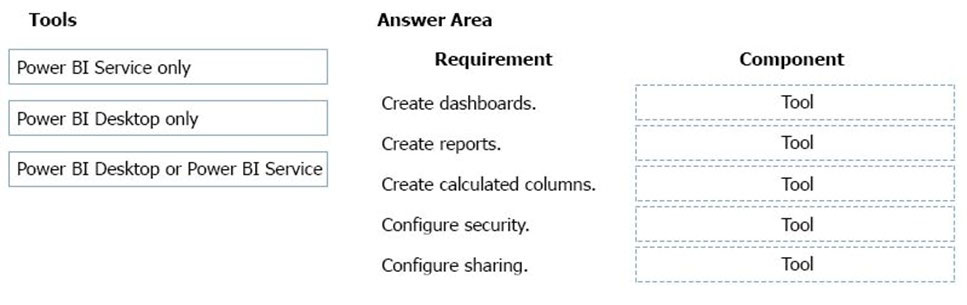
The company's IT support team needs to know when to install Power BI Desktop on users' computers and where the Power BI Service is enough to perform tasks.
You need to recommend solutions for the company.
What should you recommend? To answer, drag the appropriate components to the correct requirements. Each component may be used once, more than once, or not at all. You may need to drag the split bar between panes or scroll to view content.
NOTE: Each correct selection is worth one point.
Select and Place:
Show Answer
Correct Answer: Create dashboards — Power BI Service only
Create reports — Power BI Desktop or Power BI Service
Create calculated columns — Power BI Desktop only
Configure security — Power BI Desktop or Power BI Service
Configure sharing — Power BI Desktop or Power BI Service
Explanation: Dashboards are created in the Service, while calculated columns are created in Desktop. Reports, security, and sharing can be handled using either component.
Question 27
What is a benefit of deploying Microsoft 365 and Dynamics 365 apps in the same tenant?
A. Use Common Data Services to connect to application data.
B. You only need to set up groups in Microsoft 365 for permissions to all data.
C. Users can access both Microsoft 365 and Dynamics 365 by using Single Sign-on (SSO).
Show Answer
Correct Answer: C
Explanation: Deploying Microsoft 365 and Dynamics 365 in the same tenant lets users access both with the same identity and use single sign-on. Common Data Services (now Dataverse) can connect application data, but that is not the specific benefit of having both apps in the same tenant.
Question 27
HOTSPOT
-
A company shares a dashboard with you.
You need to add a visual to the dashboard.
Select the answer that correctly completes the sentence.
Show Answer
Correct Answer: natural language
Explanation: Power BI Q&A creates visuals by interpreting questions written in natural language, not by using Power Query or Power Fx.
Question 28
HOTSPOT
-
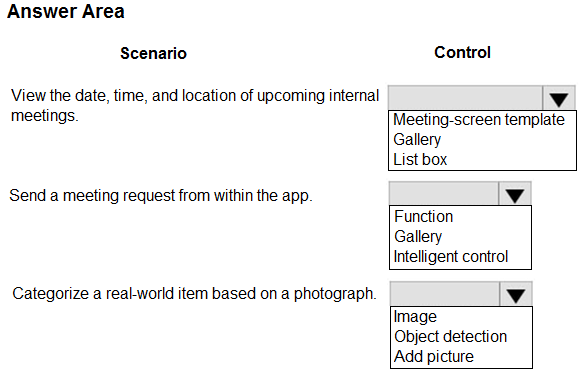
A user is creating their first Power Apps canvas app.
Which types of controls should you use for each scenario? To answer, select the appropriate options in the answer area.
NOTE: Each correct selection is worth one point.
Show Answer
Correct Answer: Gallery
Function
Object detection
Explanation: Use a Gallery to display a list of upcoming meetings, a Function control to invoke sending a meeting request, and Object detection AI to categorize a photographed real-world item.
$19
Get all 312 questions with detailed answers and explanations
Instant download HTML + PDF delivered the moment payment clears.
Secure Stripe checkout we never see or store your card details.
7-day refund if files are defective see our refund policy.