You are developing reports for a company.
You must create visualizations that include the following data:
✑ Invoices due from a third-party enterprise resource planning (ERP) system
✑ Number of calls made to the client from Microsoft Dataverse
✑ Microsoft Excel file data
The reports must be displayed in a single page.
You need to create the visualizations.
What should you use?
A. deployment pipelines
B. tables
C. columns
D. dashboards
Show Answer
Correct Answer: D
Explanation: Dashboards are designed to display multiple visualizations from different data sources on a single page. Power BI dashboards can combine tiles based on reports that use data from an ERP system, Microsoft Dataverse, and Excel, making them the appropriate choice. Deployment pipelines are for lifecycle management, while tables and columns are data structures or individual visualization elements rather than a single-page aggregation.
Question 144
HOTSPOT -
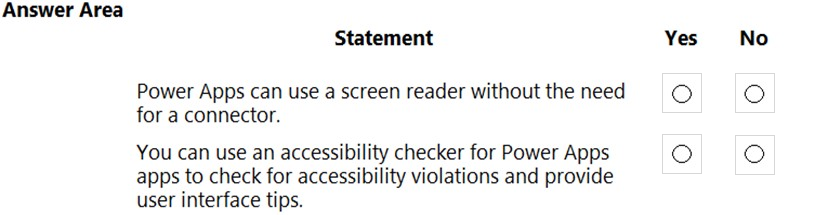
You are creating a Power Apps app. You want to ensure that the app can be used by individuals who have a vision impairment.
For each of the following statements, select Yes if the statement is true. Otherwise, select No.
NOTE: Each correct selection is worth one point.
Hot Area:
Show Answer
Correct Answer: Yes
Yes
Explanation: Power Apps supports use with screen readers without requiring a Power Platform connector, and Power Apps includes an Accessibility Checker that identifies accessibility issues and provides guidance.
Question 145
A company wants to use Power Automate to send email alerts to a specific employee whenever the company is mentioned in a Twitter post.
You need to create the flow.
From which two locations can you create the required flow? Each correct answer presents a complete solution.
NOTE: Each correct selection is worth one point.
A. a mobile app
B. a browser
C. a desktop application
D. Dynamics 365
Show Answer
Correct Answer: A, B
Explanation: The required solution is an automated cloud flow using the Twitter connector and email actions. Cloud flows can be created through the Power Automate web portal in a browser, and they can also be created from the Power Automate mobile app (with supported templates and creation capabilities). Power Automate Desktop is intended for desktop (RPA) flows rather than cloud flows like Twitter-triggered email alerts, and Dynamics 365 is not a required flow creation location.
Sources:
https://learn.microsoft.com/en-us/power-automate/email-top-scenarios
Question 146
HOTSPOT -
A company plans to implement Power Automate.
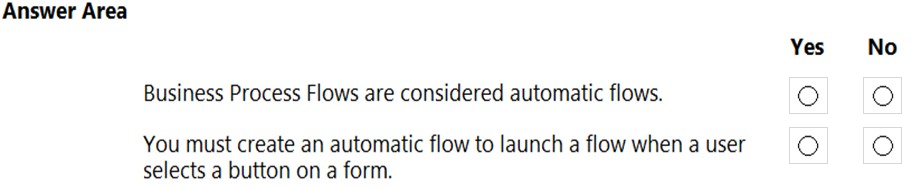
Instructions: For each of the following statements, select Yes if the statement is true. Otherwise, select No.
NOTE: Each correct selection is worth one point.
Hot Area:
Show Answer
Correct Answer: No
No
Explanation: Business Process Flows are guided user experiences, not automatic flows. A flow started by a user pressing a button is an instant flow, not an automatic flow.
Question 147
DRAG DROP -
You create and share two Power BI dashboards with an accountant. You configure the dashboards to update daily.
DashboardA shows a lock when the accountant tries to view the dashboard. DashboardB displays outdated data.
You need to identify the issues for the dashboards.
What are the issues? To answer, drag the appropriate issues to the correct dashboards. Each issue may be used once, more than once, or not at all. You may need to drag the split bar between panes or scroll to view content.
NOTE: Each correct selection is worth one point.
Select and Place:
Show Answer
Correct Answer: DashboardA: Permissions on dataset
DashboardB: Refresh has not run
Explanation: A lock icon on a shared Power BI dashboard commonly indicates the viewer lacks required permissions to the underlying dataset. Outdated data despite scheduled updates indicates the dataset refresh has not successfully run.
Question 148
You are using the Power BI service to view a visual on a report that has been shared with you.
You need to add the visual to a dashboard as a tile.
Which action should you perform?
A. Export data
B. Pin
C. Copy
D. Spotlight
Show Answer
Correct Answer: B
Explanation: To add a visual from a shared Power BI report to a dashboard as a tile, you use the Pin action. Pin creates a dashboard tile from the selected report visual. Export data downloads data, Copy duplicates content rather than creating a dashboard tile, and Spotlight emphasizes a visual during presentation but does not add it to a dashboard.
Question 150
User1 creates several Power BI dashboards for a company. User1 shares a dashboard with User2 who works for another company. User2 reports that she is able to view the dashboard. User2 forwards the email containing the dashboard sharing link that she received to User3.
User3 reports that he receives an error message when he selects the link to view the dashboard. User3 can view a dashboard that he has created.
You need to determine why User3 receives an error.
What is the issue?
A. User3 is running an out-of-date version of Power BI and must upgrade to a newer version.
B. User2 is signed in to the dashboard and must sign out before User3 can sign in.
C. Forwarding the email does not share the dashboard with User3.
D. User1 is signed in using the wrong organizational account for Power BI.
Show Answer
Correct Answer: C
Explanation: Power BI dashboard sharing grants access to specific users, not to anyone who possesses the email or link. Forwarding the sharing email does not grant User3 permission to the dashboard. User3 can access dashboards they created, so the error is due to lack of explicit sharing rather than a sign-in or version issue.
Question 151
HOTSPOT -
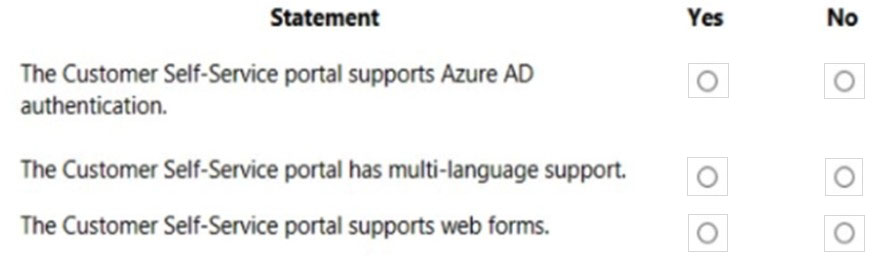
You are building a Power Apps portal by using the Customer Self-Service template.
For each of the following statements, select Yes if the statement is true. Otherwise, select No.
NOTE: Each correct selection is worth one point.
Hot Area:
Show Answer
Correct Answer: Yes
Yes
Yes
Explanation: The Customer Self-Service Power Apps portal supports Azure AD/Entra ID authentication, multi-language capabilities, and web forms.
Question 152
You create a multi-page Power BI report for an organization.
You must enable salespeople in the organization to use the report to view data relevant to their sales region only.
You need to enable security for the report.
What should you use?
A. sensitivity labels
B. Microsoft Azure Active Directory
C. Microsoft Trust Center
D. data loss prevention policies
E. row-level security
Show Answer
Correct Answer: E
Explanation: Row-level security (RLS) is the Power BI feature designed to restrict data visibility based on the viewing user. By defining roles (such as sales regions) and assigning users to those roles, each salesperson sees only the data for their own region. The other options address labeling, identity, compliance information, or data protection rather than filtering report data per user.
Question 153
HOTSPOT -
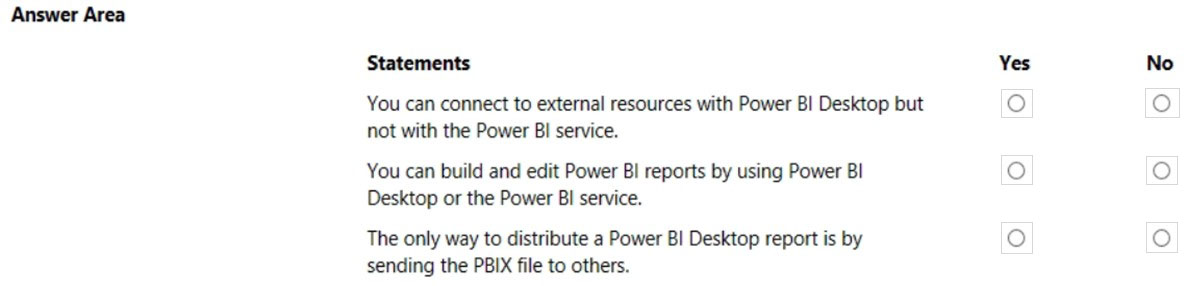
Instructions: For each of the following statements, select Yes if the statement is true. Otherwise, select No.
NOTE: Each correct selection is worth one point.
Hot Area:
Show Answer
Correct Answer: No
Yes
No
Explanation: Power BI Service can also connect to many external data sources, so the first statement is false. Reports can be built and edited in both Power BI Desktop and Power BI Service, so the second is true. PBIX is not the only distribution method; reports can be published and shared through the Power BI Service.
$19
Get all 312 questions with detailed answers and explanations
Instant download HTML + PDF delivered the moment payment clears.
Secure Stripe checkout we never see or store your card details.
7-day refund if files are defective see our refund policy.