Case study -
Overview -
Contoso, Ltd. is a consulting company that has a main office in Montreal and two branch offices in Seattle and New York.
Contoso has the users and computers shown in the following table.
The company has IT, human resources (HR), legal (LEG), marketing (MKG), and finance (FIN) departments.
Contoso recently purchased a Microsoft 365 subscription.
The company is opening a new branch office in Phoenix. Most of the users in the Phoenix office will work from home.
Existing Environment -
The network contains an Active Directory domain named contoso.com that is synced to Azure AD.
All member servers run Windows Server 2016. All laptops and desktop computers run Windows 10 Enterprise.
The computers are managed by using Microsoft Configuration Manager. The mobile devices are managed by using Microsoft Intune.
The naming convention for the computers is the department acronym, followed by a hyphen, and then four numbers, for example FIN-6785. All the computers are joined to the on-premises Active Directory domain.
Each department has an organizational unit (OU) that contains a child OU named Computers. Each computer account is in the Computers OU of its respective department.
Intune Configuration -
The domain has the users shown in the following table.
User2 is a device enrollment manager (DEM) in Intune.
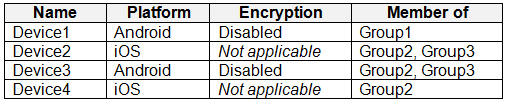
The devices enrolled in Intune are shown in the following table.
The device compliance policies in Intune are configured as shown in the following table.
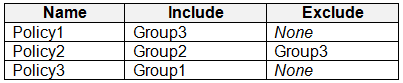
The device compliance policies have the assignments shown in the following table.
The device limit restrictions in Intune are configured as shown in the following table.
Requirements -
Planned changes -
Contoso plans to implement the following changes:
• Provide new computers to the Phoenix office users. The new computers have Windows 10 Pro preinstalled and were purchased already.
• Implement co-management for the computers.
Technical Requirements -
Contoso must meet the following technical requirements:
• Ensure that the users in a group named Group4 can only access Microsoft Exchange Online from devices that are enrolled in Intune.
• Deploy Windows 10 Enterprise to the computers of the Phoenix office users by using Windows Autopilot.
• Create a provisioning package for new computers in the HR department.
• Block iOS devices from sending diagnostic and usage telemetry data.
• Use the principle of least privilege whenever possible.
• Enable the users in the MKG department to use App1.
• Pilot co-management for the IT department.
You need to meet the technical requirements for the iOS devices.
Which object should you create in Intune?
A. a deployment profile
B. an app protection policy
C. a device configuration profile
D. a compliance policy
Show Answer
Correct Answer: C
Explanation: Create a device configuration profile and configure the iOS/iPadOS restriction to block sending diagnostic and usage data. Deployment profiles configure device enrollment, app protection policies govern app data, and compliance policies assess whether devices meet requirements.
Question 36
You have a Microsoft 365 E5 subscription and use Microsoft Defender for Cloud Apps.
You plan to perform a security audit of all the apps detected by Cloud Discovery.
You need to track which apps were audited. The solution must ensure that the list of audited apps can be displayed in the cloud app catalog.
What should you do?
A. Apply a custom app tag to each app.
B. Deploy Conditional Access App Control.
C. Define each app as a critical asset.
D. Generate a Cloud Discovery snapshot report.
E. Enable app governance.
Show Answer
Correct Answer: A
Explanation: Use a custom app tag (for example, 'Audited') on each discovered app. Custom app tags are displayed and can be used as filters in the Cloud App Catalog and Cloud Discovery views, making it easy to track which apps have already been reviewed. The other options do not provide a persistent, catalog-visible marker for audit status.
Question 36
You use Windows Admin Center to remotely administer computers that run Windows 10.
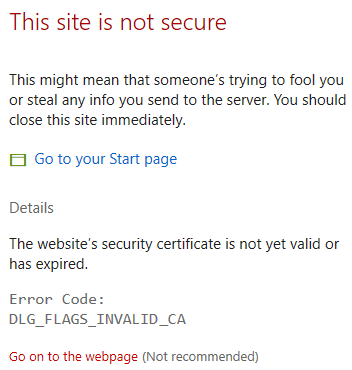
When connecting to Windows Admin Center, you receive the message shown in the following exhibit.
You need to prevent the message from appearing when you connect to Windows Admin Center.
To which certificate store should you import the certificate?
A. Client Authentication Issuers
B. Personal
C. Trusted Root Certification Authorities
Show Answer
Correct Answer: C
Explanation: The error indicates that Windows does not trust the certificate’s issuing authority. Import the certificate into the Trusted Root Certification Authorities store on the client computer so Windows trusts it when connecting to Windows Admin Center.
Question 37
HOTSPOT
-
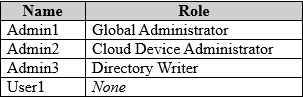
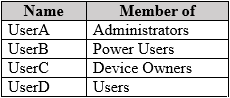
You have a Microsoft Entra tenant named contoso.com that contains the users shown in the following table.
The tenant contains a standalone workgroup computer named Computer1 that runs Window 11. Computer1 contains the local users shown in the following table.
Computer1 needs to be joined to contoso.com.
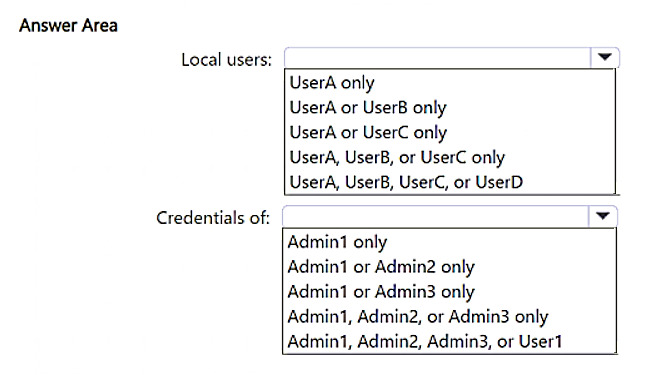
Which local users can join Computer1 to contoso.com, and the Microsoft Entra credentials of which user can be used? To answer, select the appropriate options in the answer area.
NOTE: Each correct selection is worth one point.
Show Answer
Correct Answer: Local users: UserA only
Credentials of: Admin1 or Admin2 only
Explanation: Joining a Windows 11 workgroup device to Microsoft Entra requires the current local user to be a local Administrator. For the Entra sign-in, Global Administrator and Cloud Device Administrator have the required role-based permissions; Directory Writer does not.
Question 37
You have a Microsoft Intune subscription.
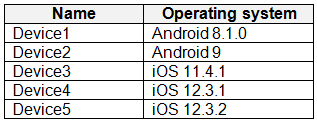
You have devices enrolled in Intune as shown in the following table.
An app named App1 is installed on each device.
What is the minimum number of app configuration policies required to manage App1?
A. 1
B. 2
C. 3
D. 4
E. 5
Show Answer
Correct Answer: B
Explanation: Intune app configuration policies for managed devices are platform-specific. The devices run two platforms—Android and iOS/iPadOS—so one policy for each platform is required. Different OS versions within a platform do not require additional policies.
Question 38
You have a Microsoft 365 E5 subscription that contains Windows 11 devices.
All the devices are onboarded to Microsoft Defender for Endpoint.
You need to compare the configuration of the devices against industry standard benchmarks.
What should you use?
A. Attack surface map
B. Events
C. Security baselines assessment
D. Initiatives
Show Answer
Correct Answer: C
Explanation: Security baselines assessment in Microsoft Defender Vulnerability Management compares device configurations against industry-standard security benchmarks (such as Microsoft security baselines/CIS where applicable) to identify configuration gaps. Attack surface map visualizes external exposure, Events shows security events, and Initiatives is an Azure/Microsoft Defender for Cloud governance concept rather than the Defender for Endpoint baseline assessment feature.
Question 38
You have a Windows 11 capable device named Device1 that runs the 64-bit version of Windows 10 Enterprise and has Microsoft Office 2019 installed.
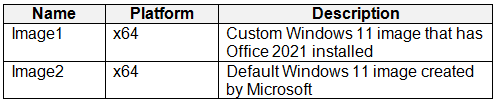
You have the Windows 11 Enterprise images shown in the following table.
Which images can be used to perform an in-place upgrade of Device1?
A. Image1 only
B. Image2 only
C. Image1 and Image2
Show Answer
Correct Answer: B
Explanation: Only Image2, the default Windows 11 image created by Microsoft, can be used for an in-place upgrade. Custom Windows images such as Image1 are not supported for this upgrade process. Both images are x64, so architecture does not distinguish them.
Question 39
HOTSPOT
-
You have a Microsoft 365 E5 subscription.
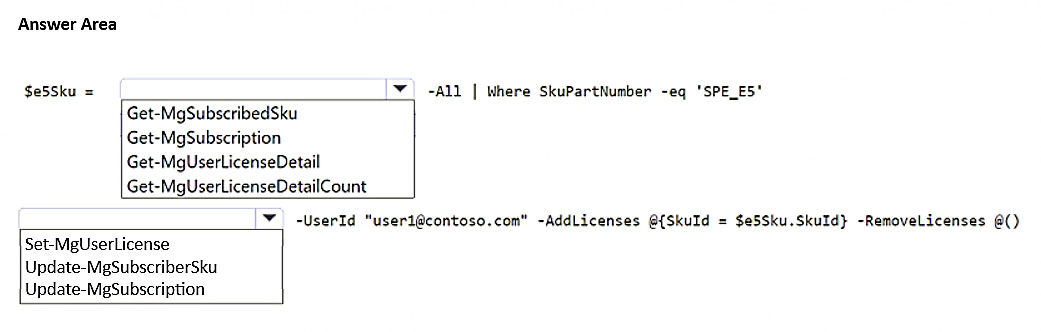
You need to use Microsoft Graph PowerShell to assign a Microsoft 365 E5 license to a new user named
.
How should you complete the command? To answer, select the appropriate options in the answer area.
NOTE: Each correct selection is worth one point.
Explanation: Retrieve the subscribed SKU for the Microsoft 365 E5 (SPE_E5) license using Get-MgSubscribedSku, then assign it to the user with Set-MgUserLicense using the retrieved SkuId.
Question 39
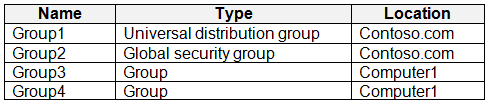
Your network contains an Active Directory domain named contoso.com. The domain contains a computer named Computer1 that runs Windows 10.
You have the groups shown in the following table.
Which groups can you add to Group4?
A. Group2 only
B. Group1 and Group2 only
C. Group2 and Group3 only
D. Group1, Group2, and Group3
Show Answer
Correct Answer: A
Explanation: Group4 is a local group on Computer1. A domain global security group such as Group2 can be added to a computer’s local group. Group1 is a distribution group, not security-enabled, and Group3 is another local group, which cannot be nested in a Windows local group. Therefore, only Group2 can be added.
Question 40
HOTSPOT
-
You have a Microsoft 365 E5 subscription.
You plan to create a Conditional Access policy named Policy1.
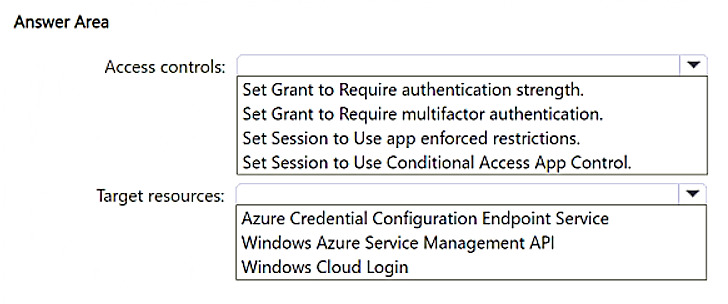
You need to ensure that only Passwordless MFA authentication methods are used when administrators attempt to access the Azure portal, Azure PowerShell, or Azure Command-Line Interface (CLI).
How should you configure Policy1? To answer, select the appropriate options in the answer area.
NOTE: Each correct selection is worth one point.
Show Answer
Correct Answer: Access controls: Set Grant to Require authentication strength.
Target resources: Windows Azure Service Management API.
Explanation: To enforce only Passwordless MFA, Conditional Access must use Require authentication strength and select the Passwordless MFA authentication strength. To cover Azure portal, Azure PowerShell, and Azure CLI, target the Windows Azure Service Management API cloud app.
$19
Get all 371 questions with detailed answers and explanations
Instant download HTML + PDF delivered the moment payment clears.
Secure Stripe checkout we never see or store your card details.
7-day refund if files are defective see our refund policy.