HOTSPOT
-
You have a Microsoft 365 subscription that includes Microsoft Intune.
From the Microsoft Intune admin center, you add the apps shown in the following table.
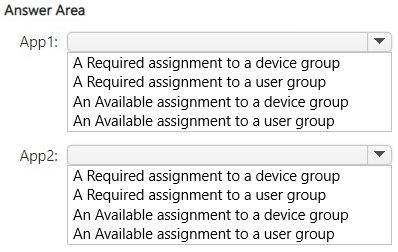
You need to configure the apps to meet the following requirements:
• App1 must automatically install for all users in the marketing department on any Windows 11 device enrolled in Intune. If a user receives a new device, App1 must install automatically.
• App2 must be available for download for any user in the HR department from a personal Android device that is not enrolled in Intune.
Which assignment should you configure for each app? To answer, select the appropriate options in the answer area.
NOTE: Each correct selection is worth one point.
Show Answer
Correct Answer: App1: A Required assignment to a user group
App2: An Available assignment to a user group
Explanation: Required user assignments follow users across enrolled devices, meeting the automatic installation requirement for marketing users on any new Windows 11 device. Available user assignments let HR users access the Android app from the Company Portal without forcing installation.
Question 114
HOTSPOT
-
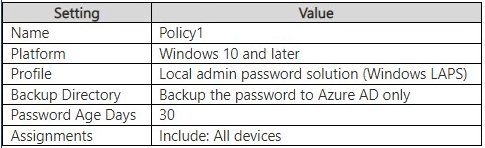
You have a Microsoft 365 E5 subscription and use Microsoft Intune. The subscription contains a Microsoft Entra tenant that syncs with an on-premises Active Directory Domain Services (AD DS) domain. The tenant has Windows Local Administrator Password Solution (Windows LAPS) enabled.
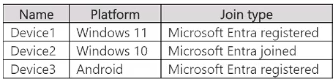
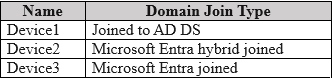
You have the Windows devices shown in the following table.
You have an Endpoint security policy that is configured as shown in the following table.
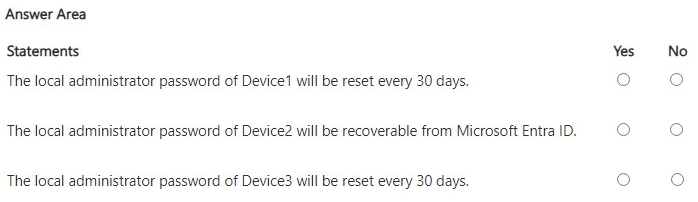
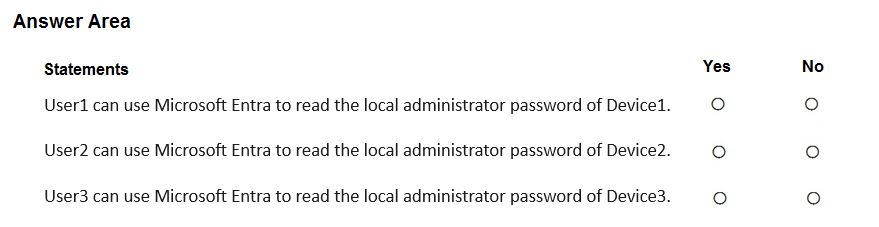
For each of the following statements, select Yes if the statement is true. Otherwise, select No.
NOTE: Each correct selection is worth one point.
Show Answer
Correct Answer: No
Yes
No
Explanation: Windows LAPS with password backup set to Microsoft Entra ID (Azure AD) only requires Microsoft Entra joined or hybrid joined devices. A purely AD DS-joined device cannot use Azure-only backup. Device2 is hybrid joined and Intune-enrolled, so its password is backed up and recoverable from Microsoft Entra ID. Device3 is not enrolled in Intune, so the Intune LAPS policy is not applied.
Question 115
HOTSPOT
-
You have an Azure subscription that is linked to a Microsoft Entra tenant. The tenant contains the devices shown in the following table.
You install the Azure Monitor Agent on all supported devices.
You create a monitored object (MO) and associate the MO to a data collection rule (DCR) named DCR1.
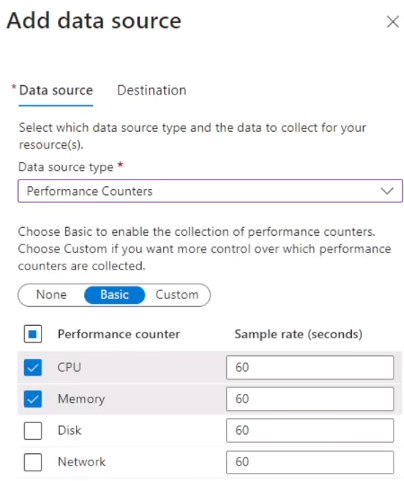
You configure DCR1 as shown in the following exhibit.
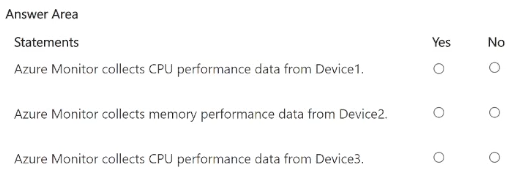
For each of the following statements, select Yes if the statement is true. Otherwise, select No.
Show Answer
Correct Answer: Device1: No
Device2: Yes
Device3: No
Explanation: AMA monitored objects with DCRs for client devices support Windows (Entra joined/hybrid joined) but not Entra registered Windows devices for this scenario, and Android doesn't support Windows performance counters. The DCR collects CPU and Memory counters, so only the Entra-joined Windows device collects the requested memory data.
Question 118
HOTSPOT
-
You have a Microsoft 365 E5 subscription.
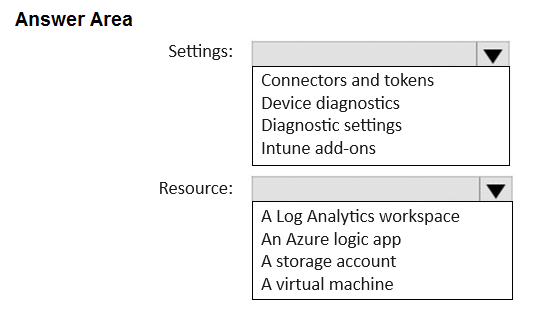
You need to route Microsoft Intune logs to an Azure resource that supports the use of visuals, monitoring, and alerting.
Which settings should you configure in Intune, and which resource should you use? To answer, select the appropriate options in the answer area.
NOTE: Each correct selection is worth one point.
Show Answer
Correct Answer: Settings: Diagnostic settings
Resource: A Log Analytics workspace
Explanation: Intune diagnostic settings can stream logs to Azure Monitor destinations. For visualization, monitoring, and alerting, the appropriate destination is an Azure Log Analytics workspace.
Question 119
You have a Microsoft 365 E5 subscription.
You need to configure the automated investigation and response (AIR) remediation level for a device named Device1 to require approval for all folders.
What should you create?
A. a security group
B. a device group
C. an administrative unit
D. an action group
Show Answer
Correct Answer: B
Explanation: Automated investigation and response (AIR) remediation levels in Microsoft Defender for Endpoint are configured at the device group level. To require approval for all folders for Device1, create a device group with the remediation level set to 'Require approval for all folders' and place Device1 in that device group.
Question 120
HOTSPOT
-
You have a Microsoft 365 E5 subscription and use Microsoft Intune.
You purchase 50 Windows devices.
You configure automatic enrollment to Intune for Microsoft Entra joined devices.
You need to use a provisioning package to join the devices to Microsoft Entra.
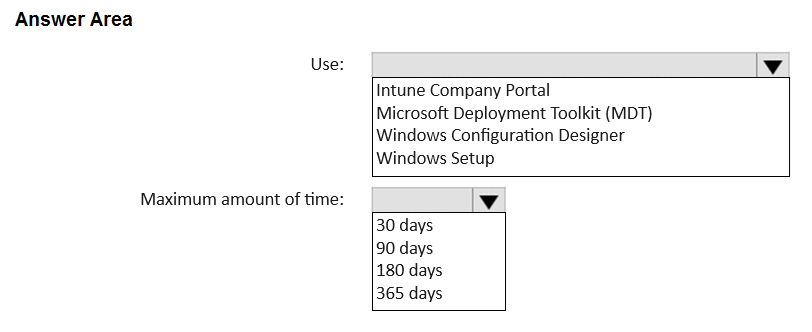
What should you use to create the provisioning package, and what is the maximum amount of time you can use the package for bulk enrollment? To answer, select the appropriate options in the answer area.
NOTE: Each correct selection is worth one point.
Show Answer
Correct Answer: Use: Windows Configuration Designer
Maximum amount of time: 180 days
Explanation: Provisioning packages for Microsoft Entra bulk enrollment are created with Windows Configuration Designer. The bulk enrollment token used in the provisioning package is valid for a maximum of 180 days.
Question 121
HOTSPOT
-
Your network contains an on-premises Active Directory Domain Services (AD DS) domain.
You have a Microsoft 365 E5 subscription that includes Microsoft Intune and syncs with the AD DS domain.
Windows Local Administrator Password Solution (Windows LAPS) is enabled in Microsoft Entra ID.
The subscription has the custom roles shown in the following table.
Microsoft Entra contains the users shown in the following table.
You have the devices shown in the following table.
For each of the following statements, select Yes if the statement is true. Otherwise, select No.
NOTE: Each correct selection is worth one point.
Show Answer
Correct Answer: No
No
Yes
Explanation: Only Microsoft Entra hybrid-joined and Entra-joined devices can store Windows LAPS passwords in Microsoft Entra ID. A password can be read only with the deviceLocalCredentials/password/read permission. Role1 has password/read but Device1 is only AD DS joined. Role2 has only standard/read (metadata only), so it cannot read Device2's password. Role3 includes password/read, so User3 can read Device3's password.
Question 122
HOTSPOT
-
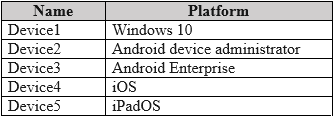
You have a Microsoft 365 tenant that uses Microsoft Intune to manage the devices shown in the following table.
You need to deploy a compliance solution that meets the following requirements:
• Marks the devices as Not Compliant if they do not meet compliance policies
• Remotely locks noncompliant devices
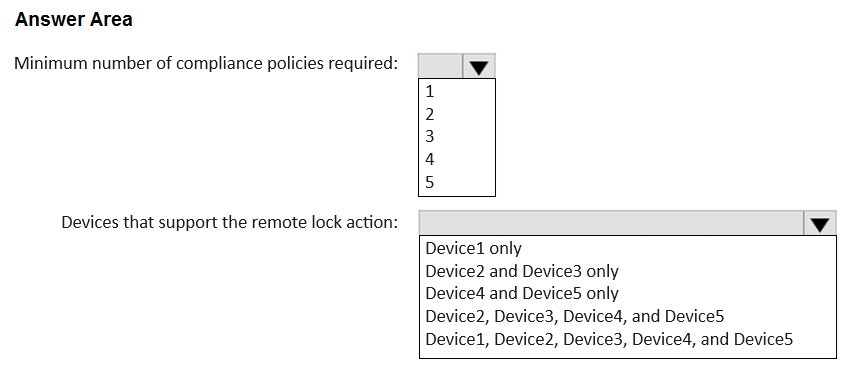
What is the minimum number of compliance policies required, and which devices support the remote lock action? To answer, select the appropriate options in the answer area.
NOTE: Each correct selection is worth one point.
Show Answer
Correct Answer: 4
Device2, Device3, Device4, and Device5
Explanation: Compliance policies are platform-specific: Windows, Android device administrator, Android Enterprise, and iOS/iPadOS (shared), requiring four policies. The remote lock action is supported for Android Device Administrator, Android Enterprise, iOS, and iPadOS, but not Windows desktop.
Question 123
HOTSPOT
-
You have a Microsoft Entra tenant that contains the devices shown in the following table.
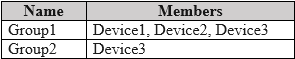
The tenant contains the groups shown in the following table.
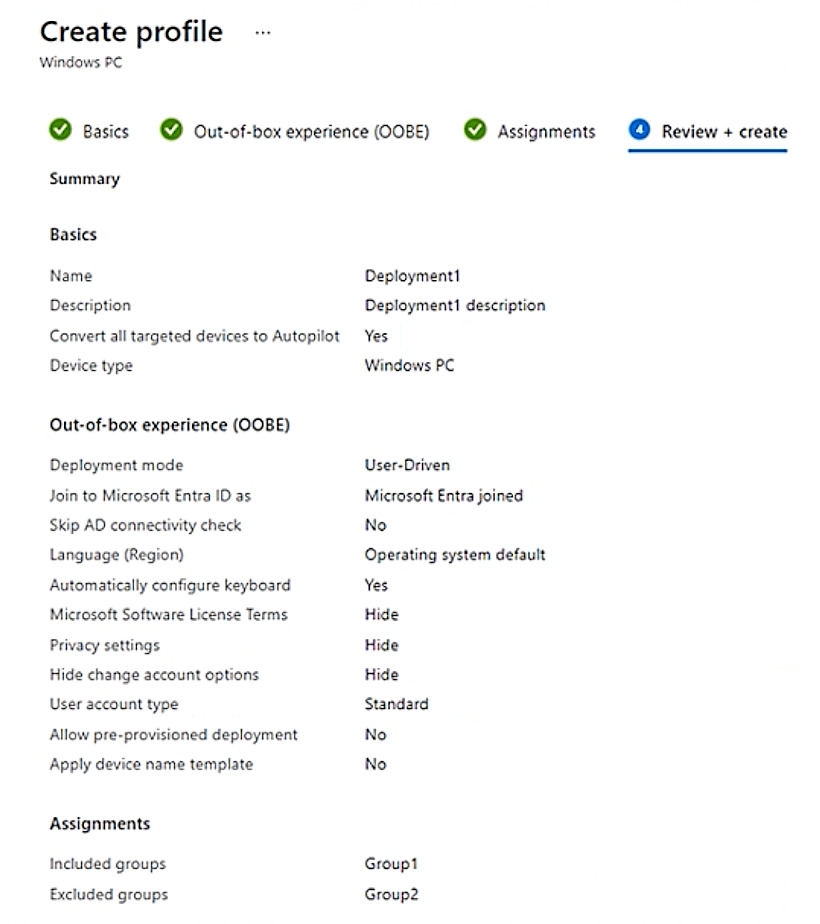
You create a Windows Autopilot deployment profile as shown in the Deployment Profile exhibit. (Click the Deployment Profile tab.)
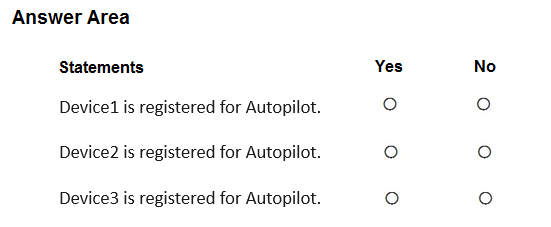
For each of the following statements, select Yes if the statement is true. Otherwise, select No.
NOTE: Each correct selection is worth one point.
Show Answer
Correct Answer: Device1: No
Device2: Yes
Device3: No
Explanation: 'Convert all targeted devices to Autopilot = Yes' registers targeted corporate, non-Autopilot devices. Personal (Entra registered) devices aren't automatically registered. Group1 is included, but Group2 is excluded, and exclusions override inclusions.
Question 124
You have a Microsoft 365 E5 subscription.
All devices are enrolled in Microsoft Intune.
You create a Conditional Access policy named Policy1 that requires multifactor authentication (MFA).
You need to ensure that Policy1 only applies to devices marked as noncompliant.
Which settings of Policy1 should you configure?
A. Device platforms under Conditions
B. Filter for devices under Conditions
C. Target resources
D. Grant
E. Session
Show Answer
Correct Answer: B
Explanation: Use the Conditional Access policy's Conditions > Filter for devices to scope the policy so it only applies to devices where the device compliance property indicates noncompliance (for example, filtering on isCompliant). The Grant control is where you require MFA, but it does not determine that the policy targets only noncompliant devices; 'Require device to be marked as compliant' would instead enforce compliance as an access requirement rather than scope the policy to noncompliant devices.
$19
Get all 371 questions with detailed answers and explanations
Instant download HTML + PDF delivered the moment payment clears.
Secure Stripe checkout we never see or store your card details.
7-day refund if files are defective see our refund policy.