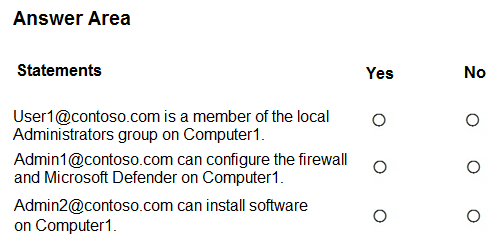
HOTSPOT -
You have an Azure AD tenant named contoso.com that contains the users shown in the following table.
You have a computer named Computer1 that runs Windows 10. Computer1 is in a workgroup and has the local users shown in the following table.
UserA joins Computer1 to Azure AD by using
.
For each of the following statements, select Yes if the statement is true. Otherwise, select No.
NOTE: Each correct selection is worth one point.
Show Answer
Correct Answer: Yes
No
No
Explanation: The Azure AD account used to join Computer1 becomes a local administrator, so User1 is an administrator. The Security Administrator and Cloud Device Administrator roles do not, by themselves, grant local administrator rights on Computer1.
Question 12
HOTSPOT
-
You have a Microsoft 365 E5 subscription.
You have 500 Windows devices that are NOT onboarded.
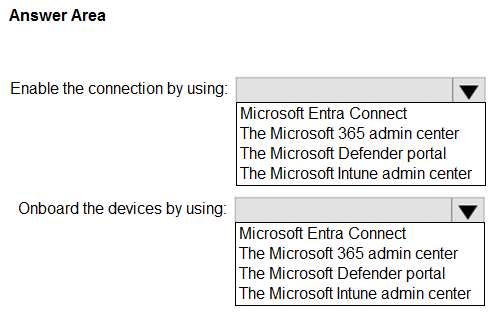
You need to connect Microsoft Intune with Microsoft Defender for Endpoint and onboard the devices. The solution must minimize administrative effort.
What should you do? To answer, select the appropriate options in the answer area.
NOTE: Each correct selection is worth one point
Show Answer
Correct Answer: Enable the connection: The Microsoft Defender portal
Onboard the devices: The Microsoft Intune admin center
Explanation: The Intune connection is enabled in the Microsoft Defender portal (Settings > Endpoints > Advanced features). To minimize effort for many devices, deploy the Defender for Endpoint onboarding policy through Microsoft Intune.
Question 12
You have a Hyper-V host. The host contains virtual machines that run Windows 10 as shown in following table.
Which virtual machines can be upgraded to Windows 11?
A. VM1 only
B. VM2 only
C. VM2 and VM3 only
D. VM1, VM2, and VM3
Show Answer
Correct Answer: B
Explanation: VM2 meets the listed requirements: it is Generation 2, has a virtual TPM, 2 virtual processors, and 4 GB of memory. VM1 is Generation 1 and lacks a TPM; VM3 has only 1 virtual processor.
Question 13
You have a Microsoft 365 subscription.
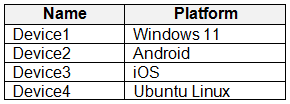
You have devices enrolled in Microsoft Intune as shown in the following table.
To which devices can you deploy apps by using Intune?
A. Device1 only
B. Device1 and Device2 only
C. Device1 and Device3 only
D. Device1, Device2, and Device3 only
E. Device1, Device2, Device3, and Device4
Show Answer
Correct Answer: D
Explanation: Intune supports app deployment to the Windows 11, Android, and iOS devices shown as Devices 1, 2, and 3. It does not support deploying apps to the Ubuntu Linux device, Device 4.
Question 13
You have a Microsoft 365 E5 subscription that contains a user named User1 and uses Microsoft Intune Suite.
You use Microsoft Intune to manage devices.
You have a device named Devic1 that is enrolled in Intune.
You need to ensure that User1 can use Remote Help from the Intune admin center for Device1.
Which three actions should you perform? Each correct answer presents part of the solution.
NOTE: Each correct selection is worth one point.
A. Deploy the Remote Help app to Device1.
B. Assign the Help Desk Operator role to User1.
C. Assign the Intune Administrator role to User1.
D. Assign a Microsoft 365 E5 license to User1.
E. Rerun device onboarding on Device1.
F. Assign the Remote Help add-on license to User1.
Show Answer
Correct Answer: A, B, F
Explanation: Deploy the Remote Help app to Device1, give User1 the Help Desk Operator permissions needed to initiate assistance, and assign User1 a license that includes Remote Help. Microsoft 365 E5 alone does not provide the Remote Help entitlement.
Question 14
You have 500 computers that run Windows 10. The computers are joined to Azure AD and enrolled in Microsoft Intune.
You plan to distribute certificates to the computers by using Simple Certificate Enrollment Protocol (SCEP).
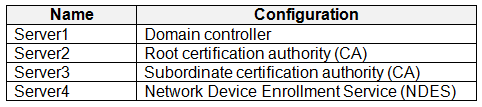
You have the servers shown in the following table.
NDES issues certificates from the subordinate CA.
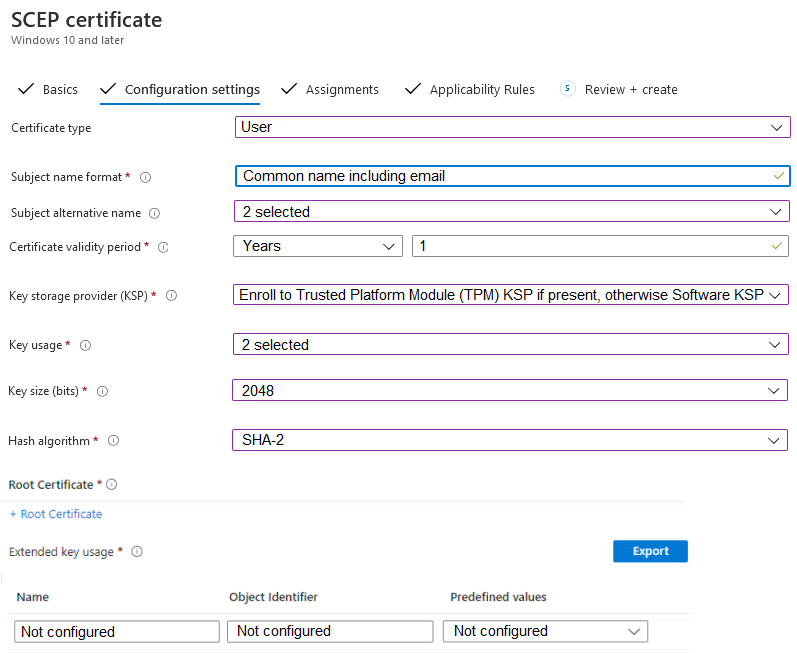
You are configuring a device configuration profile as shown in the exhibit. (Click the Exhibit tab.)
You need to complete the SCEP profile.
On which server is the required root certificate located?
A. Server1
B. Server2
C. Server3
D. Server4
Show Answer
Correct Answer: B
Explanation: The SCEP profile’s Root Certificate setting identifies the trusted root CA certificate that anchors the certificate chain. Server2 is the root CA; Server3 is the subordinate issuing CA, and Server4 hosts NDES.
Question 14
HOTSPOT -
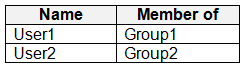
You have an Azure AD tenant that contains the users shown in the following table.
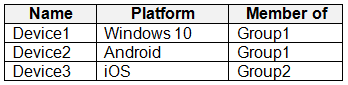
You have devices enrolled in Microsoft Intune as shown in the following table.
From Intune, you create and send a custom notification named Notification1 to Group1.
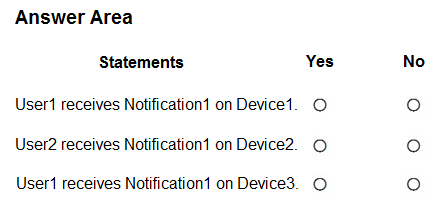
For each of the following statements, select Yes if the statement is true. Otherwise, select No.
NOTE: Each correct selection is worth one point.
Show Answer
Correct Answer: User1 on Device1: No
User2 on Device2: No
User1 on Device3: Yes
Explanation: Custom notifications sent to a group target its users, not its devices. Windows is unsupported, and User2 is not in Group1. User1 is in Group1, so the notification reaches User1’s enrolled iOS device regardless of the device’s group.
Question 15
SIMULATION
-
Username and password
-
Use the following login credentials as needed:
To enter your username, place your cursor in the Sign in box and select the username below.
To enter your password, place your cursor in the Enter password box and select the password below.
Microsoft 365 Username:
Microsoft 365 Password: i7A4$3o^HGD3L~=c[9xuOhM%^4:s11Ai
If the Microsoft Edge browser or Microsoft 365 portal does not load successfully, select the Microsoft Edge browser icon from the task bar, type the URL “https://portal.office.com”, and press Enter.
The following information is for technical support purposes only:
Lab Instance: 48262079
-
You need to create a Conditional Access policy for the sg-Legal group that requires Android devices to be compliant when they connect to Microsoft Office 365. Access to other apps and devices must NOT be affected.
Show Answer
Correct Answer: Create a Conditional Access policy:
Assignments: Users = sg-Legal
Target resources = Office 365
Conditions: Device platforms = Android
Grant: Require device to be marked as compliant
Enable the policy.
Explanation: This scopes the policy only to the sg-Legal group, only for Microsoft Office 365 cloud apps, and only for Android devices, leaving other apps and device platforms unaffected.
Question 15
You have devices enrolled in Microsoft Intune as shown in the following table.
For which devices can you manage updates by using Intune?
A. Device1 only
B. Device1 and Device2 only
C. Device1 and Device3 only
D. Device1, Device3, and Device4 only
E. Device1, Device2, Device3, and Device4
Show Answer
Correct Answer: E
Explanation: Intune can manage OS updates for Windows, iOS/iPadOS, and macOS. It can also manage Android system updates for supported Android Enterprise enrollment types, such as corporate-owned fully managed devices. Therefore, all four platforms are supported, although Android update management depends on the device’s enrollment type.
Question 15
HOTSPOT -
Case study -
Overview -
ADatum Corporation is a consulting company that has a main office in Montreal and branch offices in Seattle and New York.
ADatum has a Microsoft 365 E5 subscription.
Environment -
Network Environment -
The network contains an on-premises Active Directory domain named adatum.com. The domain contains the servers shown in the following table.
ADatum has a hybrid Azure AD tenant named adatum.com.
Users and Groups -
The adatum.com tenant contains the users shown in the following table.
All users are assigned a Microsoft Office 365 license and an Enterprise Mobility + Security E3 license.
Enterprise State Roaming is enabled for Group1 and GroupA.
Group1 and Group2 have a Membership type of Assigned.
Devices -
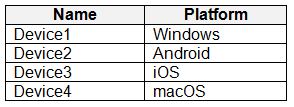
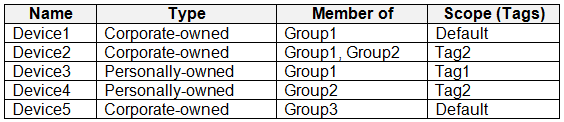
ADatum has the Windows 10 devices shown in the following table.
The Windows 10 devices are joined to Azure AD and enrolled in Microsoft Intune.
The Windows 10 devices are configured as shown in the following table.
All the Azure AD joined devices have an executable file named C:\AppA.exe and a folder named D:\Folder1.
Microsoft Intune Configuration -
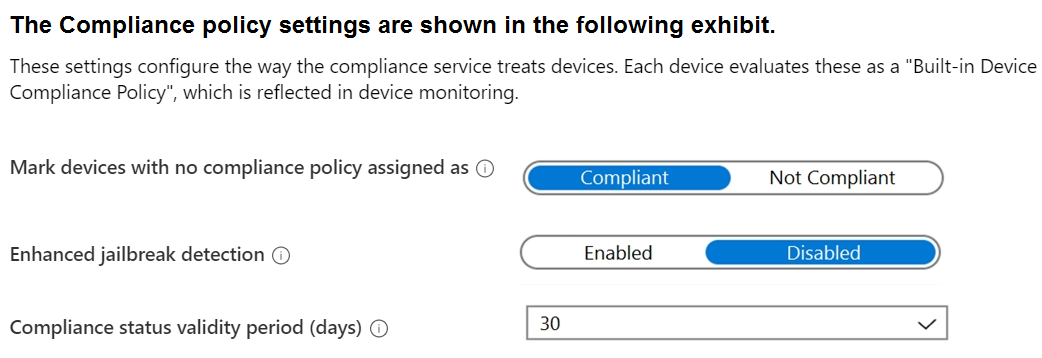
Microsoft Intune has the compliance policies shown in the following table.
The Automatic Enrollment settings have the following configurations:
MDM user scope: GroupA -
MAM user scope: GroupB -
You have an Endpoint protection configuration profile that has the following Controlled folder access settings:
Name: Protection1 -
Folder protection: Enable -
List of apps that have access to protected folders: C:\*\AppA.exe
List of additional folders that need to be protected: D:\Folder1
Assignments:
Included groups: Group2, GroupB -
Windows Autopilot Configuration -
ADatum has a Windows Autopilot deployment profile configured as shown in the following exhibit.
Currently, there are no devices deployed by using Windows Autopilot.
The Intune connector for Active Directory is installed on Server1.
Requirements -
Planned Changes -
ADatum plans to implement the following changes:
Purchase a new Windows 10 device named Device6 and enroll the device in Intune
New computers will be deployed by using Windows Autopilot and will be hybrid Azure AD joined.
Deployed a network boundary configuration profile that will have the following settings:
Name: Boundary1 -
Network boundary: 192.168.1.0/24
Scope tags: Tag1 -
Assignments:
Included groups: Group1, Group2 -
Deploy two VPN configuration profiles named Connection1 and Connection2 that will have the following settings:
Name: Connection1 -
Connection name: VPN1 -
Connection type: L2TP -
Assignments:
Included groups: Group1, Group2, GroupA
Excluded groups: --
Name: Connection2 -
Connection name: VPN2 -
Connection type: IKEv2 -
Assignments:
Included groups: GroupA -
Excluded groups: GroupB -
Technical Requirements -
ADatum must meet the following technical requirements:
Users in GroupA must be able to deploy new computers.
Administrative effort must be minimized.
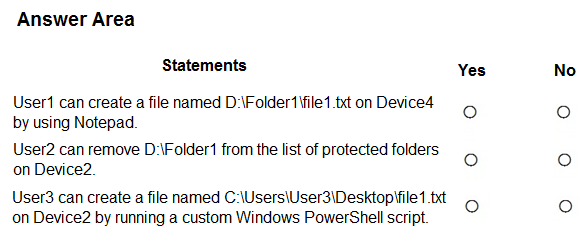
For each of the following statements, select Yes if the statement is true. Otherwise, select No.
NOTE: Each correct selection is worth one point.
Show Answer
Correct Answer: 1. No
2. No
3. No
Explanation: Protection1 applies to Device2 and Device4. Controlled folder access blocks Notepad from writing to D:\Folder1, and User2 cannot remove an Intune-managed protected folder locally. Desktop is protected by default, so the PowerShell script cannot write the file there.
$19
Get all 371 questions with detailed answers and explanations
Instant download HTML + PDF delivered the moment payment clears.
Secure Stripe checkout we never see or store your card details.
7-day refund if files are defective see our refund policy.