You have a Microsoft 365 E5 subscription.
All devices are enrolled in Microsoft Intune.
You need to ensure that devices that have NOT checked in for 30 days are deleted from Intune.
What should you configure from the Microsoft Intune admin center?
A. a device limit restriction
B. automatic enrollment
C. a device clean-up rule
D. a configuration profile
Show Answer
Correct Answer: C
Explanation: Configure a device clean-up rule in the Microsoft Intune admin center. Device clean-up rules automatically remove stale devices that have not checked in for a specified number of days, such as 30. Device limit restrictions control how many devices a user can enroll, automatic enrollment configures enrollment behavior, and configuration profiles apply settings but do not delete inactive devices.
Question 126
You have a Microsoft 365 E5 subscription.
You use Microsoft Intune to manage all Windows 11 devices.
You create an attack surface reduction (ASR) policy named Profile1 based on the Attack Surface Reduction Rules profile and assign Profile1 to all the devices.
A user reports that an Adobe Reader plug-in is now blocked.
You need to ensure that the plug-in is unblocked.
What should you do?
A. Create an Endpoint Privilege Management policy and assign the policy to all the devices.
B. Add a scope tag to Profile1.
C. Configure ASR Only Per Rule Exclusions in Profile1.
D. Create a device compliance policy and assign the policy to all the devices.
Show Answer
Correct Answer: C
Explanation: Attack Surface Reduction (ASR) rules can block specific applications or behaviors. To allow a legitimate application or plug-in that is being blocked by an ASR rule, configure ASR Only Per Rule Exclusions in the ASR policy. Endpoint Privilege Management is unrelated to ASR blocking, scope tags only affect administrative visibility, and device compliance policies do not control ASR rule behavior.
Question 127
You have a Microsoft 365 E5 subscription.
All Windows devices are enrolled in Microsoft Intune.
You need to create an app protection policy named Policy1 and apply Policy1 to the devices.
What can you protect by using Policy1?
A. Microsoft Outlook
B. Microsoft OneDrive
C. Microsoft Teams
D. Microsoft Edge
Show Answer
Correct Answer: D
Explanation: For Microsoft Intune app protection policies on the Windows platform, the supported app is Microsoft Edge. Outlook, OneDrive, and Teams are supported by app protection policies on mobile platforms, but Windows app protection is specifically for Edge.
Question 128
You have a Microsoft 365 subscription that includes Microsoft Intune.
You create a new Android app protection policy named Policy1 that prevents screen captures in all Microsoft apps.
You discover that an unmanaged email client installed on Android devices can still capture screens.
You need to ensure that users can only use Microsoft apps to access email.
What should you do?
A. Create a Conditional Access policy.
B. Create a compliance policy.
C. Modify the Data protection settings of Policy1.
D. Modify the assignments of Policy1.
Show Answer
Correct Answer: A
Explanation: App protection policies only govern protected (managed) apps and cannot prevent an unmanaged email client from accessing email or taking screenshots. To ensure users can access email only through approved Microsoft apps such as Outlook, configure a Conditional Access policy that requires an approved client app or app protection policy for Exchange Online access, thereby blocking unmanaged email clients.
Question 129
HOTSPOT
-
You have a Microsoft 365 E5 subscription.
You use Microsoft Intune to manage Windows 365 Cloud PC devices.
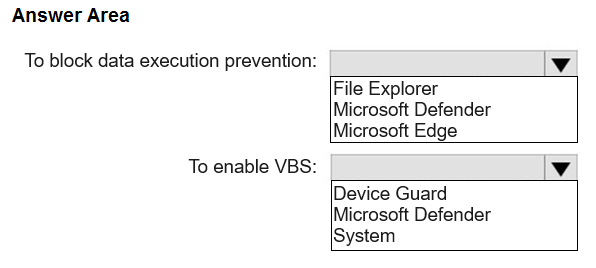
You need to deploy a Windows 365 Security Baseline to the Cloud PC devices. The solution must meet the following requirements:
• Block data execution prevention.
• Enable virtualization-based security (VBS) and Secure Boot.
What should you configure for the Windows 365 Security Baseline profile? To answer, select the appropriate options in the answer area.
NOTE: Each correct selection is worth one point.
Show Answer
Correct Answer: File Explorer
Device Guard
Explanation: The Windows 365 Security Baseline includes the 'Turn off Data Execution Prevention for Explorer' setting under File Explorer (set to Disabled to keep DEP enabled) and the 'Enable Virtualization Based Security' setting under Device Guard, where VBS with Secure Boot is configured.
Question 130
You have a Microsoft 365 subscription that includes Microsoft Intune. The subscription contains corporate-owned, fully managed Android Enterprise devices.
You plan to deploy a configuration profile that will have a device restrictions profile type named Profile1. Profile1 will assign maintenance windows for system updates.
What should you configure from the Configuration settings for Profile1?
A. Device experience
B. General
C. Connectivity
D. Power Settings
Show Answer
Correct Answer: B
Explanation: For Android Enterprise corporate-owned, fully managed devices, the Device restrictions profile places the System update configuration, including the Maintenance window option, under the General category. This is where you configure update maintenance windows for managed devices.
Question 131
You have a Microsoft 365 E5 subscription that uses Microsoft Intune.
You configure Intune to send log data to Log Analytics.
You need to review events involving devices that fail to enroll in Intune.
What should you monitor?
A. operational logs
B. audit logs
C. the Intune Device log
D. device compliance organizational logs
Show Answer
Correct Answer: A
Explanation: Operational logs in Intune Log Analytics include enrollment success and failure events for users and devices, as well as noncompliance details. Audit logs track administrative changes, and the Intune Device log is not the Log Analytics category used for enrollment failures. Device compliance organizational logs focus on compliance status rather than enrollment failures.
Question 132
You have a Microsoft 365 subscription that includes Microsoft Intune. The subscription contains Windows 11 devices enrolled in Intune. The subscription contains three groups named Departement1, Department2, and Department3.
You need to deploy Microsoft 365 Apps to the Windows 11 devices. The solution must meet the following requirements:
• Users in Department1 and Department2 must receive the full Microsoft 365 Apps suite, including Microsoft Project and Visio.
• Users in Department3 must receive the full Microsoft 365 Apps suite, including Microsoft Project, but without Visio.
• All other users must receive the full Microsoft 365 Apps suite without Microsoft Project or Visio.
What is the minimum number of deployments you should create?
A. 1
B. 2
C. 3
D. 4
Show Answer
Correct Answer: C
Explanation: Three separate Microsoft 365 Apps deployments are required because the included apps differ across three distinct target populations: (1) Department1 and Department2 receive Microsoft 365 Apps with Project and Visio, (2) Department3 receives Microsoft 365 Apps with Project but without Visio, and (3) all remaining users receive Microsoft 365 Apps without Project or Visio. These app inclusion differences cannot be achieved with fewer than three distinct deployment configurations.
Question 133
You have a Microsoft 365 E5 subscription that includes Microsoft Intune and contains a user named Admin1.
Admin1 must use the Microsoft Intune admin center to perform the following tasks:
• Create and assign apps and policies to users and devices by using Intune.
• Create, assign, and delete Windows 365 Cloud PC provisioning policies.
You need to assign the required roles to Admin1. The solution must meet the following requirements:
• Follow the principle of least privilege.
• Minimize administrative effort.
What should you do?
A. Assign Admin1 the Help Desk Operator role.
B. Assign Admin1 the Cloud PC Reader role.
C. Assign Admin1 the Cloud PC Administrator role.
D. Create a custom Microsoft Entra role and assign the role to Admin1.
E. Create a custom Intune role and assign the role to Admin1.
Show Answer
Correct Answer: C
Explanation: The built-in Cloud PC Administrator role is designed for Windows 365 administration, including creating, assigning, and deleting Cloud PC provisioning policies. It also includes the necessary Intune permissions used to manage Cloud PCs, avoiding the need to create a custom role. This satisfies the requirement to minimize administrative effort while providing the required capabilities with a built-in least-privilege role.
Question 134
HOTSPOT
-
You have a Microsoft 365 E5 subscription that includes Microsoft Intune. The subscription contains a group named Group1. Group1 contains devices enrolled in Intune.
You deploy Remote Help in Intune.
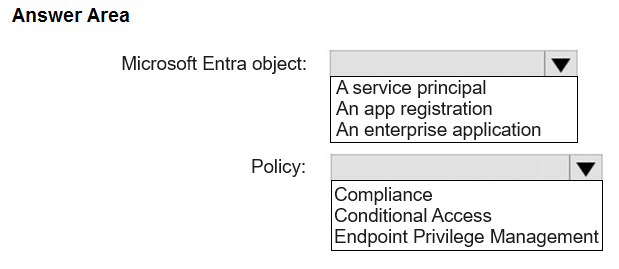
You need to configure Remote Help to only allow support administrators to join Remote Help sessions from the devices in Group1.
Which type of Microsoft Entra object should you create, and which type of policy should you configure? To answer, select the appropriate options in the answer area.
NOTE: Each correct selection is worth one point.
Show Answer
Correct Answer: Microsoft Entra object: A service principal
Policy: Conditional Access
Explanation: To control who can use Remote Help, create the Remote Assistance Service service principal in Microsoft Entra ID so it can be targeted, then apply a Conditional Access policy to restrict Remote Help access to the intended users/devices.
$19
Get all 371 questions with detailed answers and explanations
Instant download HTML + PDF delivered the moment payment clears.
Secure Stripe checkout we never see or store your card details.
7-day refund if files are defective see our refund policy.