HOTSPOT
-
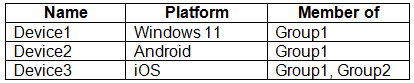
You have a Microsoft 365 E5 subscription that contains the devices shown in the following table.
All the devices are enrolled in Microsoft Intune.
The devices have apps installed as shown in the following table.
In Intune, you create an app configuration policy named Policy1 that has the following settings:
• Device enrollment type: Managed apps
• Target policy to: All Microsoft Apps
• Assignments
o Included groups: Group1
o Excluded groups: Group2
For each of the following statements, select Yes if the statement is true. Otherwise, select No.
NOTE: Each correct selection is worth one point.
Show Answer
Correct Answer: No
Yes
No
Explanation: Managed apps app configuration policies target supported mobile app platforms (Android/iOS), not Windows. Device2 is included and OneDrive is a Microsoft app. Device3 is in both included and excluded groups, and exclusion takes precedence.
Question 20
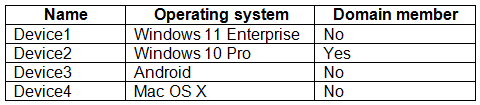
You have the devices shown in the following table.
You plan to implement Microsoft Defender for Endpoint.
You need to identify which devices can be onboarded to Microsoft Defender for Endpoint.
What should you identify?
A. Device1 only
B. Device2 only
C. Device1, Device2 only
D. Device1, Device2, and Device3 only
E. Device1, Device2, Device3, and Device4
Show Answer
Correct Answer: D
Explanation: Device1 (Windows 11 Enterprise), Device2 (Windows 10 Pro), and Device3 (Android) can be onboarded. Domain membership is not required for onboarding. Device4 is listed as Mac OS X, which is not a supported modern macOS version for Defender for Endpoint.
Question 20
You have a Microsoft 365 E5 subscription that contains 150 hybrid Azure AD joined Windows devices. All the devices are enrolled in Microsoft Intune.
You need to configure Delivery Optimization on the devices to meet the following requirements:
Allow downloads from the internet and from other computers on the local network.
Limit the percentage of used bandwidth to 50.
What should you use?
A. a configuration profile
B. a Windows Update for Business Group Policy setting
C. a Microsoft Peer-to-Peer Networking Services Group Policy setting
D. an Update ring for Windows 10 and later profile
Show Answer
Correct Answer: A
Explanation: Use an Intune configuration profile to configure Delivery Optimization. Set the download mode to allow downloads from the internet and peers on the local network, and set the bandwidth limit to 50%.
Question 21
HOTSPOT
-
You have a Microsoft 365 E5 subscription that contains 500 Windows devices enrolled in Microsoft Intune.
You deploy Microsoft Defender for Endpoint.
You need to onboard the devices to Defender for Endpoint. The solution must minimize administrative effort.
What should you do? To answer, select the appropriate options in the answer area.
NOTE: Each correct selection is worth one point.
Show Answer
Correct Answer: Advanced features
An endpoint detection and response (EDR) policy
Explanation: Enable the Microsoft Defender for Endpoint–Intune connection under Advanced features in the Defender portal, then deploy an Intune EDR policy to automatically onboard managed devices with minimal administrative effort.
Question 21
You are implementing Microsoft Intune Suite.
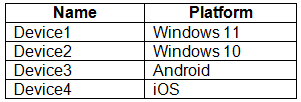
You enroll devices in Intune as shown in the following table.
The performance of which devices can be analyzed by using Endpoint analytics?
A. Device1 only
B. Device1 and Device2 only
C. Device1, Device2, and Device3 only
D. Device1, Device2, and Device4 only
E. Device1, Device2, Device3, and Device4
Show Answer
Correct Answer: B
Explanation: Endpoint analytics supports eligible Windows 10 and Windows 11 devices. Device1 runs Windows 11 and Device2 runs Windows 10; Android and iOS devices aren’t supported.
Question 21
HOTSPOT -
You have a Microsoft 365 E5 subscription.
You create a new update rings policy named Policy1 as shown in the following exhibit.
Use the drop-down menus to select the answer choice that completes each statement based on the information presented in the graphic.
NOTE: Each correct selection is worth one point.
Show Answer
Correct Answer: Fixes and improvements: will be installed immediately
New Windows functionality: 60 days
Explanation: Quality updates have a 0-day deferral and a 0-day deadline. Feature updates have a 30-day deferral followed by a 30-day installation deadline, totaling 60 days from release.
Question 22
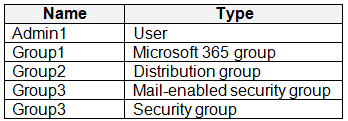
You have a Microsoft 365 tenant that contains the objects shown in the following table.
In the Microsoft Intune admin center, you are creating a Microsoft 365 Apps app named App1.
To which objects can you assign App1?
A. Group3 and Group4 only
B. Admin1, Group3, and Group4 only
C. Group1, Group3, and Group4 only
D. Group1, Group2, Group3, and Group4 only
E. Admin1, Group1, Group2, Group3, and Group4
Show Answer
Correct Answer: C
Explanation: App1 can be assigned to Microsoft 365 groups, mail-enabled security groups, and security groups. It can’t be assigned directly to an individual user or a distribution group. Therefore, the assignable objects are Group1, Group3, and Group4.
Question 23
You have a Microsoft 365 E5 subscription that contains 500 macOS devices enrolled in Microsoft Intune.
You need to ensure that you can apply Microsoft Defender for Endpoint antivirus policies to the macOS devices. The solution must minimize administrative effort.
What should you do?
A. Onboard the macOS devices to the Microsoft Purview compliance portal.
B. From the Microsoft Intune admin center, create a security baseline.
C. Install Defender for Endpoint on the macOS devices.
D. From the Microsoft Intune admin center, create a configuration profile.
Show Answer
Correct Answer: C
Explanation: Microsoft Defender for Endpoint must be installed on the macOS devices for them to receive and enforce its antivirus policies. Intune can deploy the app across the enrolled devices, avoiding manual installation. A security baseline or configuration profile is not a substitute for the Defender app.
Question 24
HOTSPOT
-
You have a Microsoft 365 subscription that contains the users shown in the following table.
You have the devices shown in the following table.
The Windows Enrollment settings have the following configurations:
• MDM user scope: Group1
• Windows Information Protection (WIP) user scope: Group2
You configure Microsoft Intune enrollment restrictions as shown in the exhibit. (Click the Exhibit tab.)
For each of the following statements, select Yes if the statement is true. Otherwise, select No.
NOTE: Each correct selection is worth one point.
Show Answer
Correct Answer: Yes
Yes
Yes
Explanation: The enrollment restriction allows Windows, macOS, and Android platforms and personally owned devices. The MDM user scope governs Windows automatic MDM enrollment, while macOS and Android can be enrolled through supported manual Intune enrollment methods; the WIP scope is unrelated to enrollment.
Question 24
You have an Azure AD tenant named contoso.com.
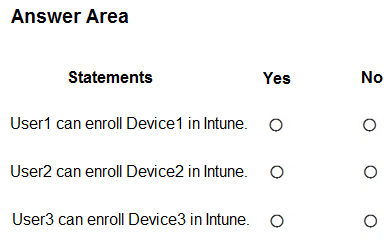
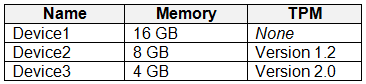
You plan to use Windows Autopilot to configure the Windows 10 devices shown in the following table.
Which devices can be configured by using Windows Autopilot self-deploying mode?
A. Device2 only
B. Device3 only
C. Device1 and Device3 only
D. Device1, Device2, and Device3
Show Answer
Correct Answer: B
Explanation: Windows Autopilot self-deploying mode requires a TPM 2.0 chip that supports device attestation. Device1 has no TPM, Device2 has TPM 1.2, and only Device3 has TPM 2.0.
$19
Get all 371 questions with detailed answers and explanations
Instant download HTML + PDF delivered the moment payment clears.
Secure Stripe checkout we never see or store your card details.
7-day refund if files are defective see our refund policy.