HOTSPOT
-
This is a case study. Case studies are not timed separately. You can use as much exam time as you would like to complete each case. However, there may be additional case studies and sections on this exam. You must manage your time to ensure that you are able to complete all questions included on this exam in the time provided.
To answer the questions included in a case study, you will need to reference information that is provided in the case study. Case studies might contain exhibits and other resources that provide more information about the scenario that is described in the case study. Each question is independent of the other questions in this case study.
At the end of this case study, a review screen will appear. This screen allows you to review your answers and to make changes before you move to the next section of the exam. After you begin a new section, you cannot return to this section.
To start the case study
-
To display the first question in the case study, click the Next button. Use the buttons in the left pane to explore the content of the case study before you answer the questions. Clicking these buttons displays information such as business requirements, existing environment, and problem statements. When you are ready to answer a question, click the Question button to return to the question.
Background
-
Fabrikam, Inc., is a manufacturer of products for the gift industry. The company plans to implement Business Central as its new enterprise resource planning (ERP) system.
The company sells to two types of customers: wholesale and retail. Retail customers order at special events and online. Wholesale customers send in orders by email.
Current Environment
-
Order processing
-
• The company uses a purchase order (PO) workflow for any PO over $500.
• The system has been fully configured for sales order prepayments and will check for a prepayment invoice at posting.
• Customers can special order products with a prepayment that is due on receipt.
Invoicing
-
• Wholesale customer payment terms are net 30, with a 2% discount if paid within 10 days.
• Retail customer payment terms are payable on receipt or shipment.
Reporting
-
• The company uses headcount (number of employees) and square footage for statistical accounts.
Integrations
-
The company currently uses Outlook, Excel, Word, and Teams to communicate internally and externally with customers and vendors.
Requirements
-
Order processing
-
• The company must be able to combine multiple purchase receipts into one vendor invoice.
• Posted vendor invoices must be reverted when damages are reported or a product is returned to the vendor.
• Fully invoiced POs must not appear on the PO list page.
• Customer prepayments vary based on customer relationship. Special orders from new customers have a 25% prepayment. Established customers have only a 15% prepayment.
• The company must be able to approve POs by email without opening Business Central.
• Customers often reorder the same items with similar quantities. The system must be configured to ask the user if recurring lines should be added to sales orders.
Invoicing
-
• Customer revenue must be posted to separate general ledger (G/L) accounts based on customer type. The G/L account must have subcategories for wholesale and retail revenue.
• Accounts receivable must be posted to separate G/L accounts based on customer type. The G/L account must have subcategories for wholesale and retail accounts receivable.
• Currently, inventory is sold at a cost based on purchase and sales over a period.
Reporting
-
• Financial reports must include statistical accounts.
• The financial report structure must map to account categories.
Integrations
-
The company requires the following integration capabilities:
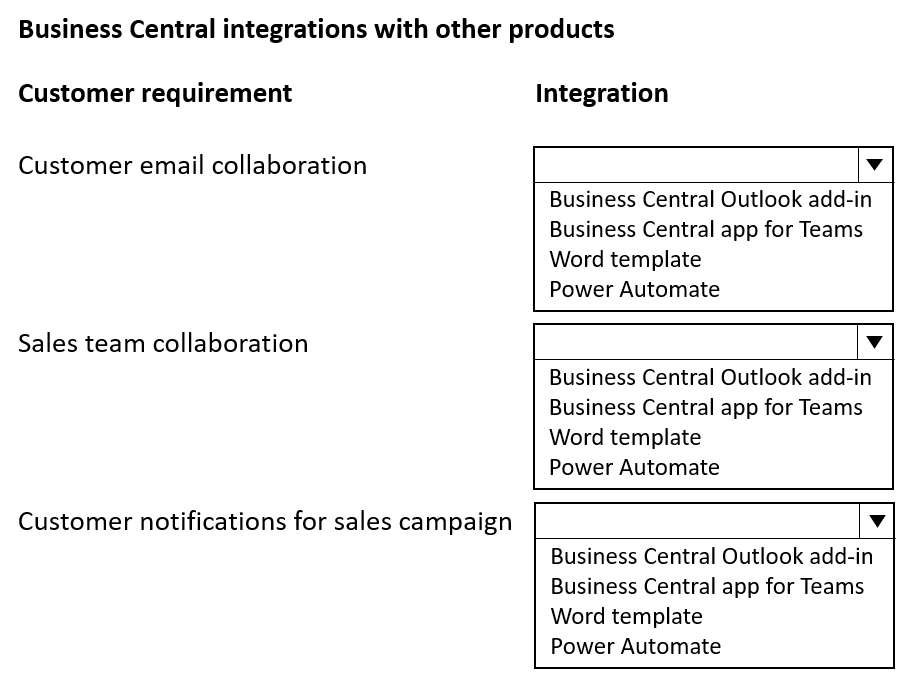
• Create sales orders while collaborating with customers by email.
• Edit customer information while messaging the sales team in a group chat.
• Communicate a brochure to all customers at once about a sales campaign.
General ledger posting accounts
The company requires the following G/L posting accounts:
• Retail Receivables = 13100
• Wholesale Receivables = 13200
• Payment Discount = 54800
• Retail Sales = 44100
• Wholesale Sales = 44200
• Sales Prepayments = 22160
Issues
-
• Order entry takes too long for wholesale customers.
• Vendors ship partial orders but send one monthly invoice. The company is unable to associate one invoice with multiple POs in the current environment.
• Inventory reconciliation was difficult in the company's old system because it allowed users to sell more inventory than was physically available.
• Users must log in to the system to provide workflow approvals.
You need to recommend integration solutions to fulfill the company requirements.
Which Microsoft integration aligns with each requirement? To answer, select the appropriate options in the answer area.
NOTE: Each correct selection is worth one point.
Show Answer
Correct Answer: Customer email collaboration — Business Central Outlook add-in
Sales team collaboration — Business Central app for Teams
Customer notifications for sales campaign — Power Automate
Explanation: Outlook add-in enables creating sales orders from email. Teams integration allows editing customer records while chatting. Power Automate can send campaign notifications to all customers automatically.
Question 50
HOTSPOT
-
This is a case study. Case studies are not timed separately. You can use as much exam time as you would like to complete each case. However, there may be additional case studies and sections on this exam. You must manage your time to ensure that you are able to complete all questions included on this exam in the time provided.
To answer the questions included in a case study, you will need to reference information that is provided in the case study. Case studies might contain exhibits and other resources that provide more information about the scenario that is described in the case study. Each question is independent of the other questions in this case study.
At the end of this case study, a review screen will appear. This screen allows you to review your answers and to make changes before you move to the next section of the exam. After you begin a new section, you cannot return to this section.
To start the case study
-
To display the first question in the case study, click the Next button. Use the buttons in the left pane to explore the content of the case study before you answer the questions. Clicking these buttons displays information such as business requirements, existing environment, and problem statements. When you are ready to answer a question, click the Question button to return to the question.
Background
-
Fabrikam, Inc., is a manufacturer of products for the gift industry. The company plans to implement Business Central as its new enterprise resource planning (ERP) system.
The company sells to two types of customers: wholesale and retail. Retail customers order at special events and online. Wholesale customers send in orders by email.
Current Environment
-
Order processing
-
• The company uses a purchase order (PO) workflow for any PO over $500.
• The system has been fully configured for sales order prepayments and will check for a prepayment invoice at posting.
• Customers can special order products with a prepayment that is due on receipt.
Invoicing
-
• Wholesale customer payment terms are net 30, with a 2% discount if paid within 10 days.
• Retail customer payment terms are payable on receipt or shipment.
Reporting
-
• The company uses headcount (number of employees) and square footage for statistical accounts.
Integrations
-
The company currently uses Outlook, Excel, Word, and Teams to communicate internally and externally with customers and vendors.
Requirements
-
Order processing
-
• The company must be able to combine multiple purchase receipts into one vendor invoice.
• Posted vendor invoices must be reverted when damages are reported or a product is returned to the vendor.
• Fully invoiced POs must not appear on the PO list page.
• Customer prepayments vary based on customer relationship. Special orders from new customers have a 25% prepayment. Established customers have only a 15% prepayment.
• The company must be able to approve POs by email without opening Business Central.
• Customers often reorder the same items with similar quantities. The system must be configured to ask the user if recurring lines should be added to sales orders.
Invoicing
-
• Customer revenue must be posted to separate general ledger (G/L) accounts based on customer type. The G/L account must have subcategories for wholesale and retail revenue.
• Accounts receivable must be posted to separate G/L accounts based on customer type. The G/L account must have subcategories for wholesale and retail accounts receivable.
• Currently, inventory is sold at a cost based on purchase and sales over a period.
Reporting
-
• Financial reports must include statistical accounts.
• The financial report structure must map to account categories.
Integrations
-
The company requires the following integration capabilities:
• Create sales orders while collaborating with customers by email.
• Edit customer information while messaging the sales team in a group chat.
• Communicate a brochure to all customers at once about a sales campaign.
General ledger posting accounts
The company requires the following G/L posting accounts:
• Retail Receivables = 13100
• Wholesale Receivables = 13200
• Payment Discount = 54800
• Retail Sales = 44100
• Wholesale Sales = 44200
• Sales Prepayments = 22160
Issues
-
• Order entry takes too long for wholesale customers.
• Vendors ship partial orders but send one monthly invoice. The company is unable to associate one invoice with multiple POs in the current environment.
• Inventory reconciliation was difficult in the company's old system because it allowed users to sell more inventory than was physically available.
• Users must log in to the system to provide workflow approvals.
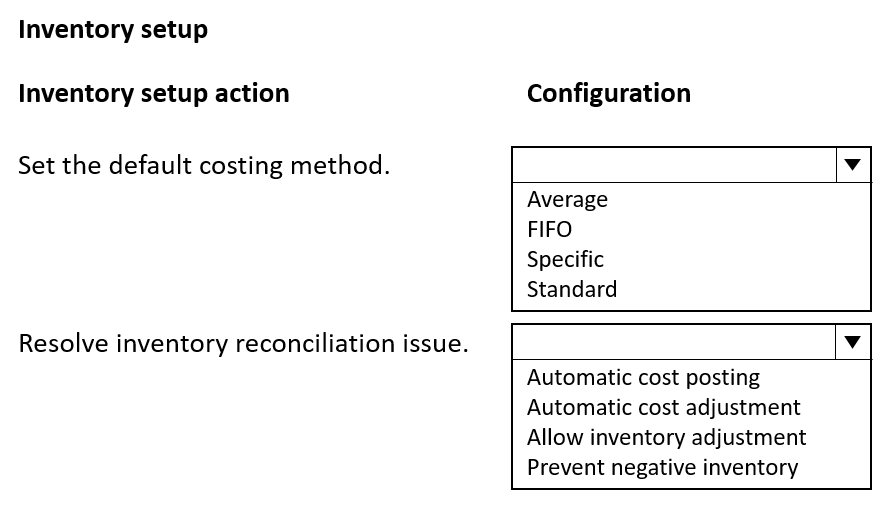
You need to complete inventory setup in Business Central to meet requirements and resolve issues.
Which two inventory setup configurations should you use? To answer, select the appropriate options in the answer area.
NOTE: Each correct selection is worth one point.
Show Answer
Correct Answer: Average
Prevent negative inventory
Explanation: The requirement states inventory is sold at a cost based on purchases and sales over a period, which matches the Average costing method. To resolve the reconciliation issue caused by selling more than was physically available, enable Prevent negative inventory.
Question 51
DRAG DROP
-
A company uses Dynamics 365 Business Central.
The finance manager requires distinct processes for posting sales, purchase invoices, and shipments.
You need to configure the restrictions.
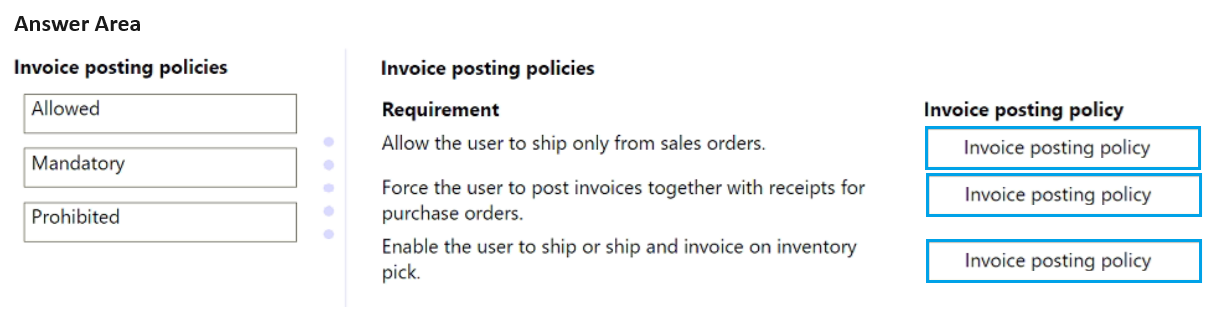
Which invoice posting policy should you use? To answer, move the appropriate invoice posting policies to the correct requirements. You may use each requirement once, more than once, or not at all. You may need to move the split bar between panes or scroll to view content.
NOTE: Each correct selection is worth one point.
Show Answer
Correct Answer: Allow the user to ship only from sales orders. → Prohibited
Force the user to post invoices together with receipts for purchase orders. → Mandatory
Enable the user to ship or ship and invoice on inventory pick. → Allowed
Explanation: Prohibited blocks invoice posting and only allows Ship/Receive. Mandatory requires Ship and Invoice or Receive and Invoice together. Allowed permits all posting options, including Ship or Ship and Invoice.
Question 53
Note: This question is part of a series of questions that present the same scenario. Each question in the series contains a unique solution that might meet the stated goals. Some question sets might have more than one correct solution, while others might not have a correct solution.
After you answer a question in this section, you will NOT be able to return to it. As a result, these questions will not appear in the review screen.
You need to transfer opening balances data into the system.
Solution: Transfer balances by using the Copy Company function.
Does the solution meet the goal?
A. Yes
B. No
Show Answer
Correct Answer: B
Explanation: The Copy Company function is intended to duplicate an entire company, including setup, master data, and transactions. It is not the appropriate method for transferring opening balances into an existing system or company. Opening balances are typically migrated using journals or data migration/import tools, so this solution does not meet the stated goal.
Question 54
DRAG DROP
-
A company uses Dynamics 365 Business Central.
The finance manager requires a specific group of operating team users to have access only to a particular set of customer data.
You need to configure and enforce the security requirements.
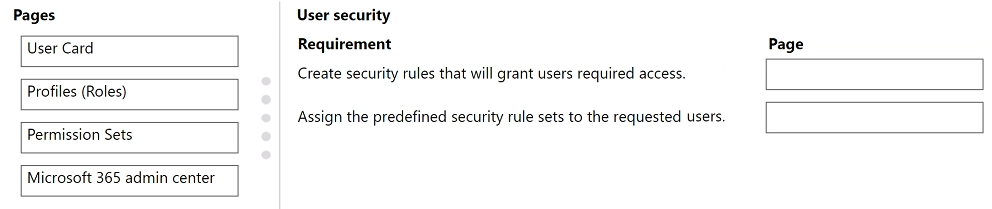
Which pages should you configure? To answer, move the appropriate pages to the correct requirements. You may use each page once, more than once, or not at all. You may need to move the split bar between panes or scroll to view content.
NOTE: Each correct selection is worth one point.
Show Answer
Correct Answer: Create security rules that will grant users required access. → Permission Sets
Assign the predefined security rule sets to the requested users. → User Card
Explanation: Permission Sets define the permissions users have. User Card is used to assign permission sets to individual users. Profiles (Roles) control Role Centers, not data permissions.
Question 55
HOTSPOT
-
This is a case study. Case studies are not timed separately. You can use as much exam time as you would like to complete each case. However, there may be additional case studies and sections on this exam. You must manage your time to ensure that you are able to complete all questions included on this exam in the time provided.
To answer the questions included in a case study, you will need to reference information that is provided in the case study. Case studies might contain exhibits and other resources that provide more information about the scenario that is described in the case study. Each question is independent of the other questions in this case study.
At the end of this case study, a review screen will appear. This screen allows you to review your answers and to make changes before you move to the next section of the exam. After you begin a new section, you cannot return to this section.
To start the case study
-
To display the first question in the case study, click the Next button. Use the buttons in the left pane to explore the content of the case study before you answer the questions. Clicking these buttons displays information such as business requirements, existing environment, and problem statements. When you are ready to answer a question, click the Question button to return to the question.
Background
-
Fabrikam, Inc., is a manufacturer of products for the gift industry. The company plans to implement Business Central as its new enterprise resource planning (ERP) system.
The company sells to two types of customers: wholesale and retail. Retail customers order at special events and online. Wholesale customers send in orders by email.
Current Environment
-
Order processing
-
• The company uses a purchase order (PO) workflow for any PO over $500.
• The system has been fully configured for sales order prepayments and will check for a prepayment invoice at posting.
• Customers can special order products with a prepayment that is due on receipt.
Invoicing
-
• Wholesale customer payment terms are net 30, with a 2% discount if paid within 10 days.
• Retail customer payment terms are payable on receipt or shipment.
Reporting
-
• The company uses headcount (number of employees) and square footage for statistical accounts.
Integrations
-
The company currently uses Outlook, Excel, Word, and Teams to communicate internally and externally with customers and vendors.
Requirements
-
Order processing
-
• The company must be able to combine multiple purchase receipts into one vendor invoice.
• Posted vendor invoices must be reverted when damages are reported or a product is returned to the vendor.
• Fully invoiced POs must not appear on the PO list page.
• Customer prepayments vary based on customer relationship. Special orders from new customers have a 25% prepayment. Established customers have only a 15% prepayment.
• The company must be able to approve POs by email without opening Business Central.
• Customers often reorder the same items with similar quantities. The system must be configured to ask the user if recurring lines should be added to sales orders.
Invoicing
-
• Customer revenue must be posted to separate general ledger (G/L) accounts based on customer type. The G/L account must have subcategories for wholesale and retail revenue.
• Accounts receivable must be posted to separate G/L accounts based on customer type. The G/L account must have subcategories for wholesale and retail accounts receivable.
• Currently, inventory is sold at a cost based on purchase and sales over a period.
Reporting
-
• Financial reports must include statistical accounts.
• The financial report structure must map to account categories.
Integrations
-
The company requires the following integration capabilities:
• Create sales orders while collaborating with customers by email.
• Edit customer information while messaging the sales team in a group chat.
• Communicate a brochure to all customers at once about a sales campaign.
General ledger posting accounts
The company requires the following G/L posting accounts:
• Retail Receivables = 13100
• Wholesale Receivables = 13200
• Payment Discount = 54800
• Retail Sales = 44100
• Wholesale Sales = 44200
• Sales Prepayments = 22160
Issues
-
• Order entry takes too long for wholesale customers.
• Vendors ship partial orders but send one monthly invoice. The company is unable to associate one invoice with multiple POs in the current environment.
• Inventory reconciliation was difficult in the company's old system because it allowed users to sell more inventory than was physically available.
• Users must log in to the system to provide workflow approvals.
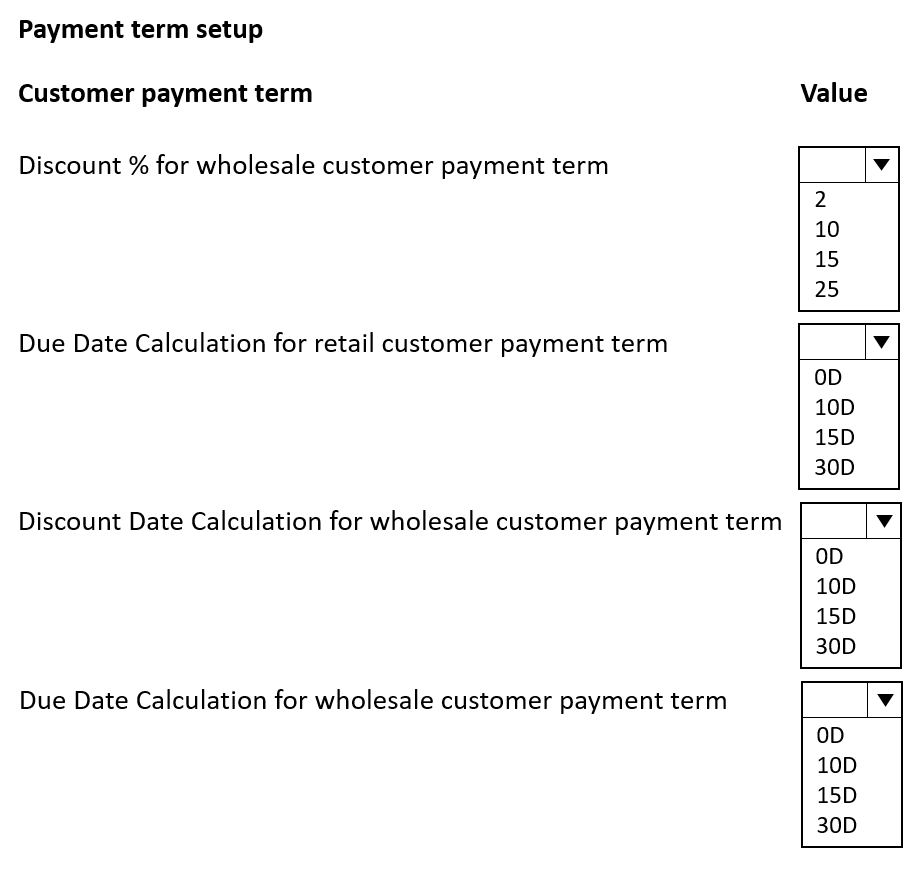
You need to select the values for the customer payment terms.
Which values should you use? To answer, select the appropriate options in the answer area.
NOTE: Each correct selection is worth one point.
Show Answer
Correct Answer: Discount % for wholesale: 2
Due Date Calculation for retail: 0D
Discount Date Calculation for wholesale: 10D
Due Date Calculation for wholesale: 30D
Explanation: Wholesale terms are net 30 with a 2% discount if paid within 10 days. Retail customers are payable on receipt, so due date is 0D.
Question 56
This is a case study. Case studies are not timed separately. You can use as much exam time as you would like to complete each case. However, there may be additional case studies and sections on this exam. You must manage your time to ensure that you are able to complete all questions included on this exam in the time provided.
To answer the questions included in a case study, you will need to reference information that is provided in the case study. Case studies might contain exhibits and other resources that provide more information about the scenario that is described in the case study. Each question is independent of the other questions in this case study.
At the end of this case study, a review screen will appear. This screen allows you to review your answers and to make changes before you move to the next section of the exam. After you begin a new section, you cannot return to this section.
To start the case study -
To display the first question in the case study, click the Next button. Use the buttons in the left pane to explore the content of the case study before you answer the questions. Clicking these buttons displays information such as business requirements, existing environment, and problem statements. When you are ready to answer a question, click the Question button to return to the question.
Background -
Fabrikam, Inc., is a manufacturer of products for the gift industry. The company plans to implement Business Central as its new enterprise resource planning (ERP) system.
The company sells to two types of customers: wholesale and retail. Retail customers order at special events and online. Wholesale customers send in orders by email.
Current Environment -
Order processing -
• The company uses a purchase order (PO) workflow for any PO over $500.
• The system has been fully configured for sales order prepayments and will check for a prepayment invoice at posting.
• Customers can special order products with a prepayment that is due on receipt.
Invoicing -
• Wholesale customer payment terms are net 30, with a 2% discount if paid within 10 days.
• Retail customer payment terms are payable on receipt or shipment.
Reporting -
• The company uses headcount (number of employees) and square footage for statistical accounts.
Integrations -
The company currently uses Outlook, Excel, Word, and Teams to communicate internally and externally with customers and vendors.
Requirements -
Order processing -
• The company must be able to combine multiple purchase receipts into one vendor invoice.
• Posted vendor invoices must be reverted when damages are reported or a product is returned to the vendor.
• Fully invoiced POs must not appear on the PO list page.
• Customer prepayments vary based on customer relationship. Special orders from new customers have a 25% prepayment. Established customers have only a 15% prepayment.
• The company must be able to approve POs by email without opening Business Central.
• Customers often reorder the same items with similar quantities. The system must be configured to ask the user if recurring lines should be added to sales orders.
Invoicing -
• Customer revenue must be posted to separate general ledger (G/L) accounts based on customer type. The G/L account must have subcategories for wholesale and retail revenue.
• Accounts receivable must be posted to separate G/L accounts based on customer type. The G/L account must have subcategories for wholesale and retail accounts receivable.
• Currently, inventory is sold at a cost based on purchase and sales over a period.
Reporting -
• Financial reports must include statistical accounts.
• The financial report structure must map to account categories.
Integrations -
The company requires the following integration capabilities:
• Create sales orders while collaborating with customers by email.
• Edit customer information while messaging the sales team in a group chat.
• Communicate a brochure to all customers at once about a sales campaign.
General ledger posting accounts -
The company requires the following G/L posting accounts:
• Retail Receivables = 13100
• Wholesale Receivables = 13200
• Payment Discount = 54800
• Retail Sales = 44100
• Wholesale Sales = 44200
• Sales Prepayments = 22160
Issues -
• Order entry takes too long for wholesale customers.
• Vendors ship partial orders but send one monthly invoice. The company is unable to associate one invoice with multiple POs in the current environment.
• Inventory reconciliation was difficult in the company's old system because it allowed users to sell more inventory than was physically available.
• Users must log in to the system to provide workflow approvals.
You need to configure the system to post to the receivables account for wholesale customers.
Which two configurations should you use? Each correct answer presents part of the solution.
NOTE: Each correct selection is worth one point.
A. Receivables account 13100
B. General Posting Setup
C. Receivables account 13200
D. General Business Posting Groups
E. Customer Posting Groups
Show Answer
Correct Answer: C, E
Explanation: In Business Central, the receivables G/L account is assigned through the Customer Posting Group. To post wholesale customer receivables, configure the Customer Posting Group to use the Wholesale Receivables account (13200). General Posting Setup controls revenue/COGS and VAT-related posting based on business/product posting groups, not the A/R control account.
Question 57
DRAG DROP
-
This is a case study. Case studies are not timed separately. You can use as much exam time as you would like to complete each case. However, there may be additional case studies and sections on this exam. You must manage your time to ensure that you are able to complete all questions included on this exam in the time provided.
To answer the questions included in a case study, you will need to reference information that is provided in the case study. Case studies might contain exhibits and other resources that provide more information about the scenario that is described in the case study. Each question is independent of the other questions in this case study.
At the end of this case study, a review screen will appear. This screen allows you to review your answers and to make changes before you move to the next section of the exam. After you begin a new section, you cannot return to this section.
To start the case study
-
To display the first question in the case study, click the Next button. Use the buttons in the left pane to explore the content of the case study before you answer the questions. Clicking these buttons displays information such as business requirements, existing environment, and problem statements. When you are ready to answer a question, click the Question button to return to the question.
Background
-
Fabrikam, Inc., is a manufacturer of products for the gift industry. The company plans to implement Business Central as its new enterprise resource planning (ERP) system.
The company sells to two types of customers: wholesale and retail. Retail customers order at special events and online. Wholesale customers send in orders by email.
Current Environment
-
Order processing
-
• The company uses a purchase order (PO) workflow for any PO over $500.
• The system has been fully configured for sales order prepayments and will check for a prepayment invoice at posting.
• Customers can special order products with a prepayment that is due on receipt.
Invoicing
-
• Wholesale customer payment terms are net 30, with a 2% discount if paid within 10 days.
• Retail customer payment terms are payable on receipt or shipment.
Reporting
-
• The company uses headcount (number of employees) and square footage for statistical accounts.
Integrations
-
The company currently uses Outlook, Excel, Word, and Teams to communicate internally and externally with customers and vendors.
Requirements
-
Order processing
-
• The company must be able to combine multiple purchase receipts into one vendor invoice.
• Posted vendor invoices must be reverted when damages are reported or a product is returned to the vendor.
• Fully invoiced POs must not appear on the PO list page.
• Customer prepayments vary based on customer relationship. Special orders from new customers have a 25% prepayment. Established customers have only a 15% prepayment.
• The company must be able to approve POs by email without opening Business Central.
• Customers often reorder the same items with similar quantities. The system must be configured to ask the user if recurring lines should be added to sales orders.
Invoicing
-
• Customer revenue must be posted to separate general ledger (G/L) accounts based on customer type. The G/L account must have subcategories for wholesale and retail revenue.
• Accounts receivable must be posted to separate G/L accounts based on customer type. The G/L account must have subcategories for wholesale and retail accounts receivable.
• Currently, inventory is sold at a cost based on purchase and sales over a period.
Reporting
-
• Financial reports must include statistical accounts.
• The financial report structure must map to account categories.
Integrations
-
The company requires the following integration capabilities:
• Create sales orders while collaborating with customers by email.
• Edit customer information while messaging the sales team in a group chat.
• Communicate a brochure to all customers at once about a sales campaign.
General ledger posting accounts
The company requires the following G/L posting accounts:
• Retail Receivables = 13100
• Wholesale Receivables = 13200
• Payment Discount = 54800
• Retail Sales = 44100
• Wholesale Sales = 44200
• Sales Prepayments = 22160
Issues
-
• Order entry takes too long for wholesale customers.
• Vendors ship partial orders but send one monthly invoice. The company is unable to associate one invoice with multiple POs in the current environment.
• Inventory reconciliation was difficult in the company's old system because it allowed users to sell more inventory than was physically available.
• Users must log in to the system to provide workflow approvals.
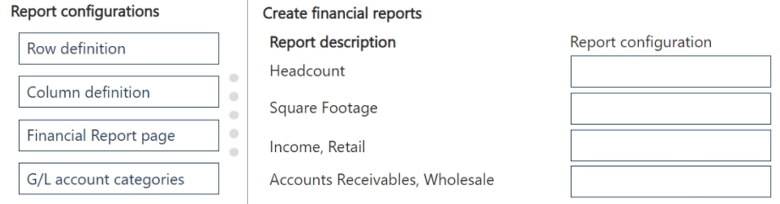
You need to create financial reports per company reporting requirements.
Which report configuration should you use to add the report descriptions to financial reports? To answer, move the appropriate report configurations to the correct report descriptions. You may use each report configuration once, more than once, or not at all. You may need to move the split bar between panes or scroll to view content.
NOTE: Each correct selection is worth one point.
Explanation: Statistical accounts such as headcount and square footage are included through row definitions in financial reports. Income and receivables by retail/wholesale are mapped through G/L account categories, which support reporting structures based on account categories.
Question 58
Note: This question is part of a series of questions that present the same scenario. Each question in the series contains a unique solution that might meet the stated goals. Some question sets might have more than one correct solution, while others might not have a correct solution.
After you answer a question in this section, you will NOT be able to return to it. As a result, these questions will not appear in the review screen.
You need to transfer opening balances data into the system.
Solution: Use a configuration package to import the data.
Does the solution meet the goal?
A. Yes
B. No
Show Answer
Correct Answer: A
Explanation: Yes. In Dynamics 365 Business Central, configuration packages are designed to import master and transactional data, including opening balances when the appropriate tables and fields are configured. They are a standard method for migrating opening balance data into the system.
Question 59
A company has been using Dynamics 365 Business Central for many years.
A new accounting manager for the company reviews the chart of accounts. The manager wants to remove some general ledger accounts.
The Check G/L Account Usage field is selected in the General Ledger Setup.
You need to assist with the account deletions.
What is one requirement that enables deletion of a general ledger account?
A. The general ledger account cannot allow for direct posting.
B. The general ledger account must be of the type Balance Sheet.
C. The fiscal year needs to be closed.
D. The account cannot be used in any posting groups or posting setup.
Show Answer
Correct Answer: D
Explanation: With Check G/L Account Usage enabled, a general ledger account can only be deleted if it is not referenced anywhere Business Central checks for usage, including posting groups and posting setup. Direct posting, account type (Balance Sheet), or closing the fiscal year are not requirements for deletion.
$19
Get all 275 questions with detailed answers and explanations
Instant download HTML + PDF delivered the moment payment clears.
Secure Stripe checkout we never see or store your card details.
7-day refund if files are defective see our refund policy.