DRAG DROP
-
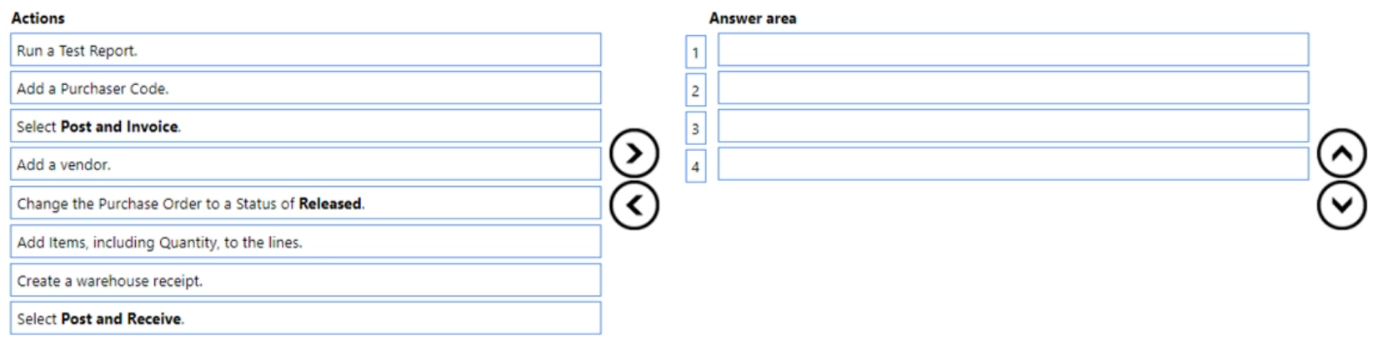
You need to configure the purchase order process for a company.
Which four actions should you perform in sequence? To answer, move the appropriate actions from the list of actions to the answer area and arrange them in the correct order.
Show Answer
Correct Answer: 1. Add a vendor.
2. Add Items, including Quantity, to the lines.
3. Change the Purchase Order to a Status of Released.
4. Select Post and Receive.
Explanation: Create the purchase order by selecting the vendor, add the purchase lines, release the order so it can be processed, then post the receipt. Other options are optional or occur later in the process.
Question 105
DRAG DROP
-
A company uses Dynamics 365 Business Central.
A user creates two accounts for the same vendor. Both accounts have open vendor ledger entries.
You need to merge any open entries from the second vendor account to the first vendor account and then delete the second vendor account.
Which three actions should you perform in sequence? To answer, move the appropriate actions from the list of actions to the answer area and arrange them in the correct order.
Show Answer
Correct Answer: 1. On the Vendor Card page, choose the Merge With action.
2. Select the duplicate vendor in the Merge With field.
3. On the Merge Duplicates page, choose the Merge action.
Explanation: To merge duplicate vendors, start from the vendor to keep, choose Merge With, select the duplicate vendor account, then execute Merge. The duplicate vendor is merged (including open entries) and removed. The option mentioning 'customer' is a wording error; it should be 'vendor'.
Question 106
A company uses Dynamics 365 Business Central.
You need to configure the system to automatically add any appropriate sales invoice discounts to sales documents.
What should you do?
A. On the Sales & Receivables Setup page, select Invoice Discount in Discount Posting.
B. On the Sales & Receivables Setup page, select Calc. Inv. Discount.
C. On the Customer card, select Invoice Disc. Code.
D. On the Sales & Receivables Setup page, select Lowest Price in Price Calculation Method.
Show Answer
Correct Answer: B
Explanation: Selecting 'Calc. Inv. Discount' on the Sales & Receivables Setup page enables Business Central to automatically calculate and apply eligible invoice discounts to sales documents. 'Discount Posting' controls posting behavior, 'Invoice Disc. Code' identifies discount groups for customers but does not enable automatic calculation globally, and 'Lowest Price' relates to price calculation, not invoice discount automation.
Question 107
DRAG DROP
-
A company uses Dynamics 365 Business Central.
The accounting manager wants partially shipped and invoiced sales orders that will not be fulfilled to not be displayed on the active page (Open Sales Order list). Deleted sales orders must be available for reporting of ordered and delivered quantities.
You need to configure sales orders.
In which order should you perform the actions? To answer, move all actions from the list of actions to the answer area and arrange them in the correct order.
Show Answer
Correct Answer: Enable Archive Sales Orders in Sales & Receivables Setup.
Reduce the sales order quantity to match the shipped quantity.
Change the sales order status to Released.
Run the Delete Invoiced Sales Orders job.
Explanation: Archiving preserves deleted orders for reporting. Reducing quantity to shipped removes outstanding quantities, releasing the order allows processing, and the Delete Invoiced Sales Orders job removes fully invoiced orders from the active list while retaining the archive.
Question 108
A company uses Dynamics 365 Business Central.
A purchaser receives a price list workbook from a vendor.
You need to upload prices to the system.
Which two types of price data can you load? Each correct answer presents part of the solution.
NOTE: Each correct selection is worth one point.
A. Unit of Measure code
B. Item No.
C. Customer price group
D. Campaign
Show Answer
Correct Answer: A, B
Explanation: When importing price list data into Dynamics 365 Business Central, item identification and the applicable unit of measure are supported price list fields. Customer price groups and campaigns are sales pricing constructs rather than vendor price list data used for this upload.
Question 109
HOTSPOT -
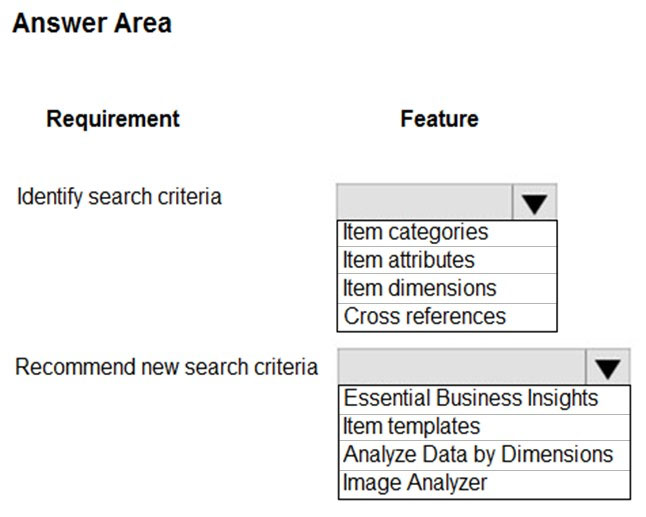
A furniture manufacturing company is creating new items in Dynamics 365 Business Central. The company currently searches for the products by material, color, and size.
You must expand the search capabilities for the items. Not all the items will have the same searchable characteristics. Some new search characteristics may need to be added.
You need to configure the system to automatically recommend additional search criteria for items.
Which features should you use? To answer, select the appropriate options in the answer area.
NOTE: Each correct selection is worth one point.
Hot Area:
Explanation: Item attributes provide flexible, extensible searchable characteristics (such as material, color, size) that can differ by item. Image Analyzer uses AI to analyze item images and suggest additional attributes/search criteria automatically.
Question 110
A company uses Dynamics 365 Business Central.
A finance manager needs to import a bank statement CSV file into Dynamics 365 Business Central.
You need to configure the system for the file import.
Which three pages should you use to complete the configuration? Each correct answer presents part of the solution.
NOTE: Each correct selection is worth one point.
A. Payment Reconciliation Journal
B. Bank Account Card
C. Bank Export/Import Setup
D. Data Exchange Definition
E. Report Selection - Bank Account
Show Answer
Correct Answer: B, C, D
Explanation: To configure bank statement CSV import in Business Central, you set up the import format in Bank Export/Import Setup, define the file mapping in Data Exchange Definition, and link the appropriate import setup to the relevant bank account on the Bank Account Card. The Payment Reconciliation Journal is used to process imported statements, not to configure the import, and Report Selection - Bank Account is unrelated.
Question 111
A company uses Dynamics 365 Business Central. The company has a customer that will also be a vendor for the company in the next financial year.
The company plans to consolidate the customer and vendor balances to reduce unnecessary payments on receipts and reduce the amount of transaction fees.
You need to configure the contact card.
Which option should you configure first?
A. Create as Employee
B. Create as Customer
C. Create as Bank
D. Create as Vendor
Show Answer
Correct Answer: D
Explanation: Because the company already has the entity as a customer and now needs it to also be a vendor, the next step from the shared contact is to create the vendor record. Once linked through the same company contact, customer and vendor balances can be consolidated for netting.
Question 112
DRAG DROP
-
You set up a new company for a customer.
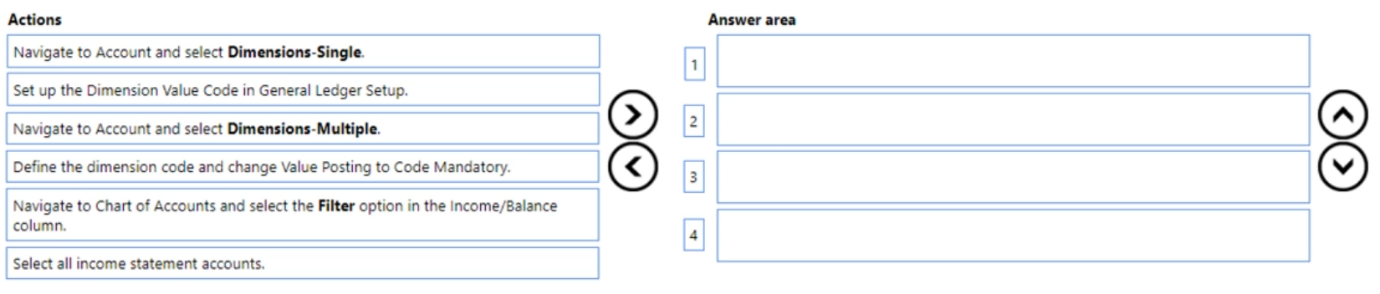
The customer requires that two global dimensions be automatically checked at transaction when income statement accounts are used.
You need to set up the requirements for all income statement accounts at once.
Which four actions should you perform in sequence? To answer, move the appropriate actions from the list of actions to the answer area and arrange them in the correct order.
Show Answer
Correct Answer: 1. Navigate to Chart of Accounts and select the Filter option in the Income/Balance column.
2. Select all income statement accounts.
3. Navigate to Account and select Dimensions-Multiple.
4. Define the dimension code and change Value Posting to Code Mandatory.
Explanation: Filter to income statement accounts, select them in bulk, open the multiple-dimensions page, then set the required global dimension(s) with Value Posting = Code Mandatory so transactions require those dimensions for all selected accounts.
Question 113
You are configuring Dynamics 365 Business Central for a client.
Invoice amounts in the local currency code must be rounded to hundredths.
You need to configure the Inv. Rounding Precision (LCY) field in General Ledger Setup.
Which value should you use?
A. 0.01
B. 0.20
C. 1.00
D. 1.11
E. 2.00
Show Answer
Correct Answer: A
Explanation: To round invoice amounts in the local currency to hundredths (two decimal places), the invoice rounding precision must be set to 0.01. A precision of 0.01 rounds values to the nearest one-hundredth. The other options represent coarser or invalid rounding increments for this requirement.
$19
Get all 275 questions with detailed answers and explanations
Instant download HTML + PDF delivered the moment payment clears.
Secure Stripe checkout we never see or store your card details.
7-day refund if files are defective see our refund policy.