Case study -
This is a case study. Case studies are not timed separately. You can use as much exam time as you would like to complete each case. However, there may be additional case studies and sections on this exam. You must manage your time to ensure that you are able to complete all questions included on this exam in the time provided.
To answer the questions included in a case study, you will need to reference information that is provided in the case study. Case studies might contain exhibits and other resources that provide more information about the scenario that is described in the case study. Each question is independent of the other questions in this case study.
At the end of this case study, a review screen will appear. This screen allows you to review your answers and to make changes before you move to the next section of the exam. After you begin a new section, you cannot return to this section.
To start the case study -
To display the first question in this case study, click the Next button. Use the buttons in the left pane to explore the content of the case study before you answer the questions. Clicking these buttons displays information such as business requirements, existing environment, and problem statements. If the case study has an All Information tab, note that the information displayed is identical to the information displayed on the subsequent tabs. When you are ready to answer a question, click the Question button to return to the question.
Background -
Northwind Traders is an independent, family-owned business. The company distributes natural pet products in the Northwest region of the country/region. Products are purchased directly from manufacturers and distributed by using its own fleet of trucks.
When the company started, deliveries were within a three-hour radius of the warehouse. Due to regional growth, current deliveries require drivers to stay overnight on some routes. The company plans to open a second warehouse to expand the region and eliminate overnights for route drivers. The company also plans to hire a second group of employees to run operations in this new location. The finance and accounting teams will remain in the original location.
The company uses a third-party system for financials and order management. The finance department stated that the company’s fiscal year begins on July 1 and ends on June 30. The mm/dd/yyyy date format is used.
As part of the expansion, the owner plans to upgrade to an ERP system and use Business Central to fulfill the company requirements and manage growth.
Current environment -
Orders -
• Orders are emailed to customer service and manually keyed into the inventory system.
Pricing and discounts -
• Customer pricing is determined by the customer market type. Customer market types are Retail, Veterinarian, and Breeder. Each customer is associated with only one market type.
• Vendors offer monthly promotions to customers by item, brand, or item category.
• Invoices should show each customer’s base price, the discount amount, and the net price.
Accounts payable -
• The company wants to expand vendor payment options in the new system.
Requirement -
Customers -
• The sales team must be able to do the following:
o Quickly set up new customers with the proper settings based on customer type. o Identify customers by market type. Customer posting groups will be used to identify which market the customer belongs to.
• Base price is determined by the customer market type.
• The sales department should receive a warning when entering the order if a customer is over their credit limit.
Sales -
• Customer discounts are offered for specific time frames by item, brand, or product category. Discounts should be added to sales lines automatically.
• Discounts must post to a unique general ledger (G/L) account.
• The business needs to be able to track revenue by location, market, and product category dimensions. Locations 100 and 200 will be set as default dimensions on the two warehouse locations. Food, treats, toys, and supplies are the required product categories, which will be set as default dimensions on the item cards. Each customer card will have a default market dimension.
• The sales manager wants to delete canceled orders and automatically archive them.
Warehouse -
• Orders will be fulfilled from two possible warehouse locations.
• Product will be transferred between locations by using transfer orders.
Sales invoices -
• Invoices will be posted after delivery.
• Invoices will be emailed to the customer.
• The sales department must be able to quickly correct posted invoices for the following scenarios: o Posted invoices that have not been paid. o Posted invoices that have been paid. o Posted invoices created from sales orders. o Posted invoices not created from sales orders.
Accounting -
• The finance department requires that the company has 12 monthly accounting periods per fiscal year.
• Finance department users must be able to reconcile the accounts receivable (AR) subledger to the G/L account at month end.
• AR department users need the ability to settle and close invoices when customers take payment discounts after the payment discount date has passed. AR users should be allowed to accept or reject the payment tolerance.
• Accounts payable (AP) department users must be able to pay vendors by electronic funds transfer (EFT) and use a payment journal batch named EFT to process payments.
• When viewing G/L entries, the finance and accounting teams must be able to see debits and credits instead of a positive or negative amount.
• The company needs to be able to track expenses by department and location. The departments are sales, operations, and administration.
• AR must be able to correct cash application entries.
Issues -
Payment application -
• Customers may have several stores that are responsible for their own orders and payments.
• Occasionally, AR clerks mistakenly apply payments to the incorrect customer invoice.
Invoicing -
• When items are delivered, customers refuse the items for reasons such as damaged or wrong item.
• After the invoices are posted, they must be corrected, which is time-consuming.
Warehouse -
• The sales department and warehouse managers must have visibility into products that are in the process of being transferred between locations.
Accounts -
• Customer accounts are difficult to view by market type.
• The finance team does not have the ability to report revenue by customer type.
Accounting -
• AR users often find variances between the AR subledger and G/L account.
• Customers often take the payment discount after the payment discount date has passed, leaving open invoices for small amounts.
• The AP department is unable to pay vendors by EFT in the current system.
• Finance and accounting team members have trouble validating postings when they use only the amounts field on G/L entries.
• The finance department is unable to run financial reports by market. All revenue postings must reference a market.
You need to resolve the issue reported by the AR users from the finance department.
What should you do?
A. Switch Blocked on the Customer Card to Yes.
B. Switch Direct Posting on the G/L Account Card to No.
C. Switch Blocked on the G/L Account Card to Yes.
D. Switch Direct Posting on the G/L Account Card to Yes.
Show Answer
Correct Answer: B
Explanation: To prevent variances between the Accounts Receivable subledger and the G/L, the AR control account should not allow direct postings. Setting Direct Posting on the G/L Account Card to No ensures all entries to the AR account flow through customer ledger transactions, keeping the subledger and G/L synchronized.
Question 93
DRAG DROP
-
A company uses Dynamics 365 Business Central.
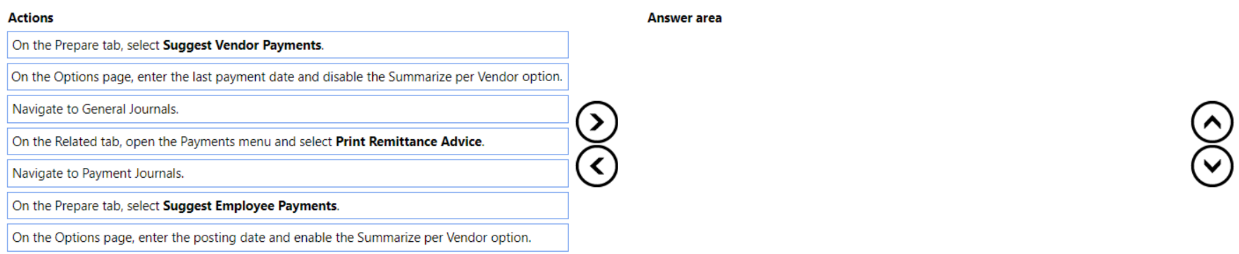
The company plans to automatically create vendor payments based on posted purchase invoices. The payments should be summarized based on the vendor invoices.
You need to configure the vendor payments.
Which three actions should you perform in sequence? To answer, move the appropriate actions from the list of actions to the answer area and arrange them in the correct order.
Show Answer
Correct Answer: Navigate to Payment Journals.
On the Prepare tab, select Suggest Vendor Payments.
On the Options page, enter the posting date and enable the Summarize per Vendor option.
Explanation: Vendor payments are generated from the Payment Journal using Suggest Vendor Payments. To create one summarized payment per vendor, enable the Summarize per Vendor option when setting the batch options.
Question 94
DRAG DROP
-
A company implements Dynamics 365 Business Central.
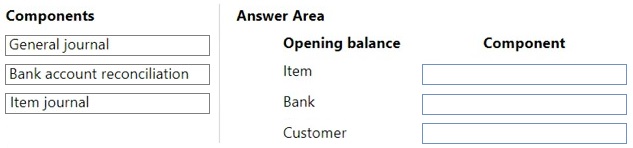
The company must import the following opening balances into Dynamics 365 Business Central:
• Item
• Bank
• Customer
You need to implement tools to import opening balances.
Which components should you use? To answer, drag the appropriate components to the correct opening balances. Each component may be used once, more than once, or not at all. You may need to drag the split bar between panes or scroll to view content.
NOTE: Each correct selection is worth one point.
Show Answer
Correct Answer: Item → Item journal
Bank → General journal
Customer → General journal
Explanation: Opening inventory is imported through Item Journals. Opening balances for bank accounts and customer ledger balances are typically established through General Journals. Bank Account Reconciliation is used to reconcile transactions, not to import opening balances.
Question 95
Note: This question is part of a series of questions that present the same scenario. Each question in the series contains a unique solution that might meet the stated goals. Some question sets might have more than one correct solution, while others might not have a correct solution.
After you answer a question in this section, you will NOT be able to return to it. As a result, these questions will not appear in the review screen.
You must streamline monthly invoicing by automating repetitive entries for monthly charges when managing subscriptions.
You need to add default general ledger (GL) accounts to a Customer Card.
Solution: Configure the Standard Sales Lines Card and assign it to the Customer Card.
Does the solution meet the goal?
A. Yes
B. No
Show Answer
Correct Answer: A
Explanation: Yes. In Business Central, recurring sales lines are defined using a Standard Sales Lines code/card, where you specify items or G/L accounts and other defaults. That standard sales line code is then assigned to the customer through Recurring Sales Lines on the Customer Card, enabling automatic insertion of recurring monthly charges. Therefore, configuring the Standard Sales Lines Card and assigning it to the Customer Card meets the goal.
Question 96
DRAG DROP
-
A company implements Dynamics 365 Business Central.
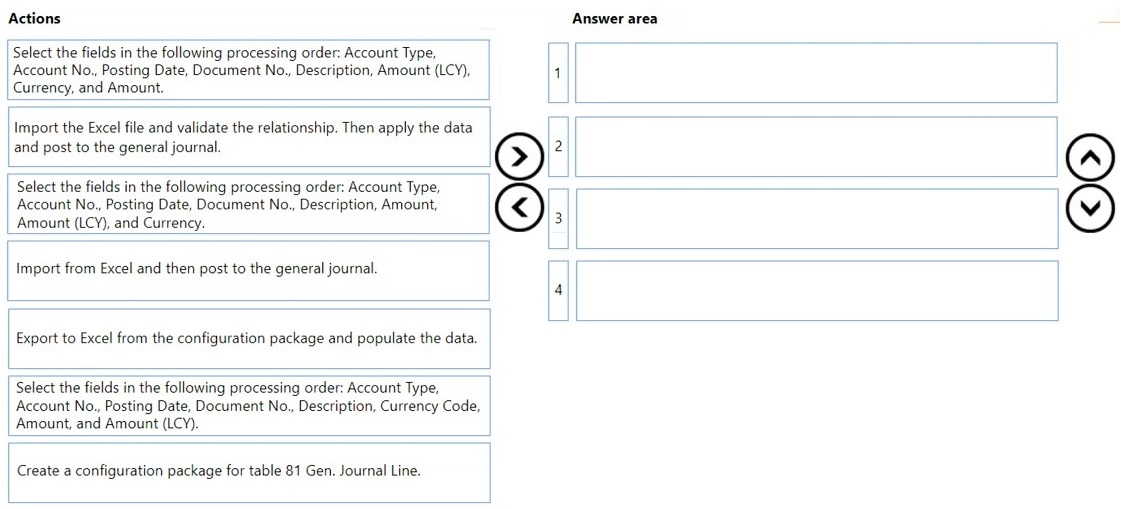
The company stores master data for vendor opening balances in an Excel file. Most of the vendors use a foreign currency for open balances. The balancing account is preselected on the journal batch.
You need to import the vendor opening balances by using configuration packages.
Which four actions should you perform in sequence? To answer, move the appropriate actions from the list of actions to the answer area and arrange them in the correct order.
Show Answer
Correct Answer: 1. Create a configuration package for table 81 Gen. Journal Line.
2. Select fields: Account Type, Account No., Posting Date, Document No., Description, Currency Code, Amount, Amount (LCY).
3. Export to Excel from the configuration package and populate the data.
4. Import the Excel file, validate relationships, apply the data, and post to the general journal.
Explanation: You must define the package and field order before exporting the Excel template. For foreign-currency vendor balances, include Currency Code before Amount and Amount (LCY), then export, populate, import, validate, apply, and post.
Question 97
A global trading company maintains records of customer information in Business Central. The company frequently conducts international trade and works with customers who operate in different currencies.
You need to configure the system to invoice customers who use foreign currency.
Which two areas should you configure? Each correct answer presents a complete solution.
NOTE: Each correct selection is worth one point.
A. Customer Card
B. Sales Invoice
C. Vendor Card
D. Adjust Exchange Rates
Show Answer
Correct Answer: A, D
Explanation: To invoice customers in foreign currency, configure the customer's default Currency Code on the Customer Card so sales documents use the correct currency automatically, and run/configure Adjust Exchange Rates to keep foreign currency values and exchange-rate-related postings accurate. The Vendor Card is unrelated to customer invoicing, and while a Sales Invoice can have its currency changed manually, it is not the primary configuration area for setting up customers to use foreign currency.
Question 98
DRAG DROP
-
A company uses Business Central. The company recently restructured. The company has only a few posted entries.
You need to change the Global Dimensions in Business Central to reflect the restructure.
Which three actions should you perform in sequence? To answer, move the appropriate actions from the list of actions to the answer area and arrange them in the correct order.
Show Answer
Correct Answer: On the General Ledger Setup page, select Change Global Dimensions.
Select new dimension codes in the dimension fields.
Update Global Dimensions in sequential order.
Explanation: Open the Change Global Dimensions process from General Ledger Setup, choose the new global dimension codes, then run the update. Parallel processing is optional and not required by the scenario.
Question 99
HOTSPOT
-
A company uses Dynamics 365 Business Central.
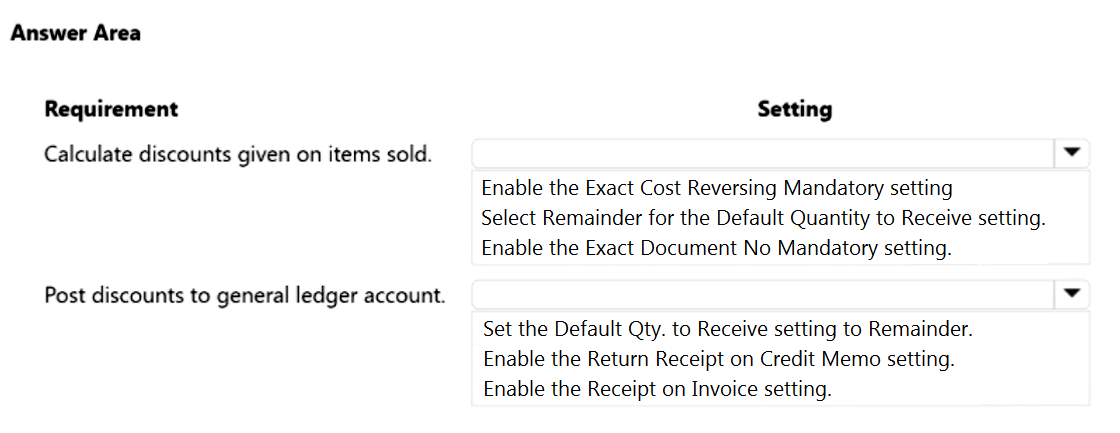
The company requires the following discount setup:
• The system must calculate the discounts given on individual items that are sold.
• The system must post the discounts to a specific general ledger account.
You need to configure the system.
Which settings should you configure? To answer, select the appropriate options in the answer area.
NOTE: Each correct selection is worth one point.
Show Answer
Correct Answer: Calculate discounts given on items sold: Enable Invoice Discounts / Sales Line Discounts feature
Post discounts to general ledger account: Configure the Sales Line Disc. Account in General Posting Setup
Explanation: Item-level discounts require sales line discounts. Posting discounts to a specific G/L account is controlled through the Sales Line Discount account in the General Posting Setup. The options visible in the screenshot appear unrelated to the stated requirements, indicating a likely exam image/option mismatch.
Question 101
DRAG DROP
-
A company uses Dynamics 365 Business Central. You grant the financial bookkeeper the D365 ACCOUNTANTS permission set.
An auditor plans to perform an annual accounting audit. The auditor must have access to the same data as the bookkeeper but with view-only permission.
You need to create the permission set for the auditor.
In which order should you perform the actions? To answer, move all actions from the list of actions to the answer area and arrange them in the correct order.
Show Answer
Correct Answer: 1. On the Permission Sets page select the D365 ACCOUNTANTS permission set.
2. Use the Copy Permission Sets function.
3. Assign a New Permission Set name to AUDIT.
4. Edit the permissions for Permission Set AUDIT.
5. Set the Insert, Modify, and Delete permissions to No for all permission lines.
Explanation: Create a copy of the existing accountant permission set, rename it, then change it to read-only by removing insert, modify, and delete permissions. The User Groups step is not required to create the permission set.
Question 103
DRAG DROP
-
You are implementing Dynamics 365 Business Central for a client.
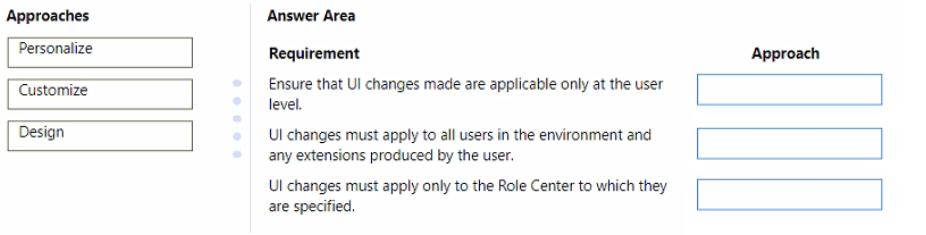
You need to ensure that the user interface (UI) meets the client’s requirements.
Which approach should you use? To answer, drag the appropriate approaches to the correct requirements. Each approach may be used once, more than once, or not at all. You may need to drag the split bar between panes or scroll to view content.
NOTE: Each correct selection is worth one point.
Show Answer
Correct Answer: Personalize
Customize
Design
Explanation: Personalize affects only the current user. Customize applies environment-wide (including extensions). Design changes are scoped to the specified Role Center.
$19
Get all 275 questions with detailed answers and explanations
Instant download HTML + PDF delivered the moment payment clears.
Secure Stripe checkout we never see or store your card details.
7-day refund if files are defective see our refund policy.