HOTSPOT -
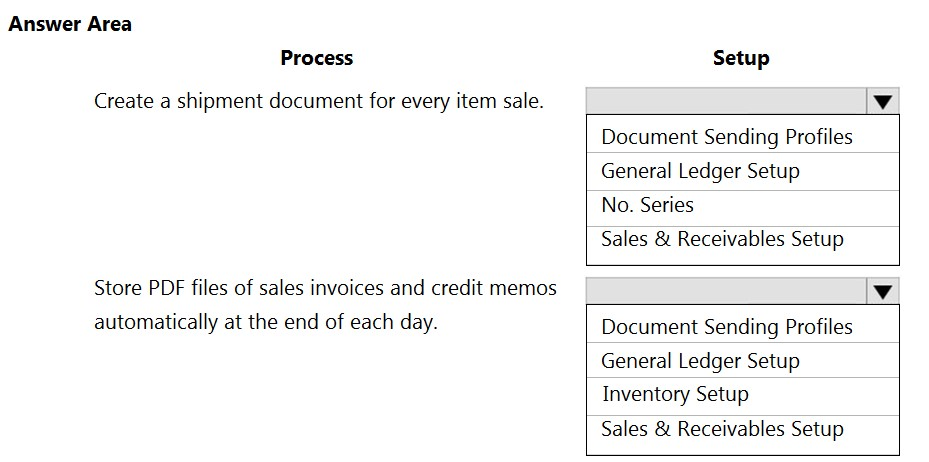
You complete the sales invoicing process for a company.
You need to validate the setup.
Which setup should you check for each process? To answer, select the appropriate options in the answer area.
NOTE: Each correct selection is worth one point.
Hot Area:
Show Answer
Correct Answer: Create a shipment document for every item sale: Sales & Receivables Setup
Store PDF files of sales invoices and credit memos: Document Sending Profiles
Explanation: The Shipment on Invoice setting controls shipment documents. Document Sending Profiles specify whether invoices and credit memos are saved as PDF files.
Question 11
A company is implementing Dynamics 365 Business Central.
The company must be able to assign transactions to unique and sequential numbers. Some transactions require multiple number series that can be used interchangeably.
You need to configure number series to meet the requirements.
What should you do?
A. Define number series codes on journal templates.
B. Create relationships between number series.
C. Enable transaction tracking.
D. Set up approval workflows.
Show Answer
Correct Answer: B
Explanation: Business Central number series can be linked through number series relationships, allowing multiple number series to be used interchangeably while maintaining unique, sequential numbering. Journal template number series apply only to specific journals, transaction tracking is unrelated, and approval workflows do not manage numbering.
Question 12
DRAG DROP -
A company implements Dynamics 365 Business Central.
The database contains very few posted entries. You observe that Global Dimension 1 is configured incorrectly.
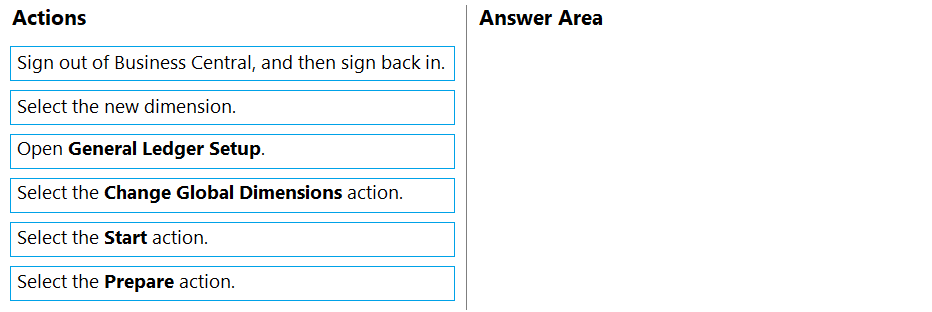
You need to run the Change Global Dimensions function in Sequential mode to replace Global Dimension 1.
Which four actions should you perform in sequence? To answer, move the appropriate actions from the list of actions to the answer area and arrange them in the correct order.
Select and Place:
Show Answer
Correct Answer: 1. Open General Ledger Setup.
2. Select the Change Global Dimensions action.
3. Select the new dimension.
4. Select the Start action.
Explanation: With few posted entries, Sequential mode applies the change directly using Start. Prepare is for parallel processing.
Question 12
A production company is implementing Dynamics 365 Business Central.
The company must be able to analyze the total acquisition and maintenance cost of each production line.
The production lines must be set up as main assets with all the machines on the line set up as components. Only the machines on the production line should have a book value and be depreciated.
You need to configure the system to post correctly for the production line assets.
Which two actions should you perform? Each correct answer presents part of the solution.
NOTE: Each correct selection is worth one point.
A. Make the production line asset inactive.
B. Disable posting to main assets.
C. Open the fixed asset card for the production line.
D. Open the Fixed Asset Setup page.
Show Answer
Correct Answer: B, D
Explanation: To model production lines as main fixed assets with depreciable machine components, configure Fixed Asset Setup to disable posting to main assets. This ensures only component assets carry book value and depreciation, while the main asset is used for grouping and analysis of total acquisition and maintenance costs.
Question 13
DRAG DROP
-
A company is implementing Dynamics 365 Business Central. The customer service team communicates daily with the customers by using Outlook.
The customer service team requires the following functionality in Outlook:
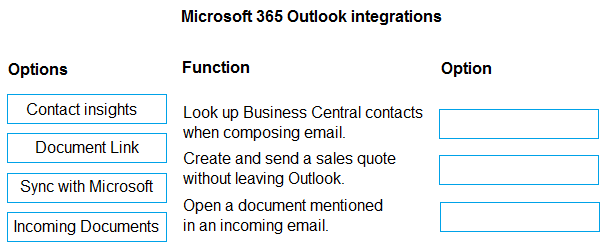
• Look up a business contact in Business Central when composing an email.
• Create a sales quote and send it back to a customer without leaving Outlook.
• Open a document in Business Central from the document number mentioned in an incoming email.
You recommend that the team install the Business Central add-in for Outlook.
You need to recommend which add-in options the customer service team should use to meet the requirements.
Which options should you recommend? To answer, move the appropriate options to the correct functions. You may use each option once, more than once, or not at all. You may need to move the split bar between panes or scroll to view content.
Show Answer
Correct Answer: Look up Business Central contacts when composing email. — Contact insights
Create and send a sales quote without leaving Outlook. — Contact insights
Open a document mentioned in an incoming email. — Document Link
Explanation: The Business Central Outlook add-in uses Contact Insights to view customer information and create sales documents directly in Outlook. Document Link recognizes Business Central document numbers in emails and opens the related record.
Question 13
HOTSPOT -
You are implementing Dynamics 365 Business Central.
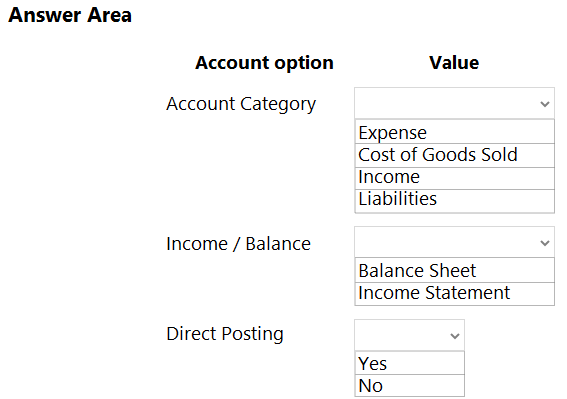
You are creating an expense account for office supplies in the chart of accounts. The account may be used for purchase invoice transactions as well as general journal transactions.
You need to configure the remaining options for the account.
Which values should you use? To answer, select the appropriate options in the answer area.
NOTE: Each correct selection is worth one point.
Hot Area:
Show Answer
Correct Answer: Account Category: Expense
Income / Balance: Income Statement
Direct Posting: Yes
Explanation: Office supplies are an expense reported on the income statement. Direct Posting must be enabled to allow transactions to post directly to the account from general journals.
Question 14
A company uses Dynamics 365 Business Central.
The finance team must dispose a fixed asset.
You need to recommend the process to post the fixed asset disposal.
Which two actions should you recommend the company perform? Each correct answer presents a complete solution.
NOTE: Each correct selection is worth one point.
A. Create and post a fixed asset G/L journal.
B. Select a Tax Category when posting the sales invoice
C. Create and post a sales invoice.
D. Manually adjust the depreciation amount in the fixed asset card.
E. Use the Reverse Transactions function to cancel the fixed asset record.
Show Answer
Correct Answer: A, C
Explanation: Fixed asset disposals in Dynamics 365 Business Central can be posted either through a Fixed Asset G/L Journal or as part of a sales transaction using a sales invoice when the asset is sold. Selecting a tax category is not itself a disposal process, manually changing depreciation is not the correct disposal method, and reversing transactions is not the standard way to dispose of an asset.
Question 14
DRAG DROP -
You set up a new company for a customer.
The customer provides you with a Microsoft Excel file that contains master data.
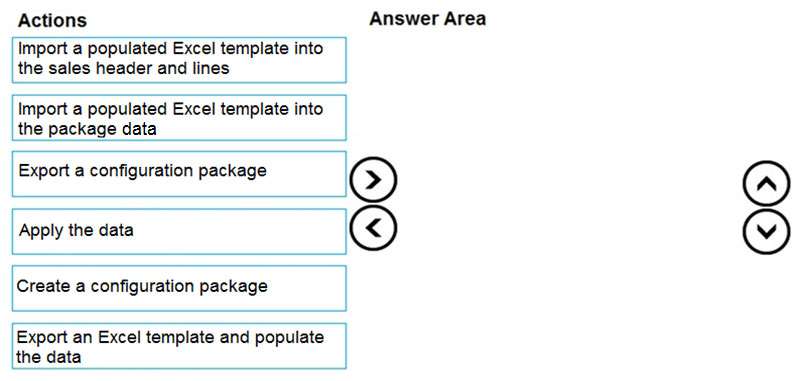
You need to import the master data by using configuration packages.
Which four actions should you perform in sequence? To answer, move the appropriate actions from the list of actions to the answer area and arrange them in the correct order.
Select and Place:
Show Answer
Correct Answer: 1. Create a configuration package.
2. Export an Excel template and populate the data.
3. Import the populated Excel template into the package data.
4. Apply the data.
Explanation: The package defines the tables and fields for the Excel template. After populating and importing the template, apply the package data to create the master records.
Question 15
A customer is using Dynamics 365 Business Central.
The customer is currently sending quotes and invoices using postal services. The customer wants to begin sending quotes and invoices by email directly from Business Central.
You need to configure outbound email.
What are two possible ways to achieve the goal? Each correct answer presents a complete solution.
NOTE: Each correct selection is worth one point.
A. Run the Set up your Business Inbox in Outlook assisted setup tool.
B. Run the Email setup assisted setup tool.
C. Run the Set up email logging assisted setup tool.
D. Configure Email Accounts options.
Show Answer
Correct Answer: B, D
Explanation: Business Central supports outbound email by using the Email Setup assisted setup to configure email capabilities or by configuring Email Accounts directly. Business Inbox in Outlook is unrelated to outbound document emailing, and Email Logging is for tracking email interactions, not configuring outbound email.
Question 16
A company has been using Dynamics 365 Business Central for many years.
A new accounting manager for the company reviews the chart of accounts. The manager wants to remove some general ledger accounts.
The Check G/L Account Usage field is selected in the General Ledger Setup.
You need to assist with the account deletions.
What is one requirement that enables deletion of a general ledger account?
A. The account cannot be used in any account schedule.
B. The account cannot be used in any posting groups or posting setup.
C. The general ledger account is configured to allow for deletion.
D. The account must have ledger entries.
Show Answer
Correct Answer: B
Explanation: With 'Check G/L Account Usage' enabled, Business Central prevents deletion of a G/L account if it is referenced in posting groups or posting setup. The account must not be in use by these configurations before it can be deleted. Account schedules do not by themselves block deletion in this context, there is no configurable 'allow deletion' setting, and accounts with ledger entries cannot be deleted, so option D is the opposite of the requirement.
$19
Get all 275 questions with detailed answers and explanations
Instant download HTML + PDF delivered the moment payment clears.
Secure Stripe checkout we never see or store your card details.
7-day refund if files are defective see our refund policy.