This is the free Microsoft MS-721 practice question bank —
130 of 253 total questions, each with a full explanation, free to
read with no signup required. Updated 2026-10-13.
Every answer is verified against official Microsoft documentation —
see our methodology.
Question 1
You have a Microsoft Teams Phone deployment.
You are deploying Direct Routing by using a certified Session Border Controller (SBC). The FQDN of the SBC is sbc1.contoso.com. You use signaling port 5067.
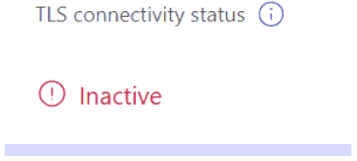
You cannot place calls and receive an error message in the Microsoft Teams admin center as shown in the following exhibit.
What is a possible cause of the issue?
A. The failover timer is set to 0 seconds.
B. Calling plan licenses are not assigned to users.
C. The Forward P-Asserted Identify (PAI) header is disabled.
D. The Digicert root certificate is missing on the SBC.
Show Answer
Correct Answer: D
Explanation: The inactive TLS connection status indicates a TLS trust or certificate-chain problem between Teams and the SBC. A missing DigiCert root certificate on the SBC can prevent the TLS connection from being established. The other options affect calling features, not TLS connectivity.
Question 1
You have a Microsoft Teams deployment.
You have a Teams Rooms on Windows device.
Users scan a code on the front of room display to join an ongoing meeting automatically.
You need to ensure that the users must manually select Accept on the room console before joining the meeting.
Which setting should you add to the SkypeSettings.xml file on the device?
A. false
B. false/AllowRoomRemoteEnabled>
C. false< /QRCodeAutoAcceptProximateMeetingInvitations>
D. false
Show Answer
Correct Answer: C
Explanation: The setting that controls whether a Teams Rooms on Windows device automatically accepts proximate meeting invitations initiated by scanning the QR code is <QRCodeAutoAcceptProximateMeetingInvitations>. Setting it to false disables automatic acceptance so a user must manually select Accept on the room console before joining.
Question 2
You have a Microsoft Teams deployment that contains multiple Teams Rooms on Windows devices. Each device is assigned a Teams Rooms Pro license.
You need to create a custom update schedule for a subset of the devices by using the Teams Rooms Pro Management portal.
What should you do first?
A. Create a new admin role and grant the Modify permission for inventory management to the role.
B. From the Signal settings, enable Windows Server Update Services (WSUS).
C. Create a new ring named Public Preview.
D. Create a new issue that has a description of MTR_Update_Services.
Show Answer
Correct Answer: C
Explanation: To create a custom update schedule for a subset of Teams Rooms on Windows devices in the Teams Rooms Pro Management portal, you first create a new update ring (such as a Public Preview ring). After the ring exists, you can configure its update schedule and assign devices to it. The other options are unrelated to creating custom update schedules.
Question 2
Case Study -
This is a case study. Case studies are not timed separately. You can use as much exam time as you would like to complete each case. However, there may be additional case studies and sections on this exam. You must manage your time to ensure that you are able to complete all questions included on this exam in the time provided.
To answer the questions included in a case study, you will need to reference information that is provided in the case study. Case studies might contain exhibits and other resources that provide more information about the scenario that is described in the case study. Each question is independent of the other questions in this case study.
At the end of this case study, a review screen will appear. This screen allows you to review your answers and to make changes before you move to the next section of the exam. After you begin a new section, you cannot return to this section.
To start the case study -
To display the first question in this case study, click the Next button. Use the buttons in the left pane to explore the content of the case study before you answer the questions. Clicking these buttons displays information such as business requirements, existing environment, and problem statements. If the case study has an All Information tab, note that the information displayed is identical to the information displayed on the subsequent tabs. When you are ready to answer a question, click the Question button to return to the question.
Overview -
Northwind Traders is a publicly traded international investment firm that has offices in San Francisco, New York, Berlin, and London.
Northwind Traders has the following departments:
• IT
• Sales
• Investment
• Management
• Investor relations
• Legal and compliance
Users in the investment department work remotely.
The IT department in the London office provides support for the users in the Berlin office.
Existing Environment. Microsoft Office 365 Environment
Northwind Traders has a Microsoft 365 subscription that contains four users named User1, User2, User3, and User4. All the users are assigned Microsoft 365 E5 and Microsoft Teams Premium licenses. User3 is granted call delegation permissions for User2.
The company uses Calling Plans.
The subscription contains the devices shown in the following table.
Each user has a Teams Phone device.
An auto attendant is configured for the IT department support desk at the London office. Another auto attendant is configured for the investor relations department. The resource account for each auto attendant is assigned a Teams Phone Resource Account license.
Existing Environment. Partner Organization
Northwind Traders partners with a company named Contoso, Ltd. Contoso has a Cisco Webex video conferencing solution.
Existing Environment. Problem Statements
Northwind Traders identifies the following issues:
• When external customers call Direct Inward Dial (DID) numbers assigned to former employees of the San Francisco office, the customers receive a message that the number is out of service. Management has requested that all calls to the DID numbers of former employees be directed to the call queue of the reception area at the San Francisco office.
• The users at Northwind Traders can accept meeting invitations from the users at Contoso by using SF_Dev_1, but the Northwind Traders users cannot join the meetings from SF_Dev_1.
• Employees report that the meeting schedule displayed on LN_Dev_2 includes confidential information, which breaches Northwind Traders security policies.
Requirements. Planned Changes -
Northwind Traders plans to implement the following changes:
• For the auto attendant of the London office support desk, configure a DID number that will be used for all inbound and outbound calls. The solution must ensure that individual agents do NOT require dedicated phone numbers.
• Ensure that User1 can modify the greeting of the inbound call queue for the investor relations department by using the Teams client only.
• Ensure that external customers can call User2 without User3 being notified of the incoming call.
• Open a new office in South Africa.
Requirements. Technical Requirements
Northwind Traders identifies the following technical requirements:
• Create a report that estimates the bandwidth required for the planned office in South Africa.
• Ensure that all Northwind Traders users can enable end-to-end encryption.
• Ensure that all meetings scheduled by the users in the legal and compliance department have end-to-end encryption enabled by default.
• Minimize Calling Plan costs.
• Ensure that the users in the management department can create and schedule Teams events for 950 shareholders.
• Ensure that the management department users can manually approve event registrations for the shareholder meetings.
• Ensure that the investment department users can configure their emergency location by using the Teams client.
• Ensure that the users in the IT department can only access the Microsoft Teams admin center by using Privileged Identity Management (PIM).
• Ensure that all solutions follow the principle of least privilege.
You need to implement the planned changes for User2.
What should you do?
A. For User2, unassign the Shared Calling policy.
B. From the Teams client of User2, configure Secondary Ringer.
C. Assign a new phone number to User2 as a private line.
D. Create a configuration profile, enable the hotline feature, and add a new phone number. Assign the profile to the Teams Phone device of User2.
Show Answer
Correct Answer: C
Explanation: Assign User2 a private line. Calls to a private line ring User2 directly and do not ring or notify User3, who is User2’s delegate. A secondary ringer only changes where a call rings, while the other options do not address delegate notifications.
Question 3
Case Study -
This is a case study. Case studies are not timed separately. You can use as much exam time as you would like to complete each case. However, there may be additional case studies and sections on this exam. You must manage your time to ensure that you are able to complete all questions included on this exam in the time provided.
To answer the questions included in a case study, you will need to reference information that is provided in the case study. Case studies might contain exhibits and other resources that provide more information about the scenario that is described in the case study. Each question is independent of the other questions in this case study.
At the end of this case study, a review screen will appear. This screen allows you to review your answers and to make changes before you move to the next section of the exam. After you begin a new section, you cannot return to this section.
To start the case study -
To display the first question in this case study, click the Next button. Use the buttons in the left pane to explore the content of the case study before you answer the questions. Clicking these buttons displays information such as business requirements, existing environment, and problem statements. If the case study has an All Information tab, note that the information displayed is identical to the information displayed on the subsequent tabs. When you are ready to answer a question, click the Question button to return to the question.
Overview -
Northwind Traders is a publicly traded international investment firm that has offices in San Francisco, New York, Berlin, and London.
Northwind Traders has the following departments:
• IT
• Sales
• Investment
• Management
• Investor relations
• Legal and compliance
Users in the investment department work remotely.
The IT department in the London office provides support for the users in the Berlin office.
Existing Environment. Microsoft Office 365 Environment
Northwind Traders has a Microsoft 365 subscription that contains four users named User1, User2, User3, and User4. All the users are assigned Microsoft 365 E5 and Microsoft Teams Premium licenses. User3 is granted call delegation permissions for User2.
The company uses Calling Plans.
The subscription contains the devices shown in the following table.
Each user has a Teams Phone device.
An auto attendant is configured for the IT department support desk at the London office. Another auto attendant is configured for the investor relations department. The resource account for each auto attendant is assigned a Teams Phone Resource Account license.
Existing Environment. Partner Organization
Northwind Traders partners with a company named Contoso, Ltd. Contoso has a Cisco Webex video conferencing solution.
Existing Environment. Problem Statements
Northwind Traders identifies the following issues:
• When external customers call Direct Inward Dial (DID) numbers assigned to former employees of the San Francisco office, the customers receive a message that the number is out of service. Management has requested that all calls to the DID numbers of former employees be directed to the call queue of the reception area at the San Francisco office.
• The users at Northwind Traders can accept meeting invitations from the users at Contoso by using SF_Dev_1, but the Northwind Traders users cannot join the meetings from SF_Dev_1.
• Employees report that the meeting schedule displayed on LN_Dev_2 includes confidential information, which breaches Northwind Traders security policies.
Requirements. Planned Changes -
Northwind Traders plans to implement the following changes:
• For the auto attendant of the London office support desk, configure a DID number that will be used for all inbound and outbound calls. The solution must ensure that individual agents do NOT require dedicated phone numbers.
• Ensure that User1 can modify the greeting of the inbound call queue for the investor relations department by using the Teams client only.
• Ensure that external customers can call User2 without User3 being notified of the incoming call.
• Open a new office in South Africa.
Requirements. Technical Requirements
Northwind Traders identifies the following technical requirements:
• Create a report that estimates the bandwidth required for the planned office in South Africa.
• Ensure that all Northwind Traders users can enable end-to-end encryption.
• Ensure that all meetings scheduled by the users in the legal and compliance department have end-to-end encryption enabled by default.
• Minimize Calling Plan costs.
• Ensure that the users in the management department can create and schedule Teams events for 950 shareholders.
• Ensure that the management department users can manually approve event registrations for the shareholder meetings.
• Ensure that the investment department users can configure their emergency location by using the Teams client.
• Ensure that the users in the IT department can only access the Microsoft Teams admin center by using Privileged Identity Management (PIM).
• Ensure that all solutions follow the principle of least privilege.
You need to meet the technical requirements for the legal and compliance department users.
What should you do first?
A. Create a new enhanced encryption policy and enable end-to-end encryption for meetings.
B. Modify the global meeting policy and configure sensitive content detection.
C. Create a new meeting template and enable end-to-end encryption.
D. Create a new policy package and add a meeting policy and a messaging policy.
Show Answer
Correct Answer: A
Explanation: First, create an enhanced encryption policy that enables end-to-end encryption for meetings. That policy makes the feature available to the legal and compliance users; a meeting template can then enable it by default for their meetings.
Question 3
You have a Microsoft 365 subscription that uses Microsoft Teams.
You have a file that contains the peripherals used by your company.
You need to import the file to Teams.
Which portal should you use?
A. Microsoft 365 admin center
B. Teams Pro Management
C. Exchange admin center
D. the Microsoft Teams admin center
Show Answer
Correct Answer: B
Explanation: Importing a file that contains peripherals used by the company is done through Teams Pro Management, which includes inventory and peripheral management capabilities for Teams devices. The Microsoft Teams admin center manages Teams settings and devices generally, but the dedicated peripheral import functionality is part of Teams Pro Management.
Question 4
DRAG DROP
-
You have a Microsoft Teams deployment.
You have the users shown in the following table.
You need to recommend add-on licenses. The solution must minimize costs.
Which add-on license should you recommend for each user? To answer, drag the appropriate licenses to the correct users. Each license may be used once, more than once, or not at all. You may need to drag the split bar between panes or scroll to view content.
NOTE: Each correct selection is worth one point.
Show Answer
Correct Answer: User1: Microsoft 365 Copilot
User2: Microsoft 365 Copilot
Explanation: Live summary and intelligent meeting recap require Microsoft 365 Copilot. User2 also needs intelligent meeting recap; although Teams Premium provides live translation, Copilot is still required for the recap requirement, making it the necessary add-on.
Question 4
Case Study -
This is a case study. Case studies are not timed separately. You can use as much exam time as you would like to complete each case. However, there may be additional case studies and sections on this exam. You must manage your time to ensure that you are able to complete all questions included on this exam in the time provided.
To answer the questions included in a case study, you will need to reference information that is provided in the case study. Case studies might contain exhibits and other resources that provide more information about the scenario that is described in the case study. Each question is independent of the other questions in this case study.
At the end of this case study, a review screen will appear. This screen allows you to review your answers and to make changes before you move to the next section of the exam. After you begin a new section, you cannot return to this section.
To start the case study -
To display the first question in this case study, click the Next button. Use the buttons in the left pane to explore the content of the case study before you answer the questions. Clicking these buttons displays information such as business requirements, existing environment, and problem statements. If the case study has an All Information tab, note that the information displayed is identical to the information displayed on the subsequent tabs. When you are ready to answer a question, click the Question button to return to the question.
Overview -
Northwind Traders is a publicly traded international investment firm that has offices in San Francisco, New York, Berlin, and London.
Northwind Traders has the following departments:
• IT
• Sales
• Investment
• Management
• Investor relations
• Legal and compliance
Users in the investment department work remotely.
The IT department in the London office provides support for the users in the Berlin office.
Existing Environment. Microsoft Office 365 Environment
Northwind Traders has a Microsoft 365 subscription that contains four users named User1, User2, User3, and User4. All the users are assigned Microsoft 365 E5 and Microsoft Teams Premium licenses. User3 is granted call delegation permissions for User2.
The company uses Calling Plans.
The subscription contains the devices shown in the following table.
Each user has a Teams Phone device.
An auto attendant is configured for the IT department support desk at the London office. Another auto attendant is configured for the investor relations department. The resource account for each auto attendant is assigned a Teams Phone Resource Account license.
Existing Environment. Partner Organization
Northwind Traders partners with a company named Contoso, Ltd. Contoso has a Cisco Webex video conferencing solution.
Existing Environment. Problem Statements
Northwind Traders identifies the following issues:
• When external customers call Direct Inward Dial (DID) numbers assigned to former employees of the San Francisco office, the customers receive a message that the number is out of service. Management has requested that all calls to the DID numbers of former employees be directed to the call queue of the reception area at the San Francisco office.
• The users at Northwind Traders can accept meeting invitations from the users at Contoso by using SF_Dev_1, but the Northwind Traders users cannot join the meetings from SF_Dev_1.
• Employees report that the meeting schedule displayed on LN_Dev_2 includes confidential information, which breaches Northwind Traders security policies.
Requirements. Planned Changes -
Northwind Traders plans to implement the following changes:
• For the auto attendant of the London office support desk, configure a DID number that will be used for all inbound and outbound calls. The solution must ensure that individual agents do NOT require dedicated phone numbers.
• Ensure that User1 can modify the greeting of the inbound call queue for the investor relations department by using the Teams client only.
• Ensure that external customers can call User2 without User3 being notified of the incoming call.
• Open a new office in South Africa.
Requirements. Technical Requirements
Northwind Traders identifies the following technical requirements:
• Create a report that estimates the bandwidth required for the planned office in South Africa.
• Ensure that all Northwind Traders users can enable end-to-end encryption.
• Ensure that all meetings scheduled by the users in the legal and compliance department have end-to-end encryption enabled by default.
• Minimize Calling Plan costs.
• Ensure that the users in the management department can create and schedule Teams events for 950 shareholders.
• Ensure that the management department users can manually approve event registrations for the shareholder meetings.
• Ensure that the investment department users can configure their emergency location by using the Teams client.
• Ensure that the users in the IT department can only access the Microsoft Teams admin center by using Privileged Identity Management (PIM).
• Ensure that all solutions follow the principle of least privilege.
You need to implement the planned changes for User1.
You create a new voice application policy and assign the policy to User1.
What should you do next?
A. Pin the Queues app for User1.
B. Assign the Teams Telephony Administrator role to User1.
C. Add User1 as an authorized user of the call queue.
D. Add User1 as a call answering agent of the call queue.
Show Answer
Correct Answer: C
Explanation: Add User1 as an authorized user of the investor relations call queue. Authorized users can manage queue settings, including its greeting, through the Teams client. A call-answering agent handles calls but does not gain queue-management permissions.
Question 5
You have a Microsoft Teams deployment.
You configure Quality of Service (QoS) to prioritize network traffic for Teams communications.
You need to validate the QoS configurations.
What should you do?
A. From Microsoft Call Quality Dashboard, review Reliability Reports.
B. Perform a packet capture and validate the source port numbers.
C. From Microsoft Call Quality Dashboard, review Quality of Experience Reports.
D. Perform a packet capture and validate that the packets have DSCP markings.
Show Answer
Correct Answer: D
Explanation: To validate that QoS is actually being applied on Teams media traffic, perform a packet capture and verify that media packets carry the expected DSCP markings. Reviewing Call Quality Dashboard reports helps assess call quality but does not directly validate QoS marking configuration. Validating only source port numbers is insufficient because ports alone do not confirm QoS tagging.
Sources:
https://learn.microsoft.com/en-us/microsoftteams/vdi-2
Question 5
You are deploying Direct Routing by using a certified Session Border Controller (SBC). The FQDN of the SBC is sbc1.contoso.com. You use signaling port 5067.
You cannot place calls and receive an error message in the Microsoft Teams admin center as shown in the following exhibit.
What is a possible cause of the issue?
A. The SIP options are disabled.
B. The firewall blocks traffic on port 5067.
C. Licenses are not assigned to the contoso.com domain.
D. Location-Based Routing is enabled for the SBC.
Show Answer
Correct Answer: B
Explanation: The inactive TLS connectivity status indicates that Microsoft Teams cannot establish a TLS connection to the SBC. A firewall blocking the configured signaling port, 5067, is a possible cause.
$19
Get all 253 questions with detailed answers and explanations
Instant download HTML + PDF delivered the moment payment clears.
Secure Stripe checkout we never see or store your card details.
7-day refund if files are defective see our refund policy.