You have a Microsoft Teams deployment.
A user named User1 plans to host a live event.
You create a new meeting policy and set Screen sharing mode to Entire screen.
You need to complete the meeting policy configuration to ensure that User1 can host the live event.
Which two settings should you set to On? Each correct answer presents part of the solution.
Note: Each correct selection is worth one point.
A. Whiteboard
B. Private meeting scheduling
C. Meet now in private meetings
D. Broadcast production with NDI and SDI hardware
E. Video Conferencing
Show Answer
Correct Answer: D, E
Explanation: To host Microsoft Teams live events, the meeting policy must allow the capabilities required for live event production. Enabling Broadcast production with NDI and SDI hardware allows broadcast integration/production features, and enabling Video Conferencing allows the user to participate with audio/video, which is required for hosting live events. The other options (Whiteboard, Private meeting scheduling, and Meet now in private meetings) are not required specifically to host a live event.
Question 106
Your network contains an on-premises Active Directory Domain Services (AD DS) domain named contoso.com.
You have a Microsoft 365 subscription.
You plan to implement Microsoft Teams Rooms shared room video conferencing.
You deploy 50 Teams Rooms on Windows devices and join each device to contoso.com.
You need to enable Direct Guest Join on all 50 devices. The solution must minimize administrative effort.
What should you do?
A. From the Microsoft Teams admin center, modify the Guest access settings.
B. Run the Set-CsVideoInteropServiceProvider cmdlet.
C. Deploy a SkypeSettings.xml file to each device by using Group Policy.
D. Run the Set-CsTeamsGuestMeetingConfiguration cmdlet.
Show Answer
Correct Answer: C
Explanation: Direct Guest Join on Microsoft Teams Rooms on Windows is configured through the Teams Rooms device configuration (SkypeSettings.xml), which includes the DirectGuestJoin settings. In an on-premises AD DS environment with 50 domain-joined devices, deploying the XML configuration by Group Policy minimizes administrative effort by centrally applying the setting to all devices. The other options configure tenant guest access or interoperability settings rather than enabling the device feature.
Question 107
You have a Microsoft 365 E5 subscription that uses Microsoft Teams Phone.
You are reconfiguring a SIP handset to use SIP Gateway.
You discover that the Teams sign-in option fails to appear on the handset.
You need to ensure that the Teams sign-in option appears on the handset.
What should you do?
A. Configure the handset to use IPv6.
B. From the Microsoft Teams admin center, add the MAC address of the handset.
C. Change the handset's default administrator password to a complex password.
D. Connect your computer to the PC port of the handset.
E. Set the provisioning server URL for the handset.
Show Answer
Correct Answer: E
Explanation: For SIP Gateway, supported SIP phones must be pointed to the Microsoft Teams SIP Gateway provisioning service. If the handset is not configured with the correct provisioning server URL, it will not download the Teams/SIP Gateway configuration and the Teams sign-in option will not appear. Adding a MAC address in the Teams admin center is not a general prerequisite for SIP Gateway sign-in.
Question 108
Your company has offices in 10 countries. The company has a tenant dial plan configured for each country.
The company recently opened an office in a new country.
You need to create a new tenant dial plan that meets the unique dialing requirements of the new country.
What should you do?
A. From the Microsoft Teams admin center, select Voice select Dial plan, and then select Add.
B. From the Microsoft Teams admin center, select Voice select Phone numbers, and then select Add.
C. From the Microsoft Teams admin center, select Voice select Calling policies and then select Add.
D. From the Microsoft Teams admin center, select Locations, select Network topology, and then select Add.
Show Answer
Correct Answer: A
Explanation: Tenant dial plans are created and managed in the Microsoft Teams admin center under Voice > Dial plans. To support a new country's unique dialing requirements, you add a new tenant dial plan and configure its normalization rules.
Sources:
https://learn.microsoft.com/en-us/microsoftteams/considerations-calling-plan
Question 109
Note: This question is part of a series of questions that present the same scenario. Each question in the series contains a unique solution that might meet the stated goals. Some question sets might have more than one correct solution, while others might not have a correct solution.
After you answer a question in this section, you will NOT be able to return to it. As a result, these questions will not appear in the review screen.
Your company purchases several Microsoft Surface Hub devices for use with Microsoft Teams Rooms.
You create a provisioning package ( ppkg) to configure certificates, apps, and proxy settings for each Surface Hub.
You need to deploy the provisioning package to each Surface Hub.
Solution: Use Group Policy and configure the provisioning package to run upon device start up.
Does this meet the goal?
A. Yes
B. No
Show Answer
Correct Answer: B
Explanation: Group Policy is not the supported mechanism for deploying provisioning packages (.ppkg) to Microsoft Surface Hub devices. Provisioning packages are typically applied during initial setup (such as via USB or other supported provisioning methods), while Surface Hub devices are managed through supported management solutions rather than startup Group Policy processing. Therefore, using Group Policy to run the provisioning package at device startup does not meet the deployment goal.
Sources:
https://www.coursehero.com/file/p68s38ce/Question-15-Note-This-question-is-part-of-a-series-of-questions-that-present-the
https://www.certlibrary.com/exam/70-774
Question 110
Note: This question is part of a series of questions that present the same scenario. Each question in the series contains a unique solution that might meet the stated goals. Some question sets might have more than one correct solution, while others might not have a correct solution.
After you answer a question in this section, you will NOT be able to return to it. As a result, these questions will not appear in the review screen.
You need to create a new call queue to route calls to support agents. The support agents must be able to see their call queue history and the shared transcribed voicemail. The solution must minimize administrative effort.
Solution: You configure group call pickup for the call queue.
Does this meet the goal?
A. Yes
B. No
Show Answer
Correct Answer: B
Explanation: Group call pickup allows members of a group to answer calls ringing for other group members, but it does not provide the call queue features required for agents to view call queue history and access a shared transcribed voicemail. Those capabilities are associated with properly configured Teams call queues and shared voicemail/Microsoft 365 group integration, not group call pickup.
Sources:
https://www.coursehero.com/file/p68s38ce/Question-15-Note-This-question-is-part-of-a-series-of-questions-that-present-the
Question 111
You have a Microsoft Teams Phone deployment.
You deploy a new network site.
You discover that the new site is not listed in location-based reports. Other sites appear in the reports.
You need to ensure that all the sites appear in the reports.
What should you do?
A. From the Microsoft Call Quality Dashboard select Tenant Data Upload and upload a CSV file that contains all the network sites.
B. From Network planner in the Microsoft Teams admin center, add a new persona.
C. From Network planner in the Microsoft Teams admin center, modify an existing network plan.
D. From Network planner in the Microsoft Teams admin center, add a new network plan.
E. From the Microsoft Call Quality Dashboard, select Tenant Data Upload and upload a CSV file that contains the new network site only.
Show Answer
Correct Answer: A
Explanation: Call Quality Dashboard location-based reporting relies on uploaded tenant network topology data (sites, subnets, buildings). After adding a new network site, upload an updated tenant data CSV containing the complete network topology so the reports include all sites. Network Planner does not populate CQD tenant data for these reports, and uploading only the new site is not the recommended approach because the tenant data upload is intended to represent the full topology.
Sources:
https://learn.microsoft.com/en-us/microsoftteams/teams-analytics-and-reports/locations-networks
https://cciedump.spoto.net/exam-questions/microsoft-ms-721-exam-with-realistic-practice-tests
Question 112
DRAG DROP
-
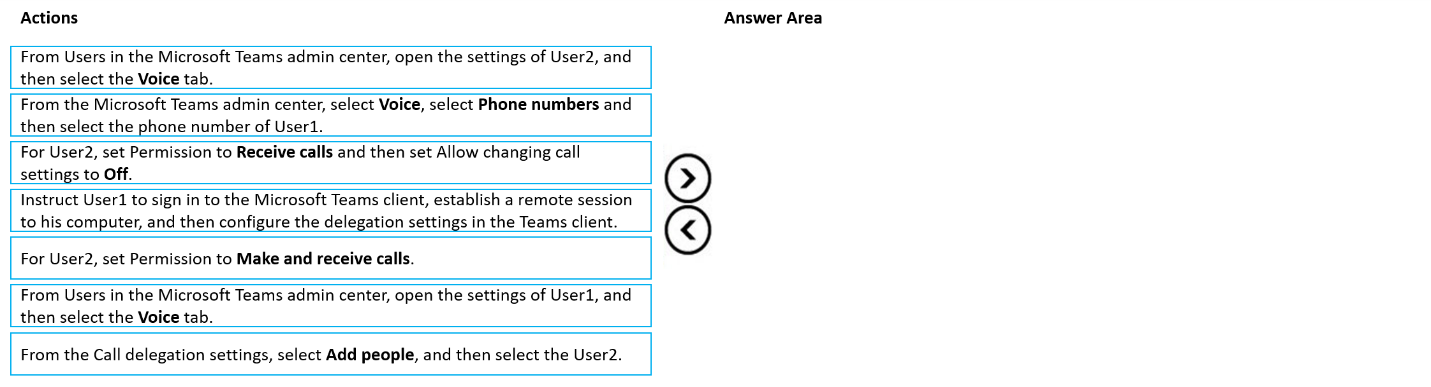
You have two users named User1 and User2.
You need to configure User2 as a call delegate for User1. The solution must meet the following requirements:
• Minimize disruptions to User1.
• Prevent User2 from placing calls on behalf of User1.
• Prevent User2 from modifying the settings of User1.
Which three actions should you perform in sequence? To answer, move the appropriate actions from the list of actions to the answer area and arrange them in the correct order.
Show Answer
Correct Answer: 1. From Users in the Microsoft Teams admin center, open the settings of User1, and then select the Voice tab.
2. From the Call delegation settings, select Add people, and then select User2.
3. For User2, set Permission to Receive calls and then set Allow changing call settings to Off.
Explanation: Configure delegation from the delegator (User1). Add User2 as the delegate, then restrict the delegate to receiving calls only and disable changing call settings, which prevents placing calls on behalf of User1 and modifying User1's settings while minimizing disruption.
Question 113
DRAG DROP
-
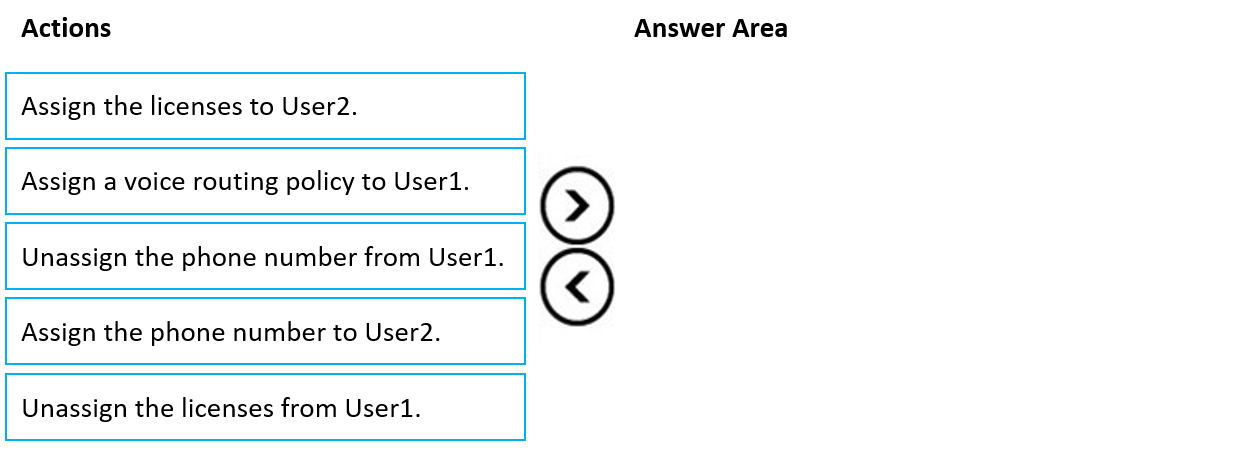
You have a Teams Phone deployment that uses Direct Routing.
You have two users named User1 and User2.
You need to move the assigned licenses and phone number of User1 to User2.
Which four actions should you perform in sequence? To answer, move the appropriate actions from the list of actions to the answer area and arrange them in the correct order.
Show Answer
Correct Answer: Unassign the phone number from User1.
Unassign the licenses from User1.
Assign the licenses to User2.
Assign the phone number to User2.
Explanation: The phone number must be freed from the original user before reassignment. The Teams Phone-related licenses are then moved to the target user, who must be licensed before the phone number can be assigned.
Question 114
You have a Teams Phone deployment.
You need to enable external users to configure their emergency address manually in the Teams client.
What should you do?
A. Enable Location-Based Routing.
B. Create a new emergency calling policy that has external location lookup mode enabled.
C. Create a new emergency call routing policy that has dynamic emergency calling configured.
D. From Networks & locations, add the external subnets of the users.
Show Answer
Correct Answer: B
Explanation: To allow external (remote) users to manually configure their emergency address in the Teams client, you use an emergency calling policy with External location lookup mode enabled. This setting specifically allows users working outside the corporate network to enter and manage their emergency location. Location-Based Routing is for PSTN call routing, emergency call routing policies determine routing of emergency calls rather than user configuration, and adding external subnets is not how remote users manually configure their address.
$19
Get all 253 questions with detailed answers and explanations
Instant download HTML + PDF delivered the moment payment clears.
Secure Stripe checkout we never see or store your card details.
7-day refund if files are defective see our refund policy.