You are deploying Direct Routing by using a certified Session Border Controller (SBC). The FQDN of the SBC is sbc1.contoso.com. You use signaling port 5067.
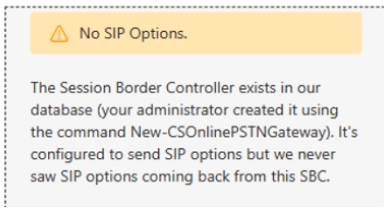
You cannot place calls and receive an error message in the Microsoft Teams admin center as shown in the following exhibit.
What is a possible cause of the issue?
A. The SIP options are disabled.
B. The failover timer is set to 0 seconds.
C. Licenses are not assigned to the contoso.com domain.
D. The firewall blocks traffic on port 5067.
Show Answer
Correct Answer: D
Explanation: The exhibit shows the SBC’s TLS connectivity as inactive. If the firewall blocks the configured signaling port, 5067, Teams cannot establish the TLS connection to the SBC, preventing calls.
Question 6
HOTSPOT
-
You have a Microsoft Teams deployment.
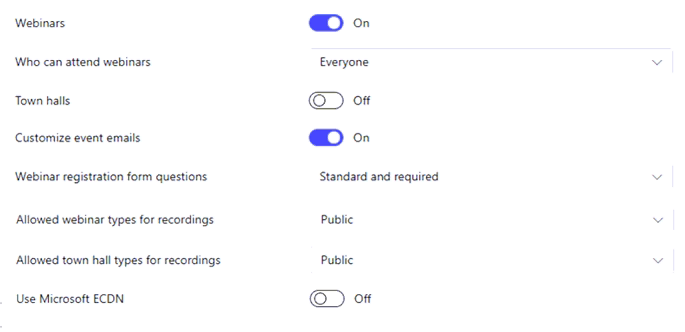
You configure an events policy as shown in the following exhibit.
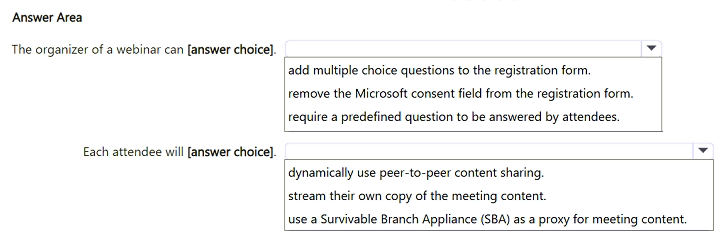
Use the drop-down menus to select the answer choice that completes each statement based on the information presented in the graphic.
NOTE: Each correct selection is worth one point.
Show Answer
Correct Answer: require a predefined question to be answered by attendees.
dynamically use peer-to-peer content sharing.
Explanation: The policy sets Webinar registration form questions to 'Standard and required', so organizers can require predefined registration questions. Microsoft eCDN relates to enterprise content delivery optimization; the expected exam answer is that attendees dynamically use peer-to-peer content sharing.
Question 7
You have a Microsoft 365 subscription that uses Microsoft Teams.
You need to ensure that guest users can attend webinars.
Which type of policy should you create?
A. meeting
B. app permission
C. messaging
D. event
Show Answer
Correct Answer: D
Explanation: Event policies in Microsoft Teams control webinar and town hall capabilities, including who can attend webinars. To allow guest users to attend webinars, you configure an event policy rather than a meeting, messaging, or app permission policy.
Question 7
Your company has a Microsoft Teams Phone deployment that uses Direct Routing.
A user named User1 reports that she cannot make calls because the dial pad is missing in Teams.
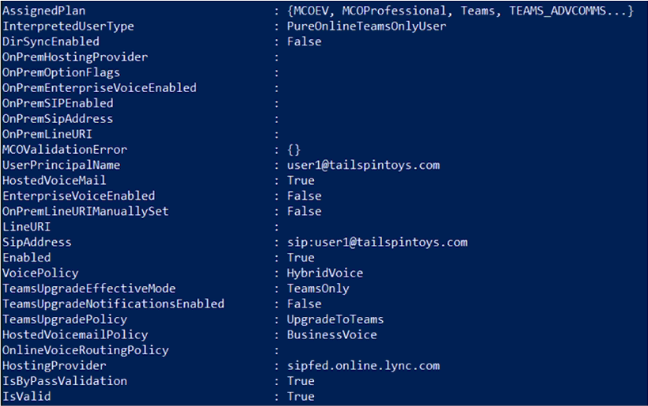
You run the Get-CsOnlineUser cmdlet and receive the output shown in the exhibit.
Which two actions should you perform to ensure that the dial pad appears in the Teams client? Each correct answer presents part of the solution.
NOTE: Each correct selection is worth one point.
A. Run the Set-CsPhoneNumberAssignment cmdlet and specify the -PhoneNumber parameter.
B. Assign a Microsoft Teams Phone Standard license to User1.
C. Run the New-CsHybridTelephoneNumber and specify the -TelephoneNumber parameter.
D. Run the Grant-CsOnlineVoiceRoutingPolicy cmdlet.
Show Answer
Correct Answer: A, D
Explanation: User1 already has the Teams Phone license (MCOEV appears in AssignedPlan). The output shows no LineURI and no OnlineVoiceRoutingPolicy. Assign a Direct Routing phone number with Set-CsPhoneNumberAssignment, then grant an online voice routing policy so the user is configured for Direct Routing calls.
Question 8
You have a Microsoft Teams Phone deployment.
You plan to deploy Teams Phone devices that will use Android AOSP management.
You need to ensure that the devices can be managed by using Microsoft 365.
What should you do first?
A. Create an Android Device Administrator compliance policy.
B. From Microsoft Intune, create an AOSP management enrollment profile.
C. Assign a Teams Shared Device license to each device.
D. Disable the Microsoft Intune service plan for new shared devices.
Show Answer
Correct Answer: B
Explanation: To manage Android AOSP-based Teams Phone devices through Microsoft 365/Intune, the first prerequisite is creating an Android AOSP corporate-owned userless enrollment profile in Microsoft Intune. This enrollment profile is required before devices can enroll and be managed. Licensing and compliance policies come later, and disabling the Intune service plan is unrelated.
Question 8
You have a Microsoft Teams deployment.
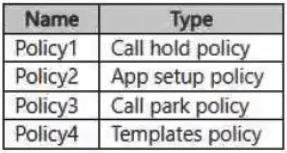
You have the policies shown in the following table.
You create a policy package named Package1.
Which policies can you assign to Package1?
A. Policy1 only
B. Policy2 only
C. Policy1 and Policy4 only
D. Policy2 and Policy3
E. Policy1, Policy 2, Policy3, and Policy4
Show Answer
Correct Answer: D
Explanation: Policy packages support App setup policies and Call park policies, so Policy2 and Policy3 can be assigned. Call hold and Templates policies are not supported policy types for a package.
Question 9
You have a Microsoft Teams Phone deployment.
You are deploying Direct Routing.
All users have a SIP URI in the format of
. The Session Border Controller (SBC) is named sbc.voice.contoso.com.
When troubleshooting errors on the SBC, you receive the warning shown in the following exhibit.
What is a possible cause of the issue?
A. Media bypass is disabled on the SBC
B. The firewall blocks inbound traffic on port 443 to the SBC
C. The firewall blocks traffic to the signaling port on the SBC
D. The firewall blocks outbound traffic on port 443 to Microsoft Teams
Show Answer
Correct Answer: C
Explanation: The “No SIP Options” warning indicates that SIP OPTIONS signaling is not reaching or being returned by the SBC. A firewall blocking traffic to the SBC’s SIP signaling port (typically 5061) could cause this. Media bypass and port 443 are not the relevant settings for SIP OPTIONS signaling.
Question 9
HOTSPOT
-
You have a Microsoft Teams deployment.
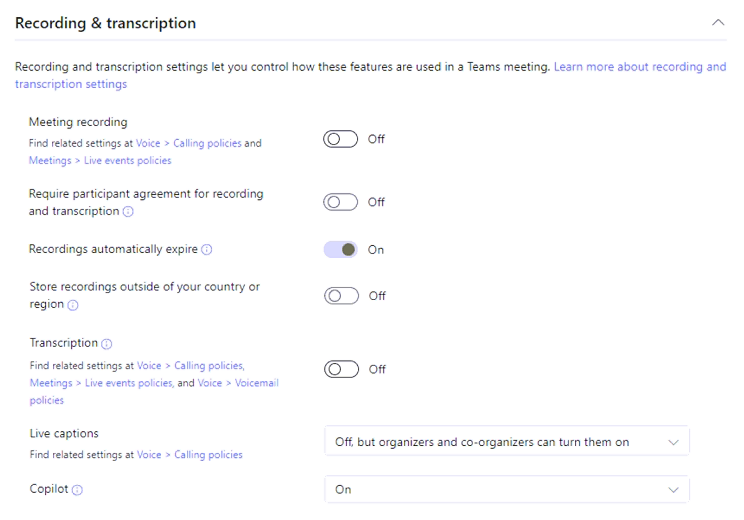
The Global (Org-wide default) settings are configured as shown in the following exhibit.
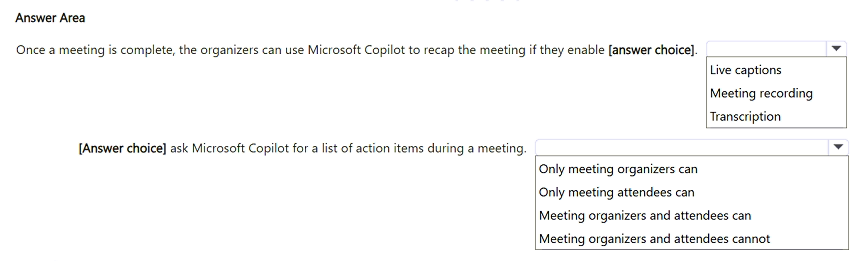
Use the drop-down menus to select the answer choice that completes each statement based on the information presented in the graphic.
NOTE: Each correct selection is worth one point.
Show Answer
Correct Answer: Transcription
Meeting organizers and attendees can
Explanation: Copilot meeting recap after a meeting relies on meeting transcription. With Copilot enabled, both organizers and attendees can ask Copilot for action items during the meeting.
Question 10
HOTSPOT
-
You have a Microsoft Teams deployment.
You need to recommend a physical device solution for the users in a flexible workspace. The solution must meet the following requirements:
• Ensure that the users can sit at any desk and have their phone number follow them.
• Ensure that the users can make outbound calls without signing in to a device.
• Ensure that the users can sign in to a device directly.
• Minimize costs.
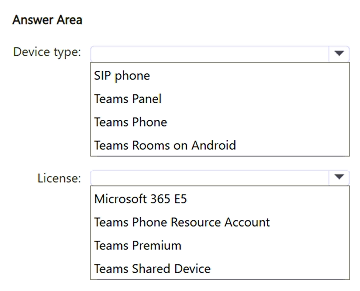
Which type of device should you recommend, and which license should you assign to the devices? To answer, select the appropriate options in the answer area.
NOTE: Each correct selection is worth one point.
Show Answer
Correct Answer: Device type: Teams Phone
License: Teams Shared Device
Explanation: Teams Phone devices support hot desking so users can sign in directly and have their phone number follow them. Teams Shared Device licensing is intended for shared/common-area Teams phones and minimizes cost while supporting shared use.
Question 10
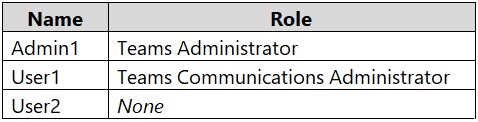
You have a Microsoft 365 E5 subscription and a Microsoft Teams deployment that contains the users shown in the following table.
You plan to use a custom policy package to contain a set of meeting policies, calling policies, and live event policies.
You need to ensure that Admin1 can create the custom policy package, and User1 and User2 can be assigned the package.
Which users require a Teams Premium license?
A. Admin1 only
B. User2 only
C. User1 and User2 only
D. Admin1, User1, and User2
Show Answer
Correct Answer: D
Explanation: Creating a custom policy package requires a Teams Premium license for Admin1. Users assigned the custom package also need Teams Premium licenses, so User1 and User2 require them as well. Their Teams roles affect permissions, not the licensing requirement.
$19
Get all 253 questions with detailed answers and explanations
Instant download HTML + PDF delivered the moment payment clears.
Secure Stripe checkout we never see or store your card details.
7-day refund if files are defective see our refund policy.