This is the free Microsoft MS-102 practice question bank —
220 of 431 total questions, each with a full explanation, free to
read with no signup required. Updated 2026-10-13.
Every answer is verified against official Microsoft documentation —
see our methodology.
Question 1
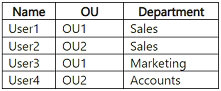
Your network contains an on-premises Active Directory Domain Services (AD DS) domain. The domain contains two organizational units (OUs) named OU1 and OU2 and the users shown in the following table.
You have a Microsoft Entra tenant.
You plan to sync the domain with the Microsoft Entra tenant by using Microsoft Entra Connect Sync.
You need to ensure that only users in the sales and marketing departments sync with the tenant. The solution must minimize administrative effort.
What should you configure in Microsoft Entra Connect?
A. OU-based filtering
B. domain-based filtering
C. group-based filtering
D. attribute-based filtering
Show Answer
Correct Answer: D
Explanation: Configure attribute-based filtering using the Department attribute. This includes users in Sales and Marketing across both OUs while excluding users in other departments, without needing to reorganize OUs or maintain a separate group.
Question 1
HOTSPOT
-
Your network contains an on-premises Active Directory Domain Services (AD DS) domain. The domain contains a user named User1.
You have a Microsoft Entra tenant that contains a user named User2.
You plan to use Microsoft Entra Cloud Sync to sync the AD DS domain and the Microsoft Entra tenant.
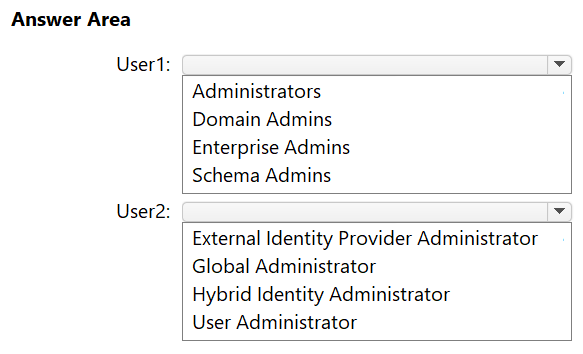
You need to ensure that User1 can install Microsoft Entra Cloud Sync in the domain, and User2 can configure Microsoft Entra Cloud Sync in the tenant. The solution must follow the principle of least privilege.
To which group should you add User1, and which role should you assign to User2? To answer, select the appropriate options in the answer area.
NOTE: Each correct selection is worth one point.
Explanation: The Cloud Sync agent setup requires domain administrator privileges in AD DS. The Hybrid Identity Administrator role provides the required tenant permissions without assigning Global Administrator.
Question 1
You have a Microsoft 365 subscription.
The Microsoft Secure Score for the subscription is 60, and the achievable score is 75.
You need to apply a Conditional Access policy that will require users to use multifactor authentication (MFA) when they connect from an untrusted device.
How will the policy affect the scores?
A. The Secure Score and the achievable score will increase.
B. The Secure Score and the achievable score will remain unchanged.
C. The Secure Score will decrease, and the achievable score will increase.
D. The Secure Score will increase, and the achievable score will decrease.
Show Answer
Correct Answer: D
Explanation: Implementing a Conditional Access policy that requires MFA satisfies a Microsoft Secure Score improvement, so the current Secure Score increases. The achievable score represents the remaining score available from recommendations not yet implemented, so after completing one recommendation, the remaining achievable score decreases.
Question 2
HOTSPOT
-
You have a Microsoft 365 E3 subscription.
You plan to use Microsoft 365 Backup.
You need to prepare the environment before you can enable Microsoft 365 Backup.
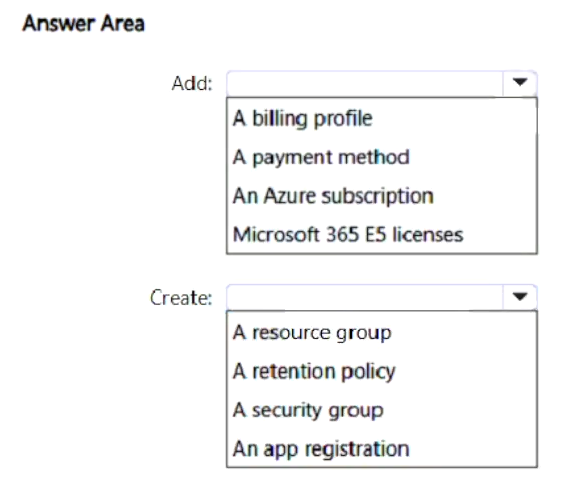
What should you do? To answer, select the appropriate options in the answer area.
NOTE: Each correct selection is worth one point.
Show Answer
Correct Answer: Add: An Azure subscription
Create: A resource group
Explanation: Microsoft 365 Backup uses pay-as-you-go billing through an Azure subscription. A resource group is needed to set up that billing.
Question 2
You have a Microsoft 365 subscription.
From the Microsoft Entra authentication methods policy, you configure the Microsoft Authenticator on companion applications settings as shown in the following exhibit.
You need to ensure that users can complete the authentication process from their mobile device.
What should each user install on their device?
A. Microsoft Teams
B. Microsoft 365 Copilot
C. Microsoft Outlook
D. Company Portal
Show Answer
Correct Answer: C
Explanation: The enabled companion-app setting allows users to complete Microsoft Authenticator authentication through Authenticator Lite in the Outlook mobile app. Users should install Microsoft Outlook.
Question 2
HOTSPOT
-
Your company has a Microsoft 365 E5 tenant.
Users at the company use the following versions of Microsoft Office:
• Microsoft 365 Apps for enterprise
• Office for the web
• Office 2021
• Office 2024
The company currently uses the following Office file types:
• .docx
• .xlsx
• .doc
• .xls
You plan to use sensitivity labels.
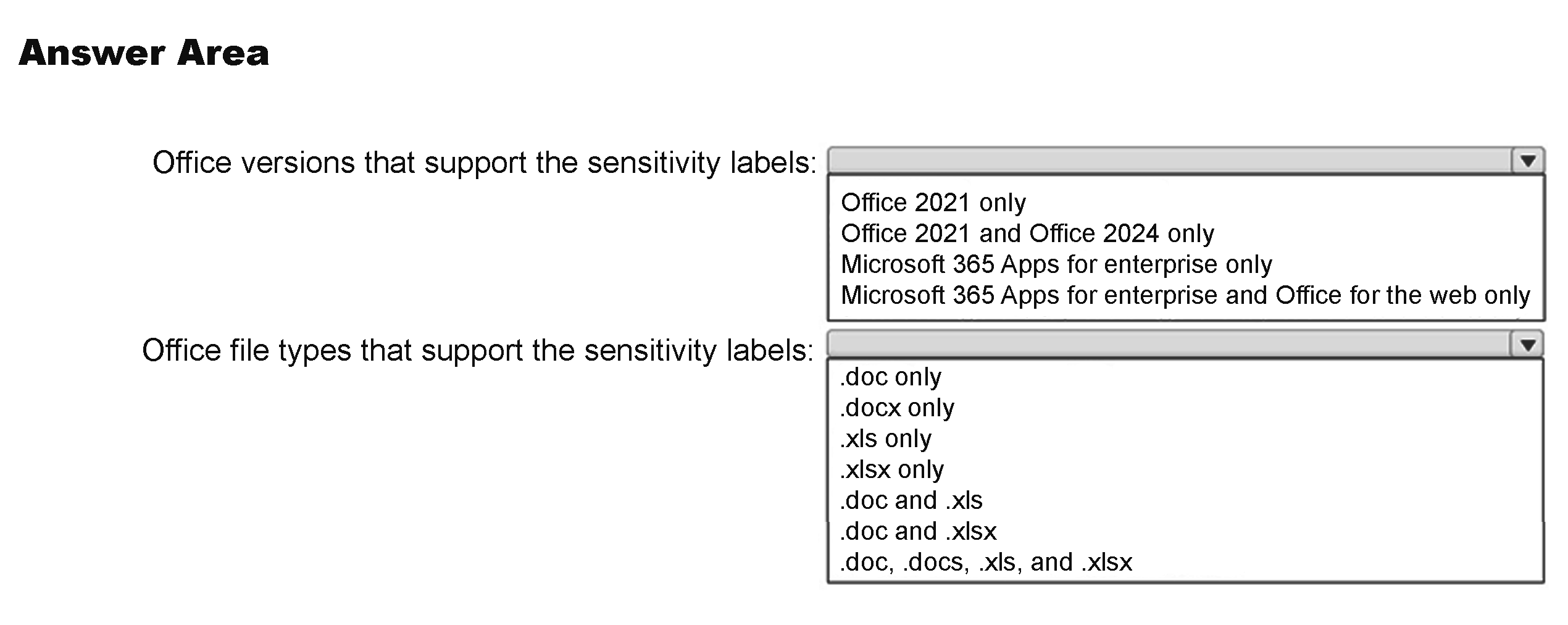
You need to identify the following:
• Which versions of Office support the sensitivity labels.
• Which file types support the sensitivity labels.
What should you identify? To answer, select the appropriate options in the answer area.
NOTE: Each correct selection is worth one point.
Show Answer
Correct Answer: Office versions: Microsoft 365 Apps for enterprise and Office for the web only
File types: .docx and .xlsx
Explanation: Built-in sensitivity labeling is supported in Microsoft 365 Apps and Office for the web. Sensitivity labels apply to modern Office Open XML formats (.docx, .xlsx), not the legacy binary .doc and .xls formats.
Question 3
HOTSPOT
-
Your network contains an on-premises Active Directory Domain Services (AD DS) domain named contoso.com. Contoso.com contains the users shown in the following table.
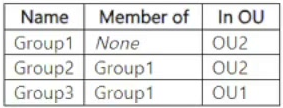
Contoso.com contains the groups shown in the following table.
Group3 has no members.
You have a Microsoft Entra tenant.
You deploy Microsoft Entra Cloud Sync and configure a scoping filter by using the following entry.
CN=Group1,OU=OU2,DC=contoso, DC=com
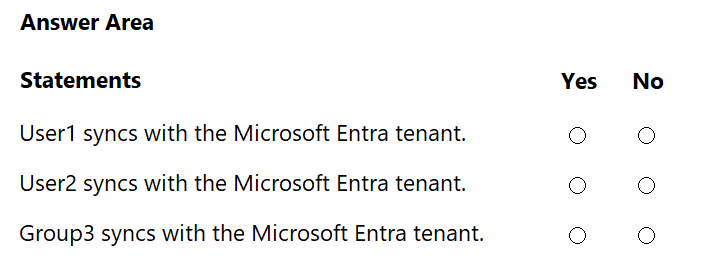
For each of the following statements, select Yes if the statement is true. Otherwise, select No.
NOTE: Each correct selection is worth one point.
Show Answer
Correct Answer: User1: Yes
User2: No
Group3: Yes
Explanation: Group scoping includes direct members of Group1 regardless of their OU. User1 and Group3 are direct members; User2 is a member only through the nested Group2.
Question 3
You have a Microsoft 365 E5 subscription.
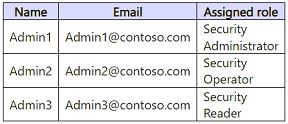
You create the users shown in the following table.
You plan to use Microsoft Entra ID Protection.
Which users will be added automatically to the Users at risk detected alerts list?
A. Admin1 only
B. Admin2 only
C. Admin1 and Admin2 only
D. Admin1 and Admin3 only
E. Admin1, Admin2, and Admin3
Show Answer
Correct Answer: D
Explanation: Admin1 (Security Administrator) and Admin3 (Security Reader) are automatically added to the Users at risk detected alert list. Security Operator is not one of the roles automatically included, so Admin2 is excluded.
Question 3
You have a Microsoft 365 E5 subscription that contains a Windows 11 device named Device1 and a user named User1.
User1 works at a branch office and reports slow connections to Microsoft 365 services.
You need to ensure that User1 can test the connections by running the Microsoft 365 network connectivity test tool on Device1. The solution must follow the principle of least privilege
To which group should you add User1 for Device1?
A. Power Users
B. Network Configuration Operators
C. Users
D. Administrators
Show Answer
Correct Answer: D
Explanation: The Microsoft 365 Network Connectivity Test Tool documentation states that the person running the advanced test on a Windows machine should have administrative permissions. Membership in the local Administrators group provides the required rights. Although Network Configuration Operators has limited networking privileges, it does not satisfy the documented requirement. Therefore, based on the documented prerequisite, the correct choice is Administrators.
Question 4
You have a Microsoft 365 E5 subscription and use Microsoft Defender for Cloud Apps.
You need to ensure that when a user-based alert is triggered in Defender for Cloud Apps, the user is marked as compromised.
Which two options can you use to automate the response? Each correct answer presents a complete solution.
NOTE: Each correct selection is worth one point
A. a Microsoft Power Automate playbook
B. a user tag
C. a custom detection rule
D. a block script
E. an automated remediation level
Show Answer
Correct Answer: A, C
Explanation: A Power Automate playbook can respond to a Defender for Cloud Apps alert and mark the affected user as compromised. A custom detection rule can also identify the alert and run the automated response action “Mark user as compromised.” An automated remediation level does not configure this user action.
Sources:
https://learn.microsoft.com/en-us/defender-cloud-apps/user-activity-policies
$19
Get all 431 questions with detailed answers and explanations
Instant download HTML + PDF delivered the moment payment clears.
Secure Stripe checkout we never see or store your card details.
7-day refund if files are defective see our refund policy.