HOTSPOT
-
You have a Microsoft 365 E5 subscription.
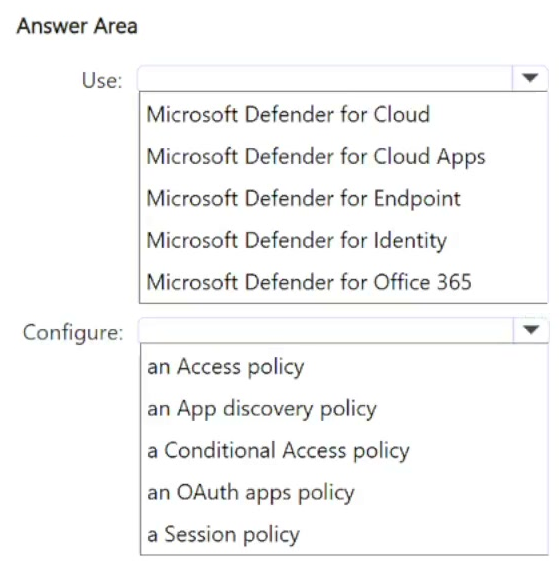
You need to ensure that an alert is generated when an app is registered in Microsoft Entra and is assigned the Directory.ReadWrite.All Microsoft Graph permission.
What should you do? To answer, select the appropriate options in the answer area.
NOTE: Each correct selection is worth one point.
Show Answer
Correct Answer: Use: Microsoft Defender for Cloud Apps
Configure: an OAuth apps policy
Explanation: Microsoft Defender for Cloud Apps can monitor Microsoft Entra OAuth app registrations and permissions. An OAuth apps policy can generate alerts when apps are registered or granted high-privilege Microsoft Graph permissions such as Directory.ReadWrite.All.
Question 42
You have a Microsoft 365 subscription that contains 500 Windows devices enrolled in Microsoft Intune.
You need to ensure that you can review vulnerability management recommendations for the devices. The solution must minimize administrative effort.
Which policy template should you select in the Microsoft Defender portal?
A. Microsoft Defender Antivirus
B. Windows Security Experience
C. Endpoint Detection and Response
D. Device Control
Show Answer
Correct Answer: C
Explanation: To review vulnerability management recommendations, devices must be onboarded to Microsoft Defender for Endpoint. In the Microsoft Defender portal, the Endpoint Detection and Response policy template is used to onboard Intune-managed Windows devices with minimal administrative effort, enabling Defender Vulnerability Management data and recommendations.
Question 42
You have a Microsoft 365 subscription.
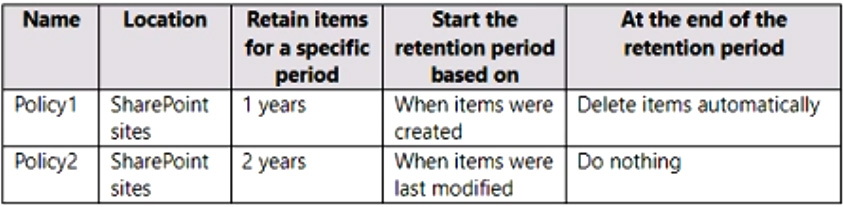
You have the retention policies shown in the following table.
Both policies are applied to a Microsoft SharePoint site named Site1 that contains a file named File1.docx.
File1.docx was created on January 1, 2022 and last modified on January 31,2022. The file was NOT modified again.
When will File1.docx be deleted automatically?
A. January 1, 2023
B. January 1, 2024
C. January 31, 2023
D. January 31, 2024
E. never
Show Answer
Correct Answer: D
Explanation: Policy1’s deletion date is January 1, 2023, but Policy2 requires the file to be retained for two years from its last-modified date, January 31, 2022. Retention takes precedence over deletion, so Policy1’s delete action is delayed until Policy2’s retention period ends on January 31, 2024. At that point, the pending deletion applies.
Question 43
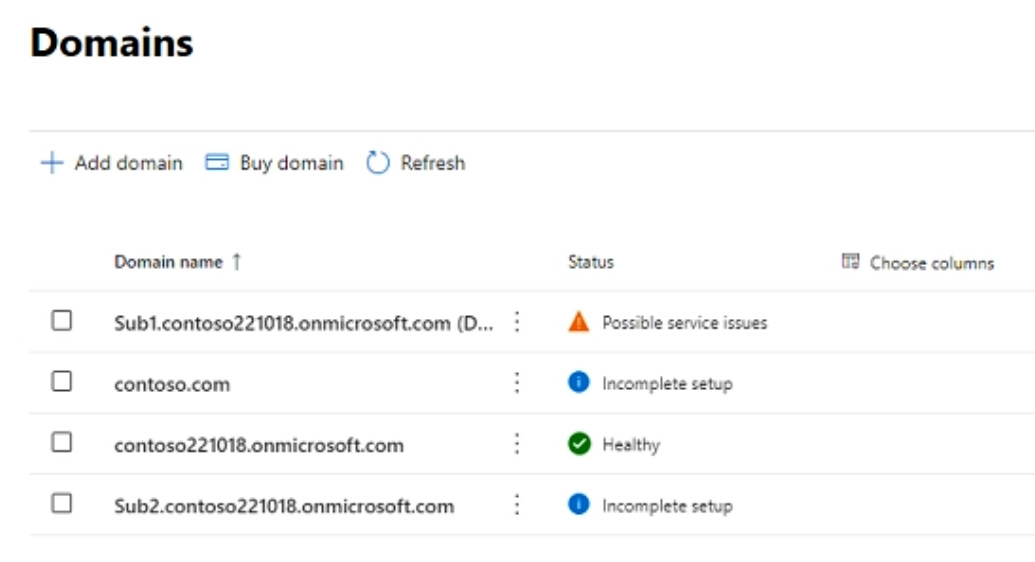
You have a Microsoft 365 subscription that contains the domains shown in the following exhibit.
Which domain name suffixes can you use when you create users?
A. only Sub1.contoso221018.onmicrosoft.com
B. onlycontoso221018.onmicrosoft.com and Sub2.contoso221018.onmicrosoft.com
C. only contoso221018.onmicrosoft.com, Sub.contoso221018.onmicrosoft.com, and Sub2.contoso221018.onmicrosoft.com
D. all the domains in the subscription
Show Answer
Correct Answer: D
Explanation: A domain’s “Incomplete setup” or “Possible service issues” status does not, by itself, prevent its use as a user sign-in suffix. The requirement is that the domain be verified. Thus, all the listed domains can be used if contoso.com has been verified; the exhibit alone does not establish whether it has.
Sources:
https://learn.microsoft.com/en-us/microsoft-365/enterprise/prepare-a-non-routable-domain-for-directory-synchronization
https://learn.microsoft.com/en-us/answers/questions/5439123/new-company-owners-wants-to-keep-existing-domain-n
Question 44
HOTSPOT
-
You have a Microsoft 365 subscription that uses the following services:
• Microsoft Entra
• Exchange Online
• Microsoft Teams
• SharePoint Online.
You are planning a backup solution that will use Microsoft 365 Backup.
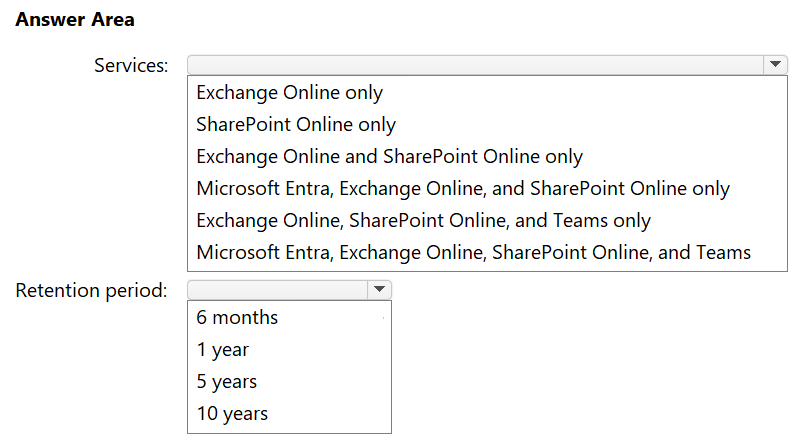
You need to recommend which Microsoft 365 services can be backed up and the longest retention period available.
What should you recommend? To answer, select the appropriate options in the answer area.
NOTE: Each correct selection is worth one point.
Show Answer
Correct Answer: Services: Exchange Online and SharePoint Online only
Retention period: 1 year
Explanation: Microsoft 365 Backup protects Exchange Online, SharePoint Online, and OneDrive (not listed here). It does not back up Microsoft Entra or Microsoft Teams as standalone services. The maximum backup retention is 1 year.
Question 44
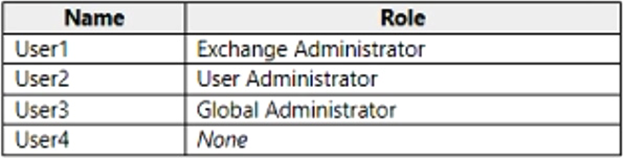
You have a Microsoft 365 subscription that uses an Azure AD tenant named contoso.com. The tenant contains the users shown in the following table.
You add another user named User5 to the User Administrator role.
You need to identify which two management tasks User5 can perform.
Which two tasks should you identify? Each correct answer presents a complete solution.
NOTE: Each correct selection is worth one point.
A. Delete User2 and User4 only.
B. Reset the password of User4 only.
C. Reset the password of any user in Azure AD.
D. Delete User1, User2, and User4 only.
E. Reset the password of User2 and User4 only.
F. Delete any user in Azure AD.
Show Answer
Correct Answer: A, E
Explanation: A User Administrator can delete and reset passwords for non-privileged users and users assigned the User Administrator role. Therefore, User5 can delete User2 and User4 and reset the passwords of User2 and User4. User1 is an Exchange Administrator and User3 is a Global Administrator, so User5 cannot perform these actions on them.
Question 45
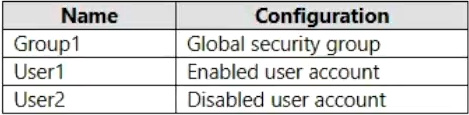
Your network contains an on-premises Active Directory domain named contoso.com. The domain contains the objects shown in the following table.
You configure Azure AD Connect to sync contoso.com to Azure AD.
Which objects will sync to Azure AD?
A. Group1 only
B. User1 and User2 only
C. Group1 and User1 only
D. Group1, User1, and User2
Show Answer
Correct Answer: D
Explanation: Group1 is a global security group, and User1 and User2 are user accounts. Azure AD Connect synchronizes these object types by default when they are within the configured sync scope; disabled user accounts are synchronized too. Therefore, all three objects sync.
Question 46
You have a Microsoft 365 subscription.
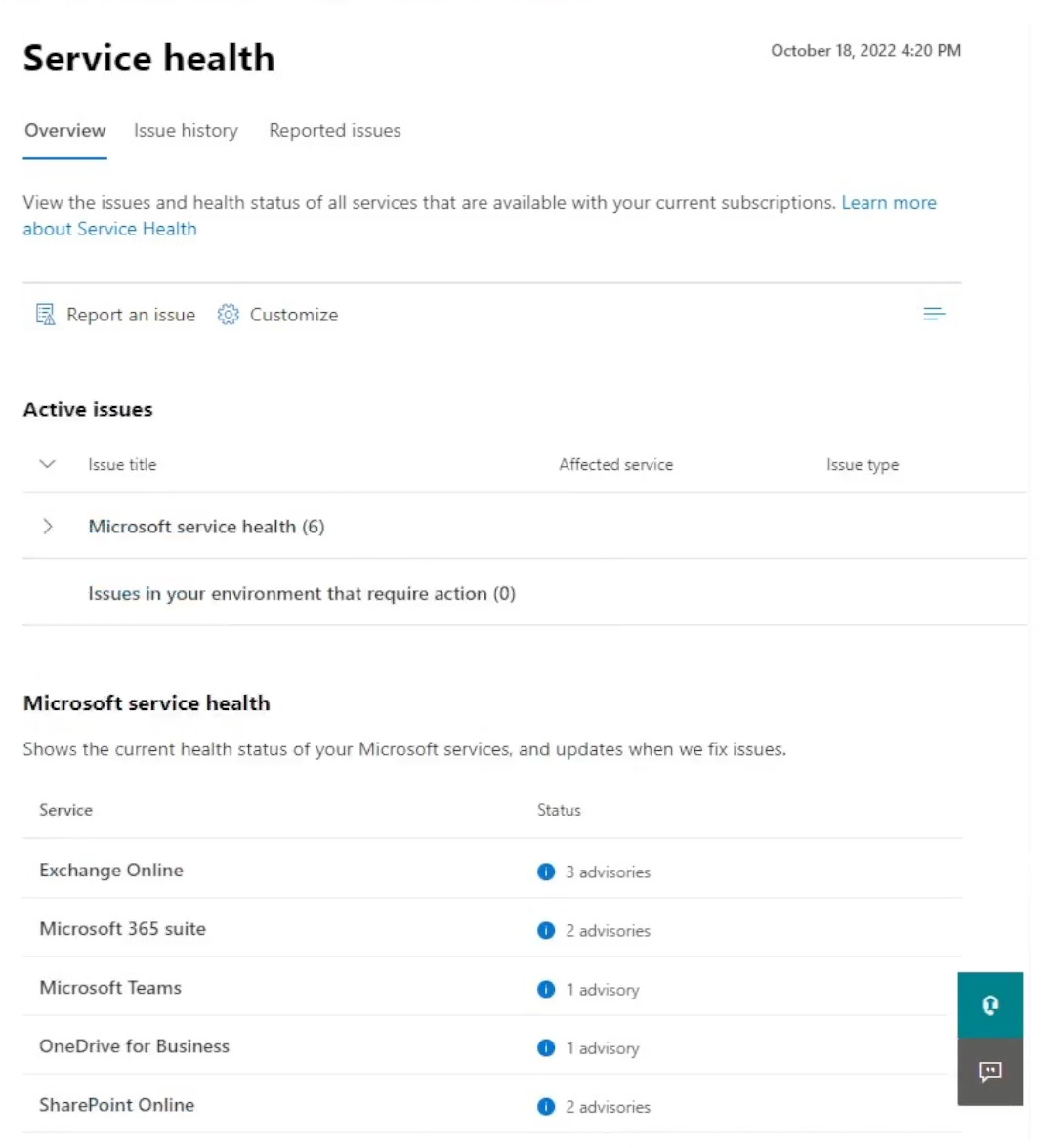
You view the Service health Overview as shown in the following exhibit.
You need to ensure that a user named User1 can view the advisories to investigate service health issues.
Which role should you assign to User1?
A. Message Center Reader
B. Reports Reader
C. Service Support Administrator
D. Compliance Administrator
Show Answer
Correct Answer: C
Explanation: Assign the Service Support Administrator role. It grants access to monitor service health and view service advisories in the Microsoft 365 admin center. Message Center Reader is for Message Center posts, not the Service Health dashboard.
Question 46
Your network contains an Active Directory domain named adatum.com that is synced to a Microsoft Entra tenant.
The domain contains 100 user accounts.
The city attribute for all the users is set to the city where the user resides.
You need to modify the value of the city attribute to the three-letter airport code of each city.
What should you do?
A. From Windows PowerShell on a domain controller, run the Get-MgUser and Update-MgUser cmdlets.
B. From Azure Cloud Shell, run the Get-MgUser and Update-MgUser cmdlets.
C. From the Microsoft 365 admin center, select the users, and then use the Bulk actions option.
D. From Windows PowerShell on a domain controller, run the Get-ADUser and Set-ADUser cmdlets.
Show Answer
Correct Answer: D
Explanation: Because the users are synchronized from on-premises Active Directory to Microsoft Entra ID, the city attribute is mastered on-premises. You must update the attribute in Active Directory using Get-ADUser and Set-ADUser on a domain-joined system (such as a domain controller). Changes will then sync to Microsoft Entra. Microsoft Graph Update-MgUser or Microsoft 365 admin center cannot permanently modify synchronized attributes.
Question 47
HOTSPOT
-
You have a Microsoft 365 E5 subscription.
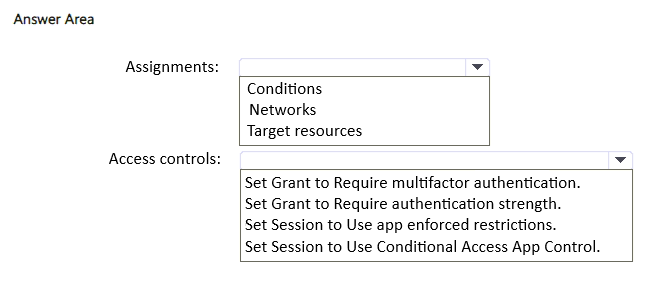
You need to create a Conditional Access policy named Policy1 that will enforce the use of phishing-resistant multifactor authentication (MFA) when a user attempts to register or join devices to a Microsoft Entra tenant.
How should you configure Policy1? To answer, select the appropriate options in the answer area.
NOTE: Each correct selection is worth one point.
Show Answer
Correct Answer: Assignments: Target resources
Access controls: Set Grant to Require authentication strength
Explanation: For device registration or join, configure the Conditional Access policy under Target resources by selecting the user action 'Register or join devices'. To enforce phishing-resistant MFA, use the Grant control 'Require authentication strength' and choose the built-in 'Phishing-resistant MFA' strength.
$19
Get all 431 questions with detailed answers and explanations
Instant download HTML + PDF delivered the moment payment clears.
Secure Stripe checkout we never see or store your card details.
7-day refund if files are defective see our refund policy.