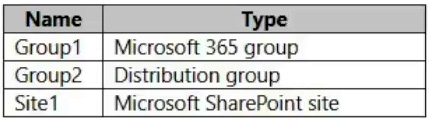
You have a Microsoft 365 E5 subscription that contains the resources shown in the following table.
You create a sensitivity label named Label1.
To which resource can you apply Label1?
A. Group1 only
B. Group2 only
C. Site1 only
D. Group1 and Group2 only
E. Group1, Group2, and Site1
Show Answer
Correct Answer:
Explanation: None of the options is correct. A sensitivity label can be applied to Group1 (a Microsoft 365 group) and Site1 (a SharePoint site), but not to Group2 (a distribution group). The missing answer choice is “Group1 and Site1 only.”
Sources:
https://learn.microsoft.com/en-us/entra/architecture/8-secure-access-sensitivity-labels
Question 48
You have a Microsoft 365 subscription.
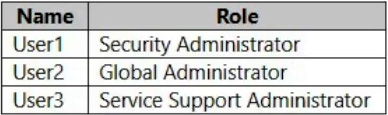
You have an Azure AD tenant that contains the users shown in the following table.
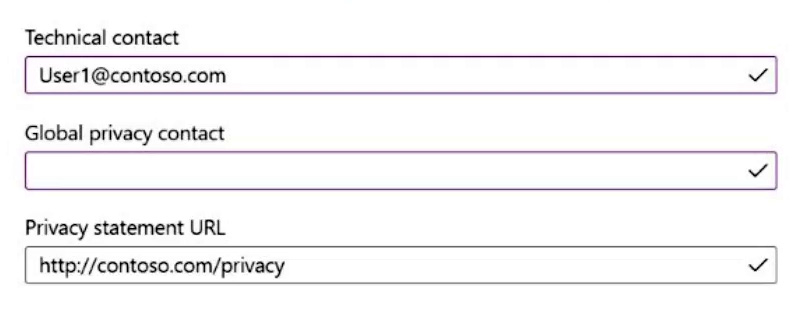
You configure Tenant properties as shown in the following exhibit.
Which users will be contacted by Microsoft if the tenant experiences a data breach?
A. User1 only
B. User2 only
C. User3 only
D. User1 and User2 only
E. User2 and User3 only
Show Answer
Correct Answer: B
Explanation: The Global privacy contact field is blank, so Microsoft contacts the tenant’s Global Administrators about a data breach. User2 is the Global Administrator. The Technical contact field is for technical support, not the designated data-breach contact, so User1 is not selected on that basis.
Question 49
HOTSPOT
-
You have a Microsoft 365 E5 subscription.
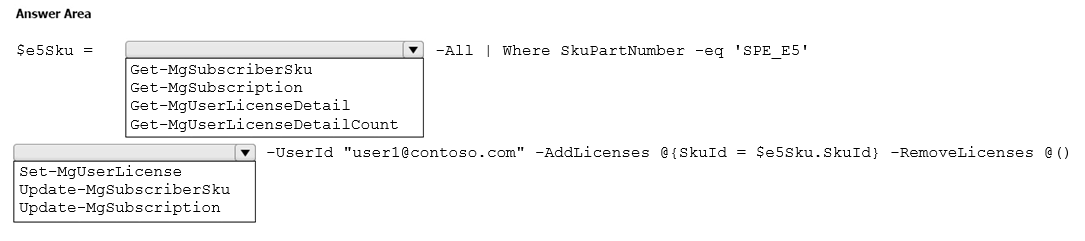
You need to use Microsoft Graph PowerShell to assign a Microsoft 365 E5 license to a new user named
.
How should you complete the command? To answer, select the appropriate options in the answer area.
NOTE: Each correct selection is worth one point.
Explanation: Use Get-MgSubscribedSku to retrieve the Microsoft 365 E5 SKU (filter by SkuPartNumber 'SPE_E5'), then use Set-MgUserLicense with -AddLicenses and -RemoveLicenses to assign the license.
Question 49
You have a Microsoft 365 E5 subscription that uses Microsoft Defender for Endpoint.
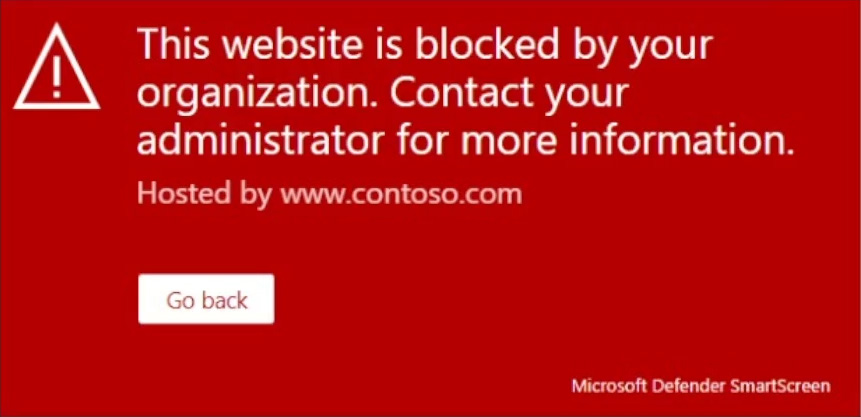
When users attempt to access the portal of a partner company, they receive the message shown in the following exhibit.
You need to enable user access to the partner company's portal.
Which Microsoft Defender for Endpoint setting should you modify?
A. Alert notifications
B. Alert suppression
C. Custom detections
D. Advanced hunting
E. Indicators
Show Answer
Correct Answer: E
Explanation: Modify Indicators and create an allow indicator for the partner portal’s URL or domain. Microsoft Defender for Endpoint indicators can control whether URLs and domains are allowed or blocked; the exhibit shows Defender SmartScreen blocking the site.
Question 50
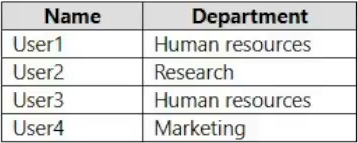
You have a Microsoft 365 subscription that contains the users shown in the following table.
You need to configure group-based licensing to meet the following requirements:
To all users, deploy an Office 365 E3 license without the Power Automate license option.
To all users, deploy an Enterprise Mobility + Security E5 license.
To the users in the research department only, deploy a Power BI Pro license.
To the users in the marketing department only, deploy a Visio Plan 2 license.
What is the minimum number of deployment groups required?
A. 1
B. 2
C. 3
D. 4
E. 5
Show Answer
Correct Answer: C
Explanation: Three deployment groups are required: one for all users to assign Office 365 E3 (with Power Automate disabled) and EMS E5, one for the Research department to assign Power BI Pro, and one for the Marketing department to assign Visio Plan 2.
Question 50
Note: This section contains one or more sets of questions with the same scenario and problem. Each question presents a unique solution to the problem. You must determine whether the solution meets the stated goals. More than one solution in the set might solve the problem. It is also possible that none of the solutions in the set solve the problem.
After you answer a question in this section, you will NOT be able to return. As a result, these questions do not appear on the Review Screen.
You have a Microsoft 365 E5 subscription.
You are implementing Microsoft Defender for Cloud Apps.
You need to ensure that you can create OAuth app policies.
Solution: You add an API token to Defender for Cloud Apps.
Does this meet the goal?
A. Yes
B. No
Show Answer
Correct Answer: B
Explanation: Adding an API token to Defender for Cloud Apps is used for integration with supported third-party apps via app connectors, not to enable OAuth app governance. To create OAuth app policies, Defender for Cloud Apps must be connected to Microsoft 365 so it can discover and evaluate OAuth apps that have been granted consent in the tenant.
Question 51
HOTSPOT
-
You have a Microsoft 365 E5 subscription that contains a user named Admin1.
Your company deploys a new branch office named Branch1.
You need to provide Admin1 with the ability to manage Branch1. The solution must meet the following requirements:
• Admin1 must only be able to manage users that have Office location set to Branch1.
• Admin1 must be able to reset passwords, manage user licenses, and modify user attributes only for the users in Branch1.
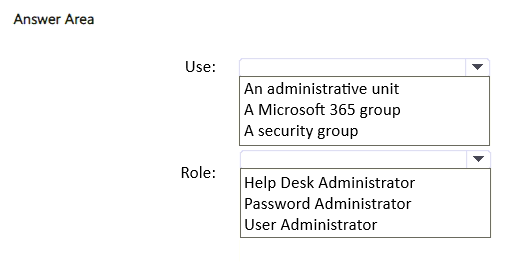
What should you use to organize the Branch1 users, and which role should you assign to Admin1? To answer, select the appropriate options in the answer area.
NOTE: Each correct selection is worth one point.
Show Answer
Correct Answer: Use: An administrative unit
Role: User Administrator
Explanation: Administrative units allow scoping administrative permissions to a subset of users (such as those with Office location = Branch1). The User Administrator role scoped to that administrative unit can reset passwords, manage licenses, and modify user attributes only for users in that unit.
Question 52
Your company has offices in Seattle and Denver.
You have a Microsoft 365 subscription.
You plan to create a Conditional Access policy named Policy1 that will enforce multifactor authentication (MFA).
You need to ensure that users at the Seattle office are excluded from MFA. Users at the Denver office must always be prompted for MFA.
What should you configure for Policy1?
A. a named location that has IP ranges location set to the Seattle office
B. Authentication strengths
C. a named location that has Countries location set to United States
D. VPN connectivity from the Seattle office
Show Answer
Correct Answer: A
Explanation: Configure a named location containing the Seattle office's public IP address ranges, then exclude that named location from the Conditional Access policy while requiring MFA for all other locations. This exempts Seattle users from MFA and ensures Denver users are prompted. A country-based named location would exclude all US users, authentication strengths do not exclude by location, and VPN connectivity is not the Conditional Access configuration needed.
Question 53
You have a Microsoft 365 E5 subscription that contains a group named Group1. The subscription uses Microsoft Defender for Cloud Apps.
You configure cloud discovery.
You need to ensure that you can create a custom report that details shadow IT usage by the members of Group1.
What should you do first?
A. Configure user enrichment.
B. Disable anonymization.
C. Add an app connector.
D. Configure user monitoring.
Show Answer
Correct Answer: A
Explanation: To create reports on shadow IT usage by members of a specific Microsoft Entra group, Defender for Cloud Apps first needs user enrichment so discovered users are mapped to Microsoft Entra ID identities and group memberships. This enables filtering and reporting by Group1. Disabling anonymization only reveals user identities after monitoring is configured, app connectors are unrelated to Cloud Discovery, and user monitoring depends on enriched identity information for group-based reporting.
Question 55
You have a Microsoft 365 subscription.
You need to identify which shadow IT apps users connect to by using Cloud Discovery in Microsoft Defender for Cloud Apps.
What should you create first?
A. a Cloud Discovery snapshot report
B. a session policy
C. an app discovery policy
D. a Conditional Access policy
Show Answer
Correct Answer: A
Explanation: Cloud Discovery first requires collecting and analyzing traffic data to discover cloud app usage. A Cloud Discovery snapshot report is the initial artifact used to identify shadow IT apps from uploaded traffic logs. App discovery policies are created afterward to generate ongoing alerts based on discovered activity. Session policies and Conditional Access policies do not perform the initial discovery.
$19
Get all 431 questions with detailed answers and explanations
Instant download HTML + PDF delivered the moment payment clears.
Secure Stripe checkout we never see or store your card details.
7-day refund if files are defective see our refund policy.