You have a Microsoft 365 E5 subscription that contains the users shown in the following table.
Which users can review the Adoption Score in the Microsoft 365 admin center?
A. User1 only
B. User2 only
C. User1 and User2 only
D. User1 and User3 only
E. User1, User2, and User3
Show Answer
Correct Answer: E
Explanation: All three users have roles that can access Adoption Score: Reports Reader, Exchange Administrator, and User Experience Success Manager.
Question 31
Overview -
Litware, Inc. is a consulting company that has a main office in Montreal and a branch office in Seattle.
Litware collaborates with a third-party company named A. Datum Corporation.
Environment -
On-Premises Environment -
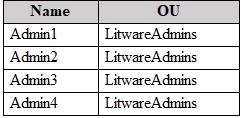
The network of Litware contains an Active Directory domain named litware.com. The domain contains three organizational units (OUs) named LitwareAdmins, Montreal Users, and Seattle Users and the users shown in the following table.
The domain contains 2,000 Windows 10 Pro devices and 100 servers that run Windows Server 2019.
Cloud Environment -
Litware has a pilot Microsoft 365 subscription that includes Microsoft Office 365 Enterprise E3 licenses and Azure AD Premium P2 licenses.
The subscription contains a verified DNS domain named litware.com.
Azure AD Connect is installed and has the following configurations:
• Password hash synchronization is enabled.
• Synchronization is enabled for the LitwareAdmins OU only.
Users are assigned the roles shown in the following table.
Self-service password reset (SSPR) is enabled.
The Azure AD tenant has Security defaults enabled.
Problem Statements -
Litware identifies the following issues:
• Admin1 cannot create conditional access policies.
• Admin4 receives an error when attempting to use SSPR.
• Users access new Office 365 service and feature updates before the updates are reviewed by Admin2.
Requirements -
Planned Changes -
Litware plans to implement the following changes:
• Implement Microsoft Intune.
• Implement Microsoft Teams.
• Implement Microsoft Defender for Office 365.
• Ensure that users can install Office 365 apps on their device.
• Convert all the Windows 10 Pro devices to Windows 10 Enterprise ES.
• Configure Azure AD Connect to sync the Montreal Users OU and the Seattle Users OU.
Technical Requirements -
Litware identifies the following technical requirements:
• Administrators must be able to specify which version of an Office 365 desktop app will be available to users and to roll back to previous versions.
• Only Admin2 must have access to new Office 365 service and feature updates before they are released to the company.
• Litware users must be able to invite A. Datum users to participate in the following activities:
• Join Microsoft Teams channels.
• Join Microsoft Teams chats.
• Access shared files.
• Just in time access to critical administrative roles must be required.
• Microsoft 365 incidents and advisories must be reviewed monthly.
• Office 365 service status notifications must be sent to Admin2.
• The principle of least privilege must be used.
You need to configure Azure AD Connect to support the planned changes for the Montreal Users and Seattle Users OUs.
What should you do?
A. From PowerShell, run the Add-ADSyncConnectorAttributeInclusion cmdlet.
B. From the Microsoft Azure AD Connect wizard, select Manage federation.
C. From the Microsoft Azure AD Connect wizard, select Customize synchronization options.
D. From PowerShell, run the Start-ADSyncSyncCycle cmdlet.
Show Answer
Correct Answer: C
Explanation: Select **Customize synchronization options** in the Azure AD Connect wizard. This lets you change the OU filtering and include both the Montreal Users and Seattle Users OUs in synchronization.
Question 31
You have a Microsoft 365 subscription.
You need to view a list of known tools used by malicious actors.
What should you use in the Microsoft Defender portal?
A. Intel explorer
B. Threat analytics
C. Intel profiles
D. Intel projects
Show Answer
Correct Answer: C
Explanation: Intel profiles in the Microsoft Defender portal provide curated information on tracked threat actors, malicious tools, and vulnerabilities. They are specifically intended to let analysts view known malicious tools and related threat context.
Question 32
You have a Microsoft 365 tenant that contains two users named User1 and User2.
You create the alert policy shown in the following exhibit.
User2 runs a script that modifies a file in a Microsoft SharePoint library once every four minutes and runs for a period of two hours.
How many alerts will User1 receive?
A. 2
B. 5
C. 10
D. 25
E. 30
Show Answer
Correct Answer: A
Explanation: The script makes 30 modifications over two hours. With aggregation enabled and a one-hour window, matching activity is grouped into one alert per hour rather than generating a separate alert for every modification or each group of five. User1 receives 2 alerts.
Question 32
You have a Microsoft 365 tenant.
You plan to manage incidents in the tenant by using the Microsoft Defender XDR.
Which Microsoft service source will appear on the Incidents page of the Microsoft Defender portal?
A. Azure Information Protection
B. Azure Web Application Firewall
C. Microsoft Sentinel
D. Microsoft Defender for Cloud Apps
Show Answer
Correct Answer: D
Explanation: The Microsoft Defender portal Incidents page in Microsoft Defender XDR aggregates and correlates alerts from integrated Defender products. Microsoft Defender for Cloud Apps is one of the native service sources that contributes incidents. Microsoft Sentinel is a separate SIEM that can integrate with Defender but is not a native incident source on the Defender XDR Incidents page. Azure Information Protection and Azure Web Application Firewall are not listed as Defender XDR incident service sources.
Question 33
Note: This question is part of a series of questions that present the same scenario. Each question in the series contains a unique solution that might meet the stated goals. Some question sets might have more than one correct solution, while others might not have a correct solution.
After you answer a question in this section, you will NOT be able to return to it. As a result, these questions will not appear in the review screen.
Your network contains an on-premises Active Directory domain named contoso.com. The domain contains the users shown in the following table.
The domain syncs to an Azure AD tenant named contoso.com as shown in the exhibit. (Click the Exhibit tab.)
User2 fails to authenticate to Azure AD when signing in as
.
You need to ensure that User2 can access the resources in Azure AD.
Solution: From the Microsoft Entra admin center, you add fabrikam.com as a custom domain. You instruct User2 to sign in as
.
Does this meet the goal?
A. Yes
B. No
Show Answer
Correct Answer: A
Explanation: Yes. User2 already has the fabrikam.com UPN suffix in on-premises Active Directory. Adding and verifying fabrikam.com as a custom domain in the Entra tenant allows that synchronized UPN to be used for sign-in, so User2 can sign in with the fabrikam.com address.
Question 34
Note: This question is part of a series of questions that present the same scenario. Each question in the series contains a unique solution that might meet the stated goals. Some question sets might have more than one correct solution, while others might not have a correct solution.
After you answer a question in this section, you will NOT be able to return to it. As a result, these questions will not appear in the review screen.
Your network contains an on-premises Active Directory domain named contoso.com. The domain contains the users shown in the following table.
The domain syncs to an Azure AD tenant named contoso.com as shown in the exhibit. (Click the Exhibit tab.)
User2 fails to authenticate to Azure AD when signing in as
.
You need to ensure that User2 can access the resources in Azure AD.
Solution: From the on-premises Active Directory domain, you assign User2 the Allow logon locally user right. You instruct User2 to sign in as
.
Does this meet the goal?
A. Yes
B. No
Show Answer
Correct Answer: B
Explanation: No. The Allow logon locally user right controls interactive logons to Windows computers; it does not resolve Azure AD authentication when User2’s UPN suffix is not accepted or synchronized as expected. The account’s UPN/domain configuration must be addressed instead.
Question 34
HOTSPOT
-
You have the Microsoft Defender XDR report schedules shown in the following exhibit.
You need to ensure that the report schedules generate reports as frequently as possible.
To what should you set the Frequency setting for each schedule? To answer, select the appropriate options in the answer area.
NOTE: Each correct selection is worth one point.
Explanation: For Microsoft Defender for Office 365 scheduled email security reports such as MailFlowStatus and ZAP, the highest supported recurring frequency is Weekly; Daily scheduling is not available for these report types.
Question 35
You have a Microsoft 365 E5 subscription that contains 1,000 Windows devices.
You need to review the exposure score of the devices.
Which portal should you use?
A. the Microsoft Intune admin center
B. the Microsoft Purview portal
C. the Microsoft Defender portal
D. the Microsoft 365 admin center
Show Answer
Correct Answer: C
Explanation: The Exposure Score for devices is part of Microsoft Defender Vulnerability Management and is viewed in the Microsoft Defender portal (formerly Microsoft 365 Defender). Intune focuses on device management and compliance, Purview is for data governance and compliance, and the Microsoft 365 admin center is for tenant administration rather than exposure scoring.
Question 35
You have a Microsoft 365 E5 tenant.
You create a retention label named Retention1 as shown in the following exhibit.
When users attempt to apply Retention1, the label is unavailable.
You need to ensure that Retention1 is available to all the users.
What should you do?
A. Create a new label policy.
B. Modify the Authority type setting for Retention1.
C. Modify the Business function/department setting for Retention1.
D. Use a file plan CSV template to import Retention1.
Show Answer
Correct Answer: A
Explanation: Creating a retention label does not make it available to users. Create a retention label policy that publishes Retention1 to all users; the policy determines who can apply the label.
$19
Get all 431 questions with detailed answers and explanations
Instant download HTML + PDF delivered the moment payment clears.
Secure Stripe checkout we never see or store your card details.
7-day refund if files are defective see our refund policy.