You have a Microsoft 365 E5 subscription that contains a domain named contoso.com.
You deploy a new Microsoft Defender for Office 365 anti-phishing policy named Policy1 that has user impersonation protection enabled for a user named
.
You discover that Policy1 blocks email messages from a regular contact named
.
You need to ensure that the messages are delivered successfully.
What should you do for Policy1?
A. Select Enable domains to protect.
B. Configure the Phishing email threshold setting.
C. Configure which users to protect.
D. Select Enable mailbox intelligence.
Show Answer
Correct Answer: D
Explanation: Enable mailbox intelligence. Mailbox intelligence learns a user's normal communication patterns and frequent contacts to reduce false positives from user impersonation protection. This helps allow legitimate messages from regular contacts that might otherwise be flagged. The other options do not specifically address false positives for trusted correspondents.
Question 154
You have a Microsoft 365 tenant.
You plan to manage incidents in the tenant by using the Microsoft Defender XDR.
Which Microsoft service source will appear on the Incidents page of the Microsoft 365 Defender portal?
A. Microsoft Sentinel
B. Microsoft Defender for Cloud
C. Azure Web Application Firewall
D. Microsoft Defender for Identity
Show Answer
Correct Answer: D
Explanation: Microsoft Defender for Identity is a native Microsoft Defender XDR signal source whose alerts and incidents appear on the Incidents page in the Microsoft 365 Defender portal. While Microsoft Sentinel and Microsoft Defender for Cloud can integrate and contribute incidents in certain connected scenarios, the question asks which Microsoft service source will appear when managing incidents using Microsoft Defender XDR in a Microsoft 365 tenant. Azure Web Application Firewall is not an incident source in the Defender XDR portal.
Question 155
Overview -
Fabrikam, Inc. is an electronics company that produces consumer products. Fabrikam has 10,000 employees worldwide.
Fabrikam has a main office in London and branch offices in major cities in Europe, Asia, and the United States.
Existing Environment -
Active Directory Environment -
The network contains an Active Directory forest named fabrikam.com. The forest contains all the identities used for user and computer authentication. Each department is represented by a top-level organizational unit (OU) that contains several child OUs for user accounts and computer accounts.
All users authenticate to on-premises applications by signing in to their device by using a UPN format of
.
Fabrikam does NOT plan to implement identity federation.
Network Infrastructure -
Each office has a high-speed connection to the Internet.
Each office contains two domain controllers. All domain controllers are configured as DNS servers.
The public zone for fabrikam.com is managed by an external DNS server.
All users connect to an on-premises Microsoft Exchange Server 2016 organization. The users access their email by using Outlook Anywhere, Outlook on the web, or the Microsoft Outlook app for iOS. All the Exchange servers have the latest cumulative updates installed.
All shared company documents are stored on a Microsoft SharePoint Server farm.
Requirements -
Planned Changes -
Fabrikam plans to implement a Microsoft 365 Enterprise subscription and move all email and shared documents to the subscription.
Fabrikam plans to implement two pilot projects:
• Project1: During Project1, the mailboxes of 100 users in the sales department will be moved to Microsoft 365.
• Project2: After the successful completion of Project1, Microsoft Teams will be enabled in Microsoft 365 for the sales department users.
Fabrikam plans to create a group named UserLicenses that will manage the allocation of all Microsoft 365 bulk licenses.
Technical Requirements -
Fabrikam identifies the following technical requirements:
• All users must be able to exchange email messages successfully during Project1 by using their current email address.
• Users must be able to authenticate to cloud services if Active Directory becomes unavailable.
• A user named User1 must be able to view all DLP reports from the Microsoft Purview compliance portal.
• Microsoft 365 Apps for enterprise applications must be installed from a network share only.
• Disruptions to email access must be minimized.
Application Requirements -
Fabrikam identifies the following application requirements:
• An on-premises web application named App1 must allow users to complete their expense reports online. App1 must be available to users from the My Apps portal.
• The installation of feature updates for Microsoft 365 Apps for enterprise must be minimized.
Security Requirements -
Fabrikam identifies the following security requirements:
• After the planned migration to Microsoft 365, all users must continue to authenticate to their mailbox and to SharePoint sites by using their UPN.
• The membership of the UserLicenses group must be validated monthly. Unused user accounts must be removed from the group automatically.
• After the planned migration to Microsoft 365, all users must be signed in to on-premises and cloud-based applications automatically.
• The principle of least privilege must be used.
You are evaluating the required processes for Project1.
You need to recommend which DNS record must be created while adding a domain name for the project.
Which DNS record should you recommend?
A. name server (NS)
B. host information (HINFO)
C. text (TXT)
D. pointer (PTR)
Show Answer
Correct Answer: C
Explanation: Answer: C. When adding a custom domain to Microsoft 365, you must create a DNS TXT record to verify ownership of the domain. After verification, other records such as MX, CNAME, and Autodiscover may be added for mail flow, but the required record during domain addition is the TXT verification record.
Question 157
HOTSPOT
-
You have a Microsoft 365 E5 subscription.
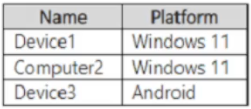
You have devices onboarded to Microsoft Defender for Endpoint as shown in the following table.
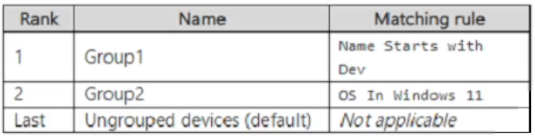
You create the device groups shown in the following table.
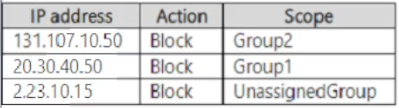
IP address indicators are defined as shown in the following table.
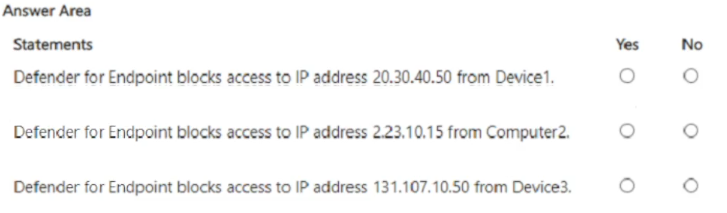
For each of the following statements, select Yes if the statement is true. Otherwise, select No.
NOTE: Each correct selection is worth one point.
Show Answer
Correct Answer: Yes
No
No
Explanation: Group membership is evaluated by ranking. Device1 and Device3 match Group1 (name starts with 'Dev'); Computer2 matches Group2 (Windows 11). IP indicators apply only to their scoped device group. Thus 20.30.40.50 is blocked for Device1 (Group1), 2.23.10.15 applies only to ungrouped devices (not Computer2), and 131.107.10.50 applies only to Group2 (not Device3).
Question 158
You have a Microsoft 365 E5 subscription.
You create a data loss prevention (DLP) policy named DLP1.
You need to ensure that endpoint rule actions are available in the advanced DLP rules for DLP1.
To which location should you apply DLP1?
A. Instances
B. OneDrive accounts
C. On-premises repositories
D. Devices
Show Answer
Correct Answer: D
Explanation: Endpoint rule actions in Microsoft Purview Data Loss Prevention are only available when the DLP policy includes the Devices location. Applying the policy to Devices enables Endpoint DLP capabilities, such as controlling actions on Windows and macOS endpoints. Locations like OneDrive, on-premises repositories, or instances do not expose endpoint-specific rule actions.
Question 159
You need to notify the manager of the human resources department when a user in the department shares a file or folder from the department's Microsoft SharePoint site.
What should you do?
A. From the SharePoint site, create an alert.
B. From the Microsoft Defender portal, create an alert policy.
C. From the SharePoint admin center, modify the sharing settings
D. From the Microsoft 365 admin center, configure SharePoint.org settings.
Show Answer
Correct Answer: B
Explanation: To notify when users share files or folders, Microsoft Purview/Defender alert policies can generate alerts for sharing-related activities and notify designated recipients. SharePoint site alerts monitor content changes rather than user sharing events, while SharePoint sharing settings and SharePoint.org settings control sharing behavior but do not provide event notifications to a manager.
Question 160
You have a Microsoft 365 E5 tenant.
You create an auto-labeling policy to encrypt emails that contain a sensitive info type. You specify the locations where the policy will be applied.
You need to deploy the policy.
What should you do first?
A. Run the policy in simulation mode.
B. Turn on co-authoring for files with sensitivity labels.
C. Review the sensitive information in Activity explorer.
D. Turn on the policy.
Show Answer
Correct Answer: A
Explanation: The correct first step is to run the auto-labeling policy in simulation mode. Microsoft Purview recommends testing auto-labeling policies in simulation to evaluate which items would be labeled or encrypted, verify accuracy, and tune the policy before enabling it. After reviewing the simulation results, you can turn the policy on. The other options are unrelated prerequisites or occur later in the deployment process.
Question 161
HOTSPOT
-
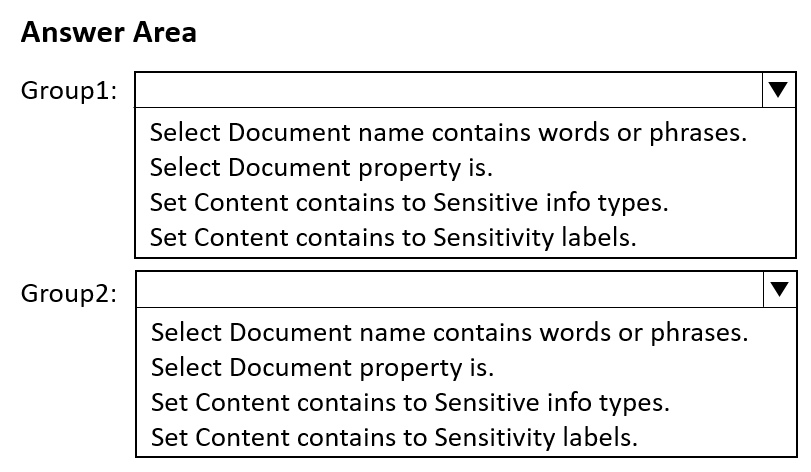
You have a Microsoft 365 E5 subscription that contains two groups named Group1 and Group2.
You plan to configure a data loss prevention (DLP) strategy that meets the following requirements:
• Members of Group1 must be prevented from sharing documents that contain credit card numbers.
• Members of Group2 must be prevented from sharing documents that are classified as internal by Microsoft Purview Information Protection.
• The solution must minimize administrative effort.
You need to create a DLP policy for each group.
Which condition should you add to each DIP policy rule for each group? To answer, select the appropriate options in the answer area.
NOTE: Each correct selection is worth one point.
Show Answer
Correct Answer: Group1: Set Content contains to Sensitive info types.
Group2: Set Content contains to Sensitivity labels.
Explanation: Credit card numbers are detected using built-in Sensitive info types. Documents classified as Internal by Microsoft Purview Information Protection are identified via Sensitivity labels, so use that condition for the second DLP policy.
Question 162
You have a Microsoft 365 subscription.
You need to implement a passwordless authentication solution that supports the following device types:
• Windows
• Android
• iOS
The solution must use the same authentication method for all devices.
Which authentication method should you use?
A. the Microsoft Authentication app
B. Voice call
C. multi-factor authentication (MFA)
D. Windows Hello for Business
Show Answer
Correct Answer: A
Explanation: The Microsoft Authenticator app supports Microsoft Entra passwordless phone sign-in across Windows, Android, and iOS by approving a cryptographic challenge from the registered mobile device. Windows Hello for Business is Windows-only, voice call is not a passwordless authentication method, and MFA is a broad authentication requirement rather than a specific passwordless method.
Question 163
HOTSPOT
-
You have a Microsoft 365 E5 subscription.
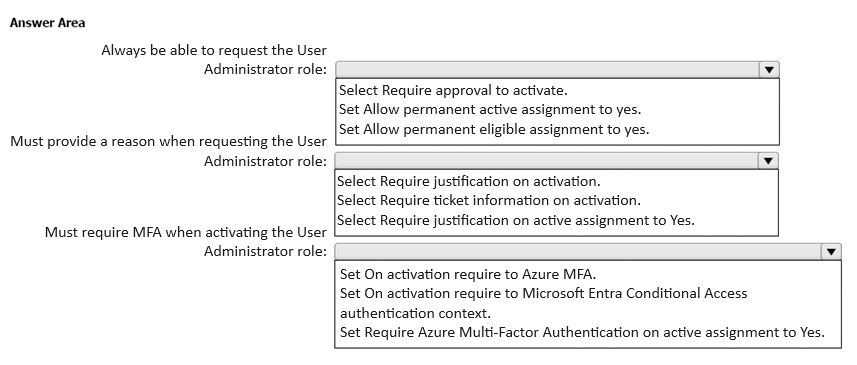
You need to configure Privileged Identity Management (PIM) for the User Administrator role in Microsoft Entra. Eligible users must meet the following requirements:
• Always be able to request the User Administrator role
• Must provide a reason when requesting the User Administrator role
• Must require multi-factor authentication (MFA) when activating the User Administrator role
The solution must minimize administrative effort.
How should you configure the Role settings for each requirement? To answer, select the appropriate options in the answer area.
NOTE: Each correct selection is worth one point.
Show Answer
Correct Answer: Set Allow permanent eligible assignment to yes.
Select Require justification on activation.
Set On activation require to Azure MFA.
Explanation: Permanent eligible assignment lets eligible users always activate/request the role. Requiring justification on activation enforces a reason. Requiring Azure MFA on activation enforces MFA when activating the eligible role.
$19
Get all 431 questions with detailed answers and explanations
Instant download HTML + PDF delivered the moment payment clears.
Secure Stripe checkout we never see or store your card details.
7-day refund if files are defective see our refund policy.