Your network contains an on-premises Active Directory domain.
You have a Microsoft 365 subscription.
You implement a directory synchronization solution that uses pass-through authentication.
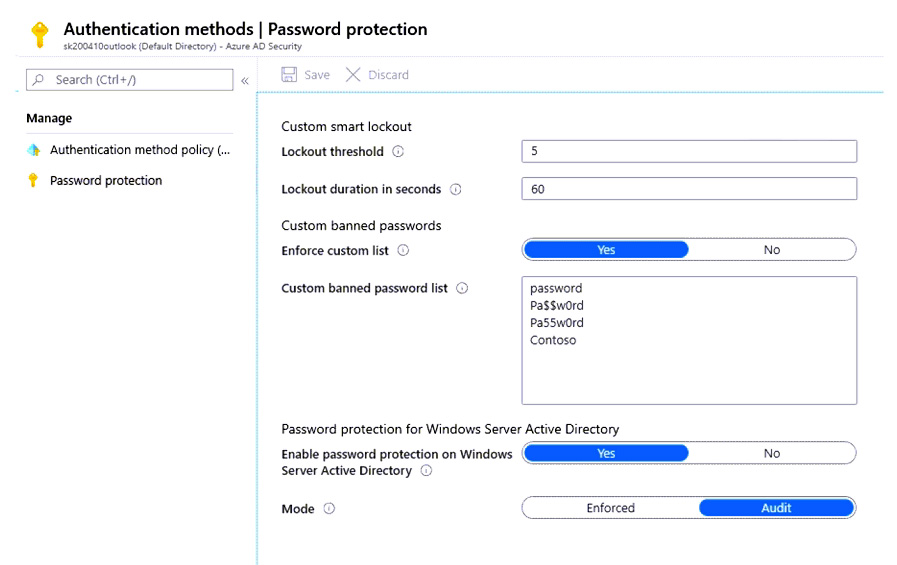
You configure Azure AD smart lockout as shown in the following exhibit.
You discover that Active Directory users can use the passwords in the custom banned passwords list.
You need to ensure that banned passwords are banned for all users.
Which three actions should you perform? Each correct answer presents part of the solution.
NOTE: Each correct selection is worth one point.
A. From a domain controller, install the Azure AD Password Protection Proxy.
B. From Active Directory, modify the Default Domain Policy.
C. From a domain controller, install the Azure AD Application Proxy connector.
D. From all the domain controllers, install the Azure AD Password Protection DC Agent.
E. From Password protection for Windows Server Active Directory, modify the Mode setting.
F. From Custom banned passwords, modify the Enforce custom list setting.
Show Answer
Correct Answer: A, D, E
Explanation: Install the Azure AD Password Protection Proxy and the DC Agent on every domain controller so on-premises password changes can be checked against the banned-password list. Then change the Windows Server Active Directory password protection mode from Audit to Enforced. The custom list is already enabled in the exhibit, so changing its setting is not required.
Question 19
Overview -
Fabrikam, Inc. is an electronics company that produces consumer products. Fabrikam has 10,000 employees worldwide.
Fabrikam has a main office in London and branch offices in major cities in Europe, Asia, and the United States.
Existing Environment -
Active Directory Environment -
The network contains an Active Directory forest named fabrikam.com. The forest contains all the identities used for user and computer authentication. Each department is represented by a top-level organizational unit (OU) that contains several child OUs for user accounts and computer accounts.
All users authenticate to on-premises applications by signing in to their device by using a UPN format of
.
Fabrikam does NOT plan to implement identity federation.
Network Infrastructure -
Each office has a high-speed connection to the Internet.
Each office contains two domain controllers. All domain controllers are configured as DNS servers.
The public zone for fabrikam.com is managed by an external DNS server.
All users connect to an on-premises Microsoft Exchange Server 2016 organization. The users access their email by using Outlook Anywhere, Outlook on the web, or the Microsoft Outlook app for iOS. All the Exchange servers have the latest cumulative updates installed.
All shared company documents are stored on a Microsoft SharePoint Server farm.
Requirements -
Planned Changes -
Fabrikam plans to implement a Microsoft 365 Enterprise subscription and move all email and shared documents to the subscription.
Fabrikam plans to implement two pilot projects:
• Project1: During Project1, the mailboxes of 100 users in the sales department will be moved to Microsoft 365.
• Project2: After the successful completion of Project1, Microsoft Teams will be enabled in Microsoft 365 for the sales department users.
Fabrikam plans to create a group named UserLicenses that will manage the allocation of all Microsoft 365 bulk licenses.
Technical Requirements -
Fabrikam identifies the following technical requirements:
• All users must be able to exchange email messages successfully during Project1 by using their current email address.
• Users must be able to authenticate to cloud services if Active Directory becomes unavailable.
• A user named User1 must be able to view all DLP reports from the Microsoft Purview compliance portal.
• Microsoft 365 Apps for enterprise applications must be installed from a network share only.
• Disruptions to email access must be minimized.
Application Requirements -
Fabrikam identifies the following application requirements:
• An on-premises web application named App1 must allow users to complete their expense reports online. App1 must be available to users from the My Apps portal.
• The installation of feature updates for Microsoft 365 Apps for enterprise must be minimized.
Security Requirements -
Fabrikam identifies the following security requirements:
• After the planned migration to Microsoft 365, all users must continue to authenticate to their mailbox and to SharePoint sites by using their UPN.
• The membership of the UserLicenses group must be validated monthly. Unused user accounts must be removed from the group automatically.
• After the planned migration to Microsoft 365, all users must be signed in to on-premises and cloud-based applications automatically.
• The principle of least privilege must be used.
You are evaluating the required processes for Project1.
You need to recommend which DNS record must be created while adding a domain name for the project.
Which DNS record should you recommend?
A. host (AAAA)
B. name server (NS)
C. mail exchanger (MX)
D. host (A)
Show Answer
Correct Answer: C
Explanation: For an Exchange hybrid migration (Project1), after adding the custom domain to Microsoft 365, an MX record is created/updated as part of domain configuration to enable mail flow and domain validation scenarios. During hybrid coexistence, mail routing relies on the MX configuration so users continue using the same email addresses with minimal disruption. NS, A, and AAAA records are not the required record for this step.
Question 19
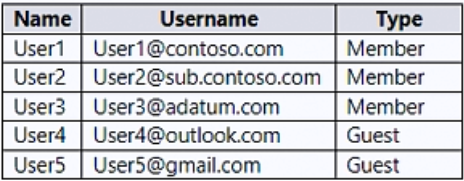
You have a Microsoft 365 subscription that contains an Azure AD tenant named contoso.com. The tenant contains the users shown in the following table.
You create and assign a data loss prevention (DLP) policy named Policy1. Policy1 is configured to prevent documents that contain Personally Identifiable Information (PII) from being emailed to users outside your organization.
To which users can User1 send documents that contain PII?
A. User2 only
B. User2 and User3 only
C. User2, User3, and User4 only
D. User2, User3, User4, and User5
Show Answer
Correct Answer: B
Explanation: User2 and User3 have UserType set to Member, so they are treated as members of the organization even though their email domains differ. User4 and User5 are Guests, so they are outside the organization and the DLP policy blocks sending them documents containing PII.
Question 20
HOTSPOT
-
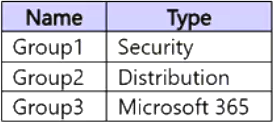
You have a Microsoft 365 E5 subscription that contains the groups shown in the following table.
You need to create a contact named Contact1 and add Contact1 to a group.
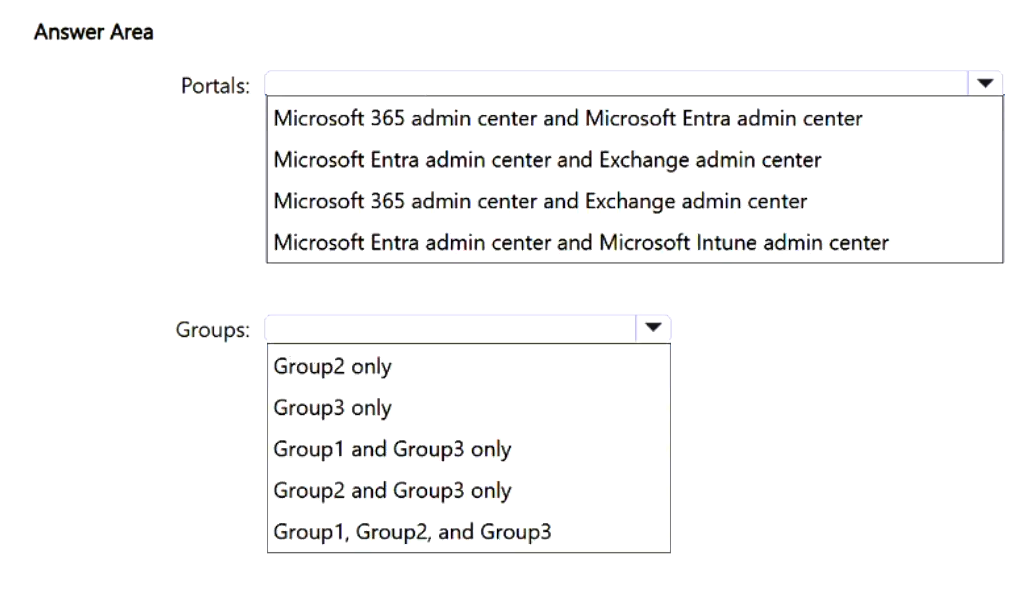
Which two portals can you use to create Contact1, and to which groups can you add Contact1? To answer, select the appropriate options in the answer area.
NOTE: Each correct selection is worth one point.
Show Answer
Correct Answer: Portals: Microsoft 365 admin center and Exchange admin center
Groups: Group2 only
Explanation: Mail contacts are created in Exchange or Microsoft 365 admin center. Mail contacts can be members of distribution groups, but Microsoft 365 groups use user/guest identities rather than mail contact objects, and security groups do not use mail contacts as members for this scenario.
Question 20
You have a Microsoft 365 E5 tenant.
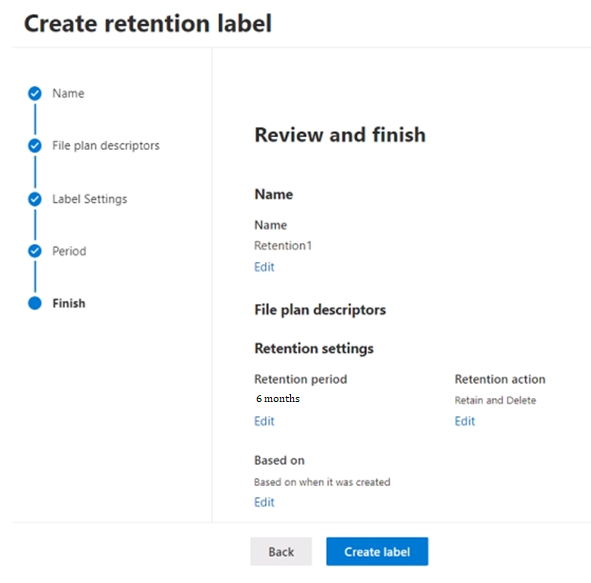
You create a retention label named Retention1 as shown in the following exhibit.
You apply Retention1 to all the Microsoft OneDrive content.
On January 1, 2020, a user stores a file named File1 in OneDrive.
On January 10, 2020, the user modifies File1.
On February 1, 2020, the user deletes File1.
When will File1 be removed permanently and unrecoverable from OneDrive?
A. February 1, 2020
B. July 1, 2020
C. July 10, 2020
D. August 1, 2020
Show Answer
Correct Answer: B
Explanation: Retention1 keeps the file for six months based on its creation date, January 1, 2020. The retention period ends on July 1, 2020, when the file can be permanently deleted, even though it was modified and deleted earlier.
Question 21
You have a Microsoft 365 subscription that contains the alerts shown in the following table.
Which properties of the alerts can you modify?
A. Status only
B. Status and Comment only
C. Status and Severity only
D. Status, Severity, and Comment only
E. Status, Severity, Comment and Category
Show Answer
Correct Answer: B
Explanation: You can modify an alert’s status and add or edit its comment. Severity and category are assigned by the system and aren’t editable.
Question 22
You have a Microsoft 365 E5 subscription.
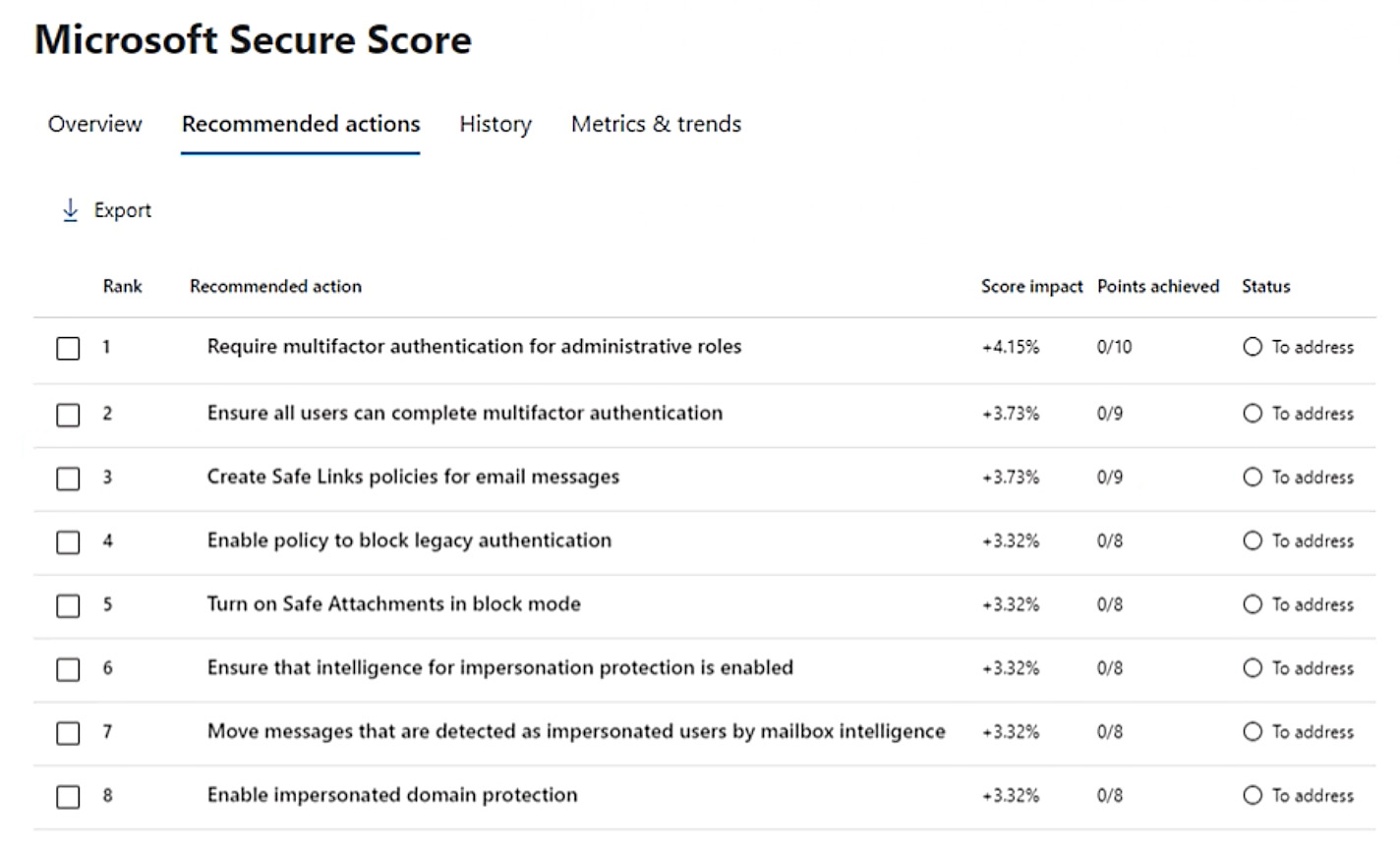
Your company’s Microsoft Secure Score recommends the actions shown in the following exhibit.
You select Create Safe Links policies for email messages and change Status to Risk accepted in the Status & action plan settings.
How does the change affect the Secure Score?
A. remains the same
B. increases by 1 point
C. increases by 9 points
D. decreases by 1 point
E. decreases by 9 points
Show Answer
Correct Answer: A
Explanation: Setting the recommendation to **Risk accepted** records that you are choosing not to implement it. It awards no points, so the Secure Score remains the same.
Question 23
HOTSPOT
-
Your company has a hybrid deployment of Microsoft 365.
An on-premises user named User1 is synced to the Microsoft Entra tenant.
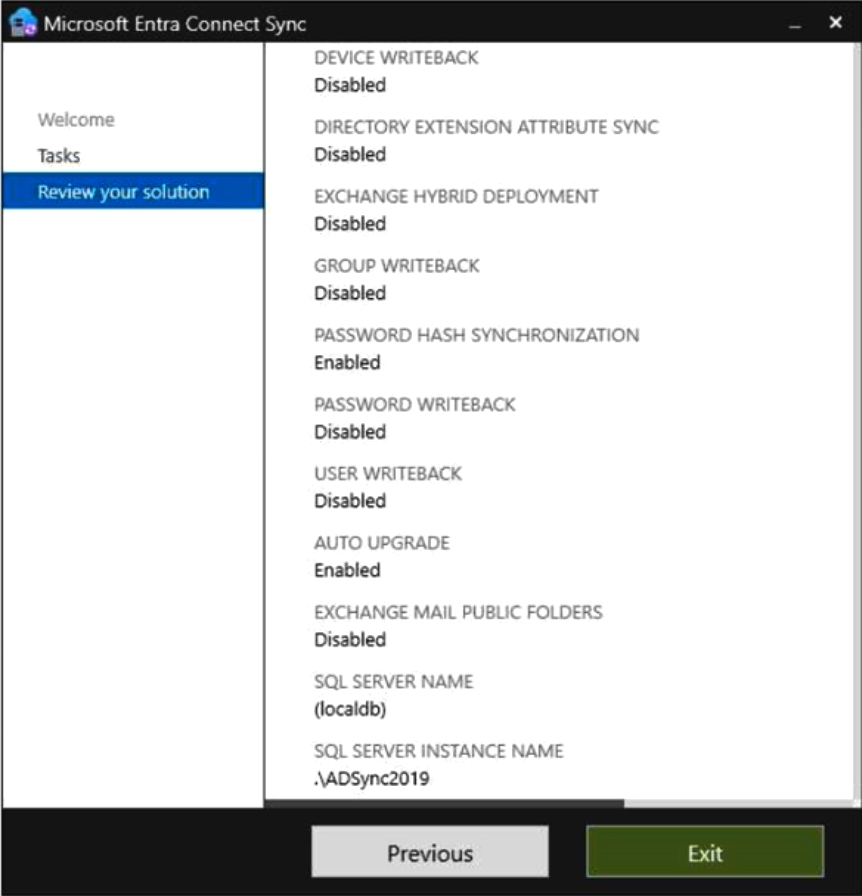
Microsoft Entra Connect Sync is configured as shown in the following exhibit.
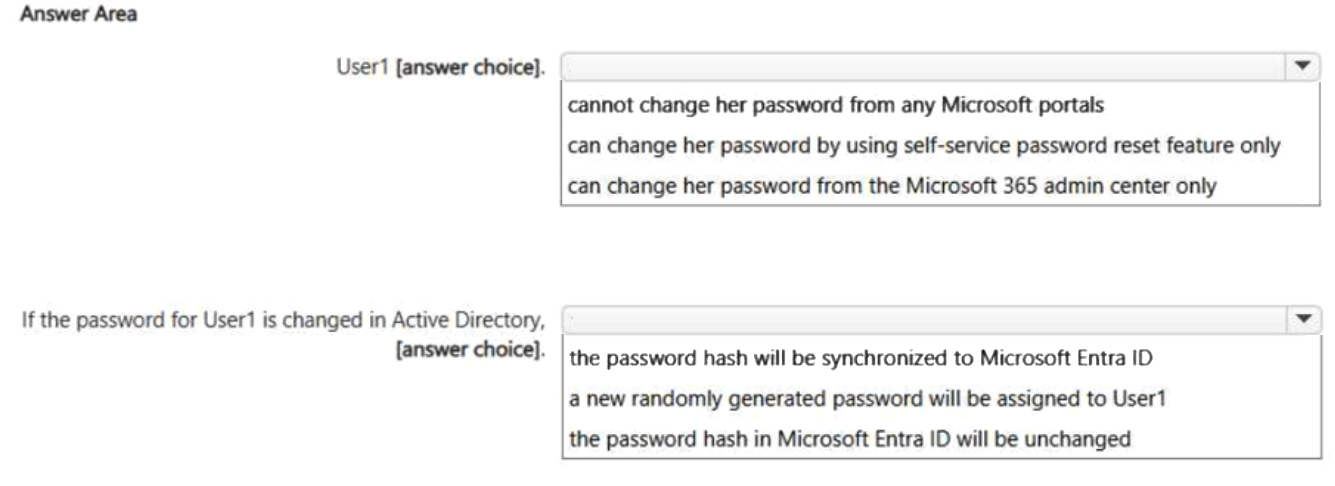
Use the drop-down menus to select the answer choice that completes each statement based on the information presented in the graphic.
NOTE: Each correct selection is worth one point.
Show Answer
Correct Answer: User1 cannot change her password from any Microsoft portals.
If the password for User1 is changed in Active Directory, the password hash will be synchronized to Microsoft Entra ID.
Explanation: Password Hash Synchronization is enabled, so on-premises password changes sync their password hash to Microsoft Entra ID. Password Writeback is disabled, so cloud password changes/resets cannot be written back to on-premises Active Directory, preventing password changes through Microsoft portals for the synced user.
Question 23
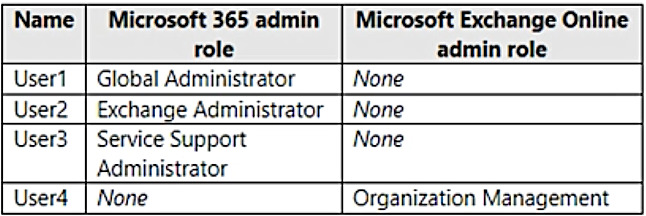
You have a Microsoft 365 subscription that contains the users shown in the following table.
You plan to use Exchange Online to manage email for a DNS domain.
An administrator adds the DNS domain to the subscription.
The DNS domain has a status of Incomplete setup.
You need to identify which user can complete the setup of the DNS domain. The solution must use the principle of least privilege.
Which user should you identify?
A. User1
B. User2
C. User3
D. User4
Show Answer
Correct Answer: A
Explanation: Completing the domain setup in Microsoft 365 requires a Global Administrator or Domain Name Administrator. Of the listed users, only User1 has one of those roles. Exchange Administrator and Exchange Online Organization Management roles do not grant the required Microsoft 365 domain-management permission.
Question 24
You have a Microsoft 365 E5 subscription that uses Microsoft Defender for Office 365.
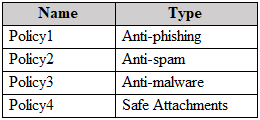
You have the policies shown in the following table.
All the policies are configured to send malicious email messages to quarantine.
Which policies support a customized quarantine retention period?
A. Policy1 and Policy2 only
B. Policy1 and Policy3 only
C. Policy2 and Policy4 only
D. Policy3 and Policy4 only
Show Answer
Correct Answer: A
Explanation: Policy1 (anti-phishing) and Policy2 (anti-spam) support customized quarantine retention periods. Anti-malware and Safe Attachments policies do not support a customized retention period in this scenario.
$19
Get all 431 questions with detailed answers and explanations
Instant download HTML + PDF delivered the moment payment clears.
Secure Stripe checkout we never see or store your card details.
7-day refund if files are defective see our refund policy.