HOTSPOT -
You have an on-premises network that includes the sites shown in the following table.
Each site is connected to the Internet by a firewall. All sites are connected to an SD-WAN. Each site is configured to propagate routes by using BGP.
You have an Azure subscription that includes a virtual network named Vnet1 that contains a Virtual Network Gateway named Gateway1.
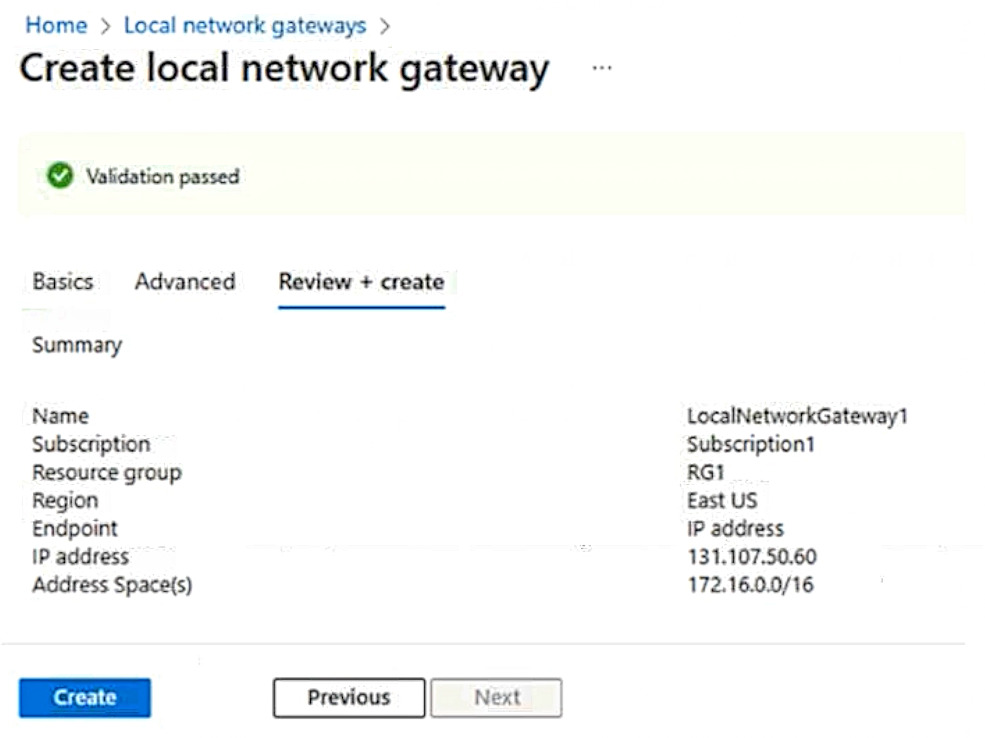
You create a local network gateway with the configuration shown in the gateway exhibit (Click the Gateway tab.)
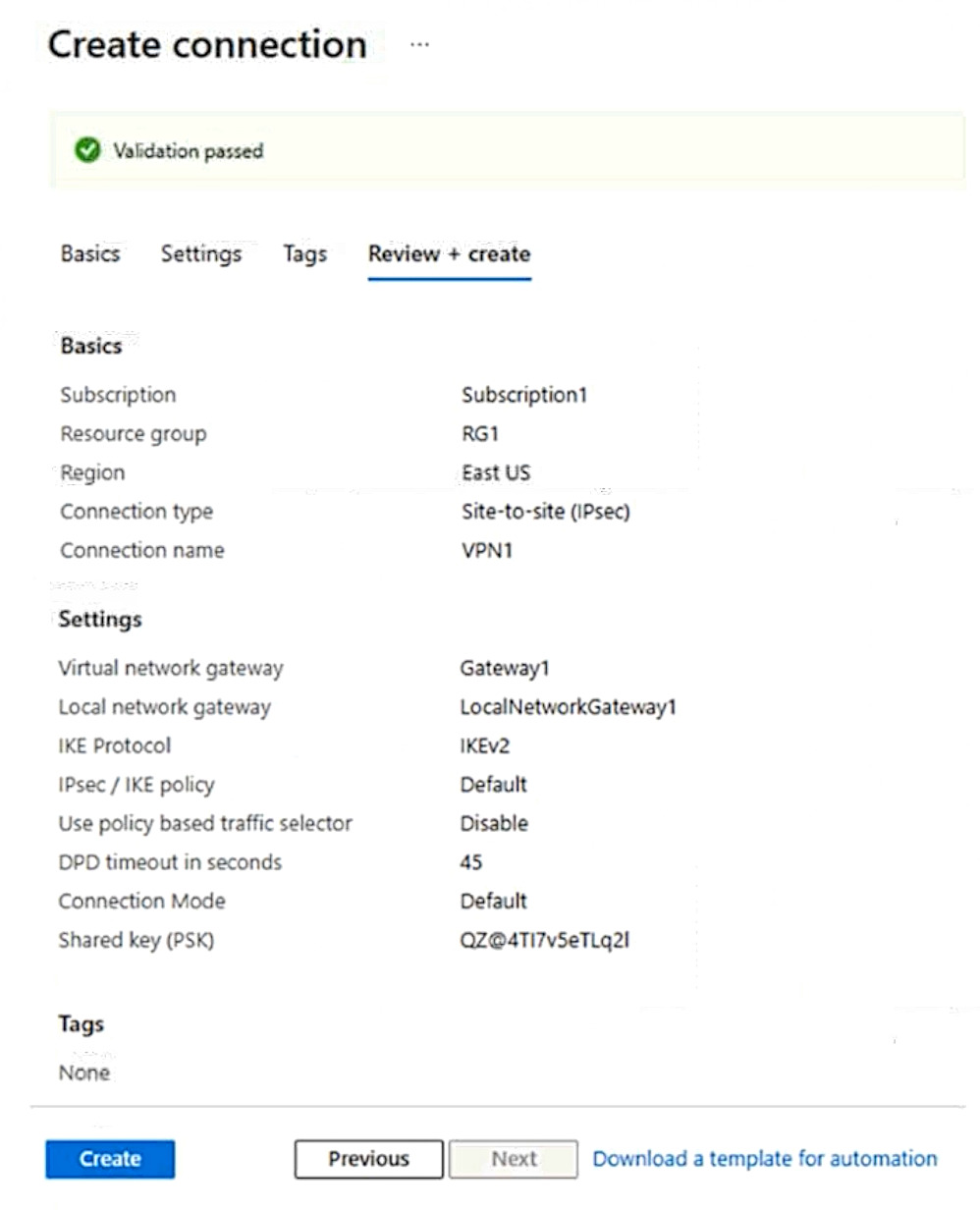
You create a Site-to-Site (S2S) connection with the configuration shown in connection exhibit. (Click the Connection tab.)
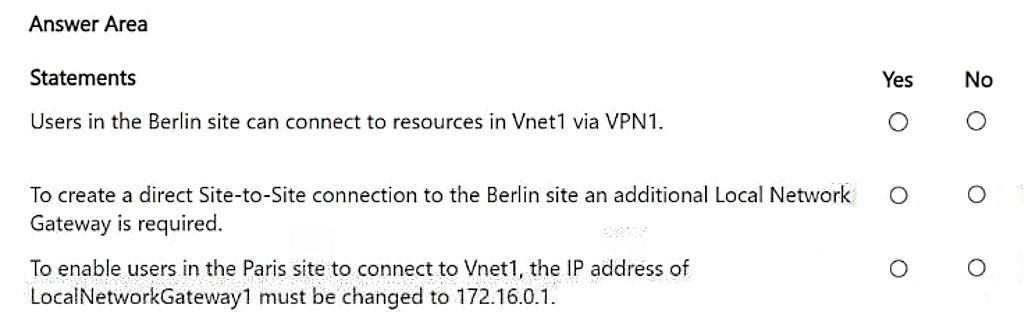
For each of the following statements, select Yes if the statement is true. Otherwise, select No.
NOTE: Each correct selection is worth one point.
Show Answer
Correct Answer: Yes
Yes
No
Explanation: The VPN terminates at the Paris firewall (public IP 131.107.50.60). Because the on-prem sites exchange routes over the SD-WAN using BGP and the LNG advertises 172.16.0.0/16, Berlin can reach Azure through Paris. A direct VPN to Berlin requires a separate Local Network Gateway because it has a different VPN endpoint public IP. The Local Network Gateway must reference the on-prem public VPN IP, not the private firewall IP.
Question 68
HOTSPOT -
You have an Azure subscription that contains a virtual network named VNet1. VNet1 uses an IP address space of 192.168.0.0/24.
You plan to deploy Azure virtual machines and Azure Bastion to VNet1.
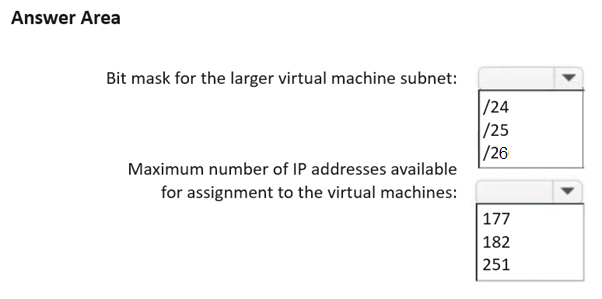
You need to recommend an IP subnetting configuration for VNet1. The solution must maximize the number of IP addresses that can be assigned to the virtual machines.
What should you recommend? To answer, select the appropriate options in the answer area.
NOTE: Each correct selection is worth one point.
Show Answer
Correct Answer: /25
182
Explanation: Azure Bastion requires a dedicated AzureBastionSubnet of at least /26. From the /24 VNet, allocate /26 to Bastion and split the remaining space into one /25 and one /26 VM subnet. Azure reserves 5 IPs per subnet, so usable VM IPs are 123 + 59 = 182.
Question 69
HOTSPOT
-
You have an Azure subscription that contains a virtual network named VNet1.
Your on-premises network connects to VNet1 by using a Site-to-Site (S2S) VPN connection.
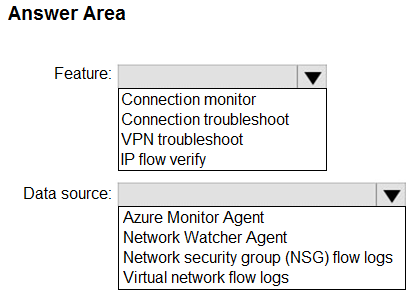
You need to ensure that Azure Network Watcher generates an alert if the VPN connection fails.
Which Network Watcher feature should you use to generate the alert, and which data source should the feature query? To answer, select the appropriate options in the answer area.
NOTE: Each correct selection is worth one point.
Show Answer
Correct Answer: Feature: Connection monitor
Data source: Network Watcher Agent
Explanation: Connection Monitor is the Network Watcher feature designed for continuous monitoring and alerting. It relies on the Network Watcher agent/extension on monitored VMs to collect connectivity data, which can be used to trigger alerts.
Question 70
HOTSPOT -
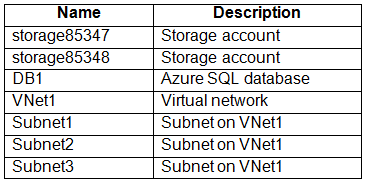
You have an Azure subscription that contains the resources shown in the following table.
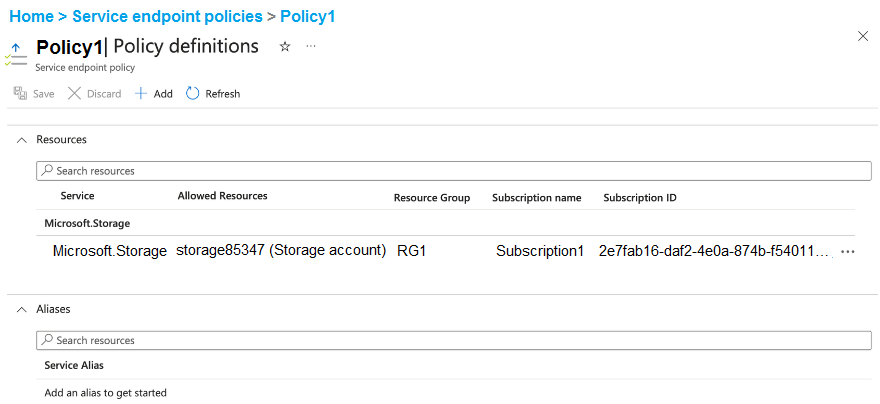
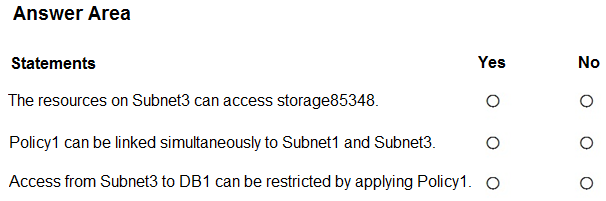
You create a service endpoint policy as shown in the Policy exhibit. (Click the Policy tab.)
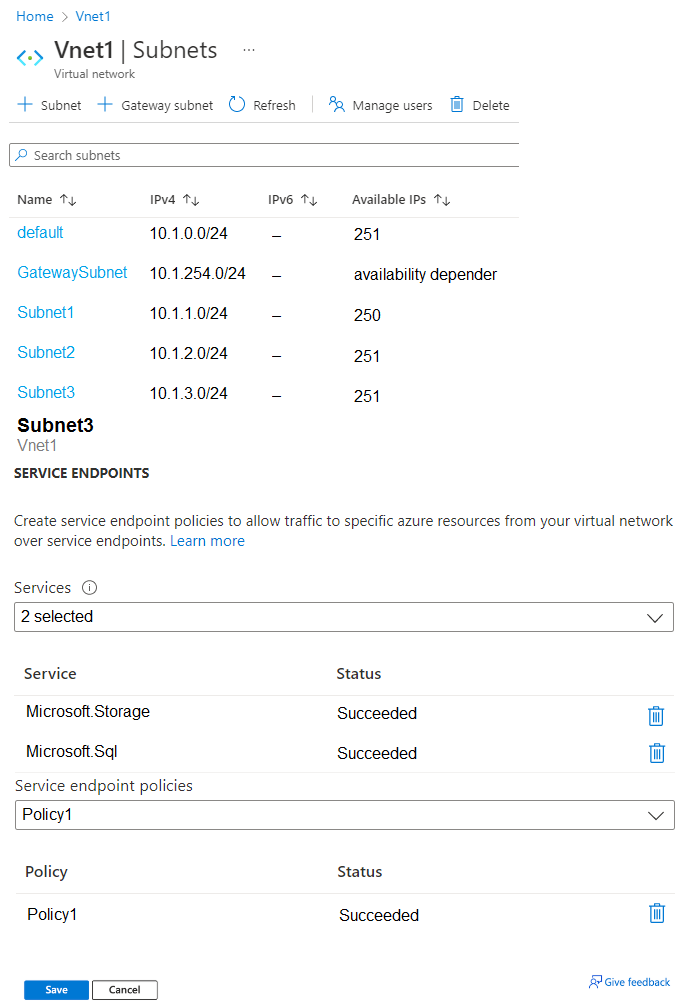
You configure the Service Endpoints settings for Subnet3 as shown in the Subnets exhibit. (Click the Subnets tab.)
For each of the following statements, select Yes if the statement is true. Otherwise, select No.
NOTE: Each correct selection is worth one point.
Show Answer
Correct Answer: 1. No
2. Yes
3. No
Explanation: The service endpoint policy allowlists only the specified Storage account (storage85347). After the policy is associated with Subnet3, access over Microsoft.Storage service endpoints is limited to that account, so storage85348 is blocked. A service endpoint policy can be associated with multiple subnets that have the required Storage service endpoint enabled. Service endpoint policies apply only to Azure Storage, not Azure SQL, so they cannot restrict access to DB1.
Question 71
HOTSPOT
-
You have an on-premises network.
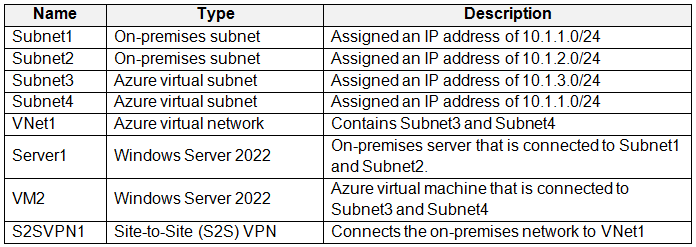
You have an Azure subscription that contains the resources shown in the following table.
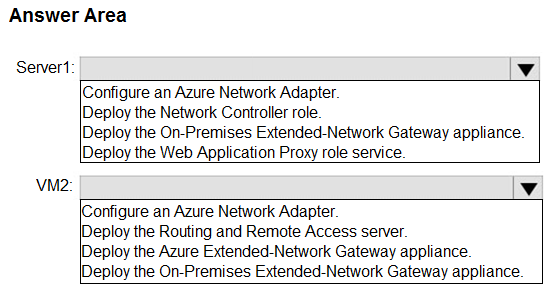
You need to ensure that on-premises devices can communicate with Azure resources that are connected to Subnet4.
What should you do on each resource? To answer, select the appropriate options in the answer area.
NOTE: Each correct selection is worth one point.
Show Answer
Correct Answer: Server1: Deploy the On-Premises Extended-Network Gateway appliance.
VM2: Deploy the Azure Extended-Network Gateway appliance.
Explanation: Subnet4 and the on-premises Subnet1 use the same IP range (10.1.1.0/24). To enable communication across overlapping address spaces, use Azure Extended Network by deploying the on-premises gateway appliance on the on-prem server and the Azure Extended-Network Gateway appliance in Azure.
Question 72
HOTSPOT -
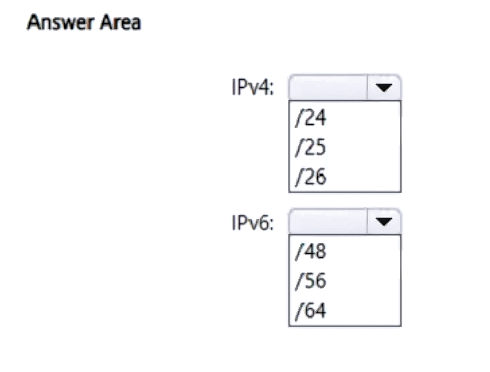
You have an Azure subscription that contains a dual-stack virtual network named VNet1. VNet1 has the following IP address spaces:
• IPv4: 192.168.0.0/24
• IPv6: fd00:db8:deca:deed:/48
You plan to deploy an Azure VPN gateway and multiple virtual machines to VNet1.
You need to configure the subnet masks for VNet1. The solution must meet the following requirements:
• Maximize the number of usable IP addresses.
• Support the deployment of the VPN gateway and the virtual machines.
Which subnet mask should you use for each address space? To answer, select the appropriate options in the answer area.
NOTE: Each correct selection is worth one point.
Show Answer
Correct Answer: IPv4: /25
IPv6: /64
Explanation: A VPN gateway requires a dedicated GatewaySubnet, so the IPv4 /24 address space must be split into at least two subnets. The largest subnet size that still allows another subnet is /25. For Azure IPv6, subnets must use a /64 prefix.
Question 73
HOTSPOT -
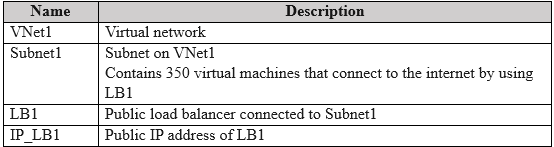
You have an Azure subscription that contains the resources shown in the following table.
You need to identify the number of established outbound connections from the virtual machines.
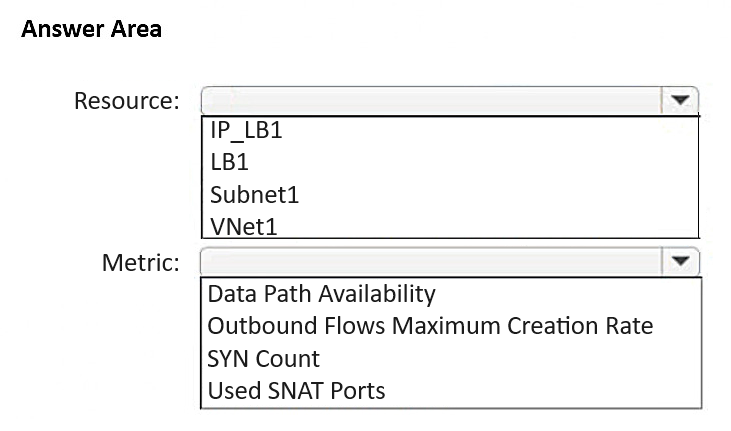
Which resource and metric should you review? To answer, select the appropriate options in the answer area.
NOTE: Each correct selection is worth one point.
Show Answer
Correct Answer: Resource: IP_LB1
Metric: Used SNAT Ports
Explanation: Outbound internet connections through a public Load Balancer use SNAT on its public IP. The 'Used SNAT Ports' metric on the public IP indicates the number of outbound connections consuming SNAT ports.
Question 74
DRAG DROP -
You have an Azure subscription that contains a virtual machine named VM1. VM1 contains a NIC named NIC1 and a public IP address named PIP1. PIP1 is assigned to NIC1.
You plan to deploy four Network Virtual Appliances (NVAs).
You need to ensure that all the inbound traffic from the internet to PIP1 is inspected by the NVAs. The solution must ensure that the NVA deployment is highly available.
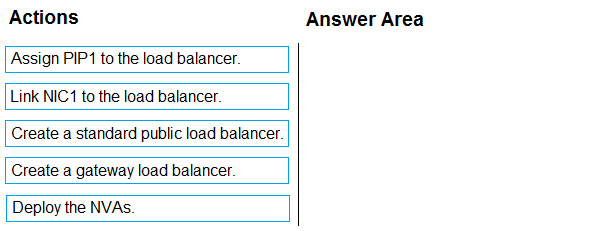
Which three actions should you perform in sequence? To answer, move the appropriate actions from the list of actions to the answer area and arrange them in the correct order.
Show Answer
Correct Answer: Create a gateway load balancer.
Deploy the NVAs.
Link NIC1 to the load balancer.
Explanation: A Gateway Load Balancer provides transparent service chaining for highly available NVAs. After deploying the NVAs behind the Gateway Load Balancer, chain the protected VM's frontend (NIC/public endpoint association) to the Gateway Load Balancer so inbound internet traffic to PIP1 is inspected before reaching VM1.
Question 75
DRAG DROP -
You have an Azure subscription that contains two virtual networks named VNet1 and VNet2.
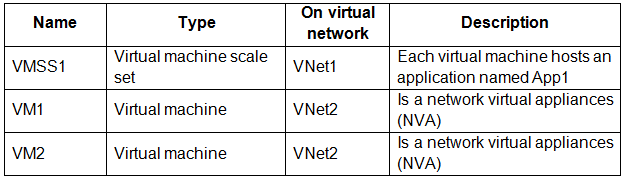
You plan to deploy the resources shown in the following table.
You need to deploy two load balancers to manage the traffic for VMSS1, VM1, and VM2. The solution must meet the following requirements:
• Either VM1 or VM2 must inspect all the traffic from the internet to App1.
• All user connections from the internet to App1 must be load balanced.
• Costs must be minimized.
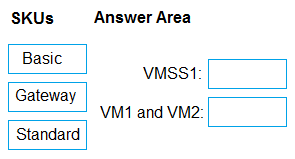
Which load balancer SKU should you include in the solution? To answer, drag the appropriate SKUs to the correct resources. Each SKU may be used once, more than once, or not at all. You may need to drag the split bar between panes or scroll to view content.
NOTE: Each correct selection is worth one point.
Show Answer
Correct Answer: VMSS1: Standard
VM1 and VM2: Gateway
Explanation: Gateway Load Balancer is designed to insert NVAs into the traffic path for inspection. The application front end should use a Standard Load Balancer, which supports chaining with Gateway Load Balancer and internet-facing load balancing for VM scale sets. Basic Load Balancer does not support this architecture.
Question 77
HOTSPOT
-
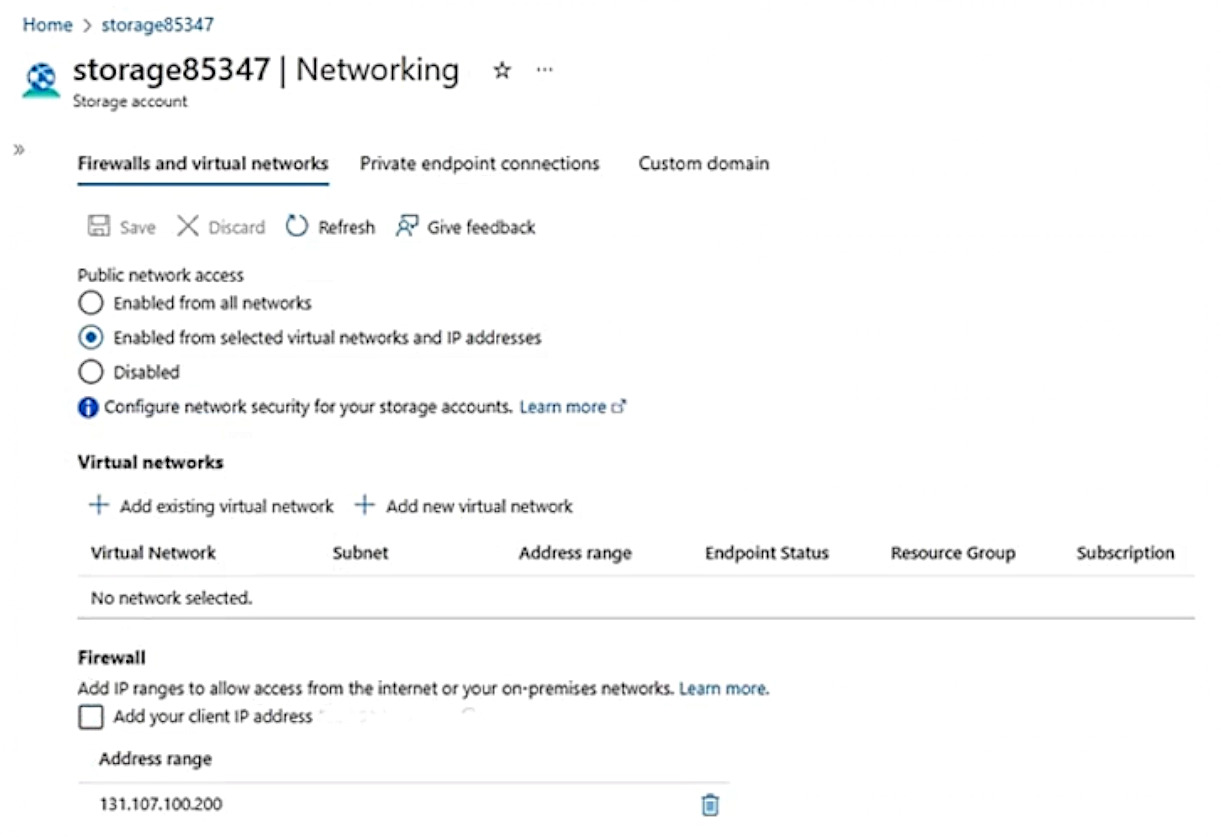
You have an on-premises server named Server that is assigned a public IP address of 131.107.100.200.
You have an Azure subscription that contains the resources shown in the following table.
storage85347 has the Networking settings configured as shown in the following exhibit.
From the Firewalls and virtual networks tab, you add Subnet1 to storage85347.
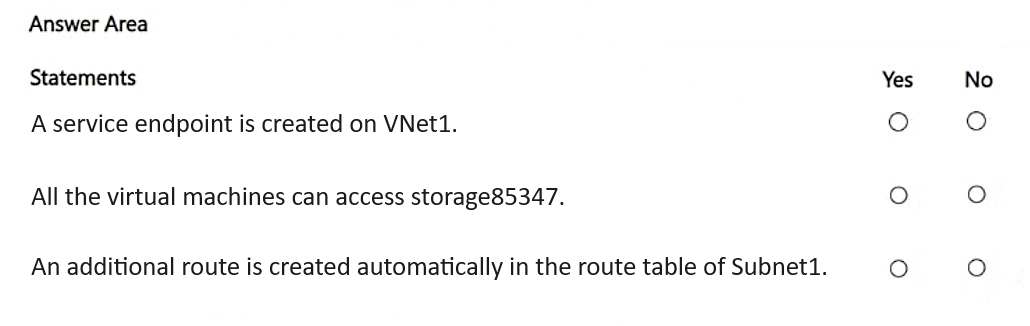
For each of the following statements, select Yes if the statement is true. Otherwise, select No.
NOTE: Each correct selection is worth one point.
Show Answer
Correct Answer: Yes
No
Yes
Explanation: Adding Subnet1 to the storage account network rules enables the Microsoft.Storage service endpoint for that subnet if needed. Only Subnet1 (not Subnet2) is allowed to access the storage account. Enabling a service endpoint adds Azure-managed service endpoint system routes for the subnet.
$19
Get all 347 questions with detailed answers and explanations
Instant download HTML + PDF delivered the moment payment clears.
Secure Stripe checkout we never see or store your card details.
7-day refund if files are defective see our refund policy.