You have an Azure subscription that contains multiple virtual machines. The virtual machines host an SAP non-production landscape on Azure.
You need to configure the virtual machines to stop and start at specific times. The solution must minimize administrative effort.
What should you use?
A. an Azure Monitor workbook
B. an Azure Resource Manager (ARM) template
C. a virtual machine scale set
D. an Azure Automation account
Show Answer
Correct Answer: D
Explanation: An Azure Automation account can run scheduled automation to start and stop the virtual machines at specified times, minimizing ongoing administrative effort. An ARM template deploys resources but does not schedule VM operations; workbooks are for monitoring, and scale sets manage groups of instances rather than scheduling standalone VMs.
Question 12
You deploy an SAP production landscape on Azure virtual machines that run SUSE Linux Enterprise Server (SLES).
You need to generate a report that details performance differences between instances of an SAP AS ABAP system.
What should you use?
A. JMeter
B. ABAPmeter
C. Micro Focus LoadRunner
D. SAP UI5 Speedtest Tool
Show Answer
Correct Answer: B
Explanation: Use ABAPmeter. It is designed to measure and report performance differences between instances of an SAP AS ABAP system.
Question 13
You plan to deploy an SAP environment on Azure. The SAP environment will have landscapes for production, development and quality assurance.
You need to minimize the costs associated with running the development and quality assurance landscapes on Azure.
What should you do?
A. Configure scaling for Azure App Service
B. Create a scheduled task that runs the stopsap command
C. Configure Azure virtual machine scale sets
D. Create Azure Automation runbooks to stop, deallocate, and start Azure virtual machines
Show Answer
Correct Answer: D
Explanation: Use Azure Automation runbooks to stop and deallocate the development and quality assurance virtual machines when they are not needed, then start them on schedule. Deallocation stops compute charges; running `stopsap` alone does not deallocate the Azure VMs.
Question 14
HOTSPOT
You have an SAP production landscape that uses SAP HANA databases.
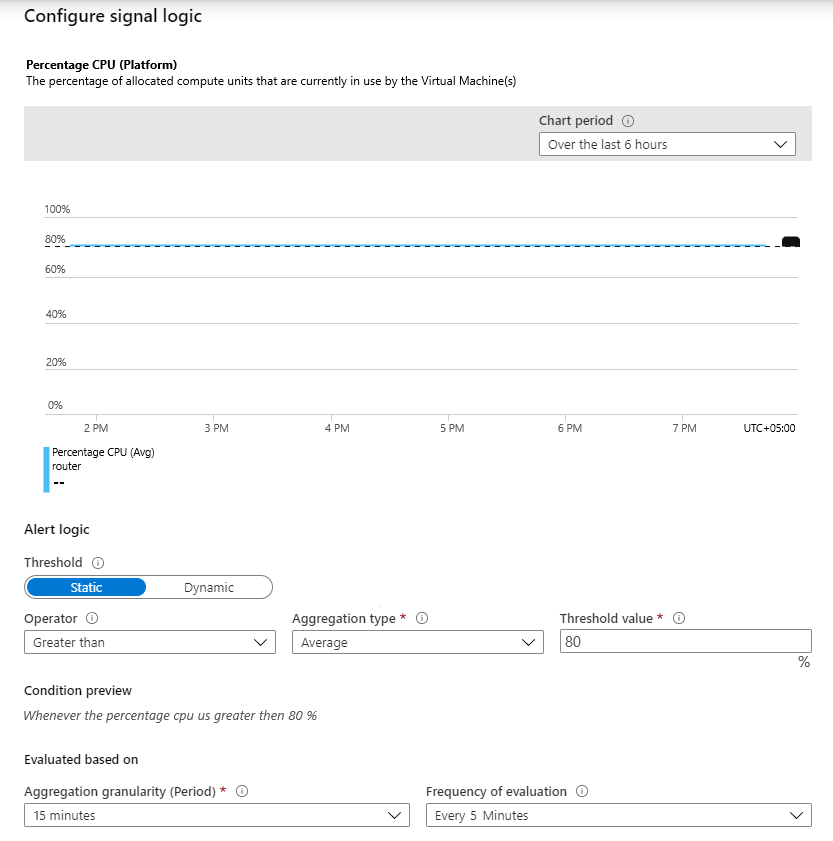
You configure a metric alert for the primary HANA server as shown in the following exhibit.
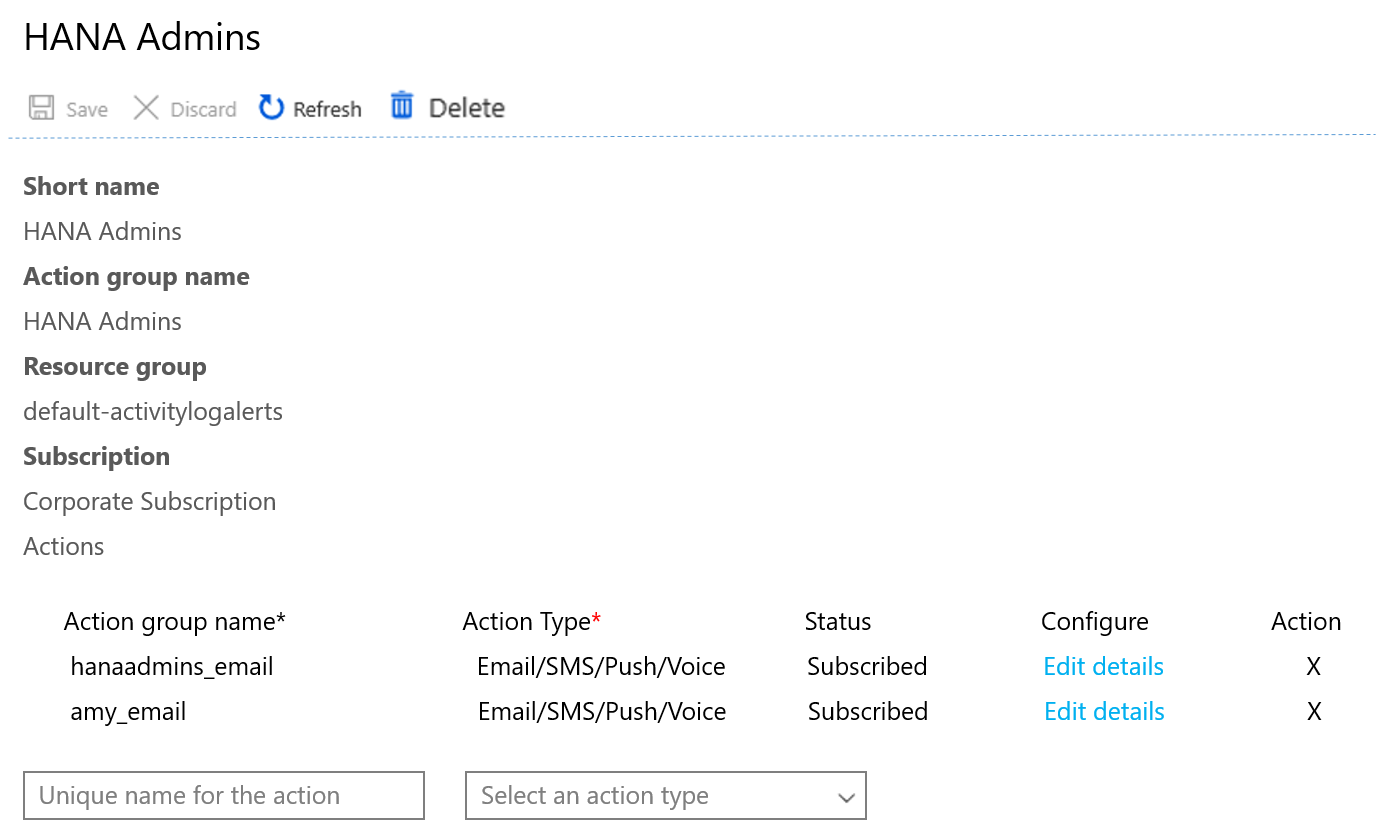
You have an action group shown in the following exhibit.
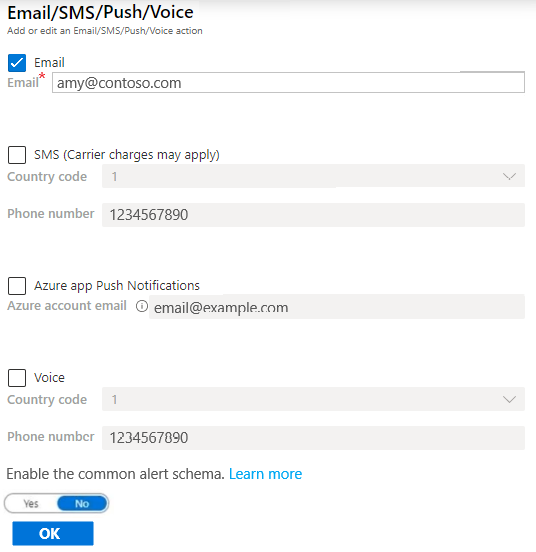
The amy_email is configured as shown in the following exhibit.
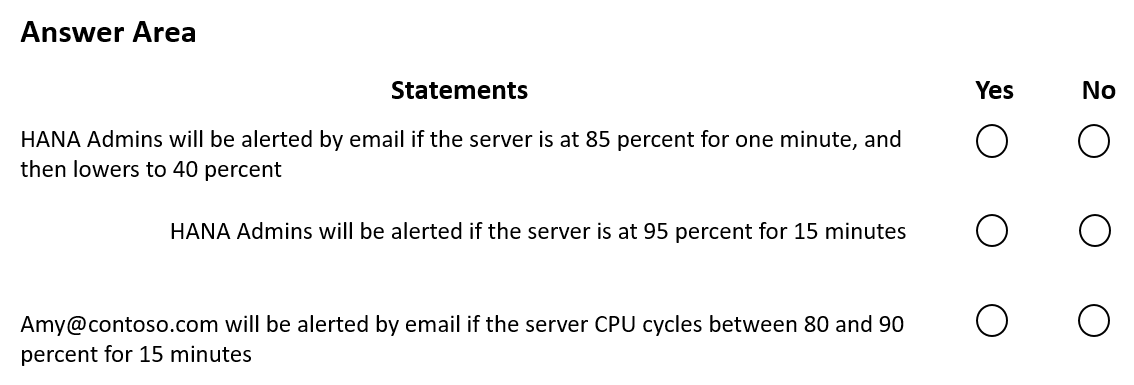
For each of the following statements, select Yes if the statement is true. Otherwise, select No.
NOTE: Each correct selection is worth one point.
Show Answer
Correct Answer: No
Yes
Yes
Explanation: The alert checks the 15-minute average CPU usage every five minutes and triggers when that average exceeds 80%. One minute at 85% followed by 40% will not meet the threshold. Sustained usage at 95%, or cycling between 80% and 90%, will meet it; the action group includes Amy’s email address.
Question 15
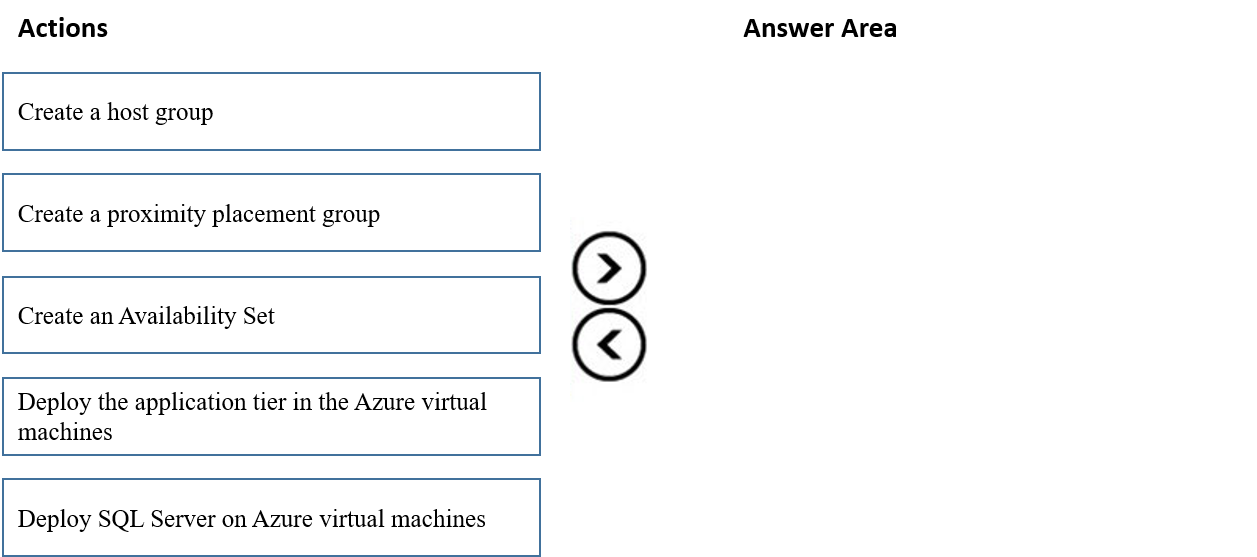
DRAG DROP
You have an Azure subscription.
You plan to deploy a SAP NetWeaver landscape that will use SQL Server on Azure virtual machines. The solution must meet the following requirements:
• The SAP application and database tiers must reside in the same Azure zone.
• The application tier in the Azure virtual machines must belong to the same Availability Set.
Which four actions should you perform in sequence? To answer, move the appropriate actions from the list of actions to the answer area and arrange them in the correct order.
NOTE: More than one order of answer choices is correct. You will receive credit for any of the correct orders you select.
Show Answer
Correct Answer: 1. Create a proximity placement group.
2. Create an Availability Set.
3. Deploy the application tier in the Azure virtual machines.
4. Deploy SQL Server on Azure virtual machines.
Explanation: Associate the Availability Set and both tiers’ VMs with the proximity placement group to keep the tiers close together. Place the application VMs in the Availability Set.
Question 16
You have an Azure subscription that contains a Recovery Services vault named RSV1 and a virtual machine named VM1. VM1 runs SUSE Enterprise Linux (SLES) and hosts an SAP HANA instance.
You need to configure a HANA Backint-based backup of the HANA databases.
You register VM1 with RSV1.
What should you do next?
A. On VM1, stop the HANA instance.
B. From RSV1, select the items to back up.
C. On VM1, run the preregistration script.
D. On VM1, install the Azure Backup Plugin for HANA.
Show Answer
Correct Answer: D
Explanation: After registering the VM with the Recovery Services vault, install the Azure Backup Plugin for HANA on VM1 to enable Backint-based database backups. The preregistration script is run before VM registration.
Question 17
HOTSPOT
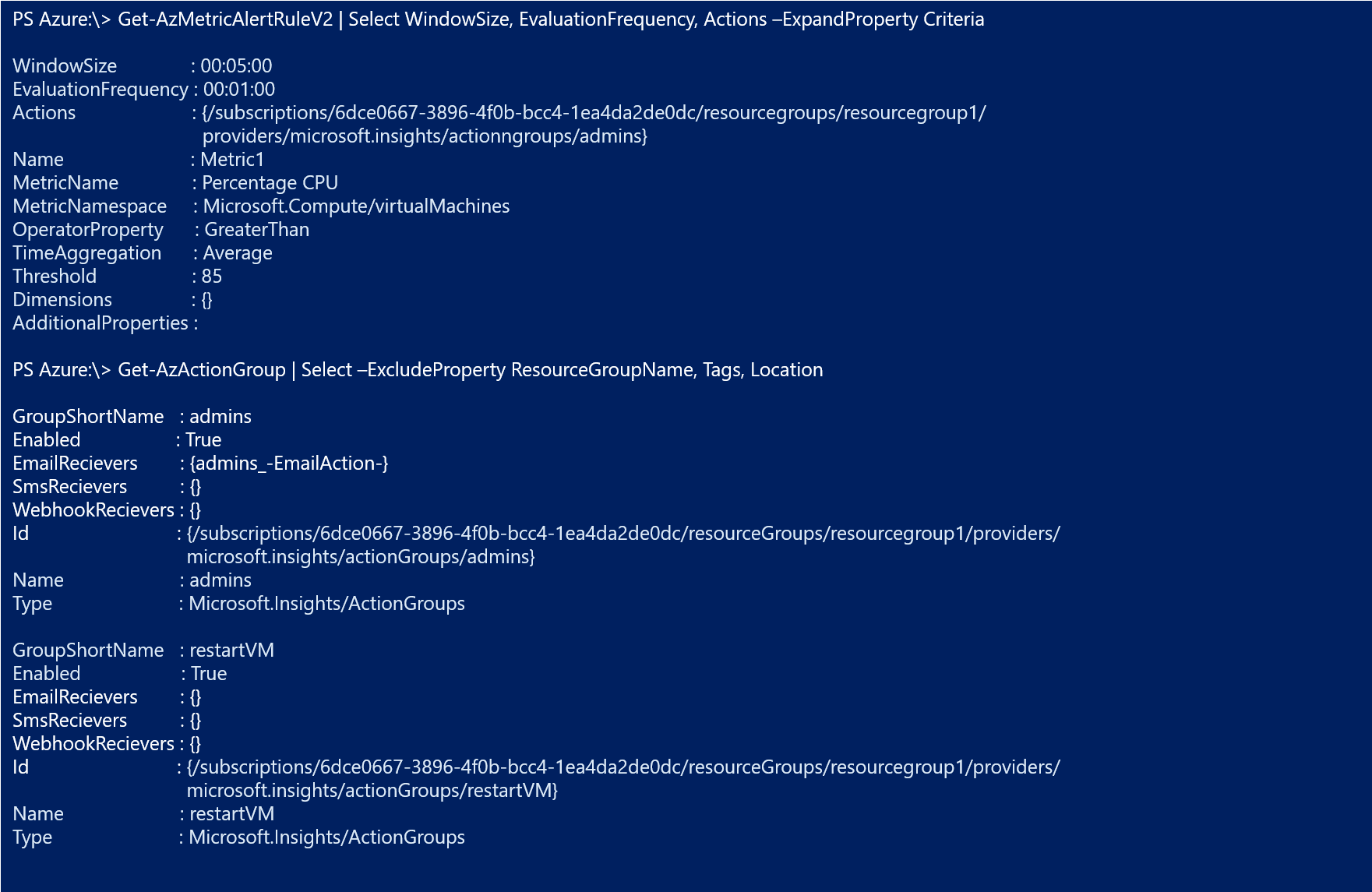
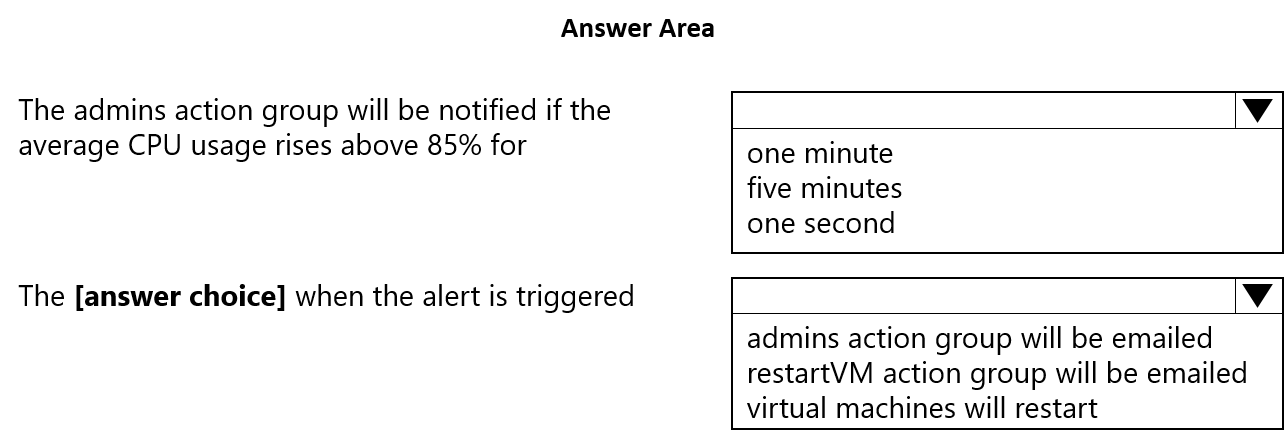
You have an Azure alert rule and action group as shown in the following exhibit.
Use the drop-down menus to select the answer choice that completes each statement based on the information presented in the graphic.
Show Answer
Correct Answer: five minutes
admins action group will be emailed
Explanation: The rule checks the average CPU usage over a five-minute window every minute. When it exceeds 85%, the linked admins action group sends an email.
Question 18
You have highly available deployment of SAP NetWeaver on Azure that uses a third-party solution for clustering ABAP SAP Central Services (ASCS) components.
You need to recommend a solution to reduce the cost of shared storage for the components.
What should you include in the recommendation?
A. Azure NetApp Files
B. Azure shared disks
C. Azure Data Share
D. Storage Spaces Direct
Show Answer
Correct Answer: B
Explanation: Azure shared disks allow multiple cluster nodes to access the same managed disk, supporting the shared-storage requirements of a clustered SAP ASCS deployment and reducing storage costs.
Question 19
You have an Azure subscription named Sub1 that contains a Microsoft Sentinel workspace named Workspace1.
You have an SAP RISE managed workload that is integrated with Sub1.
You implement the Microsoft Sentinel solution for SAP applications in Workspace1.
You need to designate specific users in the managed workload as sensitive. The solution must minimize administrative effort.
What should you use?
A. an analytics rule
B. a watchlist
C. a threat intelligence indicator
D. a hunting query
Show Answer
Correct Answer: B
Explanation: Use a watchlist to designate specific SAP users as sensitive. The Microsoft Sentinel solution for SAP applications uses a watchlist for this purpose, allowing you to maintain the user list without creating or managing a custom analytics rule or query.
Question 20
DRAG DROP
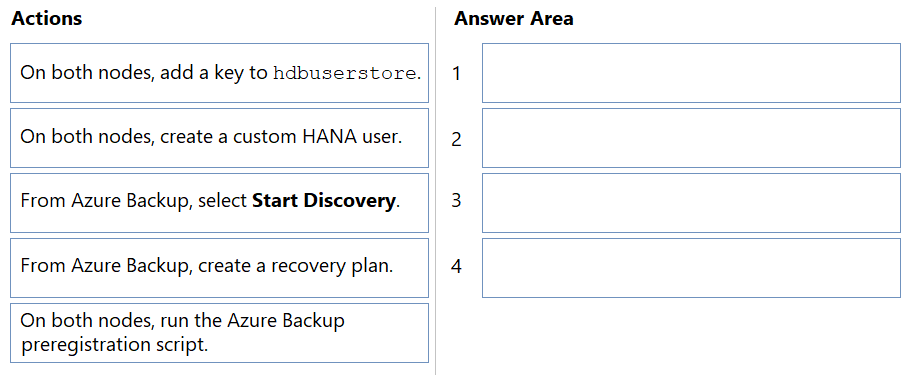
You have two Azure virtual machines. The virtual machines host a highly available SAP HANA cluster that has HANA system replication configured.
You plan to configure Azure Backup to protect the replicated databases of the cluster.
You need to ensure that when a failover occurs, Azure Backup automatically uses the new primary node for backups.
Which four actions should you perform in sequence? To answer, move the appropriate actions from the list of actions to the answer area and arrange them in the correct order.
Show Answer
Correct Answer: 1. On both nodes, create a custom HANA user.
2. On both nodes, add a key to hdbuserstore.
3. On both nodes, run the Azure Backup preregistration script.
4. From Azure Backup, select Start Discovery.
Explanation: The user and its hdbuserstore credentials must be available on both nodes before preregistration. Discovering the replicated databases afterward allows Azure Backup to follow the primary node after failover.
$19
Get all 299 questions with detailed answers and explanations
Instant download HTML + PDF delivered the moment payment clears.
Secure Stripe checkout we never see or store your card details.
7-day refund if files are defective see our refund policy.