You have an SAP HANA virtual machine that performs daily backups to an Azure Storage account container.
You need to automatically delete backups that are older than 30 days.
Which type of policy should you create?
A. Azure Information Protection (AIP)
B. Cross-Origin Resource Sharing (CORS)
C. lifecycle management
D. Conditional Access
Show Answer
Correct Answer: C
Explanation: Create an Azure Storage lifecycle management policy. It can automatically delete backup blobs after they reach 30 days of age.
Question 92
HOTSPOT
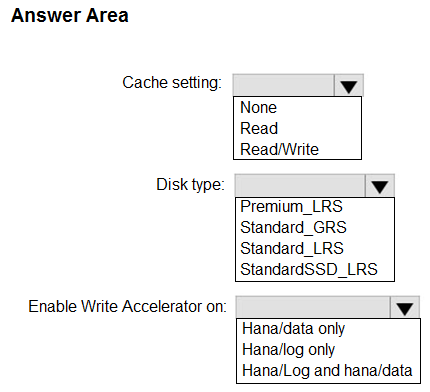
You plan to deploy SAP HANA to an Azure virtual machine for a production landscape.
You need to stripe multiple disks together by using the HANA indexserver.
How should you configure the Azure disks? To answer, select the appropriate options in the answer area.
NOTE: Each correct selection is worth one point.
Show Answer
Correct Answer: Cache setting: None
Disk type: Premium_LRS
Enable Write Accelerator on: Hana/log only
Explanation: Use Premium SSD disks for the production HANA volumes. Write Accelerator is intended for the latency-sensitive log volume and requires host caching to be set to None.
Question 93
You have an Azure virtual machine that runs SUSE Linux Enterprise Server (SLES). The virtual machine hosts a highly available deployment of SAP HANA.
You need to validate whether Accelerated Networking is operational for the virtual machine,
What should you use?
A. ethtool
B. netsh
C. iometer
D. fio
Show Answer
Correct Answer: A
Explanation: Use **ethtool** on SLES to inspect the network interface and verify that Accelerated Networking is active. `netsh` is for Windows, while `iometer` and `fio` are storage benchmarking tools.
Question 94
HOTSPOT
Your network contains an on-premises SAP landscape. The landscape contains a database server named DB1.
You have an Azure subscription that contains a storage account named storageaccount1.
You export multiple databases to separate folders in a folder named D:\Data on DB1.
You plan to migrate the on-premises SAP landscape to Azure.
You need to copy the exported databases on DB1 to a container in storageaccountl by using AzCopy.
How should you complete the command? To answer, select the appropriate options in the answer area.
NOTE: Each correct selection is worth one point.
Show Answer
Correct Answer: Copy
--recursive
Explanation: Use `azcopy copy` to upload the exported databases. The `--recursive` option includes their separate subfolders under `D:\Data`.
Question 95
You have an SAP on Azure production landscape that is hosted on Standard M-series virtual machines.
You plan to expand the storage on the virtual machines.
Which type of disk can be expanded without causing downtime?
A. Ultra
B. Standard SSD
C. Premium SSD v2
D. Premium SSD v1
Show Answer
Correct Answer: A, C
Explanation: Ultra Disks and Premium SSD v2 disks can be expanded without VM downtime. Standard SSD and Premium SSD v1 disks support expansion without downtime only under certain conditions, such as when the disk is already at least 4 TiB.
Question 96
You have an Azure subscription.
You plan to deploy a virtual machine named VM1 that will have the following configurations:
• Data disk size: 4 TB
• Generation: Generation 2
• Data disk type: Ultra disk
• Data disk encryption type: Double encryption
VM1 will host the SAP global transport directory in a volume on the data disk.
You need to ensure that you can replicate VM1 by using Azure Site Recovery.
Which configuration should you change?
A. generation
B. data disk type
C. data disk encryption type
D. data disk size
Show Answer
Correct Answer: B
Explanation: Change the data disk type. Azure Site Recovery does not support replicating VMs that have Ultra disks. Generation 2, a 4-TB data disk, and double encryption are supported configurations.
Question 97
You have an SAP landscape on Azure that contains the virtual machines shown in the following table.
You need to ensure that the Application Server role is available if a single Azure datacenter fails.
What should you include in the solution?
A. Azure Basic Load Balancer
B. Azure Load Balancer Standard
C. Azure Private Link
D. Azure AD Application proxy
Show Answer
Correct Answer: B
Explanation: Azure Standard Load Balancer supports zone-redundant deployments, helping keep the Application Server role available if a single Azure datacenter (availability zone) fails. Azure Basic Load Balancer does not provide this zone-redundancy capability.
Question 98
HOTSPOT
You have an Azure subscription.
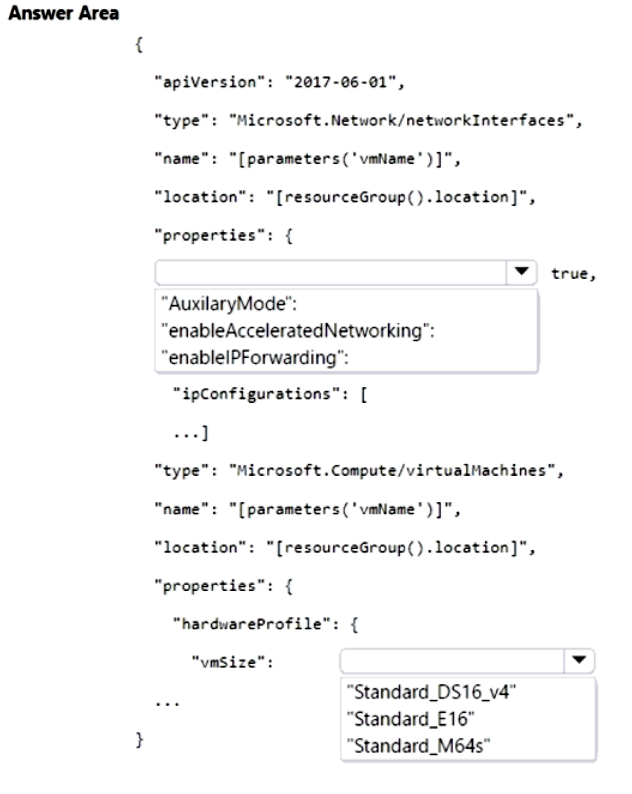
You need to deploy multiple virtual machines that will host SAP HANA by using an Azure Resource Manager (ARM) template. The solution must meet SAP certification requirements.
How should you complete the template? To answer, select the appropriate options in the answer area.
NOTE: Each correct selection is worth one point.
Show Answer
Correct Answer: NIC property: "enableAcceleratedNetworking"
VM size: "Standard_M64s"
Explanation: SAP HANA requires a certified VM size. Standard_M64s is a certified memory-optimized option, and accelerated networking should be enabled on its network interface.
Question 99
You are planning a deployment of SAP on Azure that will use SAP HANA.
You need to ensure that the SAP application servers are in the same datacenter as the HANA nodes.
What should you use?
A. an application group
B. a proximity placement group
C. a resource group
D. a virtual machine scale set
Show Answer
Correct Answer: B
Explanation: A proximity placement group places the SAP application server VMs near the SAP HANA nodes, minimizing network latency between them.
Sources:
https://learn.microsoft.com/en-us/azure/sap/large-instances/hana-large-instance-virtual-machine-migration
Question 100
Your on-premises network has a 100-Mbps internet connection and contains an SAP production landscape that has 14 TB of data files.
You plan to migrate the on-premises SAP landscape to Azure.
You need to migrate the data files to an Azure Files share. The solution must meet the following requirements:
• Migrate the files within seven days.
• Minimize administrative effort.
• Minimize service outages.
What should you use?
A. Azure Migrate
B. AzCopy
C. Azure Data Box
D. Azure Site Recovery
Show Answer
Correct Answer: C
Explanation: Use Azure Data Box. A 100-Mbps connection cannot transfer 14 TB within seven days, even assuming continuous full-speed transfer. Data Box lets you ship the bulk data to Azure rather than transfer it over the network, minimizing migration effort and disruption.
$19
Get all 299 questions with detailed answers and explanations
Instant download HTML + PDF delivered the moment payment clears.
Secure Stripe checkout we never see or store your card details.
7-day refund if files are defective see our refund policy.