HOTSPOT
You have an on-premises SAP landscape that uses DB2 databases and contains an SAP Financial Accounting (SAP FIN) deployment. The deployment contains a file share that stores 50 GB of bitmap files.
You plan to migrate the on-premises SAP landscape to SAP HANA on Azure and store the images on Azure Files shares. The solution must meet the following requirements:
• Minimize costs.
• Minimize downtime.
• Minimize administrative effort.
You need to recommend a migration solution.
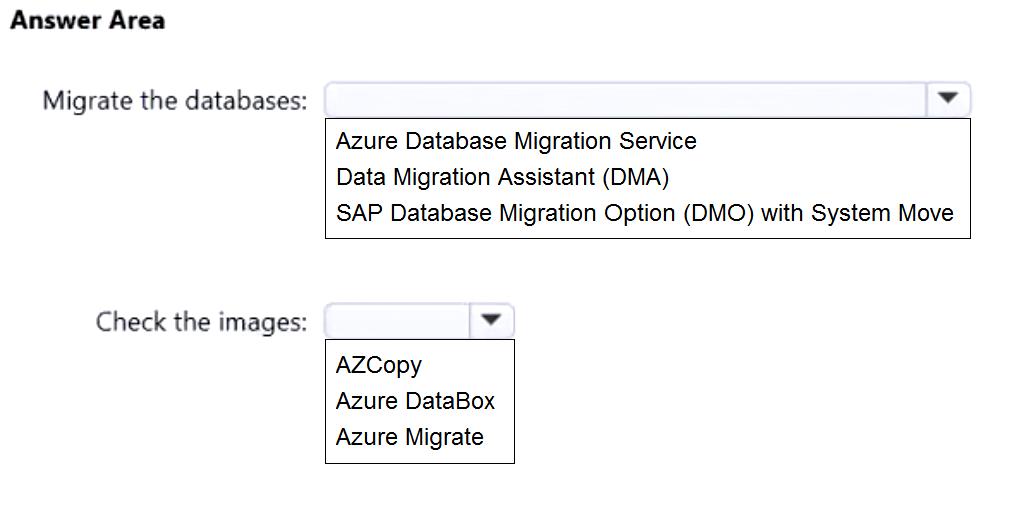
What should you recommend using to migrate the databases and to check the images? To answer, select the appropriate options in the answer area.
NOTE: Each correct selection is worth one point.
Show Answer
Correct Answer: Migrate the databases: SAP Database Migration Option (DMO) with System Move
Check the images: AzCopy
Explanation: DMO with System Move supports migrating the SAP system from DB2 to SAP HANA on Azure. AzCopy is a low-effort, low-cost way to transfer and verify the 50-GB image share in Azure Files.
Question 102
HOTSPOT
You have an existing on-premises SAP landscape that is hosted on VMware VSphere.
You plan to migrate the landscape to Azure.
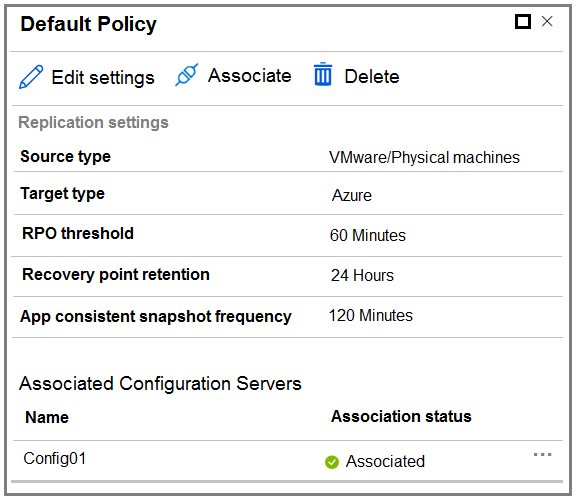
You configure the Azure Site Recovery replication policy shown in the following exhibit.
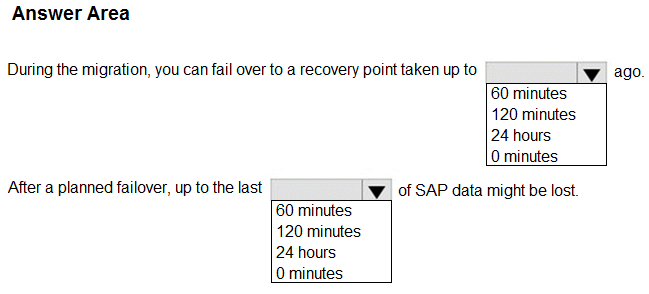
Use the drop-down menus to select the answer choice that completes each statement based on the information presented in the graphic.
NOTE: Each correct selection is worth one point.
Show Answer
Correct Answer: During the migration: 24 hours
After a planned failover: 0 minutes
Explanation: Recovery point retention allows selection of a point up to 24 hours old. A planned failover synchronizes the latest changes before switching over, so the 60-minute RPO threshold does not imply 60 minutes of data loss.
Question 103
You plan to deploy a highly available SAP HANA deployment on Azure that will be hosted on a Pacemaker cluster.
You need to configure the security principal of the Azure fence agent for the cluster. The solution must minimize administrative effort.
What should you use?
A. a user-assigned managed identity
B. a system-assigned managed identity
C. a service principal
D. Azure shared disks
Show Answer
Correct Answer: B
Explanation: Use a system-assigned managed identity. Azure can create and manage it automatically for the VM, avoiding the extra setup and credential management required for a service principal or user-assigned identity.
Question 104
You have 100 Azure virtual machines that host SAP workloads and have the SAP Host Agent and the SAP Adaptive Extensions installed.
You plan to deallocate the virtual machines during non-business hours.
You need to change the managed disk type of the virtual machines when they are deallocated. The solution must minimize administrative effort.
What should you use?
A. SAP Information Lifecycle Management (ILM)
B. SAP Landscape Management (LaMa)
C. Azure Functions
D. Azure Automation
Show Answer
Correct Answer: D
Explanation: Use Azure Automation to run a scheduled runbook that changes the managed disk types when the VMs are deallocated. It can automate this across all 100 VMs with minimal administrative effort.
Question 105
You are deploying an SAP production landscape on Azure.
You deploy virtual machines that have SAP Digital Boardroom and SAP HANA installed.
You need to measure network latency between the virtual machines.
What should you use?
A. Network Performance Monitor
B. lometer
C. Connection Monitor in Azure Network Watcher
D. SockPerf
Show Answer
Correct Answer: C
Explanation: Azure Network Watcher Connection Monitor measures connectivity and round-trip latency between virtual machines.
Question 106
Note: This question is part of a series of questions that present the same scenario. Each question in the series contains a unique solution that might meet the stated goals. Some question sets might have more than one correct solution, while others might not have a correct solution.
After you answer a question in this section, you will NOT be able to return to it. As a result, these questions will not appear in the review screen.
You deploy SAP HANA on Azure (Large Instances).
You need to back up the SAP HANA database to Azure.
Solution: Back up directly to disk, copy the backups to an Azure virtual machine, and then copy the backup to an Azure Storage account.
Does this meet the goal?
A. Yes
B. No
Show Answer
Correct Answer: A
Explanation: Backing up the SAP HANA database to disk and then copying the backup through an Azure virtual machine into an Azure Storage account places the backup in Azure, so the solution meets the goal.
Question 107
You plan to deploy an SAP production landscape in Azure.
You need to recommend an Azure support agreement for the deployment. The solution must meet the following requirements:
• Receive support for moderate business impact events within four hours.
• Comply with the SAP support agreement.
• Minimize costs.
Which support level should you recommend?
A. Basic
B. Professional Direct
C. Developer
D. Standard
Show Answer
Correct Answer: D
Explanation: Standard support meets the four-hour response requirement for moderate-impact issues and is the least expensive Azure support plan that satisfies SAP production support requirements. Basic does not include technical support, while Developer and Professional Direct are unnecessary or more costly.
Question 108
You have an Azure subscription and an Enterprise Agreement (EA).
You plan to deploy an SAP on Azure production landscape that will contain the following virtual machines:
• One M-series virtual machine with 128 cores
• 15 E-series virtual machines with a total of 300 cores
• 10 D-series virtual machines with a total of 160 cores
During the deployment of the E-series virtual machines, you receive the following error message.
Operation results in exceeding quota limits of Core.
You need to ensure you can complete the E-series virtual machine deployment. The solution must meet the following requirements:
• Maintain the performance of the SAP landscape.
• Minimize administrative effort.
• Minimize costs.
What should you do?
A. Convert the subscription to Pay-As-You-Go (PAYG).
B. Create a second subscription and split the virtual machines evenly between both subscriptions.
C. Resize the D-series and E-series virtual machines.
D. Request a quota increase for the Azure region.
Show Answer
Correct Answer: D
Explanation: Request a quota increase for the Azure region. The deployment is blocked by the regional core quota; increasing it lets you deploy the E-series VMs without changing VM sizes or splitting the landscape across subscriptions. This preserves performance and minimizes administrative effort and cost.
Question 109
Your on-premises network contains the following:
• A 1-Gbps internet connection
• An SAP HANA 1.0 instance that has a 4-TB database
• An SAP landscape that uses SUSE Linux Enterprise (SLES) 12
You have an Azure subscription that contains a virtual machine. The virtual machine is of the M64s SKU and runs SLES 15 and HANA 2.0.
You need to migrate the database to the virtual machine and upgrade the database to HANA 2.0. The solution must meet the following requirements:
• The migration must be performed during a weekend.
• The database can be offline during the migration.
Which migration method should you use?
A. Azure Data Box
B. HANA database backup and log shipping
C. Azure Migrate
D. HANA database export and import
Show Answer
Correct Answer: D
Explanation: Use HANA database export and import. It supports moving the database from HANA 1.0 to HANA 2.0, and the database may be offline during the migration. With a 1-Gbps connection and a weekend maintenance window, transferring 4 TB is feasible. Backup and log shipping is not the suitable method for this cross-version migration.
Question 110
You have an on-premises SAP AnyDB deployment hosted on an operating system that is NOT supported in Azure.
You need to migrate the deployment to Azure by performing a replatform and migration to SAP HANA. The solution must meet the following requirements:
• Minimize administrative effort.
• Minimize downtime.
What should you use?
A. Azure Migrate
B. Azure Database Migration Service
C. SAP Software Provisioning Manager
D. SAP Software Update Manager
Show Answer
Correct Answer: D
Explanation: Use SAP Software Update Manager (SUM) with the Database Migration Option (DMO). DMO combines the SAP database migration to HANA with the system update/move, reducing administrative effort and enabling downtime optimization. SUM is therefore a better fit than a conventional migration with SWPM.
$19
Get all 299 questions with detailed answers and explanations
Instant download HTML + PDF delivered the moment payment clears.
Secure Stripe checkout we never see or store your card details.
7-day refund if files are defective see our refund policy.