You have an on-premises SAP Enterprise Central Component (ECC) landscape that is hosted on servers that run Windows Server and uses an Oracle database.
You need to migrate the landscape to SAP S/4HANA on Azure virtual machines. The solution must minimize downtime.
What should you use?
A. Azure Site Recovery
B. Software Update Manager (SUM)
C. Software Provisioning Manager (SWPM)
D. Azure Migrate
Show Answer
Correct Answer: B
Explanation: Use Software Update Manager (SUM) with Database Migration Option (DMO) to combine the SAP system conversion and migration from Oracle to SAP HANA in one process, helping minimize downtime. SWPM is used for provisioning and installation tasks, not the conversion-and-database-migration process.
Question 112
You plan to deploy an SAP production landscape on Azure.
You need to estimate how many SAP operations will be processed by the landscape per hour. The solution must minimize administrative effort.
What should you use?
A. SAP Quick Sizer
B. SAP HANA hardware and cloud measurement tools
C. SAP S/4HANA Migration Cockpit
D. SAP GUI
Show Answer
Correct Answer: A
Explanation: SAP Quick Sizer estimates the hardware and infrastructure requirements for an SAP landscape using workload inputs, including expected transaction volume. It is the simplest option for estimating operations per hour with minimal administrative effort.
Question 113
HOTSPOT
You have an Azure subscription.
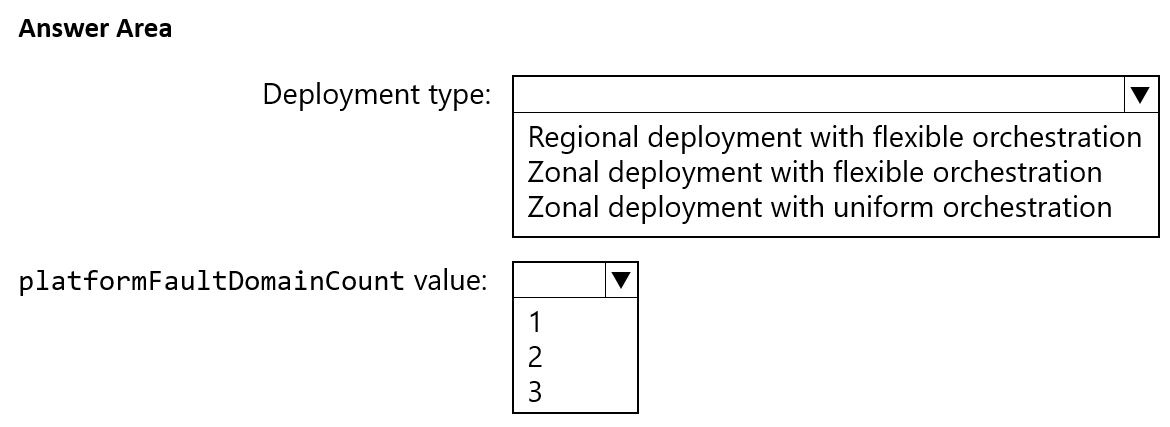
You plan to deploy a highly available SAP NetWeaver system to an Azure region that contains three availability zones. The system will be hosted in an Azure virtual machine scale set.
You need to recommend which type of deployment and which platformFaultDomainCount value to use. The solution must maximize the availability of the system.
What should you recommend? To answer, select the appropriate options in the answer area.
NOTE: Each correct selection is worth one point.
Explanation: A zonal deployment distributes the SAP VMs across availability zones for the highest availability. A zonal scale set with flexible orchestration requires a platformFaultDomainCount of 1.
Question 114
HOTSPOT
You are designing a four-node SAP Web Dispatcher deployment for an SAP on Azure landscape.
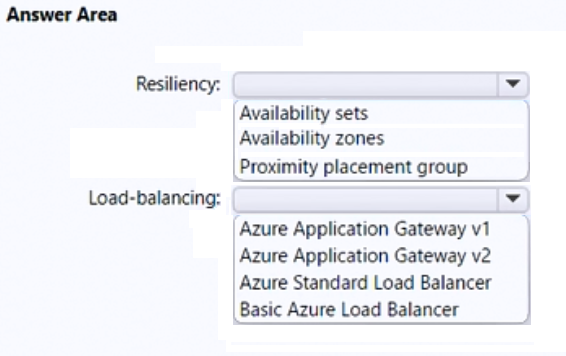
You need to recommend a resiliency solution and a load-balancing solution for the deployment. The solution must meet the following requirements:
• Receive the highest SLA from Microsoft.
• Load balance client connections.
• Minimize administrative effort.
What should include in the recommendation for each solution? To answer, select the appropriate options in the answer area.
NOTE: Each correct selection is worth one point.
Show Answer
Correct Answer: Resiliency: Availability zones
Load-balancing: Azure Standard Load Balancer
Explanation: Distributing the four nodes across availability zones provides the strongest resiliency option. Azure Standard Load Balancer balances client connections with less administration than an application-layer gateway and offers the higher SLA.
Question 115
HOTSPOT
You have an SAP on Azure landscape.
You need to gather the following metrics:
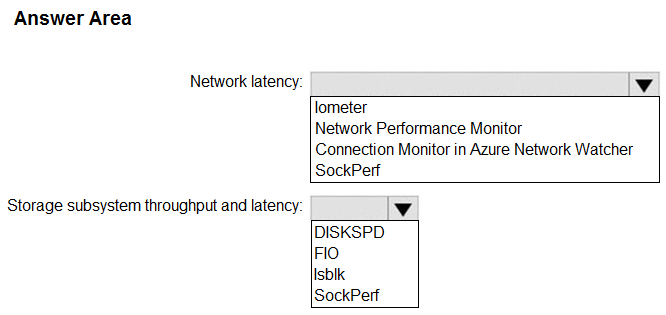
• The network latency between an SAP NetWeaver server and an SAP HANA server.
• The throughput and latency of the storage subsystem on Windows Server and Linux platforms.
What should you use for each metric? To answer, select the appropriate options in the answer area.
NOTE: Each correct selection is worth one point.
Show Answer
Correct Answer: Network latency: Connection Monitor in Azure Network Watcher
Storage subsystem throughput and latency: FIO
Explanation: Connection Monitor measures latency between the SAP servers. FIO measures storage throughput and latency on both Windows Server and Linux.
Question 116
DRAG DROP
You plan to deploy an SAP production landscape on Azure. The landscape will use SAP HANA databases that run on Azure virtual machines.
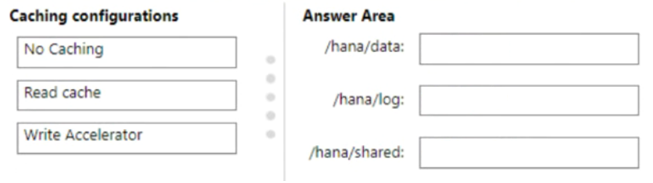
Each HANA virtual machine will contain the following three premium data disks:
• Shared
• Data
• Log
You need to configure caching on the data disks. The solution must meet the following requirements:
• Maximize data throughput.
• Minimize potential data loss.
Which caching configuration should you use for each disk? To answer, drag the appropriate caching configurations to the correct disks. Each caching configuration may be used once, more than once, or not at all. You may need to drag the split bar between panes or scroll to view content.
NOTE: Each correct selection is worth one point.
Explanation: Read caching improves throughput for data and shared files without caching writes. Disabling caching for the log disk helps protect transaction-log durability. Write Accelerator requires a supported VM configuration, which is not specified.
Question 117
HOTSPOT
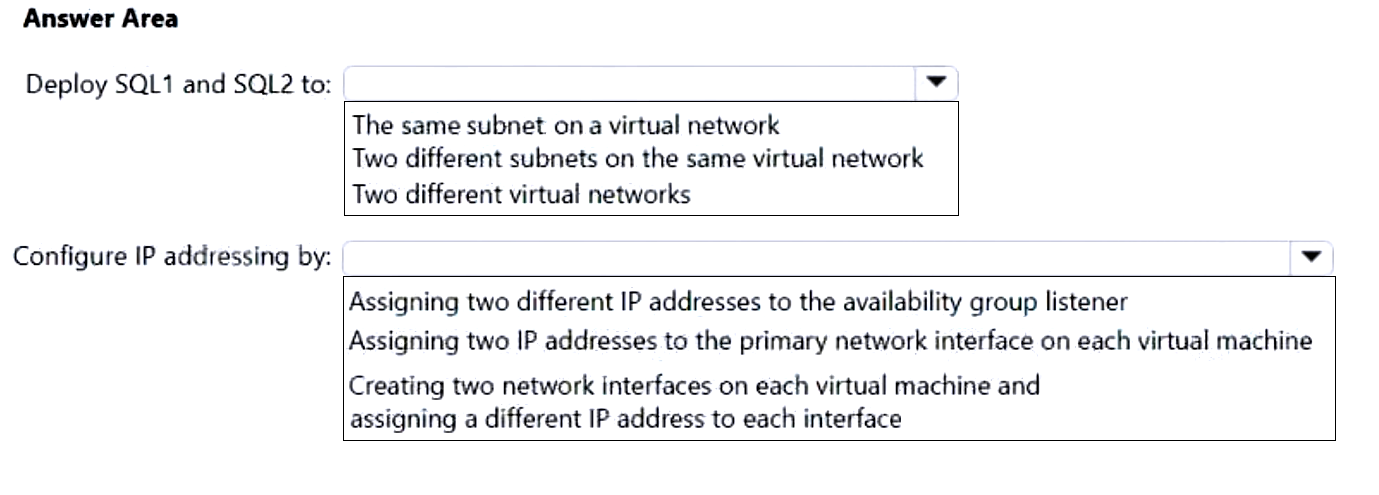
You have an Azure subscription. The subscription contains two virtual machines named SQL1 and SQL2 that host a Microsoft SQL Server 2019 Always On availability group named AOG1.
You plan to deploy an SAP NetWeaver system that will have a database tier hosted on AOG1.
You need to configure networking for SQL1 and SQL2. The solution must meet the following requirements:
• Eliminate the need to create a distributed network name (DNN).
• Minimize costs.
What should you do? To answer, select the appropriate options in the answer area.
NOTE: Each correct selection is worth one point.
Show Answer
Correct Answer: Deploy SQL1 and SQL2 to: Two different subnets on the same virtual network
Configure IP addressing by: Assigning two different IP addresses to the availability group listener
Explanation: A multi-subnet availability group listener uses an IP address in each subnet. This avoids both a distributed network name and the cost of a load balancer.
Question 118
DRAG DROP
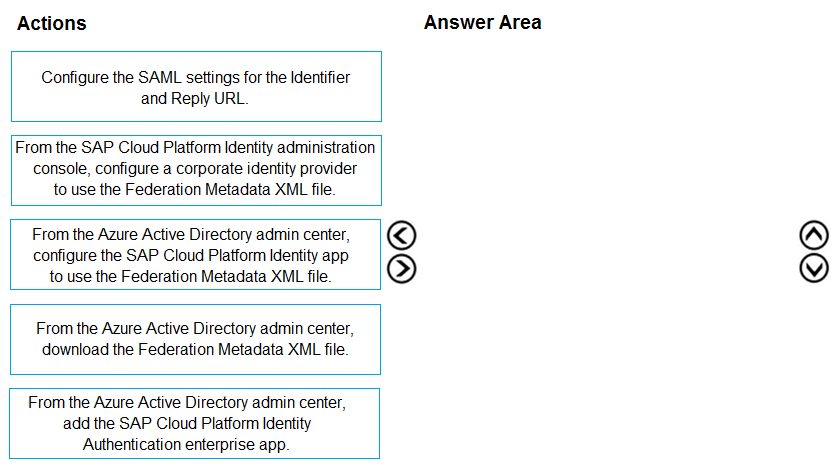
You have an Azure tenant and an SAP Cloud Platform tenant.
You need to ensure that users sign in automatically by using their Azure AD accounts when they connect to SAP Cloud Platform.
Which four actions should you perform in sequence? To answer, move all actions from the list of actions to the answer area and arrange them in the correct order.
Show Answer
Correct Answer: 1. Add the SAP Cloud Platform Identity Authentication enterprise app in the Azure Active Directory admin center.
2. Configure its SAML Identifier and Reply URL.
3. Download the Federation Metadata XML file from the Azure Active Directory admin center.
4. In the SAP Cloud Platform Identity administration console, configure a corporate identity provider using that file.
Explanation: Azure AD acts as the identity provider. Configure the enterprise app first, then use its federation metadata to establish trust in SAP Cloud Platform Identity Authentication.
Question 119
HOTSPOT
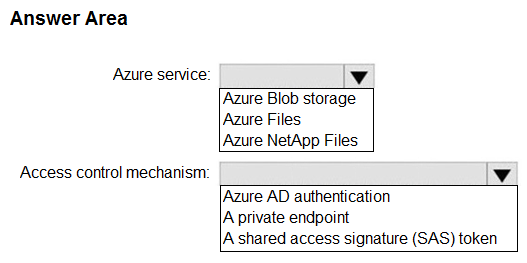
You have an on-premises SAP NetWeaver deployment that runs SUSE Linux Enterprise Server (SLES). The deployment contains 200 GB of files used by application servers stored in an NFS share.
You plan to migrate the on-premises deployment to Azure.
You need to implement an NFS storage solution. The solution must meet the following requirements:
• Ensure that only the application servers can access the storage.
• Support NFS 4.1
• Minimize costs.
What should you include in the solution? To answer, select the appropriate options in the answer area.
NOTE: Each correct selection is worth one point.
Show Answer
Correct Answer: Azure service: Azure Files
Access control mechanism: A private endpoint
Explanation: Azure Files supports NFS 4.1 and is the lower-cost choice for a 200-GB share. A private endpoint provides private network access that can be restricted to the application servers.
Question 120
HOTSPOT
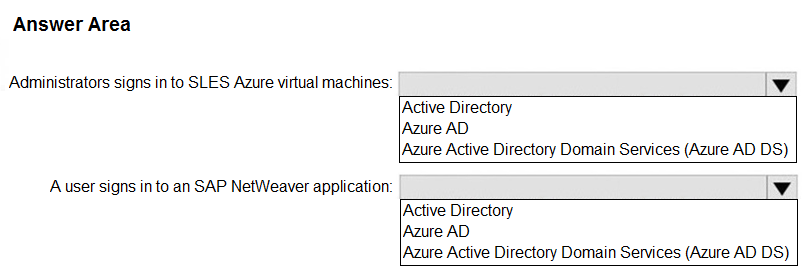
You have an Azure AD tenant named contoso.com that syncs to an Active Directory domain hosted on an Azure virtual machine.
You plan to deploy an SAP NetWeaver landscape on Azure that will use SUSE Linux Enterprise Server (SLES).
You need to recommend an authentication solution for the following scenarios. The solution must support Azure Multi-Factor Authentication (MFA):
• Administrators sign in to SLES Azure virtual machines.
• A user signs in to an SAP NetWeaver application.
What should you recommend for each scenario? To answer, select the appropriate options in the answer area.
NOTE: Each correct selection is worth one point.
Show Answer
Correct Answer: Administrators sign in to SLES Azure virtual machines: Azure AD
A user signs in to an SAP NetWeaver application: Azure AD
Explanation: Azure AD supports MFA for Linux VM sign-in and can provide MFA-backed single sign-on to SAP NetWeaver.
$19
Get all 299 questions with detailed answers and explanations
Instant download HTML + PDF delivered the moment payment clears.
Secure Stripe checkout we never see or store your card details.
7-day refund if files are defective see our refund policy.