You have a project in Azure DevOps named Project1 that contains two environments named environment1 and environment2.
When a new version of Project is released, the latest version is deployed to environment2, and the previous version is redeployed to environment1.
You need to distribute users across the environments. The solution must meet the following requirements:
• New releases must be available to only a subset of the users.
• You must gradually increase the number of users that can access environment2.
What should you use?
A. VIP swaping
B. web app deployment slots
C. Azure Load Balancer
D. Azure Traffic Manager
Show Answer
Correct Answer: D
Explanation: Azure Traffic Manager can use weighted routing to send a small proportion of users to environment2, then gradually increase that proportion. Deployment slots support traffic splitting for Azure Web Apps, but the question specifies two Azure DevOps environments, not Web App slots.
Question 29
You use Azure DevOps processes to build and deploy code.
You need to compare how much time is spent troubleshooting issues found during development and how much time is spent troubleshooting issues found in released code.
Which KPI should you use?
A. defect escape rate
B. unplanned work rate
C. defect rate
D. rework rate
Show Answer
Correct Answer: A
Explanation: Use the defect escape rate. It compares defects caught during development with defects discovered after release, indicating how many issues escaped pre-release detection and require troubleshooting in released code.
Question 29
DRAG DROP
-
You have an Azure subscription that contains 50 virtual machines.
You manage the configuration of the virtual machines by using Azure Automation State Configuration.
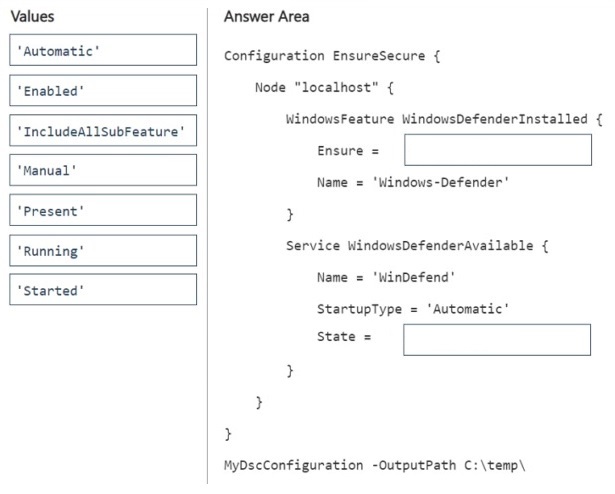
You need to ensure that Windows Defender is installed on each virtual machine and the Windows Defender service is running.
How should you complete the Desired State Configuration (DSC) code? To answer, drag the appropriate values to the correct targets. Each value may be used once, more than once, or not at all. You may need to drag the split bar between panes or scroll to view content.
NOTE: Each correct selection is worth one point.
Show Answer
Correct Answer: Ensure = 'Present'
State = 'Running'
Explanation: The DSC WindowsFeature resource uses Ensure = 'Present' to install the Windows Defender feature. The Service resource uses State = 'Running' to ensure the WinDefend service is running, while StartupType = 'Automatic' ensures it starts automatically.
Question 30
HOTSPOT
-
You are using an Azure Pipelines pipeline to build and deploy a web app.
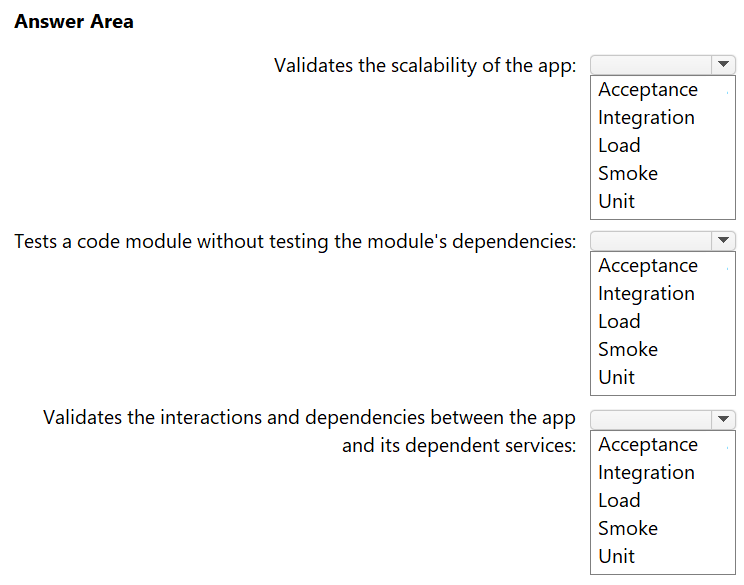
You need to implement a testing strategy that meets the following requirements:
• Validates the scalability of the app
• Tests a code module without testing the module's dependencies
• Validates the interactions and dependencies between the app and its dependent services
Which type of test should you implement for each requirement? To answer, select the appropriate options in the answer area.
NOTE: Each correct selection is worth one point.
Show Answer
Correct Answer: Load
Unit
Integration
Explanation: Load testing validates scalability. Unit testing isolates a code module from its dependencies using mocks/stubs. Integration testing verifies interactions between the application and dependent services.
Question 30
You have a GitHub repository that contains workflows. The workflows contain steps that execute predefined actions. Each action has one or more versions.
You need to request the specific version of an action to execute.
Which three attributes can you use to identify the version? Each correct answer presents a complete solution.
NOTE: Each correct selection is worth one point.
A. the SHA-based hashes
B. the tag
C. the runner
D. the branch
E. the serial
Show Answer
Correct Answer: A, B, D
Explanation: A GitHub Actions reference can identify an action version by a commit SHA, a tag, or a branch name. A runner and a serial are not version identifiers.
Question 31
You use release pipelines in Azure Pipelines to deploy an app. Secrets required be the pipeline are stored as pipeline variables. Logging of commands is enabled for the Azure Pipelines agent.
You need to prevent the values of the secrets from being logged.
What should you do?
A. Store the secrets in the environment variables instead of the pipeline variables.
B. Pass the secrets on the command line instead of in the pipeline variables.
C. Apply a prefix of secret to the name of the variables.
D. Echo the values of the secrets to the command line.
Show Answer
Correct Answer: A
Explanation: Store the secrets in environment variables and make them available to the tasks that need them. Avoid passing secrets on the command line or echoing them. Prefixing a variable name with `secret` does not mark it as secret.
Question 32
You use Azure Pipelines to build and test code.
You need to analyze the agent pool usage.
What are two ways to achieve the goal? Each correct answer presents a complete solution.
NOTE: Each correct selection is worth one point.
A. Review the historical graph for the agent pools.
B. Review the Pipeline duration report.
C. Query the TaskAgentPoolSizeSnapshot/TaskAgentPoolSizeSnapshots endpoint.
D. Query the PipelineRun/PipelineRuns endpoint.
Show Answer
Correct Answer: A, C
Explanation: Agent pool usage can be analyzed either through the built-in historical graph for agent pools (pool consumption report) or programmatically through the Analytics TaskAgentPoolSizeSnapshot/TaskAgentPoolSizeSnapshots endpoint, which exposes agent pool size and usage history. The Pipeline duration report focuses on pipeline execution times rather than agent pool utilization, and PipelineRun entities provide run data rather than agent pool usage metrics.
Question 32
You need to the merge the POC branch into the default branch. The solution must meet the technical requirements.
Which command should you run?
A. git rebase
B. git merge --squash
C. git push
D. git merge --allow-unrelated-histories
Show Answer
Correct Answer: A
Explanation: Use `git rebase` if the requirement is for the POC branch’s commit history to become the basis of the default branch’s history. A squash merge would combine the POC changes into one commit rather than retain its commits. The question does not indicate that the branches have unrelated histories.
Question 33
DRAG DROP
-
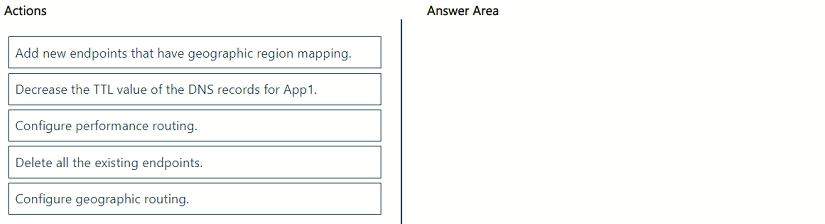
You have an Azure subscription that contains an Azure Traffic Manager profile named ATM1 and a web app named App1. ATM1 manages App1 traffic. ATM1 is configured to route callers to the endpoint that has the lowest latency.
You need to configure ATM1 to route all traffic from Asia to an endpoint in Australia.
Which three actions should you perform in sequence from the Azure portal? To answer, move the appropriate actions from the list of actions to the answer area and arrange them in the correct order.
Show Answer
Correct Answer: Delete all the existing endpoints.
Configure geographic routing.
Add new endpoints that have geographic region mapping.
Explanation: To change an existing Traffic Manager profile from Performance to Geographic routing in the Azure portal, remove the existing endpoints first, switch the routing method to Geographic, then recreate endpoints with geographic region mappings (such as mapping Asia to the Australia endpoint).
Question 33
You plan to deploy a new database environment. The solution must meet the technical requirements.
You need to prepare the database for the deployment.
How should you format the export?
A. NDF
B. BACPAC
C. DACPAC
D. MDF
Show Answer
Correct Answer: B
Explanation: Use a BACPAC: it exports the database schema together with its data, including the reference data needed in the new environment. A DACPAC is primarily for deploying database schema; MDF and NDF are database data files, not the appropriate export package.
$19
Get all 541 questions with detailed answers and explanations
Instant download HTML + PDF delivered the moment payment clears.
Secure Stripe checkout we never see or store your card details.
7-day refund if files are defective see our refund policy.