You manage projects by using Azure Boards.
You have a current work item named itemA that is dependent on a work item named itemB.
You need to define the dependency for itemA.
What should you do in the web portal for Azure DevOps?
A. Add a Parent link to the user story of item
B. From Backlogs, open the context menu, select Add link, and then select itemA. Set Link type to Successor and add the ID of item
C. From Backlogs, open the context menu, select Add link, and then select itemB. Set Link type to Related and add the ID of itemA.
D. From itemA, open the Links tab, and then select Add link. Set Link type to References and add the ID of itemB.
Show Answer
Correct Answer: B
Explanation: To represent a dependency where itemA depends on itemB in Azure Boards, use the Predecessor/Successor link type. Since itemA cannot proceed until itemB is complete, itemA is the Successor and itemB is its predecessor. The backlog context menu allows adding this dependency link. Parent is for hierarchy, Related is a non-dependency association, and References is not used for dependency tracking.
Question 54
You have an existing build pipeline in Azure Pipelines.
You need to use incremental builds without purging the environment between pipeline executions.
What should you use?
A. a self-hosted agent
B. Microsoft-hosted parallel jobs
C. a File Transform task
Show Answer
Correct Answer: A
Explanation: Use a self-hosted agent. Its machine and build workspace can persist between pipeline runs, allowing incremental builds without purging the environment. Microsoft-hosted agents use fresh environments, and File Transform modifies files rather than preserving build state.
Question 55
You have a project in Azure DevOps that uses an Azure Boards board and stores code in a GitHub repository. The repository contains a file named README.md.
You need to ensure that README.md includes the status of the work items on the board. The solution must minimize administrative effort.
What should you do first?
A. Create a GitHub personal access token (PAT).
B. Enable GitHub annotations for the board.
C. Install the Azure Boards app for GitHub.
D. Select Allow anonymous users to access the status badge.
Show Answer
Correct Answer: D
Explanation: To display Azure Boards status in a GitHub README.md, you use a status badge. The first step in configuring the badge is enabling anonymous access to the status badge so GitHub can render it publicly. Installing the Azure Boards GitHub app is for linking commits, pull requests, and work items, not for displaying a board status badge in README.md. A PAT is unnecessary for this task, and GitHub annotations are unrelated.
Question 55
You are building an ASP.NET Core application.
You plan to create an application utilization baseline by capturing telemetry data.
You need to add code to the application to capture the telemetry data. The solution must minimize the costs of storing the telemetry data.
Which two actions should you perform? Each correct answer presents part of the solution.
NOTE: Each correct selection is worth one point
A. Add the <InitialSamplingPercentage>99</InitialSamplingPercentage> parameter to the ApplicationInsights.config file.
B. From the code of the application, enable adaptive sampling.
C. From the code of the application, add Azure Application Insights telemetry.
D. Add the <MaxTelemetryItemsPerSecond>5</MaxTelemetryItemsPerSecond> parameter to the ApplicationInsights.config file.
E. From the code of the application, disable adaptive sampling.
Show Answer
Correct Answer: B, C
Explanation: Add Application Insights telemetry to capture application usage, and use adaptive sampling to reduce the volume of telemetry stored—and therefore its cost. ASP.NET Core configuration is done in code rather than in an ApplicationInsights.config file. Disabling adaptive sampling would not meet the cost-reduction goal.
Sources:
https://learn.microsoft.com/en-us/azure/azure-monitor/app/application-insights-faq
Question 56
You need to configure GitHub to use Azure Active Directory (Azure AD) for authentication.
What should you do first?
A. Create a conditional access policy in Azure AD.
B. Register GitHub in Azure AD.
C. Create an Azure Active Directory B2C (Azure AD B2C) tenant.
D. Modify the Security settings of the GitHub organization.
Show Answer
Correct Answer: B
Explanation: First add or register GitHub as an application in Azure AD. You can then configure the identity-provider settings in GitHub and set up access policies or assignments as needed.
Question 57
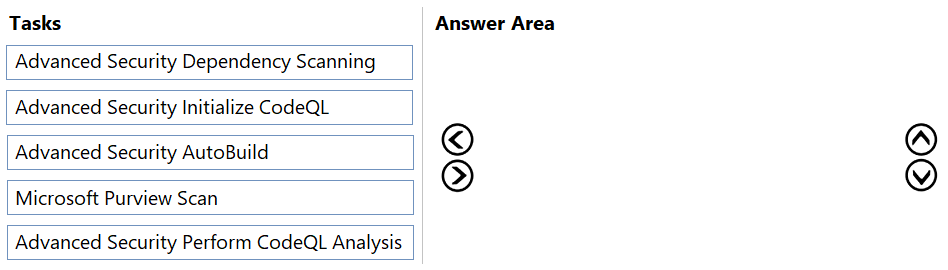
DRAG DROP
-
You have an Azure Repos repository named Repo1 that is used for source control.
You need to configure code scanning for Repo1.
Which three tasks should the pipeline perform in sequence? To answer, move the appropriate tasks from the list of tasks to the answer area and arrange them in the correct order.
Explanation: For Azure Repos code scanning with GitHub Advanced Security, the pipeline initializes CodeQL, builds the code so CodeQL can analyze it, and then runs the CodeQL analysis. Dependency scanning and Microsoft Purview Scan are separate features.
Question 57
You have an Azure DevOps organization named Contoso.
You need to receive Microsoft Teams notifications when work items are updated.
What should you do?
A. From Azure DevOps, configure a service hook subscription
B. From Microsoft Teams, configure a connector
C. From the Microsoft Teams admin center, configure external access
D. From Microsoft Teams, add a channel
E. From Azure DevOps, install an extension
Show Answer
Correct Answer: B
Explanation: Configure the Azure DevOps connector from a Microsoft Teams channel. The connector lets you select the Azure DevOps project and subscribe to work-item update notifications. Although service hooks are involved in some integration workflows, the Teams-managed setup is initiated from Teams.
Question 58
You use Azure Pipelines to manage build pipelines, GitHub to store source code, and Dependabot to manage dependencies.
You have an app named App1.
Dependabot detects a dependency in App1 that requires an update.
What should you do first to apply the update?
A. Create a pull request.
B. Approve the pull request.
C. Create a branch.
D. Perform a commit.
Show Answer
Correct Answer: B
Explanation: Dependabot automatically creates a branch and pull request with the dependency update. Review and approve the pull request to apply the update; you do not need to create the branch or pull request yourself.
Question 58
You plan to deploy a solution that will include multiple microservices.
You need to recommend a deployment strategy for the microservices. The solution must meet the following requirements:
• Enable testing and monitoring of changes during a gradual rollout.
• Control the number of users that will receive new code releases.
Which strategy should you recommend?
A. progressive exposure
B. A/B
C. feature toggle
D. blue/green
Show Answer
Correct Answer: A
Explanation: Progressive exposure (canary deployment) gradually rolls out a new version to a controlled subset of users, enabling monitoring and testing during rollout while controlling how many users receive the new release. A/B testing compares variants for experimentation, feature toggles gate functionality but are not a deployment rollout strategy by themselves, and blue/green switches traffic between two environments, typically with an all-or-nothing cutover rather than gradual exposure.
Question 59
You configure an Azure Application Insights availability test.
You need to notify the customer services department at your company by email when availability is degraded.
You create an Azure logic app that will handle the email and follow up actions.
Which type of trigger should you use to invoke the logic app?
A. an HTTPWebhook trigger
B. an HTTP trigger
C. a Request trigger
D. an ApiConnection trigger
Show Answer
Correct Answer: C
Explanation: Use a Request trigger. It exposes an endpoint that Azure Monitor/Application Insights can call with an incoming alert request, invoking the logic app. The HTTP trigger is for making outbound requests, while the HTTPWebhook trigger is designed for subscription-based webhook registration.
$19
Get all 541 questions with detailed answers and explanations
Instant download HTML + PDF delivered the moment payment clears.
Secure Stripe checkout we never see or store your card details.
7-day refund if files are defective see our refund policy.