DRAG DROP
-
You have a project in Azure DevOps.
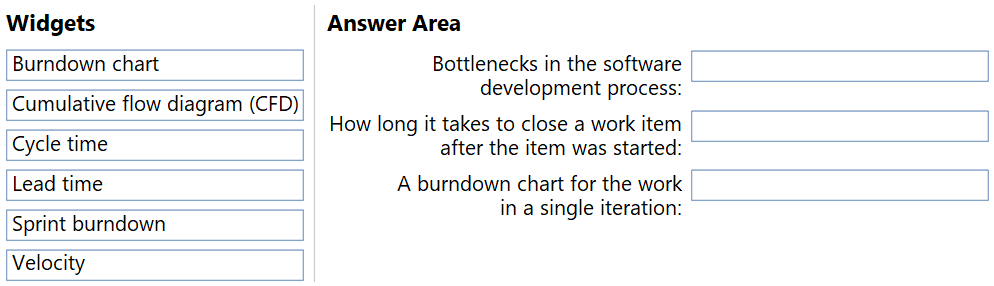
You need to configure a dashboard. The solution must include the following metrics:
• Bottlenecks in the software development process
• A burndown chart for the work in a single iteration
• How long it takes to close a work item after the item was started
Which type of widget should you use for each metric? To answer, drag the appropriate widget types to the correct metrics. Each widget type may be used once, more than once, or not at all. You may need to drag the split bar between panes or scroll to view content.
NOTE: Each correct selection is worth one point.
Show Answer
Correct Answer: Bottlenecks in the software development process: Cumulative flow diagram (CFD)
How long it takes to close a work item after the item was started: Cycle time
A burndown chart for the work in a single iteration: Sprint burndown
Explanation: CFD visualizes workflow and highlights bottlenecks. Cycle time measures the duration from work start to completion, while lead time measures from creation to completion. Sprint Burndown is the widget for tracking remaining work within a single iteration.
Question 107
DRAG DROP
-
You use Semantic Versioning (SemVer) as a dependency versioning strategy.
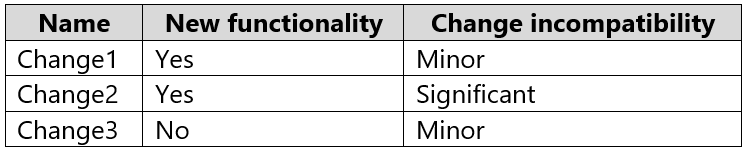
You perform changes to code as shown in the following table.
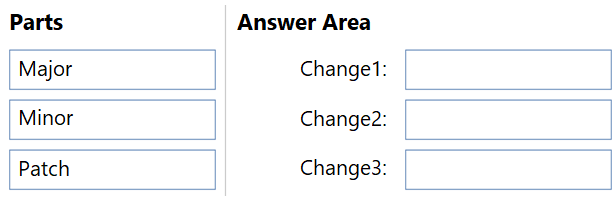
Which part of the version should you increment for each change? To answer, drag the appropriate parts to the correct changes. Each part may be used once, more than once, or not at all. You may need to drag the split bar between panes or scroll to view content.
NOTE: Each correct selection is worth one point.
Show Answer
Correct Answer: Change1: Minor
Change2: Major
Change3: Patch
Explanation: Using the versioning scheme expected by this exam: new functionality with minor incompatibility increments Minor; significant incompatibility increments Major; no new functionality with only minor fixes increments Patch.
Question 108
SIMULATION -
You plan to deploy a website that will be hosted in two Azure regions.
You need to create an Azure Traffic Manager profile named az400123456789n1-tm in a resource group named RG1lod123456789. The solution must ensure that users will always connect to a copy of the website that is in the same country.
To complete this task, sign in to the Microsoft Azure portal.
Explanation: Geographic routing ensures users are directed to endpoints based on their geographic location, satisfying the requirement that users always connect to a website copy in the same country.
Question 109
DRAG DROP
-
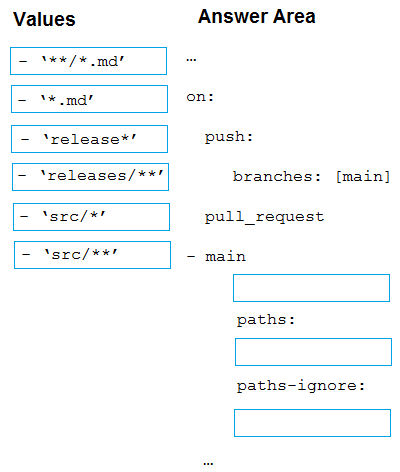
You have a GitHub repository named repo1 that stores the code of an app named App1. You need deploy a workflow for repo1 by using GitHub Actions. The solution must meet the following requirements:
• Scan on pushes to the main branch.
• Scan on pull requests to the main branch.
• Scan on pull requests to any branch that has a prefix of releases/.
• Scan all the files in the subdirectories of the src directory.
How should you complete the code? To answer, drag he appropriate values to the correct targets. Each value may be used once, more than once, or not at all.
Explanation: Use releases/** to match pull requests targeting any releases/ branch, src/** to include all files under src recursively, and **/*.md as the paths-ignore pattern (this exam item appears to assume markdown files are excluded).
Question 110
You use Azure Pipelines to build and test code projects.
You notice an increase in cycle times.
You need to identify whether agent pool exhaustion is causing the issue.
What are two possible ways to achieve this goal? Each correct answer presents a complete solution.
NOTE: Each correct selection is worth one point.
A. Query the PipelineRun/PipelineRuns endpoint.
B. Query the TaskAgentPoolSizeSnapshots endpoint.
C. View the Pipeline duration report.
D. View the pool consumption report at the organization level.
Show Answer
Correct Answer: B, D
Explanation: To determine whether increased pipeline cycle times are caused by agent pool exhaustion, you need data about agent pool capacity and utilization. Querying TaskAgentPoolSizeSnapshots provides historical analytics on agent pool sizing/capacity, while the organization-level pool consumption report shows agent utilization, queued jobs, and concurrency. Pipeline run data or duration reports show execution timing but do not specifically identify agent pool exhaustion as the cause.
Question 111
You use GitHub for source control.
You are evaluating whether to use proxying to add a private upstream MyGet package feed to your MyGet feed.
What are two possible advantages of this approach? Each correct answer presents a complete solution.
NOTE: Each correct selection is worth one point.
A. minimizes the impact of upstream source availability issues
B. minimizes latency when accessing the package
C. provides automatic authentication
D. minimizes the impact on your storage quota
Show Answer
Correct Answer: C, D
Explanation: For MyGet upstream source proxying, the documented benefits are that authentication against private upstream MyGet feeds is handled automatically and proxied upstream packages do not count against your MyGet storage quota. Reduced latency and resilience to upstream outages are benefits associated with mirroring rather than simple proxying.
Question 112
DRAG DROP
-
You are implementing a new project in Azure DevOps.
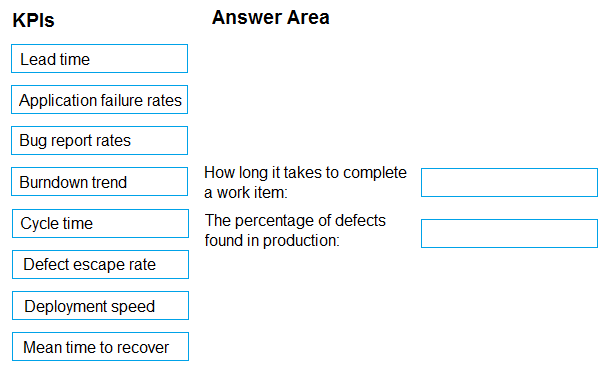
You need to assess the performance of the project. The solution must identify the following metrics:
• How long it takes to complete a work item
• The percentage of defects found in production
Which DevOps KPI should you review for each metric? To answer, drag the appropriate KPIs to the correct metrics. Each KPI may be used once, more than once, or not at all. You may need to drag the split bar between panes or scroll to view content.
NOTE: Each correct selection is worth one point.
Show Answer
Correct Answer: How long it takes to complete a work item: Cycle time
The percentage of defects found in production: Defect escape rate
Explanation: Cycle time measures the elapsed time from when work begins until the work item is completed. Defect escape rate measures the proportion/percentage of defects that escape into production.
Question 113
You have a GitHub repository.
You need to ensure that all the code in the repository is scanned for vulnerabilities.
What should you use?
A. Dependabot alerts
B. branch protection rules
C. CodeQL actions
D. GitHub Advisory Database databases
Show Answer
Correct Answer: C
Explanation: CodeQL Actions performs static analysis across the repository's source code to identify security vulnerabilities. Dependabot alerts focus on vulnerable dependencies, branch protection rules enforce workflow policies rather than scan code, and the GitHub Advisory Database is a catalog of known vulnerabilities used by other tools rather than a scanner.
Question 114
DRAG DROP
-
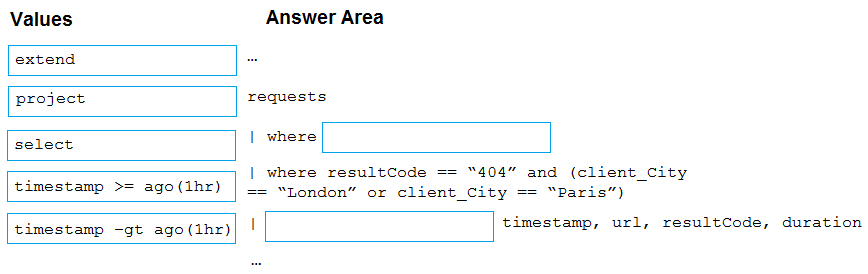
You have a web app named App1 that uses Application Insights in Azure Monitor to store log data. App1 has users in multiple locations.
You need to query App1 requests from London and Paris that return a 404 error. The solution must meet the following requirements:
• Return the timestamp url, resultCode, and duration fields
• Only show requests made during the last hour.
How should you complete the query? To answer, drag the appropriate values to the correct targets. Each value may be used once, more than once, or not at all.
Show Answer
Correct Answer: timestamp >= ago(1hr)
project
Explanation: Filter requests to the last hour using 'timestamp >= ago(1hr)'. Then use 'project' to return only the required columns: timestamp, url, resultCode, and duration.
Question 116
You manage source code control and versioning by using GitHub.
A large file is committed to a repository accidentally.
You need to reduce the size of the repository. The solution must remove the file from the repository.
What should you use?
A. bfg
B. lfs
C. gvfs
D. init
Show Answer
Correct Answer: A
Explanation: BFG Repo-Cleaner is designed to rewrite Git history and remove large or unwanted files from a repository, reducing its size. Git LFS stores large files but does not remove an accidentally committed file from repository history. GVFS is for virtualizing large repos, and git init initializes a repository.
$19
Get all 541 questions with detailed answers and explanations
Instant download HTML + PDF delivered the moment payment clears.
Secure Stripe checkout we never see or store your card details.
7-day refund if files are defective see our refund policy.