You have an app named App1 that uses Application Insights to monitor application performance.
You need to analyze how often a page in App1 is accessed.
Which pane in Application Insights should you use?
A. Events
B. Sessions
C. Impact
D. Users
Show Answer
Correct Answer: A
Explanation: The Events pane is used to analyze how often specific pages and features are used. Page views are tracked as events, making it the appropriate place to analyze page access frequency. Sessions focuses on user visits, Users on user counts/behavior, and Impact on the effect of issues.
Question 96
Note: This question is part of a series of questions that present the same scenario. Each question in the series contains a unique solution that might meet the stated goals. Some question sets might have more than one correct solution, while others might not have a correct solution.
After you answer a question in this section, you will NOT be able to return to it. As a result, these questions will not appear in the review screen.
You have an Azure pipeline that is used to deploy a web app. The pipeline includes a test suite named TestSuite1. TestSuite1 is used to validate the operations of the web app.
TestSuite1 fails intermittently.
You identify that the failures are unrelated to changes in the source code and execution environment.
You need to minimize troubleshooting effort for the TestSuite1 failures.
Solution: You enable flaky test management.
Does this meet the goal?
A. Yes
B. No
Show Answer
Correct Answer: A
Explanation: Enabling flaky test management meets the goal. Azure DevOps flaky test management identifies and tracks intermittently failing tests that are not caused by code or environment changes, helping isolate flaky tests, reduce noise from unreliable failures, and minimize troubleshooting effort.
Question 98
Note: This question is part of a series of questions that present the same scenario. Each question in the series contains a unique solution that might meet the stated goals. Some question sets might have more than one correct solution, while others might not have a correct solution.
After you answer a question in this section, you will NOT be able to return to it. As a result, these questions will not appear in the review screen.
You have an Azure pipeline that is used to deploy a web app. The pipeline includes a test suite named TestSuite1. TestSuite1 is used to validate the operations of the web app.
TestSuite1 fails intermittently.
You identify that the failures are unrelated to changes in the source code and execution environment.
You need to minimize troubleshooting effort for the TestSuite1 failures.
Solution: You implement the Test Results Trend widget.
Does this meet the goal?
A. Yes
B. No
Show Answer
Correct Answer: B
Explanation: The Test Results Trend widget helps visualize historical test outcomes but does not reduce troubleshooting effort for intermittent, unrelated test failures. Azure DevOps provides flaky test management to identify, track, and manage intermittent test failures, which is the appropriate feature for this scenario.
Question 99
You manage projects by using Azure Boards.
You have a current work item name itemA that is dependant on a work item named itemB.
You need to define the dependency for itemA.
What should you do in the web portal for Azure DevOps?
A. From itemA, open the Links tab, and then select Add link. Set Link type to Related and add the ID of itemB.
B. From Backlogs, open the context menu, select Add link, and then select itemA. Set Link type to Successor and add the ID of item
C. From itemA, open the Links tab, and then select Add link. Set Link type to References and add the ID of itemB.
D. From Queries, open the context menu, select Add link, and then select Existing Item. Set Link type to Affected By and add the ID of itemB.
Show Answer
Correct Answer: B
Explanation: Azure Boards models dependencies using the Predecessor/Successor link types rather than Related or References. To indicate that itemA depends on itemB, create a dependency link of type Successor/Predecessor from the backlog context so the work items are linked as dependency items. The other options use incorrect link types or unsupported locations.
Question 100
You manage a project by using Azure Boards. You manage the project code by using GitHub.
You have three work items that have IDs of 456, 457, and 458.
You need to create a pull request that will be linked to all the work items. The solution must set the state of work item 456 to done.
What should you add to the commit message?
A. #AB456, #AB457, #AB458 Completed #AB456
B. #456, #457, #458 Completed #456
C. Done #AB456, #AB457, #AB458
D. #AB456, #AB457, #AB458 Verifies #AB456
Show Answer
Correct Answer: A
Explanation: The current Azure Boards/GitHub integration uses keywords such as 'Fixes AB#456' to both link and complete a work item. None of the options exactly matches the modern syntax, making the question outdated. Among the provided choices, A is the closest because it links all three work items using the Azure Boards reference format and includes a completion keyword for work item 456. The other options either omit the Azure Boards reference format or use an action that does not correspond to completing the work item.
Question 101
You manage projects by using Azure Boards.
You have a current work item name itemA that is dependant on a work item named itemB.
You need to define the dependency for itemA.
What should you do in the web portal for Azure DevOps?
A. Add a Parent link to the user story of item
B. From Backlogs, open the context menu, select Add link, and then select itemA. Set Link type to Successor and add the ID of item
C. From itemA, open the Links tab, and then select Add link. Set Link type to References and add the ID of itemB.
D. From Backlogs, open he context menu, select Add link, and then select itemA. Set Link type to References and add the ID of itemB.
Show Answer
Correct Answer: B
Explanation: A dependency where itemA depends on itemB is represented by making itemA the Successor of itemB (itemB is the predecessor). In the Azure DevOps web portal, you can add this link from the backlog context menu by selecting Add link, choosing itemA, setting the link type to Successor, and entering the ID of itemB. Parent/Child is for hierarchy, and References does not model dependency.
Question 102
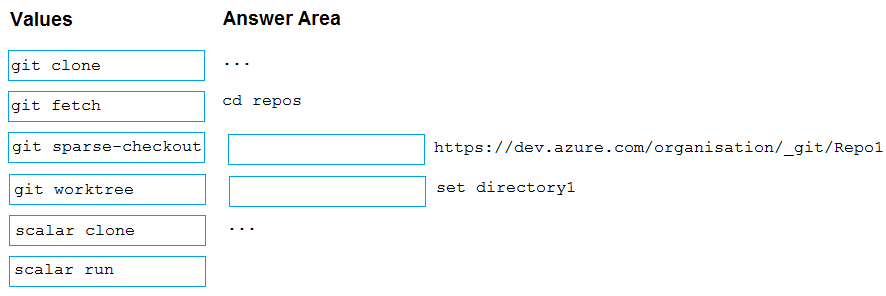
DRAG DROP
-
You have a large repository named Repo1 that contains a directory named directory1.
You plan to modify files in directory1.
You need to create a clone of Repo1. The solution must minimize the amount of transferred data.
How should you complete the script? To answer, drag the appropriate values to the correct targets. Each value may be used once, more than once, or not at all. You may need to drag the split bar between panes or scroll to view content.
NOTE: Each correct selection is worth one point.
Show Answer
Correct Answer: scalar clone
git sparse-checkout
Explanation: For a large repository, use Scalar to optimize cloning. Then use sparse-checkout to restrict the working tree to directory1, minimizing transferred and checked-out data.
Question 103
You have an Azure key vault named KV1 and three web servers.
You plan to deploy an app named App1 to the web servers.
You need to ensure that App1 can retrieve a secret from KV1. The solution must meet the following requirements:
• Minimize the number of permission grants required.
• Follow the principle of least privilege.
What should you include in the solution?
A. role-based access control (RBAC) permission
B. a system-assigned managed identity
C. a user-assigned managed identity
D. a service principal
Show Answer
Correct Answer: C
Explanation: A user-assigned managed identity can be shared by the application instances running on all three Azure web servers, so you grant the Key Vault permission once instead of once per server. This minimizes permission grants while still following least privilege by granting only the required Key Vault secret access to that managed identity. A system-assigned managed identity would require a separate identity and permission assignment for each server. A service principal requires credential management, and RBAC permission alone is not an identity.
Question 104
You have an Azure subscription that contains an Azure container registry. The container registry contains an ACR Tasks task named Task1. Task1 is configured to run once every five days.
You need to trigger Task1 to run immediately.
Which command should you run?
A. az acr task run
B. az acr build
C. az acr taskrun
D. az acr run
Show Answer
Correct Answer: A
Explanation: The Azure CLI command to manually trigger an existing Azure Container Registry (ACR) Task to run immediately is `az acr task run`. This executes the specified task on demand, regardless of its scheduled trigger. The other options are not valid for running an existing scheduled ACR Task.
Question 105
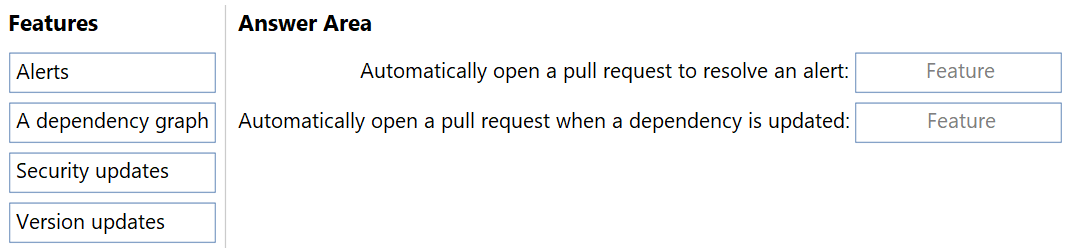
DRAG DROP
-
You have a GitHub repository.
You need to configure Dependabot dependency scanning. The solution must meet the following requirements:
• Automatically open a pull request to resolve an alert.
• Automatically open a pull request when a dependency is updated.
What should you enable for each requirement? To answer, drag the appropriate features to the correct requirements. Each feature may be used once, more than once, or not at all. You may need to drag the split bar between panes or scroll to view content.
NOTE: Each correct selection is worth one point.
Show Answer
Correct Answer: Automatically open a pull request to resolve an alert: Security updates
Automatically open a pull request when a dependency is updated: Version updates
Explanation: Dependabot Security updates create pull requests to remediate vulnerable dependencies identified by alerts. Dependabot Version updates create pull requests to keep dependencies up to date when newer versions are available.
$19
Get all 541 questions with detailed answers and explanations
Instant download HTML + PDF delivered the moment payment clears.
Secure Stripe checkout we never see or store your card details.
7-day refund if files are defective see our refund policy.